
1. Produktet er slutview
The Sonew A7-RK-EM is an advanced RFID access control keypad reader designed for secure entry management. It features a durable zinc alloy casing with an IP67 waterproof rating, making it suitable for both indoor and outdoor installations. This device supports EM ID cards (125 KHz) and keypad input, offering flexible access methods. With a user capacity of up to 2000, it is ideal for various applications including homes, offices, and residential areas. The unit operates on a wide DC10-24V power supply and includes a Wiegand 26/34-bit output interface for compatibility with existing security systems.

Figur 1: Forside view of the Sonew A7-RK-EM RFID Access Control Keypad Reader.
2. Sikkerhedsoplysninger
- Læs alle instruktioner omhyggeligt før installation og drift.
- Sørg for, at strømforsyningen voltage matches the device's requirements (DC10-24V).
- Afbryd strømmen, før du udfører nogen form for ledningsføring eller vedligeholdelse.
- Avoid exposing the device to extreme physical shock or corrosive substances.
- Kun kvalificeret personale bør udføre installation og ledningsføring.
3. Pakkens indhold
Bekræft at alle varer er til stede i pakken:
- 1 x Sonew A7-RK-EM Access Controller Reader
- 1 x Screw Pack (mounting screws and wall anchors)
- 1 x brugermanual

Figure 2: Package contents including the access controller and mounting hardware.
4. Specifikationer
| Feature | Specifikation |
|---|---|
| Model | A7-RK-EM |
| Materiale | Zinc Alloy Casing |
| Strømforsyning Voltage | DC 10-24V |
| Driftsstrøm | ≤ 50 mA |
| Kortlæseafstand | 4-8 cm |
| Vandtæt vurdering | IP67 |
| Brugerkapacitet | 2000 |
| Kortlæsningstype | EM ID Card (125 KHz) |
| Wiegand-interface | 26-bit / 34-bit |
| Driftstemperatur | -40°C til 70°C (-40°F til 158°F) |
| Driftsfugtighed | 0% - 98% (non-condensing) |
5. Opsætning og installation
Proper installation is crucial for the optimal performance and security of the access control system. Follow these general steps:
- Vælg en placering: Select a suitable mounting location, ensuring it is within reach of power and door lock wiring. The IP67 rating allows for outdoor placement.
- Monter enheden: Use the provided screw pack to securely mount the access controller to a wall or door frame. Ensure it is level and stable.
- Ledningsføring: Connect the power supply (DC 10-24V) and the Wiegand output to your door lock system or access control panel. Refer to the wiring diagram for correct connections.
- Test forbindelser: Before final power-up, double-check all wiring to prevent short circuits or damage.
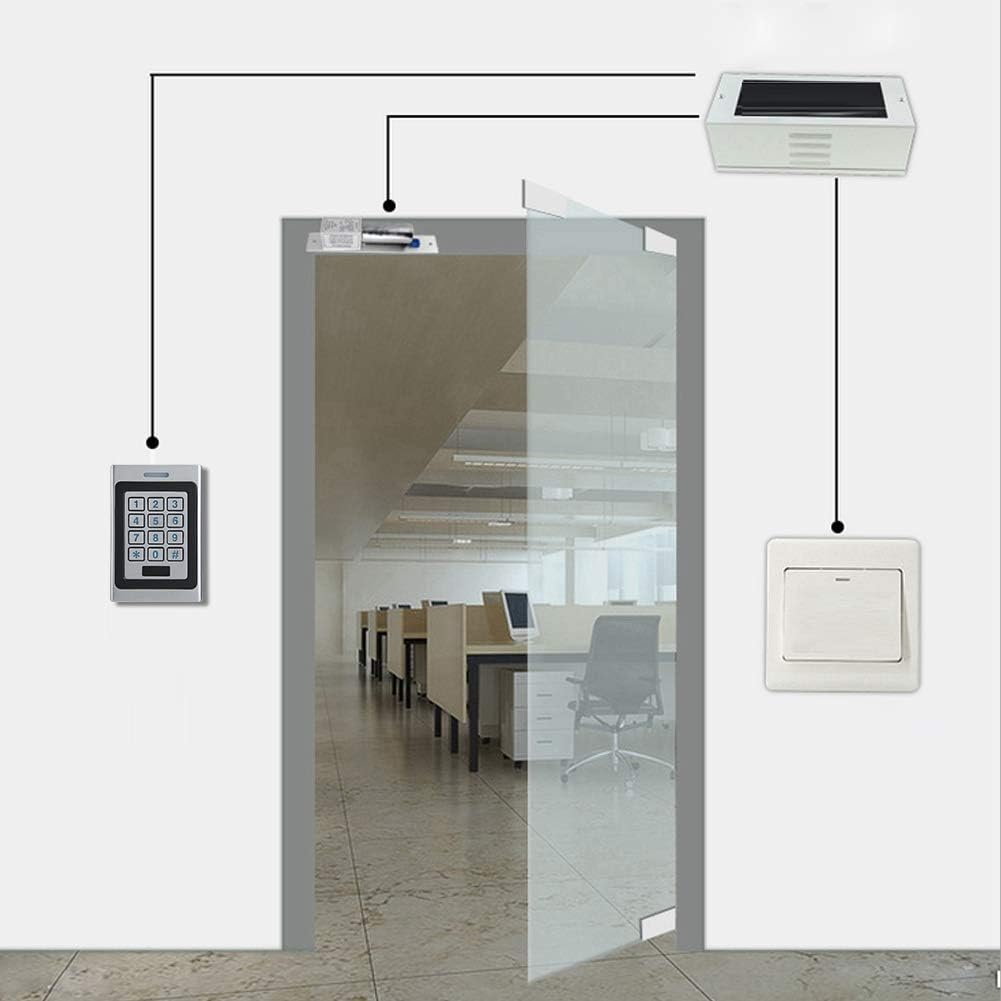
Figur 3: Eksample wiring diagram for connecting the access controller to a door lock system.

Figure 4: The access controller installed on a wall in an office environment.
6. Betjeningsvejledning
The A7-RK-EM offers multiple ways to gain access:
- RFID-kortadgang: Present a registered EM ID card (125 KHz) to the reader area on the device. The LED indicator will confirm successful access.
- Tastaturadgang: Enter your registered PIN code using the numeric keypad. Press '#' to confirm the entry.
- Card + PIN Access: For enhanced security, combine both methods by presenting your card and then entering your PIN.
Refer to the full user manual for detailed instructions on programming user cards, PINs, and managing the 2000-user capacity.

Figure 5: Using an RFID card to gain access.

Figure 6: Operating the keypad for access.
7. Vedligeholdelse
To ensure the longevity and reliable operation of your Sonew A7-RK-EM access controller, follow these maintenance guidelines:
- Rensning: Wipe the device periodically with a soft, damp klud. Undgå at bruge slibende rengøringsmidler eller opløsningsmidler, der kan beskadige casing or keypad.
- Miljøbeskyttelse: Although IP67 rated, extreme weather conditions (e.g., prolonged direct sunlight, heavy snow accumulation) should be considered for optimal performance.
- Firmwareopdateringer: Tjek producentens website for any available firmware updates to ensure the device has the latest features and security enhancements.

Figure 7: The IP67 weatherproof design ensures durability in various outdoor conditions.
8. Fejlfinding
Hvis du støder på problemer med din adgangscontroller, kan du se følgende almindelige problemer og løsninger:
- Enheden tænder ikke: Kontroller strømforsyningens tilslutninger, og sørg for, at lydstyrken er korrekt.tage is within the specified range (DC 10-24V). Verify the power source is active.
- Kort læser ikke: Ensure the RFID card is of the correct type (EM ID 125 KHz) and is properly registered. Present the card within the specified reading distance (4-8 cm).
- Tastaturet reagerer ikke: Check for any physical damage to the keypad. Ensure the device is powered on.
- Døren låser ikke op: Verify the wiring to the door lock mechanism. Ensure the lock itself is functioning correctly and receiving the unlock signal from the access controller.
- Adgang nægtet: Confirm that the card or PIN is correctly registered and has appropriate access permissions.
For persistent issues, consult the detailed troubleshooting section in the complete user manual or contact customer support.
9. Garanti og support
Sonew products are designed for reliability and performance. This product comes with a standard manufacturer's warranty against defects in materials and workmanship. Please retain your proof of purchase for warranty claims.
For technical support, warranty inquiries, or further assistance, please contact Sonew customer service through the retailer where the product was purchased or visit the official Sonew webwebsted for kontaktoplysninger.