
1. Introduktion
Thank you for choosing the Wendry 9601G Car Stereo. This multimedia player is designed to enhance your in-car entertainment and connectivity. It features a 7-inch high-definition touchscreen, Bluetooth for hands-free calls and music streaming, and support for various media formats via USB and TF card. This manual provides essential information for installation, operation, maintenance, and troubleshooting to ensure optimal performance and user satisfaction.
2. Sikkerhedsoplysninger
- Læs alle instruktioner omhyggeligt før installation og drift.
- Installation should be performed by a qualified technician to prevent damage to the unit or vehicle.
- Betjen ikke enheden på en måde, der distraherer dig fra kørslen. Prioritér altid trafiksikkerhed.
- Undgå at udsætte enheden for ekstreme temperaturer, direkte sollys i længere perioder eller fugt.
- Use only specified power supply (DC12V). For 24V systems, a transformer is required.
- Forsøg ikke at skille enheden ad eller ændre den. Dette kan ugyldiggøre garantien og forårsage skade.
3. Pakkens indhold
Bekræft at alle varer er til stede i pakken:
- 1 x Main Unit (Wendry 9601G Car Stereo)
- 1 x infrarød fjernbetjening
- 1 x Brugsanvisning (dette dokument)
- 1 x strømkabel
- 1 x demonteringsværktøj
- 1 x Reversing Camera Kit
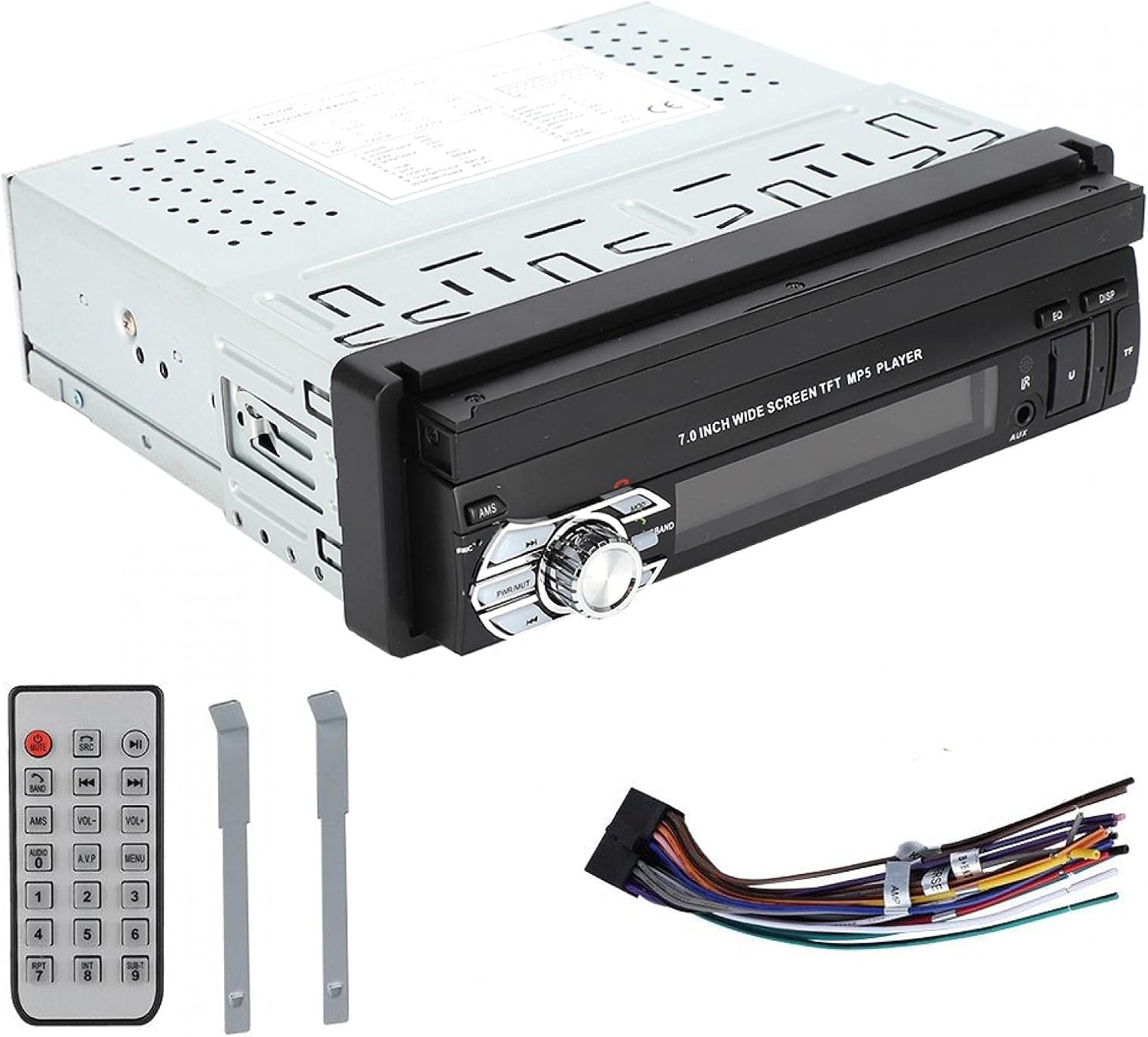
Image: Included accessories: remote control, wiring harness, and disassembly tools.
4. Produktet er slutview
The Wendry 9601G is a single DIN car multimedia player featuring a retractable 7-inch touchscreen. It supports various audio and video formats, Bluetooth connectivity, and includes inputs for USB, TF card, and a reverse camera.
Nøglefunktioner:
- 7-inch High-Definition Retractable Touchscreen
- Bluetooth til håndfri opkald og musikstreaming
- Supports 24-bit 96kHz WAV audio format for high-fidelity sound
- USB 2.0 Interface for U disks and mobile hard drives
- TF Card Slot for media playback
- Reverse Video Input with reversing priority (requires compatible camera)
- Dynamic Menu Interface

Image: The Wendry 9601G car stereo with its 7-inch screen extended, showing multimedia playback.

Billede: Forside view of the car stereo with the screen retracted, showing the 'BT AUDIO' display.
5. Opsætning og installation
5.1 Ledningsdiagram
Refer to the wiring diagram provided on the unit's casing or in the separate wiring guide for correct connections. Incorrect wiring can cause damage to the unit or your vehicle's electrical system.

Billede: Bagside view of the car stereo, illustrating the connection ports for power, audio, video, and reverse camera input.
5.2 Generelle installationstrin
- Afbryd batteriet: Før start skal du frakoble den negative pol på dit køretøjs batteri for at forhindre kortslutninger.
- Fjern gammel enhed: Carefully remove your existing car stereo using appropriate tools.
- Tilslut ledninger: Connect the power cable, speaker wires, antenna, and any other necessary cables (e.g., reverse camera, external amplifier) to the new unit according to the wiring diagram. Ensure all connections are secure.
- Test funktionalitet: Before fully mounting, reconnect the battery and briefly test the unit's basic functions (power on/off, audio, screen operation).
- Monteringsenhed: Slide the stereo into the single DIN slot and secure it using the provided mounting brackets or screws.
- Gentilslut batteri: Tilslut batteriets minuspol igen.
6. Betjeningsvejledning
6.1 Power On/Off and Screen Operation
- Magt: Press the power button (usually labeled PWR/MUTE) to turn the unit on or off.
- Skærmtilbagetrækning: The 7-inch screen is retractable. Use the dedicated button or menu option to extend or retract the screen.
- Touchskærm: Navigate through menus and control functions by touching the icons on the screen.

Image: The car stereo's screen extended, showing video playback.
6.2 Bluetooth-forbindelse
- Aktiver Bluetooth: On the stereo, navigate to the Bluetooth menu. Ensure Bluetooth is enabled on your mobile device.
- Parring: Søg efter available devices on your mobile phone. Select "9601G" (or similar device name) from the list. Enter the default PIN (usually "0000" or "1234") if prompted.
- Håndfri opkald: Når den er parret, kan du foretage og modtage opkald direkte via stereoanlægget.
- Musikstreaming: Play music from your paired device, and control playback (play/pause, skip) via the stereo's touchscreen or remote control.
6.3 Medieafspilning (USB/TF-kort)
- Indsæt medie: Insert a USB drive into the USB 2.0 port or a TF card into the TF card slot.
- Vælg kilde: On the stereo, select the USB or TF card source from the main menu.
- Gennemse Files: Use the touchscreen to browse and select audio or video files til afspilning.
- USB-opladning: The USB port supports high current output, allowing you to charge most mobile phones.

Image: The car stereo's USB port can charge mobile phones.
6.4 Bakkameraindgang
If a compatible reverse camera is connected, the stereo will automatically switch to the camera view when the vehicle is put into reverse gear. This feature provides reversing priority for enhanced safety.
7. Vedligeholdelse
- Rengøring af skærmen: Brug en blød, fnugfri klud til forsigtigt at tørre berøringsskærmen af. Brug ikke slibende rengøringsmidler eller opløsningsmidler.
- Generel rengøring: Keep the unit free from dust and debris. Use a soft, dry cloth for cleaning the main body.
- Undgå væsker: Spild ikke væsker på enheden.
- Temperatur: Undgå at efterlade enheden i ekstremt varme eller kolde forhold i længere perioder.
8. Fejlfinding
| Problem | Mulig årsag | Løsning |
|---|---|---|
| Enheden tænder ikke. | Forkert ledningsføring; Sprunget sikring; Problem med bilens batteri. | Check power connections; Inspect vehicle fuse box; Verify battery charge. |
| Ingen lyd. | Lydstyrken er for lav; Mute aktiveret; Forkert højttalerledningsføring. | Øg lydstyrken; Deaktiver mute; Kontroller højttalerforbindelserne. |
| Bluetooth opretter ikke forbindelse. | Bluetooth not enabled; Device out of range; Pairing issue. | Ensure Bluetooth is on for both devices; Bring devices closer; Re-attempt pairing. |
| USB/TF-kort genkendes ikke. | Ikke-understøttet format; Beskadiget files; Loose connection. | Check file formats; Try a different USB/TF card; Ensure secure connection. |
| Bakkamera viser ikke. | Camera not connected; Incorrect wiring; Faulty camera. | Verify camera connection; Check reverse trigger wire; Test camera functionality. |
Hvis problemerne fortsætter efter at have forsøgt disse løsninger, bedes du kontakte kundesupport.
9. Specifikationer
| Mærke | Wendry |
| Model | 9601G |
| Strømforsyning Voltage | DC12V (24V requires transformer) |
| Skærmstørrelse | 7 tommer |
| Forbindelsesteknologi | Bluetooth, USB |
| Kompatible enheder | Smartphone, tablet, personlig computer |
| Særlige funktioner | Berøringsskærm |
| Lydudgangstilstand | Stereoanlæg |
| Produktdimensioner | 18.4 x 17.8 x 6.2 cm (7.2 x 7.0 x 2.4 tommer) |
| Produktets vægt | 1.42 kg (59.3 oz) |

Image: Dimensions of the Wendry 9601G car stereo.
10. Garanti og support
For warranty information, please refer to the documentation provided at the time of purchase or contact your retailer. If you encounter any issues or require technical assistance, please reach out to Wendry customer support through the official channels provided by your seller.