
FIFINE T669
FIFINE Studio Condenser USB Microphone T669 User Manual
Model: T669
1. Opsætningsvejledning
1.1 Udpakning og komponenttjek
Carefully unpack all items from the box. Verify that all components listed below are present and in good condition.
- Kondensator mikrofon
- Scissor Boom Arm Stand
- C-Clamp
- Popfilter
- Forrude
- Shock Mount
- 8.2ft USB-B to USB Cable
- metalring
- Brugermanual

Figur 1.1: All components included in the FIFINE T669 microphone kit.
1.2 Assembling the Microphone Kit
- Sæt C-Cl påamp: Fastgør C-clamp to the edge of your desk or table. Ensure the table thickness is less than 2.1 inches for proper fit. Tighten the screw until the clamp er solidt på plads.
- Insert the Boom Arm: Slide the base of the boom arm stand into the hole on the C-clamp. Tighten the locking screw on the clamp to secure the arm.
- Mount the Shock Mount: Skru stødbeslaget på den gevindskårne ende af bomarmen.
- Tilslut mikrofonen: Gently place the FIFINE T669 microphone into the shock mount. The microphone should be held securely by the elastic bands of the shock mount.
- Install the Pop Filter: Attach the pop filter's clamp to the boom arm. Position the pop filter directly in front of the microphone, approximately 2-3 inches away, to reduce plosive sounds.
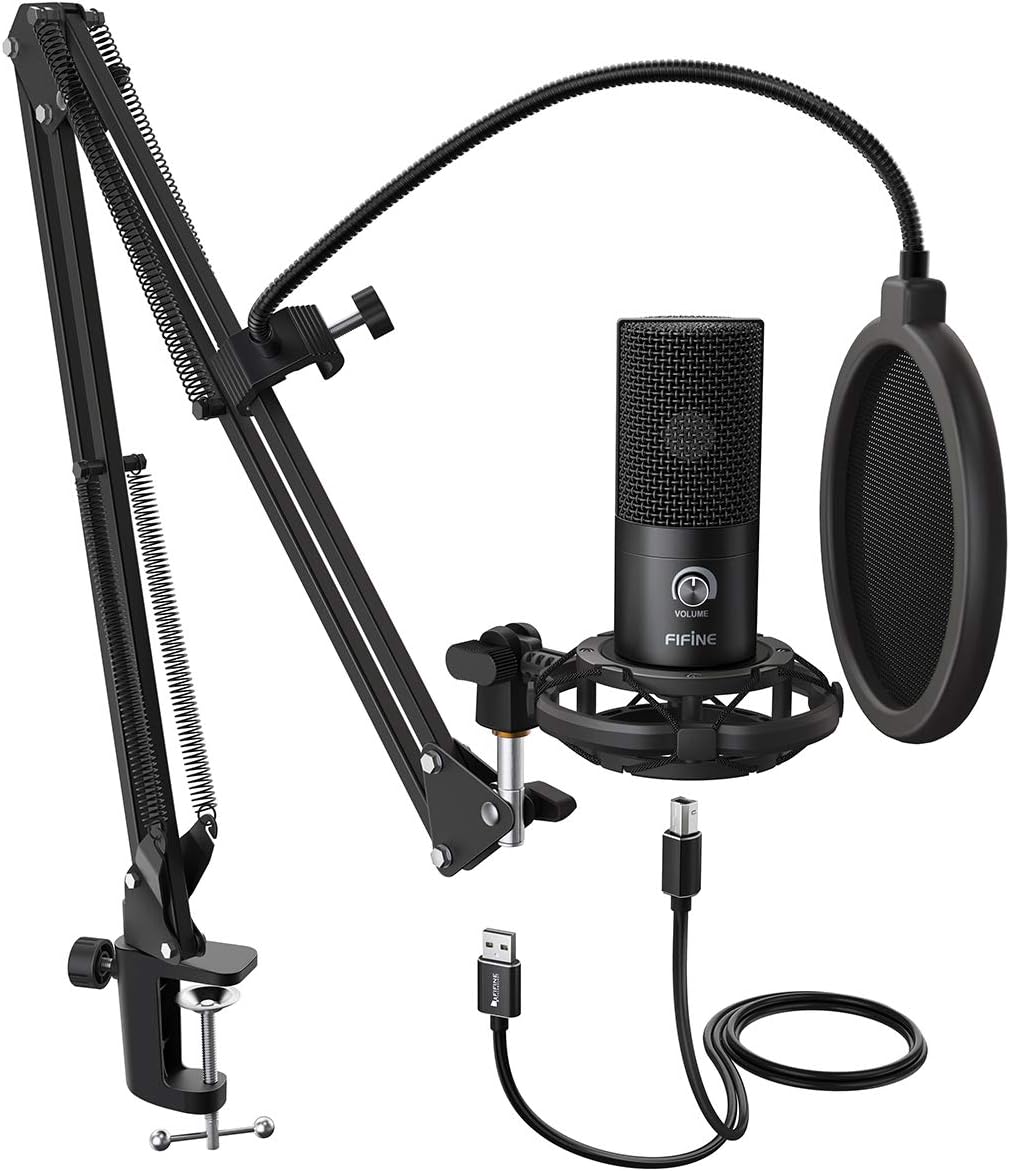
Figur 1.2: Fully assembled FIFINE T669 microphone kit.

Figur 1.3: Boom arm C-clamp attachment guidelines.
1.3 Tilslutning til din enhed
The FIFINE T669 microphone features a USB output for direct connection to your computer.
- Tilslut USB-kablet: Plug the USB-B end of the provided 8.2ft USB cable into the microphone's USB port.
- Tilslut til computer: Plug the USB-A end of the cable into an available USB port on your PC, laptop, or PS4/PS5.
- Driver installation: The microphone is plug-and-play and does not require additional drivers for Windows, Mac OS, or PS4/PS5. Your operating system should automatically recognize the device.
- Vælg som inputenhed: After connecting, navigate to your device's sound settings and select "FIFINE Microphone" (or similar) as your default input device.
Note: Denne mikrofon er ikke kompatibel with Xbox consoles or mobile phones.

Figur 1.4: Device compatibility for the FIFINE T669 microphone.

Figur 1.5: USB-A connector for the FIFINE T669 microphone.
2. Betjeningsvejledning
2.1 Grundlæggende betjening
Once connected, the microphone is ready for use. The T669 features a convenient volume knob for quick adjustments.
- Plug and Play: The microphone will be automatically detected by your computer.
- Lydstyrkeknap: Rotate the 'VOLUME' knob on the microphone to adjust the input gain. Turn clockwise to increase sensitivity and counter-clockwise to decrease it. Adjust this to achieve optimal recording levels without distortion.

Figur 2.1: Convenient Volume Knob for input gain adjustment.
2.2 Optimizing Sound Quality
To achieve the best possible sound quality from your FIFINE T669 microphone, consider the following:
- Kardioid polært mønster: The T669 utilizes a cardioid polar pattern, meaning it primarily picks up sound from the front of the microphone and rejects sound from the sides and rear. Position the microphone directly facing the sound source (e.g., your mouth) for clear audio and to minimize ambient noise.
- Brug af popfilter: The included pop filter is crucial for reducing plosive sounds (harsh 'p' and 'b' sounds) and protecting the microphone from moisture. Ensure it is positioned correctly between your mouth and the microphone.
- Shock Mount: The shock mount isolates the microphone from vibrations and handling noise transmitted through the boom arm or desk. Avoid bumping the desk during recording.

Figur 2.2: Microphone diaphragm and cardioid polar pattern.
2.3 Ansøgninger
The FIFINE T669 is versatile and suitable for various audio applications:
- Podcasting and Voiceovers: Captures clear and rich vocal audio.
- Gaming and Streaming: Provides excellent voice communication for online gaming and live streaming platforms.
- Musikoptagelse: Suitable for home studio recording of vocals and acoustic instruments.
- Videokonference: Enhances audio clarity for Zoom, Skype, and other online meeting applications.
3. Vedligeholdelse og pleje
Korrekt vedligeholdelse sikrer din mikrofons levetid og optimale ydeevne.
3.1 Rengøring
- Use a soft, dry cloth to wipe the microphone body and boom arm.
- For the microphone grille, use a soft brush to gently remove any dust or debris.
- Brug ikke flydende rengøringsmidler, opløsningsmidler eller slibende materialer, da disse kan beskadige mikrofonens overflade eller interne komponenter.
3.2 Opbevaring
- Når den ikke er i brug, skal du opbevare mikrofonen på et køligt, tørt sted væk fra direkte sollys og ekstreme temperaturer.
- If disassembling, ensure all components are clean and dry before storing them in their original packaging or a protective case.
4. Fejlfinding
If you encounter issues with your FIFINE T669 microphone, refer to the following common problems and solutions:
- Ingen lydoutput:
- Sørg for, at USB-kablet er korrekt tilsluttet til både mikrofonen og din computer.
- Check your computer's sound settings to confirm the FIFINE microphone is selected as the default input device.
- Adjust the volume knob on the microphone to an audible level.
- Prøv at tilslutte mikrofonen til en anden USB-port på din computer.
- Genstart din computer.
- Forvrænget eller uklar lyd:
- Reduce the input gain using the volume knob on the microphone if the sound is distorted (clipping).
- Ensure the pop filter is correctly positioned to minimize plosives.
- Check for background noise in your environment and try to minimize it.
- Ensure the microphone is positioned correctly, facing the sound source directly.
- Mikrofon genkendes ikke af computer:
- Prøv en anden USB-port.
- Sørg for, at dit operativsystem er opdateret.
- Verify that the microphone is compatible with your device (not compatible with Xbox or phones).
- Check Device Manager (Windows) or System Information (Mac) to see if the device appears, even with an error.
For further assistance, please refer to the official FIFINE support resources or the detailed user manual PDF available online.
5. Tekniske specifikationer
| Feature | Specifikation |
|---|---|
| Modelnavn | T669 sort |
| Polar mønster | Envejs (kardioid) |
| Forbindelsesteknologi | USB |
| Connector Type | USB Type-A |
| Frekvensområde | 20Hz-20KHz |
| Signal-støjforhold | 78 dB |
| Støjniveau | 70 dB |
| Varens vægt | 700 gram (1.54 pund) |
| Produktdimensioner | 16.5 x 9.61 x 2.99 tommer |
| Materiale | Metal |
| Kompatible enheder | Personal Computer (Laptop, PC, PS4/PS5) |
| Strømkilde | Elektrisk med ledning |
6. Garanti og support
FIFINE products are designed for reliability and performance. For specific warranty details, please refer to the warranty information provided with your purchase or visit the official FIFINE webwebsted.
6.1 Teknisk support
If you require technical assistance or have questions not covered in this manual, please contact FIFINE customer support. Contact information can typically be found on the FIFINE official webwebstedet eller på produktemballagen.
An electronic version of this user manual is available for download at: FIFINE T669 User Manual (PDF)
Ask a question about this manual
Ask about setup, troubleshooting, compatibility, parts, safety, or missing instructions. Manuals+ will review the question and use this page’s manual context to help answer it.