
1. Introduktion og overview
Thank you for choosing the Bewinner 12-inch LED Digital Photo Frame. This device allows you to display your favorite photos, play music and videos, and utilize clock and calendar functions. It features a high-resolution 12-inch LED screen (1280x800) and supports various media formats.

Billede: Den digitale fotorammeasing its 12-inch LED screen with a high-resolution image.
The frame is constructed from high-quality ABS material and comes with an infrared remote control for convenient operation. It includes built-in speakers and a 3.5mm headphone jack for audio output.
Pakkeindhold:
- 1 x Bewinner Digital Photo Frame
- 1 x fjernbetjening
- 1 x strømadapter/oplader
- 1 x Rammestativ
- 1 x Brugermanual (dette dokument)
2. Opsætning
2.1 Udpakning
Carefully remove all components from the packaging. Ensure all items listed in the package contents are present and undamaged.
2.2 Montering af stativet
Locate the detachable frame stand. Insert the stand into the designated slot on the back of the digital photo frame. Ensure it is securely attached to provide stable support on any flat surface.

Billede: Bagside view of the digital photo frame with the stand in place, highlighting the port layout.
2.3 Strømtilslutning
Connect the provided power adapter to the DC IN port on the digital photo frame. Plug the other end of the adapter into a standard electrical outlet. The frame will typically power on automatically or enter standby mode.
2.4 Inserting a Memory Card or USB Drive
The digital photo frame supports external storage via SD cards (up to 32GB, not included) and USB 2.0 host devices. Insert your SD card into the memory card slot or connect a USB flash drive to the USB host port. Ensure the media is inserted correctly.
Note: This device does not have significant internal storage for media files. An external SD card or USB drive is required to display photos, videos, or music.

Billede: Side profile of the digital photo frame, illustrating the various input ports including USB and SD card slots.
3. Betjeningsvejledning
The digital photo frame can be operated using the buttons on the back of the frame or the included infrared remote control.
3.1 Grundlæggende navigation
- Power knap: Turns the frame on or off.
- Menu/Setup Button: Giver adgang til hovedmenuen og indstillingerne.
- Piletaster (op/ned/venstre/højre): Naviger gennem menuer og vælg muligheder.
- Enter knap: Bekræfter valg.
- Afslut-knap: Returns to the previous screen or main display.
- Lydstyrkeknapper: Adjust audio volume (VOL+, VOL-).
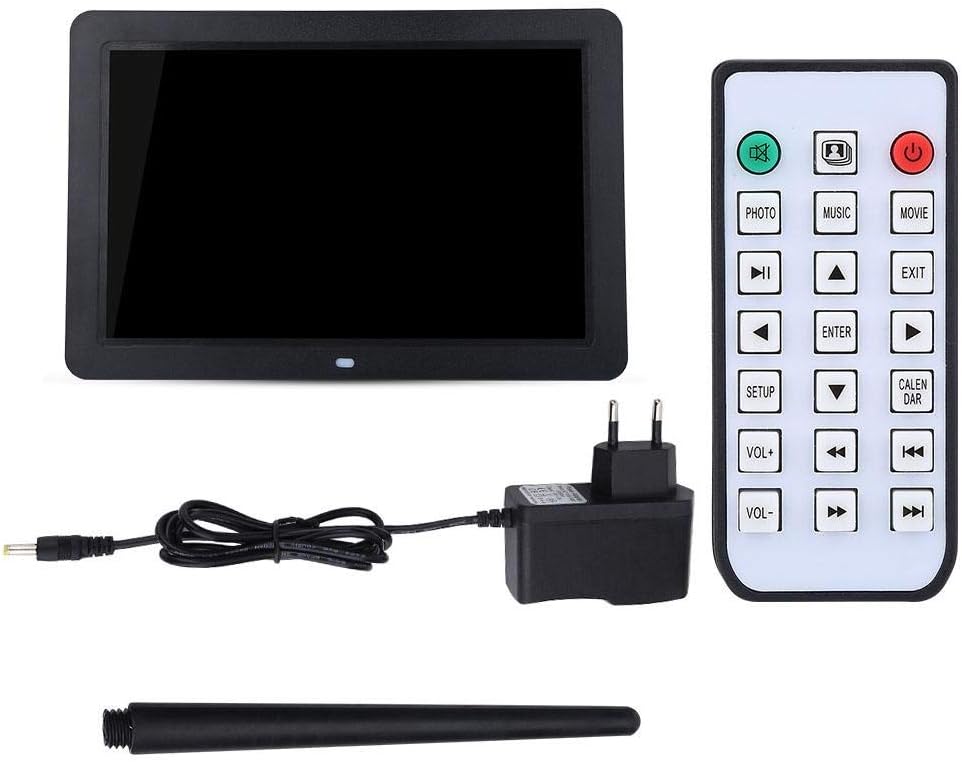
Image: The included remote control, showing buttons for various functions like Photo, Music, Movie, Setup, Calendar, and volume control.
3.2 Photo Playback
The frame supports JPEG and JPG image formats. To view fotos:
- Ensure your photos are stored on a compatible SD card or USB drive.
- From the main menu, select "Photo" or press the FOTO knappen på fjernbetjeningen.
- Navigate to your desired folder or select "All Photos" to start a slideshow.
- You can configure slideshow duration, transition effects, and brightness settings in the "Setup" menu.

Image: The digital photo frame displaying a high-resolution image, demonstrating its photo playback capability.
3.3 Musikafspilning
The frame supports MP3 audio format. To play music:
- Store your MP3 files on a compatible SD card or USB drive.
- From the main menu, select "Music" or press the MUSIK knappen på fjernbetjeningen.
- Gennemse din musik files and select a track to play.
- Adjust the volume using the VOL+ and VOL- buttons. You can also connect headphones to the 3.5mm jack.

Image: The digital photo frame displaying a visual while playing music, with an overlay indicating MP3 support.
3.4 Videoafspilning
The frame supports various video formats including RM, RMVB, MKV, MOV, M4V, MPG, FLV, PMP, AVI, VOB, DAT, MP4, and 3PG. To play videos:
- Store your video files on a compatible SD card or USB drive.
- From the main menu, select "Movie" or press the FILM knappen på fjernbetjeningen.
- Browse your video files and select a video to play.
- Juster lydstyrken med knapperne VOL+ og VOL-.
3.5 Ur- og kalenderfunktioner
The digital photo frame includes built-in clock and calendar functions. To access these:
- From the main menu, select "Calendar" or press the KALENDER knappen på fjernbetjeningen.
- You can set the time and date in the "Setup" menu.
3.6 Indstillinger og tilpasning
Access the "Setup" menu to customize various settings:
- Sprog: Vælg dit foretrukne sprog.
- Skærmindstillinger: Adjust brightness, contrast, and aspect ratio.
- Indstillinger for slideshow: Configure interval, transition effects, and playback mode (e.g., sequential, random).
- Tid og dato: Indstil det aktuelle klokkeslæt og dato.
- Automatisk afspilning: Set the frame to automatically play music, images, videos, or a mixed sequence upon startup.
4. Vedligeholdelse
4.1 Rengøring af skærmen
To clean the LED screen, gently wipe it with a soft, lint-free cloth. For stubborn smudges, slightly dampRengør kluden med vand eller en skærmsikker rengøringsopløsning. Undgå at bruge skrappe kemikalier eller slibende materialer.
4.2 Generel pleje
- Keep the digital photo frame away from direct sunlight, excessive heat, and moisture.
- Undgå at tabe eller udsætte enheden for kraftige stød.
- Do not attempt to disassemble the frame, as this will void any potential warranty and may cause damage.
- Når den ikke er i brug i længere perioder, skal du tage strømadapteren ud.
5. Fejlfinding
If you encounter issues with your Bewinner Digital Photo Frame, please refer to the following common problems and solutions:
| Problem | Mulig årsag/løsning |
|---|---|
| Rammen tændes ikke. |
|
| No photos/videos/music displayed. |
|
| Fjernbetjeningen virker ikke. |
|
| Images appear washed out or too bright/dark. |
|
| Audio is distorted or no sound. |
|
6. Specifikationer
| Feature | Detalje |
|---|---|
| Mærke | Bewinner |
| Modelnummer | Bewinner1moich0rzq-03 |
| Skærmstørrelse | 12 tommer |
| Display Type | LED |
| Opløsning | 1280 x 800 (WXGA) |
| Aspektforhold | 16:9 |
| Lysstyrke | 250 cd/m² |
| Skal materiale | ABS (Acrylonitril Butadien Styren) |
| Farve | Sort |
| Understøttelse af ekstern lagring | SD Card (up to 32GB), USB 2.0 Host |
| Understøttede billedformater | JPEG, JPG (Base Encoding) |
| Understøttede musikformater | MP3 |
| Understøttede videoformater | RM, RMVB, MKV, MOV, M4V, MPG, FLV, PMP, AVI, VOB, DAT, MP4, 3PG |
| Understøttet e-bogsformat | TXT |
| Indbygget højttaler | 8Ω2W * 2 |
| Driftsmetode | Infrared Remote Control, On-frame Buttons |
| Grænseflader | 3.5mm Headphone Jack, Memory Card Slot, USB 2.0 Host, Mini USB Adapter, Charging Port |
| Dimensioner (L x B x H) | Ca. 30.5 x 20.2 x 2.5 cm (12.0 x 7.9 x 1.0 tommer) |
| Vægt | Ca. 895 g |
| Strømkilde | Kabel elektrisk |

Image: Dimensional diagram of the digital photo frame, indicating its width and height.
7. Garanti og support
Information regarding specific warranty terms and conditions for the Bewinner Digital Photo Frame is not provided in the product details. For warranty claims or technical support, please refer to the retailer or manufacturer's official webwebstedet, hvor du købte produktet.
Please note that information on spare parts availability and guaranteed software updates is also not available.