
Metallic Gear MG-NE210_BK02
Metallic Gear Neo Mini V2 Series Mini-ITX Case User Manual
Model: MG-NE210_BK02
Indledning
The Metallic Gear Neo Mini V2 is a compact mini-tower PC case designed for Mini-ITX motherboards. Developed by Phanteks, this case features premium aluminum panels and a tempered glass side panel, offering both durability and a clear view of your internal components. Its space-efficient design supports full-size hardware and includes features for clean cable management. The Neo Mini V2 is also ready for liquid cooling, supporting up to 280mm All-In-One (AIO) liquid coolers, and integrates RGB lighting for customizable aesthetics.
This manual provides detailed instructions for setting up, operating, and maintaining your Metallic Gear Neo Mini V2 case, along with troubleshooting tips and product specifications.
Opsætning
1. Udpakning og inspektion
Carefully remove the case from its packaging. Inspect the case for any signs of damage during transit. Ensure all accessories listed in the packing list are present. The accessories typically include screws, cable ties, and a user manual.
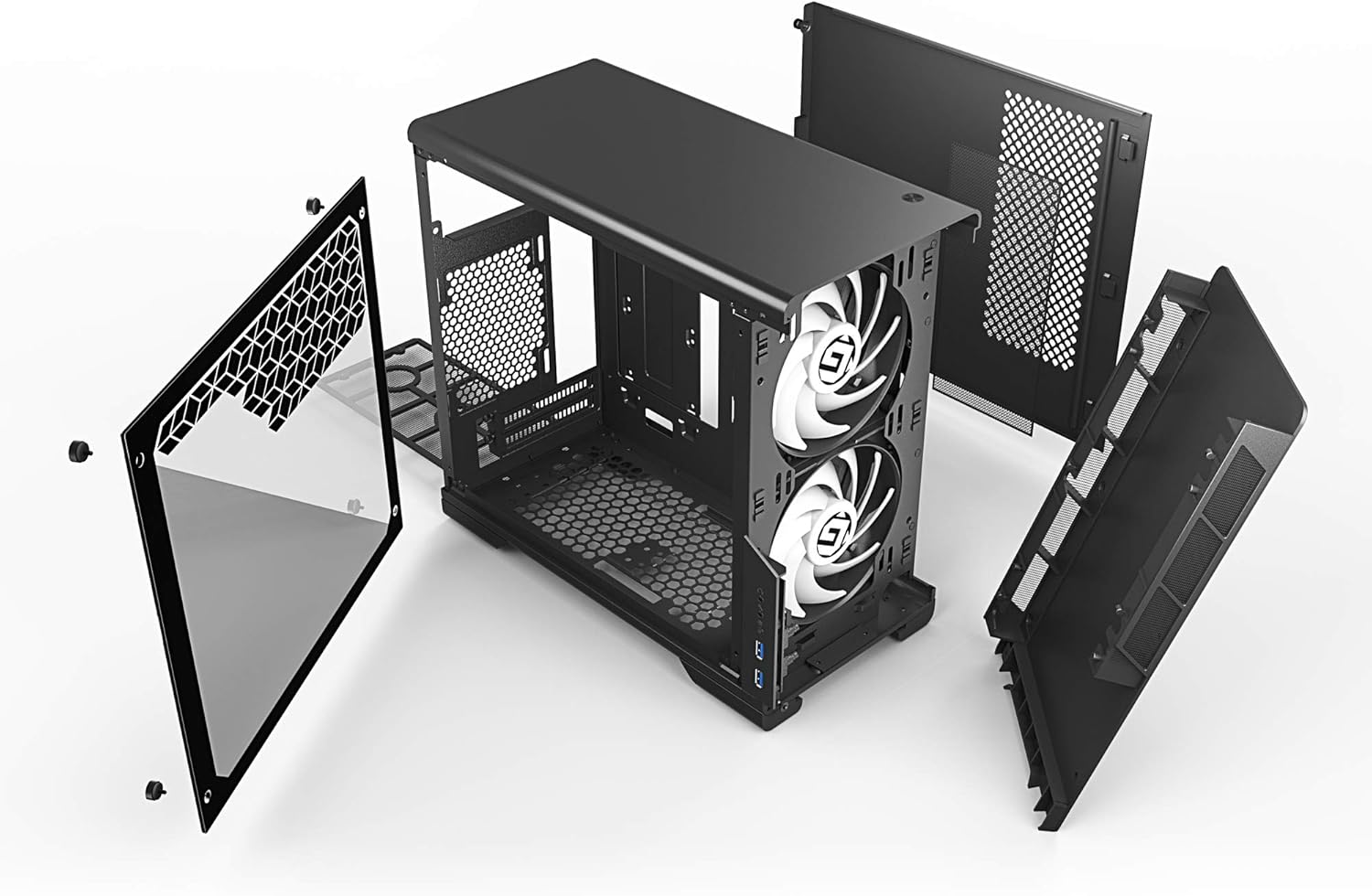
Figur 1: Eksploderet view showing the main chassis, tempered glass panel, and removable panels. This illustrates the modular design for easier assembly.
2. Forberedelse af sagen
- Placer etuiet på en stabil, flad overflade.
- Remove the tempered glass side panel by unscrewing the four thumb screws located at each corner. Carefully set the panel aside on a soft, non-abrasive surface to prevent scratches.
- Remove the opposite solid side panel by unscrewing the two rear thumb screws and sliding the panel backward.
3. Installation af bundkort
- Install the I/O shield into the designated opening at the rear of the case.
- Align your Mini-ITX motherboard with the standoffs inside the case. Ensure the screw holes on the motherboard align with the standoffs.
- Fastgør bundkortet med de medfølgende skruer. Spænd ikke for hårdt.

Figure 2: Internal layout of the Neo Mini V2 case, showing the motherboard tray, cable routing cutouts, and drive mounts. This view highlights the ampplads til installation af komponenter.
4. Installation af strømforsyningsenhed (PSU)
- The Neo Mini V2 features a top-loaded PSU design for easy accessibility.
- Mount your ATX power supply to the removable PSU bracket.
- Slide the PSU with the bracket into the top compartment of the case and secure it with screws.
5. Installation af lagerdrev
- The case supports multiple storage drives. Locate the 2.5" SSD/HDD mounts behind the motherboard tray and the 3.5" HDD cage at the bottom front.
- Secure your drives using the provided screws.
6. Installation af grafikkort og udvidelseskort
- Fjern de nødvendige PCIe-slotdæksler på bagsiden af kabinettet.
- Indsæt dit grafikkort eller andre udvidelseskort i bundkortets PCIe-stik.
- Fastgør kortene med skruer.
7. Cooling System Installation (Fans/AIO)
- The Neo Mini V2 supports up to 280mm AIO liquid cooling radiators at the front.
- Install case fans in designated mounting points (front, rear, bottom) as needed for optimal airflow.

Figure 3: Front interior view of the Neo Mini V2, demonstrating space for cooling solutions like dual fans or a 280mm AIO radiator.
8. Kabelforvaltning
- Utilize the cable routing cutouts and Velcro straps behind the motherboard tray to organize and secure cables.
- Connect all necessary power cables from the PSU to the motherboard, graphics card, and storage drives.
- Connect front panel I/O cables (USB, audio, power/reset switches, RGB) to their respective headers on the motherboard.

Figur 4: Bageste interiør view highlighting the cable management channels and Velcro straps, designed to keep wiring tidy and improve airflow.
9. Samling af kabinettet
- Once all components are installed and cables are managed, reattach the solid side panel and secure it with thumb screws.
- Carefully reattach the tempered glass side panel and secure it with its four thumb screws.
Drift
Tænder
- Tilslut din skærm, tastatur, mus og andet tilbehør til de relevante porte på dit bundkort og grafikkort.
- Connect the power cable to the PSU and plug it into a wall outlet.
- Flip the power switch on the PSU to the "ON" position.
- Press the power button located on the top front of the case to start your system.

Figure 5: Detail of the power button, located on the top panel for easy access.
Front I / O-porte
The Metallic Gear Neo Mini V2 case provides convenient front I/O ports for easy access to peripherals and audio. These include:
- 2 x USB 3.0 porte
- Hovedtelefonstik
- Mikrofonstik
- RGB control button (if connected to compatible RGB headers)
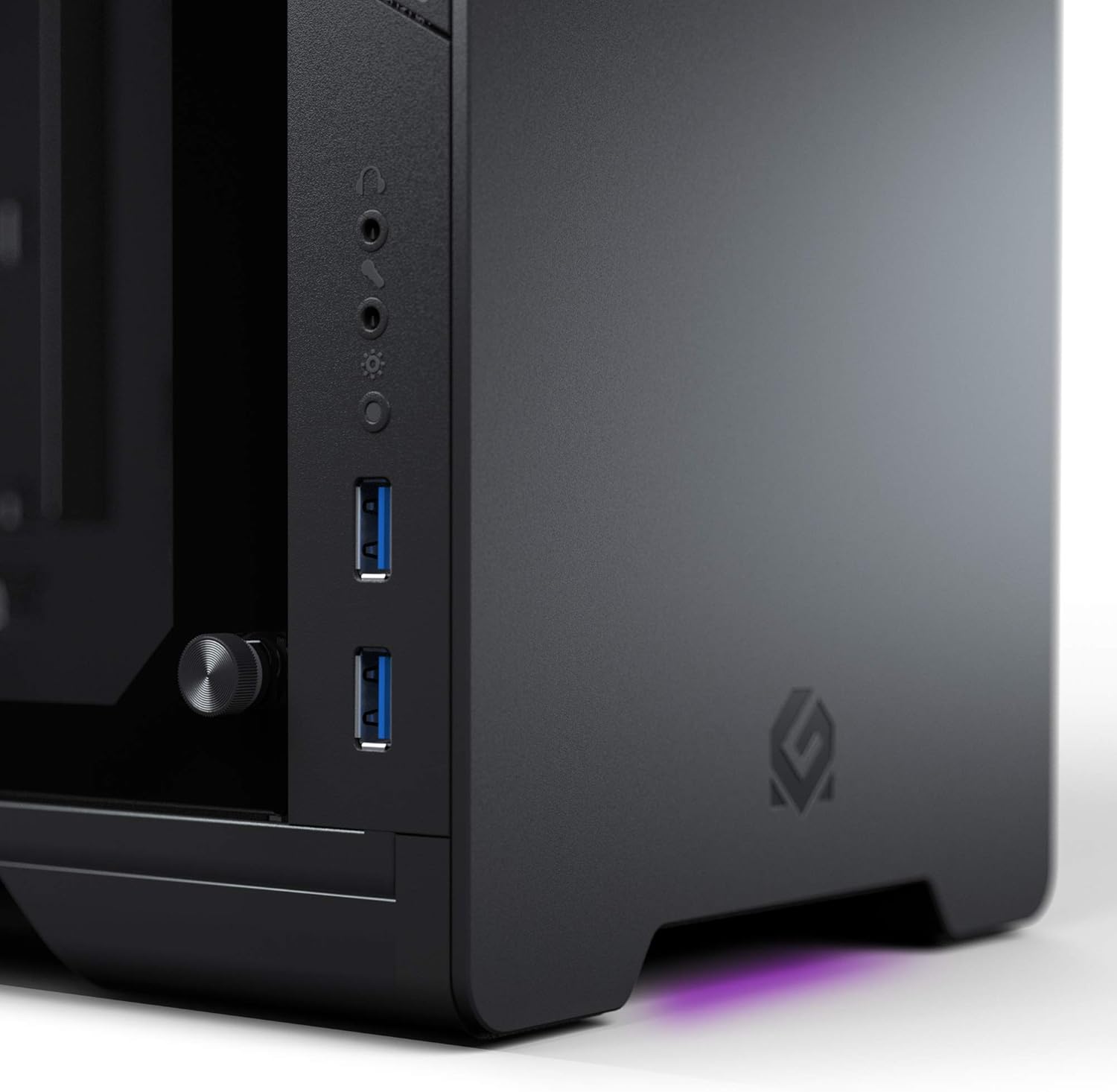
Figure 6: Front I/O panel showing USB 3.0 ports, audio jacks, and the RGB control button for quick connectivity and lighting adjustments.
RGB lysstyring
The integrated RGB lighting can be controlled via the dedicated button on the front I/O panel or synchronized with compatible RGB-enabled motherboards and other Phanteks RGB products. Refer to your motherboard's manual for software-based RGB control options.
Opretholdelse
Dust Filtration
The Neo Mini V2 case is equipped with dust filters to prevent dust buildup inside your system. Regularly clean these filters to maintain optimal airflow and cooling performance.
- Frontfilter: The front panel can be removed to access the front dust filter. Gently pull the bottom of the front panel to detach it.
- PSU Filter: A removable dust filter is located at the bottom of the case, beneath the power supply intake. Slide it out for cleaning.
To clean the filters, gently brush off accumulated dust or rinse them with water if heavily soiled. Ensure filters are completely dry before reinstallation.
Generel rengøring
- Use a soft, dry microfiber cloth to wipe down the exterior aluminum panels and tempered glass.
- For stubborn smudges on the tempered glass, a glass cleaner can be used, applied to the cloth first, not directly to the glass.
- Undgå at bruge slibende rengøringsmidler eller opløsningsmidler, da disse kan beskadige overfladen.
- Periodically use compressed air to clear dust from internal components and fan blades. Ensure the system is powered off and unplugged before performing internal cleaning.
Fejlfinding
| Problem | Mulig årsag | Løsning |
|---|---|---|
| Systemet tænder ikke. | PSU switch off, loose power cables, faulty power button connection. | Ensure PSU switch is ON. Check all power connections (24-pin, CPU, GPU, storage). Verify front panel power button cable is correctly connected to motherboard. |
| RGB-belysningen virker ikke. | Incorrect RGB header connection, software issue, faulty RGB controller. | Ensure RGB cable from case is connected to the correct motherboard header. Try using the case's RGB control button. Check motherboard RGB software settings. |
| Front USB ports not functioning. | Loose USB 3.0 header cable. | Verify the USB 3.0 cable from the front panel is securely connected to the motherboard's USB 3.0 header. |
| Dårlig luftstrøm eller høje temperaturer. | Dusty filters, incorrect fan orientation, insufficient fans. | Clean dust filters regularly. Ensure fans are oriented correctly (intake/exhaust). Consider adding more fans or upgrading to an AIO liquid cooler if temperatures remain high. |
Specifikationer
| Feature | Detalje |
|---|---|
| Modelnavn | MG NEO Mini V2 |
| Varemodelnummer | MG-NE210_BK02 |
| Mærke | Metallic Gear |
| Sagstype | Mini-tårn |
| Bundkort kompatibilitet | Mini ITX |
| Materiale | Hærdet glas, aluminium |
| Farve | Sort |
| Dimensioner (LxBxH) | 15.1 x 7.5 x 14 tommer (38.35 x 19.05 x 35.56 cm) |
| Varens vægt | 10.78 pund (4.89 kg) |
| Front I / O-porte | 2 x USB 3.0, Headphone, Microphone, RGB Control Button |
| Strømforsyningsmonteringstype | Øverste måned |
| Afkølingsmetode | Vand, luft |
| AIO Liquid Cooling Support | Up to 280mm (Front) |
| Integreret belysning | RGB (Multi-color) |
Garanti og support
Metallic Gear products are manufactured by Phanteks and typically come with a manufacturer's warranty covering defects in materials and workmanship. For specific warranty terms and duration, please refer to the warranty card included with your product or visit the official Metallic Gear/Phanteks webwebsted.
For technical support, troubleshooting assistance, or to inquire about replacement parts, please contact Metallic Gear customer support through their official website or the contact information provided in your product packaging. When contacting support, please have your product model number (MG-NE210_BK02) and purchase information ready.
Note: The RGB fan is not included with the case and must be purchased separately if desired.