
ARREGUI 241150
ARREGUI Supra 241150 Electronic Wall Safe
Brugermanual
1. Introduktion
This manual provides detailed instructions for the installation, operation, and maintenance of your ARREGUI Supra 241150 Electronic Wall Safe. Please read this manual thoroughly before using the safe to ensure proper function and security. Keep this manual for future reference.
The ARREGUI Supra 241150 is a robust wall-mounted safe designed for securing valuables. It features an electronic combination lock, an emergency key override, and an extendable bottom for flexible storage capacity.
2. Sikkerhedsoplysninger
- Always keep the emergency keys in a secure location away from the safe. Do not store them inside the safe.
- Ensure the safe is securely installed in a wall according to the installation instructions to prevent unauthorized removal. Professional installation is recommended.
- Udsæt ikke pengeskabet for ekstreme temperaturer eller fugtighed.
- Udskift batterierne med det samme, når indikatoren for lavt batteri vises, for at undgå at blive låst ude.
- Do not share your access codes with unauthorized individuals.
- This safe is not water-resistant. Avoid exposure to water.
3. Pakkens indhold
Bekræft at alle varer er til stede i pakken:
- ARREGUI Supra 241150 Wall Safe Unit
- Nødnøgler (2)
- AA-batterier (4)
- Instruktionsmanual (dette dokument)
4. Opsætning
4.1. Væginstallation
The ARREGUI Supra 241150 is designed for flush wall mounting. Proper installation is crucial for the safe's security. It is highly recommended to have the safe installed by a qualified professional.
- Choose a suitable location within a wall that can support the safe's weight (13 kg) and dimensions (approximately 32 cm height x 42 cm width x 15-25 cm depth).
- Cut an opening in the wall slightly larger than the safe's body dimensions, ensuring sufficient depth for the extendable bottom.
- Insert the safe into the opening.
- Secure the safe to the wall structure using appropriate fasteners (not included) through the pre-drilled holes inside the safe. Ensure it is firmly anchored.
- Finish the wall around the safe for a flush and secure fit.

Image: The ARREGUI Supra 241150 wall safe seamlessly integrated into a grey wall, positioned above a wooden desk with various items.
4.2. Batteriinstallation
The safe requires 4 AA batteries for the electronic lock. These are included in the package.
- Open the safe door using one of the emergency keys (refer to section 5.4 if needed).
- Find batterirummet på indersiden af døren til pengeskabet.
- Isæt de 4 AA-batterier, og sørg for at polerne vender korrekt (+/-).
- Luk batterirummets dæksel.
- The safe is now powered and ready for code setting.
4.3. Indstilling af indledende kode
Your safe comes with a factory default code. It is crucial to change this immediately to a personal code. The safe supports two codes: a User Code and a Master Code. Both can be 3 to 6 digits long.
Indstilling af brugerkoden:
- Med døren åben, tryk på NULSTIL button located on the inside of the door. The indicator light will flash.
- Enter your desired 3-6 digit user code on the keypad.
- Tryk på # button to confirm. The indicator light will flash again, confirming the new code is set.
- Test the new user code with the door open before closing it.
Indstilling af masterkoden:
- Med døren åben, tryk på 0 button twice, then press the NULSTIL knappen. Indikatorlampen vil blinke.
- Enter your desired 3-6 digit master code on the keypad.
- Tryk på # button to confirm. The indicator light will flash again, confirming the new master code is set.
- Test the new master code with the door open before closing it.

Billede: En detaljeret view of the electronic keypad and emergency key slot on the ARREGUI Supra 241150 safe.
5. Betjeningsvejledning
5.1. Åbning af pengeskabet med elektronisk kode
- Enter your User Code or Master Code on the keypad.
- Tryk på # knap.
- If the code is correct, the green indicator light will illuminate, and you will hear a beep.
- Drej knappen med uret inden for 5 sekunder for at åbne døren.
- If an incorrect code is entered three times, the system will lock for a short period.

Image: The ARREGUI Supra 241150 safe in its closed state, highlighting the electronic keypad and manual opening knob.
5.2. Lukning af pengeskabet
- Luk pengeskabslågen godt.
- Drej knappen mod uret for at aktivere låseboltene.
- Ensure the door is fully secured.
5.3. Changing Codes
Follow the steps in section 4.3 "Initial Code Setting" to change either the User Code or Master Code at any time. Remember to test the new code with the door open before closing it.
5.4. Emergency Key Override
In case of forgotten codes, battery failure, or electronic malfunction, the safe can be opened using the emergency key.
- Locate the emergency keyhole, usually concealed behind a cover on the keypad panel.
- Insert one of the emergency keys into the keyhole.
- Drej nøglen med uret, mens du samtidig drejer knappen med uret for at åbne pengeskabsdøren.
- Once open, you can replace batteries or reset codes as needed.

Image: The ARREGUI Supra 241150 safe with its door ajar, revealing the internal compartment and the electronic lock mechanism with an emergency key.
5.5. Adjustable Bottom / Extendable Depth
The ARREGUI Supra 241150 features an extendable bottom, allowing you to adjust the safe's internal depth. This provides flexible storage capacity.
- Åbn pengeskabsdøren.
- Locate the mechanism for the extendable bottom inside the safe.
- Carefully pull or push the bottom panel to extend or retract it to your desired depth. The mechanism typically has multiple fixed positions.
- Ensure the bottom is securely locked into place at the chosen depth before storing items.
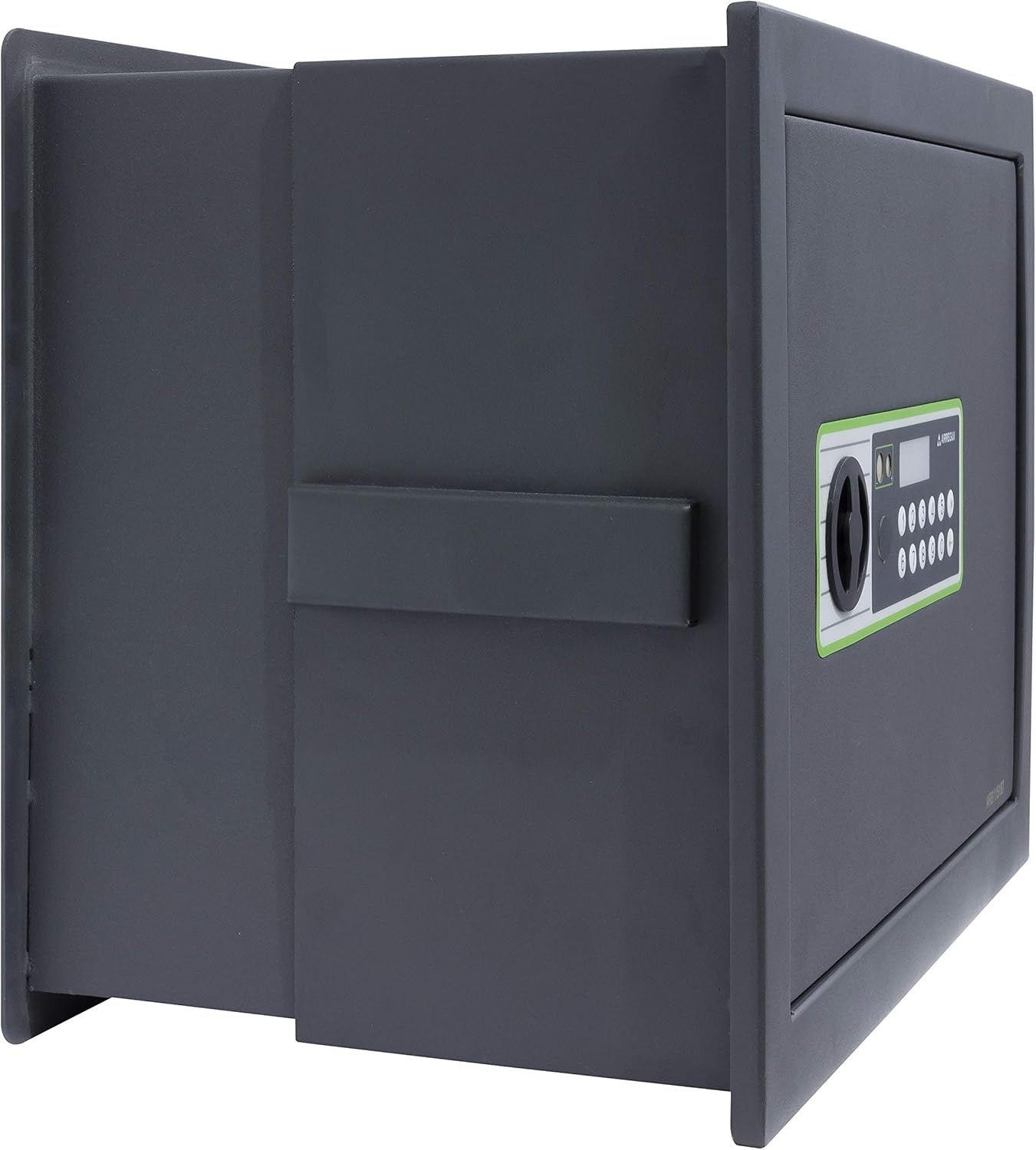
Billede: Side view of the ARREGUI Supra 241150 safe, showing the extendable bottom partially extended, increasing internal depth.

Billede: Side view of the ARREGUI Supra 241150 safe, with the extendable bottom fully extended to its maximum depth.

Image: The interior of the ARREGUI Supra 241150 safe, featuring an adjustable shelf and various items securely stored, demonstrating its capacity.
6. Vedligeholdelse
6.1. Udskiftning af batteri
When the batteries are low, the visual alarm (indicator light) will flash, or the keypad may become unresponsive. Replace all 4 AA batteries promptly.
- Open the safe door (using the code or emergency key).
- Åbn batterirummets dæksel.
- Fjern de gamle batterier og bortskaf dem på en ansvarlig måde.
- Indsæt 4 nye AA-batterier, og sørg for korrekt polaritet.
- Luk batterirummets dæksel.
6.2. Rensning
Rengør ydersiden af pengeskabet med en blød, damp klud. Brug ikke slibende rengøringsmidler eller opløsningsmidler, da disse kan beskadige overfladen eller de elektroniske komponenter.
7. Fejlfinding
| Problem | Mulig årsag | Løsning |
|---|---|---|
| Pengeskabet åbner ikke med kode. | Forkert kode indtastet. Lave batterier. Elektronisk funktionsfejl. | Indtast koden omhyggeligt igen. Replace batteries (see section 6.1). Use emergency key (see section 5.4). |
| Tastaturet reagerer ikke. | Døde batterier. System lockout after multiple incorrect attempts. | Replace batteries (see section 6.1). Wait for the lockout period to expire (usually a few minutes). |
| Døren lukker ikke ordentligt. | Obstruction in the door frame. Locking bolts not fully retracted. | Tjek om der er genstande, der blokerer døren. Ensure the knob is turned fully to retract bolts before closing. |
8. Specifikationer
- Mærke: ARREGUI
- Modelnummer: Supra 241150
- Produktmål (H x B x D): Approximately 32 cm x 42 cm x 15-25 cm (Height, Width, Depth - extendable)
- Låsetype: Electronic Combination, Key Override
- Farve: Dark Grey (Black)
- Kapacitet: 19 Liters (approximate, may vary with extension)
- Materiale: Legeret stål
- Front Thickness: 6 mm
- Kropstykkelse: 2 mm
- Monteringstype: Vægmontering
- Speciel funktion: Adjustable/Extendable Bottom
- Varens vægt: 13 kilo
- Strømkilde: 4 x AA batterier
- Alarm: Visual (Low Battery Indicator)
- Vandtæthed: Ikke vandafvisende
9. Garanti og support
For warranty information or technical support, please refer to the documentation provided with your purchase or contact ARREGUI customer service directly. Contact details can typically be found on the manufacturer's webwebstedet eller på din købskvittering.
Please have your model number (Supra 241150) and purchase date ready when contacting support.
Ask a question about this manual
Ask about setup, troubleshooting, compatibility, parts, safety, or missing instructions. Manuals+ will review the question and use this page’s manual context to help answer it.