
1. Produktet er slutview
HyperX Cloud Orbit S er et førsteklasses gamingheadset designet til en uovertruffen lydoplevelse. Det har avancerede Audeze planar magnetiske drivere og Waves Nx headtracking- og 3D-lydteknologi, der leverer betagende klarhed og præcision. Dette headset er kompatibelt med pc, Xbox, PS4, Mac, mobil og Switch.

Figur 1: HyperX Cloud Orbit S gamingheadset.
2. Opsætningsvejledning
2.1 Pakkens indhold
- HyperX Cloud Orbit S Headset
- Aftagelig støjreducerende mikrofon
- USB-C til USB-C kabel
- USB-C til USB-A-kabel
- 3.5 mm lydkabel

Figur 2: Alle dele inkluderet i HyperX Cloud Orbit S-pakken.
2.2 Tilslutning af dit headset
HyperX Cloud Orbit S tilbyder alsidige tilslutningsmuligheder, der passer til dit gaming-setup.
- USB-C til USB-C: Til direkte digital lydforbindelse til kompatible enheder.
- USB-C til USB-A: Til digital lydtilslutning til enheder med standard USB-A-porte.
- 3.5 mm lydkabel: Til analog lydtilslutning til enheder med et 3.5 mm jackstik.

Figur 3: Headset tilsluttet med aftagelig mikrofon og USB-C-kabel.

Figur 4: De tre forskellige aftagelige kabelmuligheder til headsettet.
For en visuel guide til opsætning af din HyperX Cloud Orbit S, se den officielle produktvideo:
Video 1: HyperX Cloud Orbit og Orbit S - Produktvideo. Denne video giver en oversigtview af headsettets funktioner og tilslutningsmuligheder.
2.3 Softwareinstallation (valgfrit)
Til avanceret lydtilpasning, inklusive lydprofileog HRTF-personalisering, download og installer HyperX Orbit-softwaren fra den officielle HyperX webwebsted. Denne software giver dig mulighed for at finjustere din lydoplevelse til dine præferencer.

Figur 5: HyperX Orbit-softwaregrænseflade til avanceret lydtilpasning.
3. Betjening af dit headset
3.1 Indbyggede kontroller
Headsettet har intuitive indbyggede kontroller, der giver nem adgang til vigtige funktioner:
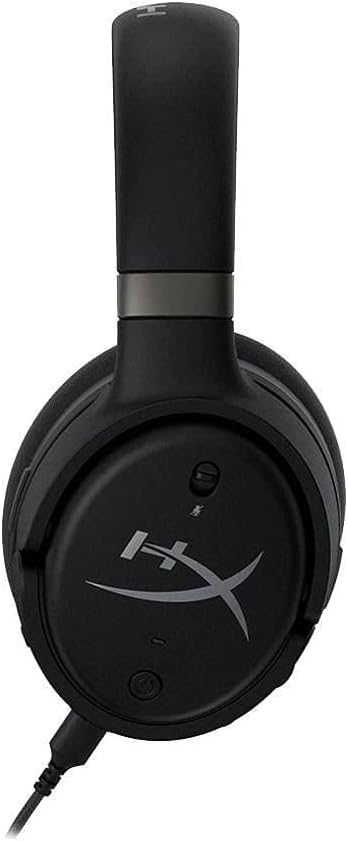
- Volumenhjul: Justerer den samlede lydstyrke.
- Mikrofonvolumenhjul: Justerer mikrofonens inputlydstyrke.
- 3D-lydknap: Slår Waves Nx 3D-lyd til/fra.
- Mikrofon mute knap: Slår mikrofonen fra eller til.
- Power knap: Tænder/slukker headsettet.

Figur 6: Side view af headsettet, der fremhæver kontrollayoutet.

Figur 7: Detaljeret view af headsettets porte og kontroller.
3.2 Brug af mikrofon
Fastgør den aftagelige støjreducerende mikrofon til den dertil beregnede port på venstre ørekop. Placer mikrofonen tæt på munden for optimal stemmeklarhed. Det integrerede popfilter hjælper med at reducere eksplosive lyde.
Figur 8: Headset med den aftagelige mikrofon i brug.
3.3 Waves Nx 3D-lyd og hovedsporing
Waves Nx-teknologien skaber et fuldt fordybende 3D-lydmiljø. Hovedsporing sporer dit hoveds position for at stabilisere lydbilledet, så du føler, at du er midt i handlingen. Denne funktion forbedrer realismen i spil og medier.

Figur 9: Brugeren oplever fordybende lyd med headsettet.

Figur 10: Hovedsporingsteknologi giver et stabilt lydbillede, når brugeren bevæger hovedet.
Oplev de fordybende muligheder i HyperX Cloud Orbit S i denne reklame:
Video 2: HyperX Cloud Orbit - Kommerciel. Fremviser headsettets fordybende lyd og headtracking-funktioner.
4. Pleje og vedligeholdelse
- Rengør ørekopperne og hovedbøjlen regelmæssigt med en blød, tør klud.
- Undgå at udsætte headsettet for ekstreme temperaturer eller fugt.
- Opbevar headsettet et sikkert sted for at forhindre fysisk skade, især på hovedbøjlen og ørekoppernes led.
- Håndter aftagelige kabler forsigtigt for at forhindre, at stikkene flosser eller beskadiges.
5. Fejlfinding af almindelige problemer
| Problem | Mulig årsag | Løsning |
|---|---|---|
| Ingen lydudgang | Forkert kabeltilslutning, lav lydstyrke, dæmpet lyd. | Sørg for, at kablerne er korrekt tilsluttet. Kontroller lydstyrken på headsettet og enheden. Bekræft, at lyden ikke er slået fra på headsettet eller enheden. |
| Mikrofon virker ikke | Mikrofonen er afbrudt, lydløs eller har forkerte inputindstillinger. | Sørg for, at mikrofonen er sat helt i. Kontroller mikrofonens mute-knap. Bekræft, at mikrofonindgang er valgt i din enheds lydindstillinger. |
| Statisk eller hvid støj | Interferens, lav signalkvalitet eller iboende ampstøj fra lifteren. | Prøv at tilslutte til en anden USB-port eller enhed. Sørg for, at der ikke er stærke elektromagnetiske interferenskilder i nærheden. Der kan være et let støjniveau ved aktivering. amplifikation. |
| Ubehag ved headsettet | Forkert pasform eller langvarig brug. | Juster hovedbøjlen for en behagelig pasform. Tag pauser under længere tids brug. Ørekopperne i memory foam er designet til komfort. |
6. Tekniske specifikationer
| Feature | Specifikation |
|---|---|
| Modelnavn | Cloud Orbit S |
| Forbindelsesteknologi | Kablet (USB-C, USB-A, 3.5 mm) |
| Audio driver type | Planar magnetisk driver (Audeze) |
| Frekvensområde | 20 Hz - 20,000 Hz |
| Varens vægt | 368 gram (13 ounce) |
| Inkluderede komponenter | Headset, aftagelig mikrofon |
| Kompatible enheder | PC, Xbox, PS4, Mac, Mobil, Switch |
7. Garanti og support
For garantioplysninger og teknisk support henvises til den dokumentation, der følger med dit produkt, eller besøg de officielle HyperX-supportkanaler. Gem din købsbevis til garantikrav.


