
1. Introduktion
This manual provides detailed instructions for the RedThunder K900 Semi-Mechanical Keyboard. Designed for both gaming and general use, this keyboard combines the tactile feedback of mechanical switches with the quiet operation of membrane keyboards. It features customizable RGB backlighting, multimedia shortcuts, and an ergonomic design for enhanced user experience.
2. Nøglefunktioner
2.1 Semi-Mechanical Switch Technology
The RedThunder K900 keyboard utilizes a semi-mechanical structure, blending membrane keyboard technology with mechanical switches. This design offers a quieter typing experience while retaining the distinct tactile feedback characteristic of mechanical keyboards. Each switch is tested for 60 million keystrokes, ensuring long-term durability.
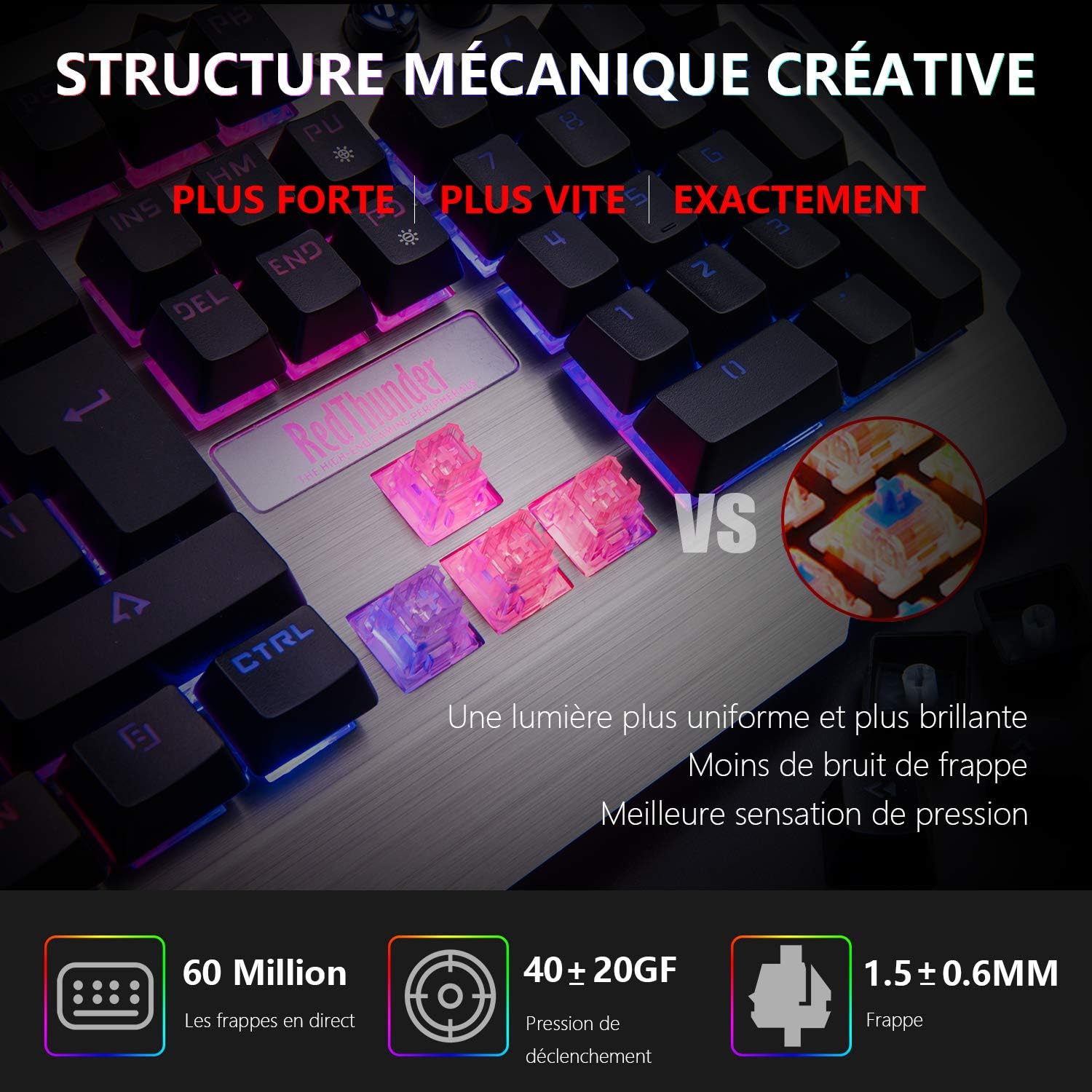
Image: Detail of the semi-mechanical switch structure, highlighting the transparent switch components.
2.2 Tilpasset RGB-baggrundsbelysning
The keyboard features advanced RGB backlighting with multiple lighting effects. The lighting is divided into 6 customizable zones, each capable of displaying 7 independent colors, allowing for 42 total color combinations. Various built-in lighting modes, including streamer mode, are also available.

Image: The RedThunder K900 keyboard showcasing its vibrant RGB backlighting across different zones.
2.3 Enhanced Efficiency and Anti-Ghosting
Experience precise, comfortable, and rapid input with the K900. It includes 12 dedicated multimedia shortcuts for quick audio adjustments without interrupting your activity. Additionally, 25 anti-ghosting keys ensure that almost all commonly used gaming keys register simultaneously and accurately.

Image: Close-up of the RedThunder K900 keyboard showing the 12 multimedia shortcuts and indicating anti-ghosting functionality.
2.4 Ergonomic and Durable Design
The K900 features a distinctive and robust design with a full metal panel. Integrated elements such as an ergonomic wrist rest and a mobile phone holder enhance both aesthetics and practicality. Its solid construction ensures perfect stability on your desk.

Image: The RedThunder K900 keyboard from an angled view, illustrating the ergonomic wrist rest and integrated phone holder.
3. Opsætning
3.1 Tilslutning af tastaturet
The RedThunder K900 keyboard is a Plug & Play device. No driver installation is required for basic functionality.
- Find en ledig USB-A-port på din computer eller kompatible enhed.
- Sæt tastaturets USB-stik i USB-A-porten.
- Tastaturet vil automatisk blive genkendt af dit operativsystem.
3.2 Kompatibilitet
The keyboard is fully compatible with the following operating systems: Windows 10, Windows 8, Windows 7, Windows Vista, Windows ME, Mac OS 8, Mac OS 9, and Linux. It is also compatible with IBM systems, game consoles, laptops, and other peripheral devices.
4. Betjening
4.1 RGB-baggrundsbelysningskontrol
The RedThunder K900 offers extensive control over its RGB backlighting. Use the FN key in combination with other keys to adjust lighting settings:
- FN + INS: Skift mellem forskellige lystilstande.
- FN + HJEM: Adjust the color of the light.
- FN + Page Up / Page Down: Turn up/down brightness.
- FN + Left Arrow / Right Arrow: Adjust fast/slow breathing rate.
- FN + (1-6): Choose specific colors for customized zones (press FN+PU twice to start customizing, then FN+(1-6) to select color).
Video: Demonstrates various RGB lighting effects and how to adjust them using FN key combinations on the RedThunder K900 keyboard.
4.2 Multimediegenveje
The keyboard features 12 multimedia shortcuts accessible via the FN nøgle i kombination med F1 ved F12 keys. These shortcuts allow for quick control of media playback, volume, and other functions.
Image: The RedThunder K900 keyboard showing the F1-F12 keys with their corresponding multimedia functions when used with the FN key.
5. Vedligeholdelse
To ensure the longevity and optimal performance of your RedThunder K900 keyboard, follow these maintenance guidelines:
- Rensning: Regularly clean the keyboard with a soft, dry cloth. For deeper cleaning, use compressed air to remove dust and debris from between the keys. A slightly damp cloth can be used for the surface, but avoid excessive moisture.
- Spildmodstand: While the keyboard is designed with some spill resistance, it is not fully waterproof. In case of accidental spills, immediately disconnect the keyboard, wipe off any liquid, and allow it to dry completely before reconnecting.
- OpbevaringOpbevar tastaturet et køligt og tørt sted, væk fra direkte sollys og ekstreme temperaturer.
6. Fejlfinding
Hvis du støder på problemer med dit RedThunder K900-tastatur, kan du bruge følgende almindelige løsninger:
- Tastaturet reagerer ikke: Ensure the USB cable is securely plugged into both the keyboard and the computer. Try plugging the keyboard into a different USB port or a different computer to rule out port or system issues.
- Baggrundsbelysning virker ikke: Check if the backlighting is turned off or set to the lowest brightness. Use the FN + Page Up key combination to increase brightness. Ensure no software conflicts are preventing the lighting from functioning.
- Nøgler registreres ikke: Clean around the affected keys to remove any debris that might be obstructing the switch. If the issue persists, contact customer support.
- Lag or Input Delay: Ensure your computer's drivers are up to date. Try connecting the keyboard directly to a USB port on your motherboard rather than a USB hub.
7. Specifikationer
| Feature | Detalje |
|---|---|
| Mærke | Rød Torden |
| Modelnummer | K900 |
| Farve | Sølv |
| Operativsystemkompatibilitet | Mac OS 8, Mac OS 9, Windows 10, Windows 7, Windows 8 |
| Forbindelsesteknologi | USB-A |
| Særlige funktioner | Wrist Rest, Metal Panel, Semi-Mechanical, Mobile Phone Holder, Customizable Lighting |
| Kompatible enheder | Game Console, Laptop, Computers and Peripherals |
| Tastaturbeskrivelse | French (AZERTY layout) |
| Anbefalede anvendelser | Spil |
| Farvestyring af tastaturbaggrundsbelysning | RGB |
| Produktdimensioner | 49L x 19W x 4H centimeter |
8. Garanti og support
RedThunder is committed to providing high-quality products and customer satisfaction.
- Garanti: This product is covered by an 18-month warranty from the date of purchase.
- Penge-tilbage-garanti: A 30-day money-back guarantee is offered for this product.
- Kundesupport: For any questions or assistance during use, please do not hesitate to contact us via email. Refer to your product packaging or the RedThunder official webwebsted for kontaktoplysninger.