
1. Introduktion
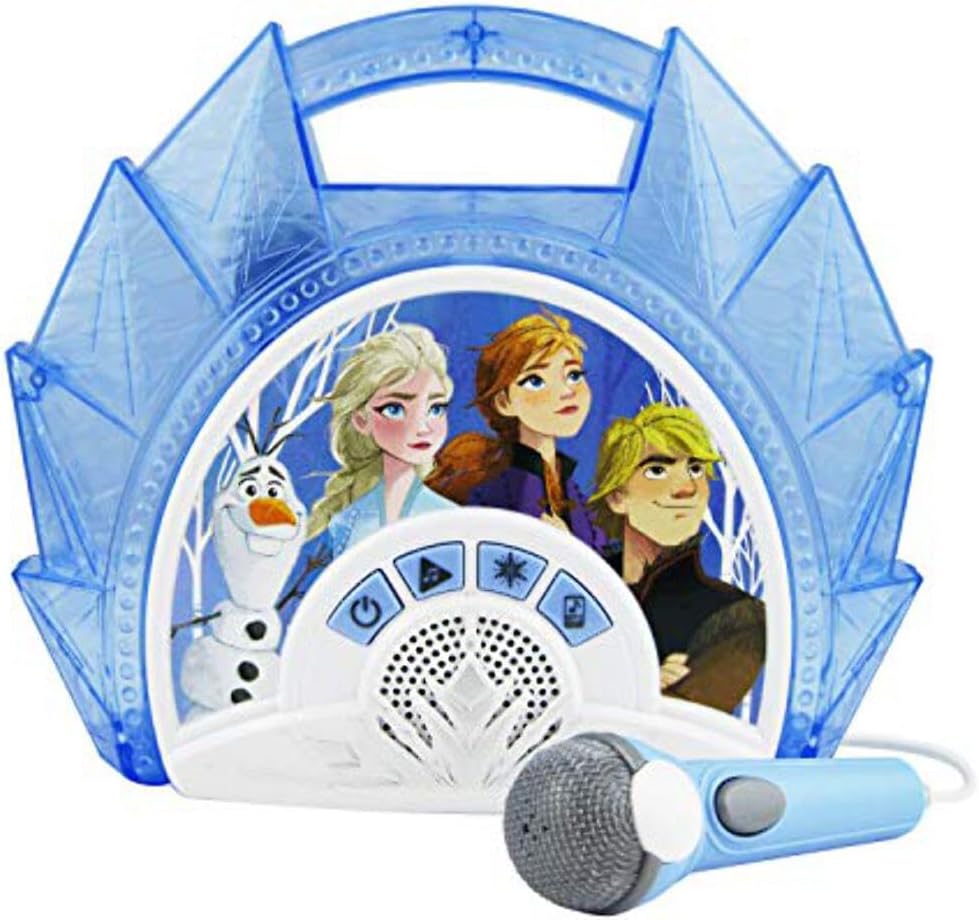
This manual provides instructions for the eKids FR-115F2 Frozen Sing Along Boombox. This device features a real working microphone, built-in music, and flashing lights. It also includes an AUX-in port for connecting external audio devices. The unit is designed to be portable and lightweight.

Figur 1: Forside view of the eKids FR-115F2 Frozen Sing Along Boombox with microphone.
2. Opsætning
2.1 Batteriinstallation
The boombox requires batteries for operation. Locate the battery compartment on the back of the unit. Open the compartment cover and insert the required batteries, ensuring correct polarity (+/-). Close the compartment cover securely.
2.2 Mikrofonforbindelse
Connect the included microphone to the designated microphone input port on the boombox. Ensure the connection is firm.
Figur 2: Tilbage view highlighting battery compartment, AUX-in, and control buttons.
3. Betjening
3.1 Tænd/sluk
Tryk på Tænd/sluk-knap (typically marked with a power symbol) to turn the boombox on or off.
3.2 Built-in Music Playback
To play built-in music, press the Song Select Button to cycle through available tracks. Press the Play/Repeat Button to start or repeat a song.
3.3 Connecting External Devices (AUX-in)
To connect an external audio device (e.g., MP3 player, smartphone), use a 3.5mm audio cable (not included) to connect your device to the AUX Line-in port on the boombox. Press the MP3 (Aux) Mode Button to switch to AUX input mode. Audio from your connected device will now play through the boombox speakers.
3.4 Brug af mikrofon
After connecting the microphone, ensure the microphone's Tænd/sluk-knap is in the 'On' position. You can sing along to built-in music or music from a connected external device. Adjust your singing volume as needed.

Figure 3: Detail of the microphone with its On/Off switch.
3.5 lysshow
Tryk på Lys knap (often marked with a star icon) to activate or deactivate the flashing light show feature.

Figure 4: The boombox in operation, demonstrating the light show feature.
4. Vedligeholdelse
4.1 Rengøring
To clean the boombox, use a soft, dry cloth. Do not use abrasive cleaners, solvents, or chemical sprays. Keep the unit dry and away from excessive moisture.
4.2 Pleje af batterier
Remove batteries if the unit will not be used for an extended period to prevent leakage. Do not mix old and new batteries, or different types of batteries. Dispose of used batteries responsibly according to local regulations.
5. Fejlfinding
5.1 Ingen strøm
- Kontroller, om batterierne er korrekt installeret og ikke er opbrugt.
- Udskift batterierne om nødvendigt.
- Sørg for, at tænd/sluk-knappen er trykket helt ned.
5.2 Ingen lyd
- If using built-in music, ensure the volume is turned up and the unit is not in AUX mode.
- If using an external device, check the connection cable, the device's volume, and ensure the boombox is in AUX mode.
- Ensure the microphone's On/Off switch is in the 'On' position if microphone sound is missing.
5.3 Mikrofonen virker ikke
- Ensure the microphone is securely plugged into its port.
- Check the On/Off switch on the microphone itself.
- Ensure the boombox volume is adequate.
6. Specifikationer
| Mærke | eKids |
| Model | FR-115F2 |
| Strømkilde | Batteridrevet |
| Forbindelsesteknologi | AUX (3.5 mm jack) |
| Inkluderede komponenter | Mikrofon |
| Antal højttalere | 1 |
| Medietype | MP3 |
| Varedimensioner (D x B x H) | 5.9 x 25.5 x 25.6 cm |
| Anbefalede anvendelser | Smartphones (for AUX connection) |
| Speciel funktion | Portable, Flashing Lights |
7. Garantioplysninger
Dette produkt leveres med en 2 års producentgaranti. Please retain your proof of purchase for warranty claims. For specific terms and conditions, refer to the warranty documentation included with your product or contact eKids customer support.
8. Support
If you encounter any issues not covered in this manual or require further assistance, please visit the official eKids website or contact their customer support. Keep your model number (FR-115F2) handy when seeking support.