
1. Introduktion
The Dual DAB 3A Digital Radio Adapter is designed to upgrade your existing audio system with modern digital radio reception and Bluetooth streaming capabilities. This adapter allows you to enjoy DAB+ and FM radio broadcasts with clear digital quality and stream audio wirelessly from compatible devices. Its user-friendly interface and remote control ensure convenient operation.
2. Sikkerhedsoplysninger
- Strømforsyning: Use only the provided AC power adapter. Ensure the voltage opfylder de krav, der er angivet på adapteren.
- Vand og fugt: Do not expose the device to rain, moisture, or dripping/splashing liquids. Keep it away from water sources.
- Ventilation: Ensure adequate ventilation around the unit. Do not block ventilation openings. Avoid placing the device on soft surfaces that may obstruct airflow.
- Varmekilder: Hold enheden væk fra varmekilder såsom radiatorer, varmeapparater, komfurer eller andre varmeproducerende apparater.
- Rensning: Disconnect the power before cleaning. Use a soft, dry cloth. Do not use liquid cleaners or aerosol sprays.
- Service: Forsøg ikke selv at servicere dette produkt. Overlad al service til kvalificeret servicepersonale.
3. Pakkens indhold
Kontroller venligst, at alle nedenstående varer er inkluderet i din pakke:
- Dual DAB 3A Digital Radio Adapter
- AC strømadapter
- Fjernbetjening
- Instruktionsbog
- External Wire Antenna
4. Produktet er slutview
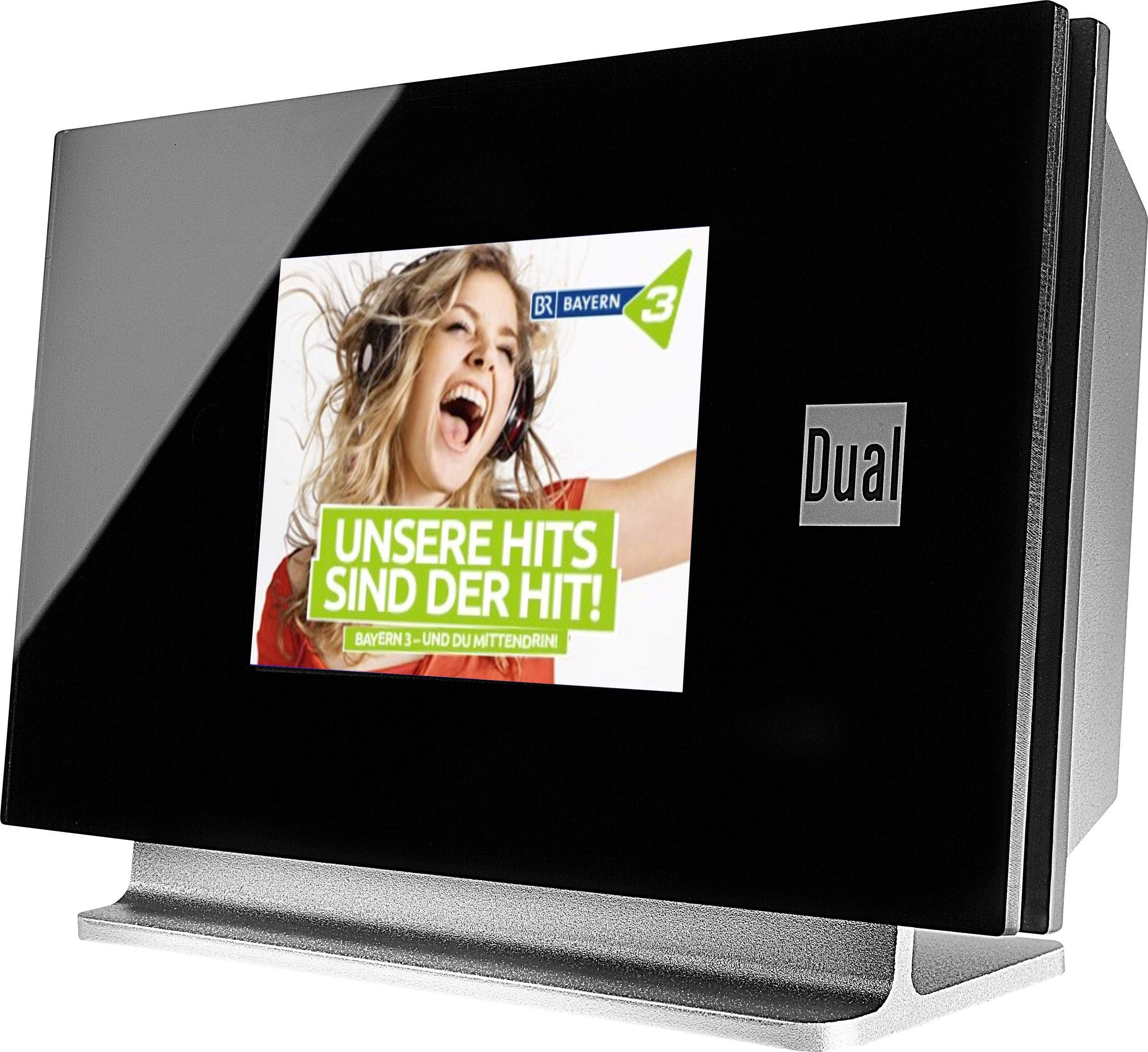
This image displays the Dual DAB 3A Digital Radio Adapter from a front-side angle. The front features a large, black TFT color display showing a radio station's album art and text. The side view indicates the product dimensions: 15 cm (width), 6 cm (depth), and 10.49 cm (height).
Frontpanel
- TFT-farveskærm: Shows station information, track details, album art, and menu options.
Bagpaneltilslutninger
- Antenneindgang: For connecting the external wire antenna or a commercially available antenna.
- AUX-UD: Audio output for connecting to an external amplifier eller lydanlæg.
- Strømindgang: Til tilslutning af AC-strømadapteren.
Fjernbetjening
The included remote control provides full functionality for navigating menus, changing stations, adjusting volume, and selecting input modes.
5. Opsætning
- Tilslut antenne: Connect the supplied external wire antenna to the antenna input on the rear panel of the DAB 3A adapter. For optimal reception, extend the antenna fully.
- Tilslut til lydsystem: Use an appropriate audio cable (not included) to connect the AUX-OUT port on the rear of the DAB 3A to an available audio input (e.g., AUX-IN, Line-IN) on your existing amplifier eller stereoanlæg.
- Tilslut strøm: Plug the AC power adapter into the power input on the rear of the DAB 3A, then plug the adapter into a wall outlet.
- Tænd: Press the Power button on the unit or the remote control to turn on the adapter. The display will illuminate.
- Initial Scan (DAB+): Upon first power-on, the unit may automatically perform a scan for available DAB+ stations. Allow this process to complete.
6. Betjening
Tænd/sluk
- Tryk på Magt button on the unit or remote control to turn the device on or off.
DAB+ Radio Mode
- Tryk på Mode button on the remote control until DAB+ mode is selected.
- If no stations are found or you wish to rescan, navigate to the 'Full Scan' option in the menu and confirm. The adapter will search for available DAB+ stations.
- Brug Op/Ned navigation buttons on the remote to browse through the list of available stations.
- Trykke OK/Enter for at vælge en station.
- The TFT display will show station name, program information, and potentially album art or weather data.
FM-radiotilstand
- Tryk på Mode button on the remote control until FM mode is selected.
- For automatisk at scanne efter stationer skal du trykke på og holde Scan button (or equivalent on remote). The adapter will tune to the next strong station.
- For at indstille manuelt, brug Op/Ned navigation buttons to adjust the frequency.
Bluetooth-tilstand
- Tryk på Mode button on the remote control until Bluetooth mode is selected. The display will show 'Bluetooth Pairing' or similar.
- Aktiver Bluetooth på din smartphone eller tablet, og søg efter tilgængelige enheder.
- Select 'Dual DAB 3A' from the list of devices to pair.
- Once paired, you can stream audio from your device to the DAB 3A adapter.
AUX-IN tilstand
- Connect an external audio source (e.g., MP3 player, CD player) to the AUX-IN port on the rear of the DAB 3A using a 3.5mm audio cable (not included).
- Tryk på Mode button on the remote control until AUX-IN mode is selected.
- Audio from the connected external device will now play through your audio system.
7. Vedligeholdelse
- Rengøring af enheden: Disconnect the power adapter before cleaning. Use a soft, dry, lint-free cloth to wipe the surface of the unit. Do not use abrasive cleaners, waxes, or solvents.
- Rengøring af skærmen: Gently wipe the TFT display with a soft, dry microfiber cloth. Avoid pressing hard on the screen.
- Opbevaring: Hvis enheden skal opbevares i længere tid, skal den afbrydes fra strømforsyningen og opbevares et køligt, tørt sted væk fra direkte sollys og ekstreme temperaturer.
8. Fejlfinding
| Problem | Mulig årsag | Løsning |
|---|---|---|
| Ingen strøm | Strømadapteren er ikke tilsluttet, eller der er en defekt stikkontakt. | Sørg for, at strømadapteren er korrekt tilsluttet enheden og en fungerende stikkontakt. |
| Dårlig DAB+/FM-modtagelse | Antenna not properly connected or poor signal strength. | Ensure the antenna is fully extended and properly connected. Try repositioning the antenna or the unit. Consider using a stronger external antenna if available. |
| Bluetooth-parring mislykkes | Bluetooth not enabled on source device or adapter is not in pairing mode. | Ensure Bluetooth is enabled on your smartphone/tablet and the DAB 3A is in Bluetooth mode. Try restarting both devices. |
| Ingen lyd | Lydstyrken er for lav, forkert indgang valgt amplifier, or audio cable issue. | Increase the volume on both the DAB 3A and your ampliberator. Sørg for din amplifier is set to the correct input (e.g., AUX-IN). Check the audio cable connections. |
9. Specifikationer
- Model: 75862
- Tuner teknologi: DAB Plus, FM
- Forbindelse: Bluetooth
- Understøttede radiobånd: FM, DAB+
- Skærmtype: Farve Display
- Strømkilde: AC Adapter
- Hardwaregrænseflade: Bluetooth
- Kompatible enheder: Smartphone, Laptop
- Særlige funktioner: Bluetooth, Remote Control
- Produktdimensioner: 15 x 6 x 10.5 cm
- Varens vægt: 540 g
10. Garanti og support
This product comes with a standard manufacturer's warranty. For detailed warranty information, please refer to the warranty card included in your package or visit the official Dual website. For technical support, troubleshooting assistance, or service inquiries, please contact Dual customer support through their official channels.