
1. Introduktion
Thank you for choosing the Zeerkeer TK905 Professional Waterproof Real-Time GPS Tracker. This device is designed to provide reliable and accurate tracking for a variety of assets, including trucks, cars, motorcycles, freezers, and boats. With its robust features and user-friendly interface, you can monitor your valuables with confidence. Please read this manual carefully before using the device to ensure proper operation and maximize its lifespan.
2. Sikkerhedsoplysninger
- Sørg for at få installeret enheden af en kvalificeret fagmand, hvis du er usikker på de elektriske forbindelser.
- Forsøg ikke at åbne eller ændre enheden, da dette vil ugyldiggøre garantien og kan forårsage skade.
- Hold enheden væk fra ekstreme temperaturer, direkte sollys og ætsende materialer.
- Brug kun det medfølgende USB-kabel til opladning.
- Bortskaf enheden og dens komponenter på en ansvarlig måde i henhold til lokale bestemmelser.
3. Pakkens indhold
Upon opening your Zeerkeer TK905 package, please verify that all items listed below are present and in good condition:
- 1 x Zeerkeer TK905 GPS Tracker
- 1 x USB-kabel
- 1 x Opbevaringspose
- 1 x Micro SIM Adapter
- 1 x Nano SIM Adapter

Image: Contents of the Zeerkeer TK905 GPS Tracker package, including the tracker, USB cable, storage bag, and SIM card adapters.
4. Produktet er slutview
4.1 Nøglefunktioner
- Real-time Positioning: GPS/LBS positioning with accuracy up to 5 meters.
- Geo-hegn: Set up a security zone; receive app/SMS alerts if the device enters or exits the area.
- Rutehistorik: View up to 6 months of historical routes, with 3 months accessible via the app.
- Flere alarmer: Includes mobile alarm, shock alarm, overspeed alarm, low power alarm, and anti-removal alarm.
- Vandtæt Design: IP65 rated for stable operation in various environments.
- Lang batterilevetid: 5000mAh battery provides up to 90 days of standby time.
- Stærk magnetisk base: For easy and secure installation on metal surfaces.

Billede: En overview of the Zeerkeer TK905 GPS Tracker highlighting its core functionalities: multi-alarm system, real-time location tracking, historical route playback, vehicle detection, and geo-fencing capabilities for comprehensive vehicle control.
4.2 Enhedskomponenter

Billede: Detaljeret views of the TK905 GPS Tracker, showcasing its physical features including the USB charging port, SIM card slot, a hole for attaching a lanyard, and the powerful magnetic base designed for secure attachment to vehicles. Text indicates 5000mAh battery and 90 days standby.
4.3 Dimensioner

Image: A clear diagram illustrating the compact dimensions of the TK905 GPS Tracker: 0.87 inches (2.2 cm) in height, 2.83 inches (7.2 cm) in width, and 3.54 inches (9 cm) in length.
5. Opsætning
5.1 Installation af SIM -kort
The TK905 requires a 2G GSM SIM card (not included) with call, SMS, and internet data capabilities. Ensure the SIM card's PIN code and voicemail are disabled before insertion. Use the provided adapters if necessary.
- Åbn dækslet til SIM-kortstikket på enheden.
- Insert the prepared SIM card into the slot, ensuring correct orientation.
- Close the SIM card slot cover securely to maintain waterproofing.
5.2 Strømtilslutning
The TK905 can be powered by its internal 5000mAh battery or connected to a vehicle's power supply (9-75V DC).
For Vehicle Battery Connection:
This method provides continuous power and is recommended for long-term tracking.
- Locate your vehicle's battery. If present, remove the battery cover to access the terminals.
- Ensure the surface where you intend to mount the tracker is clean and dry.
- Connect the RED cable (with fuse) to the positive (+) battery terminal.
- Connect the BLACK cable (ground) to the negative (-) battery terminal.
- Verify the LED indicators: BLUE solid indicates GPS is available; ORANGE solid indicates Internet is available.
- Secure the tracker in a discreet location using its strong magnetic base. Ensure the side with the GPS logo is oriented upwards for optimal signal reception.
Video: This video demonstrates the step-by-step installation process of a vehicle GPS tracker, showing how to connect it to a car's battery terminals.
5.3 App og Web Platform opsætning
The Zeerkeer TK905 supports tracking via a mobile application (iOS/Android) and a web platform. Download the app by scanning the QR code provided in the product packaging or visiting http://www.mytkstar.net/download.htm.
- Register an account using the device's IMEI/ID number.
- Log ind på appen eller web platform to start tracking.
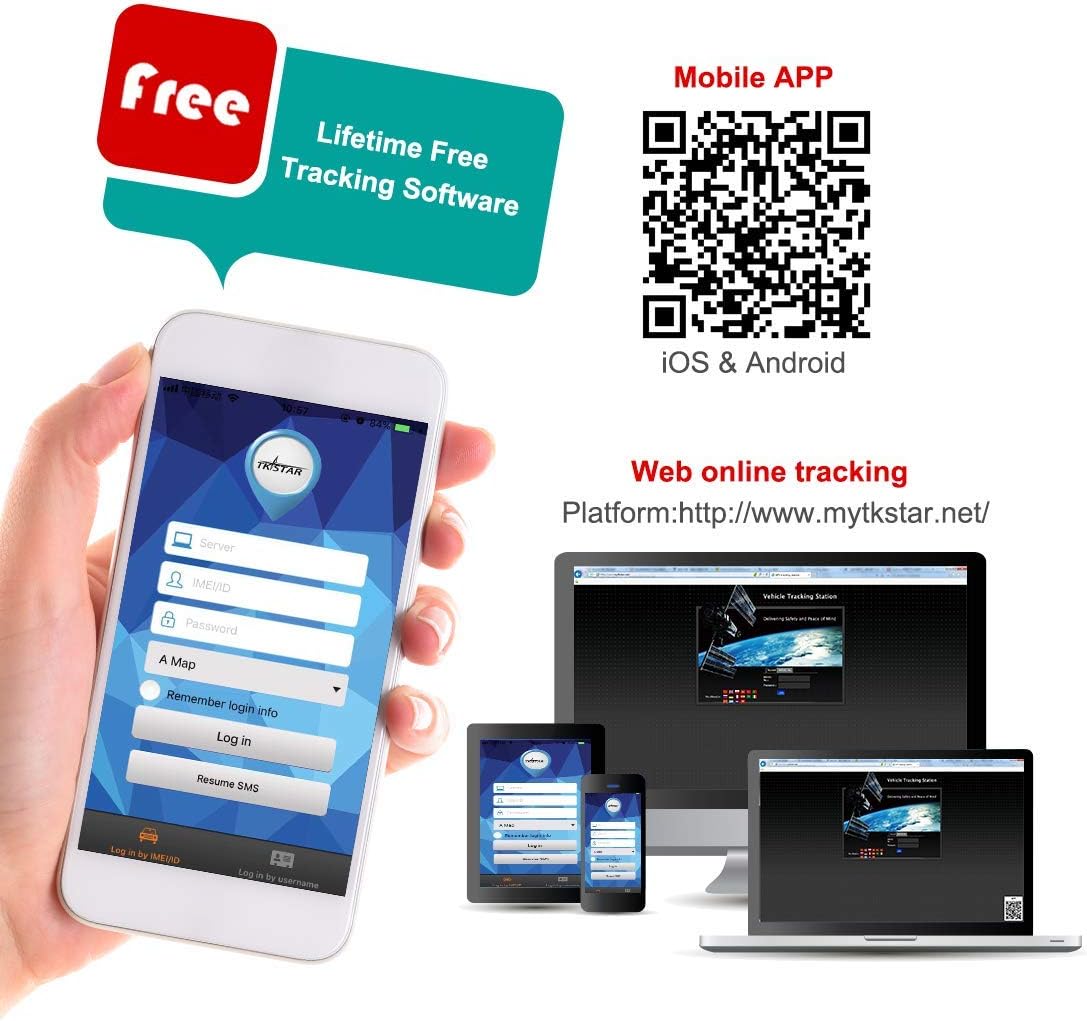
Image: This image shows the mobile application and web platform for the TKSTAR GPS tracker, illustrating how users can access tracking information on smartphones, tablets, and computers. A QR code is provided for easy mobile app download, and the web platform URL er synlig.
6. Betjeningsvejledning
6.1 Sporing i realtid
Access the mobile app or web platform til view the current location of your TK905 tracker in real-time. The location is updated continuously, providing precise coordinates.
6.2 Afspilning af historikrute
The device stores historical route data for up to 6 months. You can review the movements of the past 3 months directly through the mobile application or web platform.

Image: App interface displaying a route playback function with map and satellite views, showing blue location markers along a tracked path in an urban area.
6.3 Geo-Fence (Electronic Fence)
Set up virtual boundaries (geo-fences) on the map. If the tracker enters or exits these predefined zones, you will receive an instant alert via the app or SMS.

Image: Geo-fence display showing a map view with blue markers and a radius range from 100 to 5000 meters, shown on the screen.
6.4 Alarmer
- Shock Alarm: Receive an SMS alert if the device detects vibration or shock. Activate this feature in the app settings.
- Alarm for overhastighed: Set a speed limit, and receive alerts if the tracker exceeds it. This alarm functions under continuous positioning mode.
- Anti-Removal (Loosing) Alarm: The device has an anti-removal induction sensor. If the tracker is removed or its sensor is uncovered, it will send a 'Loosing alarm' SMS to the admin number.
- Alarm med lav effekt: Receive an alert when the battery level is low, prompting you to recharge the device.

Image: Smartphone displaying a 'Shake Alarm' notification, indicating the GPS tracker has been shaken, with an illustration of a person attempting to steal a car.

Image: Smartphone displaying an 'Overspeed Alarm' notification, with a car driving fast on a road and a speedometer icon.

Image: Illustration of a GPS tracker being removed from the underside of a car, triggering a 'Loosing alarm' notification on a smartphone.
6.5 Sleep Modes
The TK905 features smart sleep modes to conserve battery life. The tracker can enter sleep mode after a configured time interval or upon detecting no movement. It can be woken up by shock, SMS commands, or a call.
6.6 Remote Voice Monitor
Send a 'Monitor-Password' command to the device. Then, call the SIM number in the tracker. The device will automatically pick up, allowing you to monitor the surrounding audio.

Image: Illustration of a remote voice monitor feature, showing a person on a phone call with a car in the background, indicating the ability to listen to the surroundings of the GPS tracker.
6.7 Fleet Management
The tracking platform allows for managing multiple trackers, making it suitable for fleet management. You can monitor several vehicles and users from a single interface.

Image: Smartphone screen displaying a list of GPS trackers with their status (online/offline) and battery levels, with a truck on a road in the background, illustrating fleet management.
7. Vedligeholdelse
- Opladning: Recharge the device when the low power alarm is triggered. Use the provided USB cable.
- Rensning: Tør enheden af med en blød, tør klud. Brug ikke skrappe kemikalier eller slibende rengøringsmidler.
- Vandtæt pleje: Although waterproof, avoid prolonged submersion or high-pressure water jets to ensure longevity. Ensure the SIM card slot cover is always securely closed.
- Opbevaring: Hvis batteriet opbevares i længere tid, skal det oplades til ca. 50% og opbevares et køligt og tørt sted.
8. Fejlfinding
| Problem | Mulig årsag | Løsning |
|---|---|---|
| Device cannot power on | Lavt batteri eller ingen strømforbindelse. | Charge the device or check the power connection to the vehicle battery. |
| Intet GPS-signal | Device is in an area with poor GPS reception (e.g., indoors, underground) or not oriented correctly. | Flyt enheden til et åbent område med en klar view of the sky. Ensure the GPS logo side is facing upwards. |
| No network connection (Orange LED off) | SIM card not inserted correctly, no data plan, or poor network coverage. | Check SIM card insertion. Verify SIM card has an active data plan. Move to an area with better network coverage. |
| App /Web platform shows incorrect location | Device is using LBS (cellular tower) positioning due to weak GPS signal, which is less accurate. | Ensure the device has a strong GPS signal (Blue LED solid). Location accuracy improves with GPS. |
| Alarmer virker ikke | Alarm settings are not configured in the app or SMS commands. | Check and configure alarm settings in the mobile application or via SMS commands. Ensure the admin number is correctly set. |
9. Specifikationer
| Feature | Beskrivelse |
|---|---|
| Mærke | Zeerkeer |
| Modelnummer | TK905 |
| Speciel funktion | Vandtæt |
| Forbindelsesteknologi | USB |
| Understøttet applikation | Text message, Find my phone |
| Specifikke anvendelser for produktet | Vehicle tracking, including cars, trucks, motorcycles, and boats |
| Materiale | Plast, Gummi |
| Batterilevetid (Standby) | 90 dage |
| Kompatible enheder | Smartphone |
| Batterikapacitet | 5000 mioampere-time (mAh) |
| GTIN / UPC | 699916415185 |
10. Garanti og support
Your Zeerkeer TK905 GPS Tracker comes with a standard manufacturer's warranty. For specific warranty details, please refer to the documentation included in your product packaging or contact Zeerkeer customer support.
For technical support, troubleshooting assistance, or any questions regarding your device, please visit the official Zeerkeer website or contact their customer service team. Contact information can typically be found on the product packaging or the brand's official online presence.