
Indledning
This manual provides instructions for the installation, operation, and maintenance of your Swann SRDVR-44580V 4 Channel Digital Video Recorder. This DVR is designed to work with select Swann cameras, offering 1080p Full HD recording capabilities, HDMI and VGA outputs, and remote access via the HomeSafe View App. Please read this manual thoroughly before operating the device.
Pakkens indhold
Bekræft, at alle nedenstående varer er inkluderet i din pakke:
- Swann SRDVR-44580V 4 Channel Digital Video Recorder
- Strømadapter
- HDMI kabel
- Ethernet kabel
- USB-mus
- Tyveriafskrækkende klistermærker

Billede 1: Contents of the Swann SRDVR-44580V package, including the DVR unit, power adapter, HDMI cable, Ethernet cable, USB mouse, and theft deterrent stickers.
Enhed overview
Frontpanel
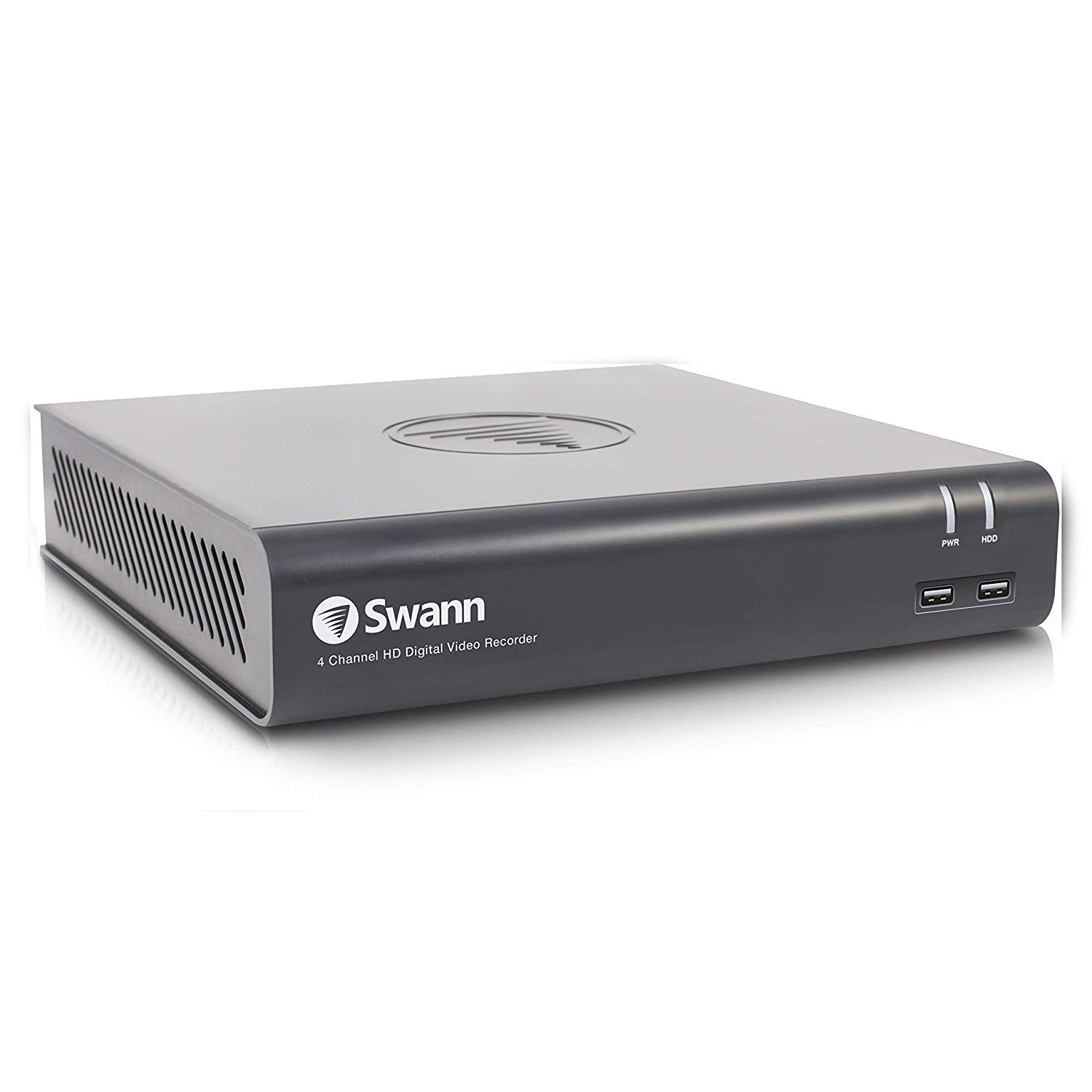
Billede 2: Front view of the Swann SRDVR-44580V Digital Video Recorder, showing the Swann logo, '4 Channel HD Digital Video Recorder' text, PWR and HDD indicator lights, and two front USB ports.
The front panel features indicator lights for power (PWR) and hard disk drive activity (HDD). Two USB 2.0 ports are conveniently located on the front for connecting a mouse or USB storage devices.
Bagpanel
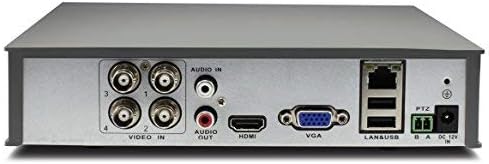
Billede 3: Bag view of the Swann SRDVR-44580V Digital Video Recorder, displaying various input and output ports including Video In (BNC), Audio In/Out (RCA), HDMI, VGA, LAN, USB, PTZ, and Power Input.
The rear panel provides all necessary connections for your security system:
- Videoindgang (BNC): Four ports for connecting compatible security cameras.
- Lyd ind/ud (RCA): For connecting audio input devices (e.g., microphone) and audio output to a speaker or monitor.
- HDMI udgang: For connecting to a high-definition monitor or TV.
- VGA udgang: For connecting to a standard computer monitor.
- LAN-port (RJ45): For network connection to enable remote viewing and internet access.
- USB-porte: Ekstra USB-porte til eksterne enheder.
- PTZ Port: For connecting Pan-Tilt-Zoom cameras.
- Strømindgang: For connecting the DC 12V power adapter.
Opsætning
Follow these steps to set up your Swann SRDVR-44580V:
- Tilslut kameraer: Connect your compatible Swann security cameras to the BNC 'Video In' ports on the rear panel. Ensure connections are secure.
- Tilslut en skærm: Use an HDMI cable to connect the DVR's HDMI output to your TV or monitor. Alternatively, use a VGA cable for VGA-compatible displays.
- Tilslut USB-mus: Sæt den medfølgende USB-mus i en af USB-portene på forsiden eller bagsiden af DVR'en.
- Opret forbindelse til netværk (valgfrit for fjernadgang): Til fjernbetjening viewnetværksfunktioner skal du tilslutte et Ethernet-kabel fra DVR'ens LAN-port til din router eller netværksswitch.
- Tilslut strøm: Connect the power adapter to the DVR's 'Power Input' port and then plug it into a power outlet. The DVR will power on automatically.
- Indledende konfiguration: Follow the on-screen prompts to complete the initial setup, including setting the date/time, creating a password, and configuring network settings.
Drift
Once set up, you can begin operating your DVR system:
- Levende View: The DVR will display live video from connected cameras on your monitor. Use the mouse to navigate the on-screen menu.
- Indspilning: The DVR is pre-configured to record continuously or based on motion detection. You can customize recording schedules and settings via the main menu.
- Afspilning: Til review optaget footage, access the 'Playback' function from the main menu. You can search by date, time, and event type.
- Remote Access (HomeSafe View App):
- Download the 'HomeSafe View' app from your mobile device's app store (iOS or Android).
- Open the app and follow the instructions to add your DVR using its unique ID or QR code.
- Når du er tilsluttet, kan du view live camera feeds, play back recordings, and receive alerts from anywhere with an internet connection.
- Backup: You can back up important video footage to a USB flash drive connected to the DVR's USB port.
Opretholdelse
Regular maintenance ensures optimal performance and longevity of your DVR system:
- Harddiskstyring: The DVR's hard drive will automatically overwrite the oldest recordings when it becomes full. Regularly back up any critical footage til ekstern lagring.
- Rensning: Keep the DVR unit clean and free from dust. Use a soft, dry cloth to wipe the exterior. Do not use liquid cleaners directly on the device. Ensure ventilation openings are not blocked.
- Firmwareopdateringer: Periodically check the official Swann support website for available firmware updates. Updating the firmware can improve performance, add new features, and enhance security.
- Power Cycle: If the DVR experiences minor issues, try power cycling the unit by disconnecting the power adapter for a few seconds and then reconnecting it.
Fejlfinding
Hvis du støder på problemer med din DVR, skal du se følgende almindelige fejlfindingstrin:
- Ingen videoudgang på skærmen:
- Ensure the HDMI or VGA cable is securely connected to both the DVR and the monitor.
- Kontroller, at skærmen er tændt og indstillet til den korrekte inputkilde (HDMI/VGA).
- Check if the DVR's power indicator light is on.
- Ingen optagelse:
- Check the hard drive status in the DVR's menu to ensure it is detected and functioning correctly.
- Verify that recording schedules are properly configured and motion detection is enabled if desired.
- Ensure cameras are connected and displaying live video.
- Fjernadgang virker ikke:
- Confirm the DVR is connected to your network via an Ethernet cable and has an active internet connection.
- Check your router settings to ensure the DVR is assigned an IP address and there are no firewall restrictions.
- Verify that the HomeSafe View app is correctly configured with the DVR's details.
- Camera Not Displaying Video:
- Check the BNC cable connection between the camera and the DVR.
- Sørg for, at kameraet modtager strøm.
- Confirm the camera is compatible with the Swann SRDVR-44580V.
Specifikationer
| Modelnummer | SRDVR-44580V |
| Video input | 4 kanaler (BNC) |
| Videoudgange | 1 x HDMI, 1 x VGA |
| Optagelsesopløsning | Up to 1080p (supports resolutions up to 1920 x 1536 pixels) |
| Lydindgang | 1xRCA |
| Lydudgang | 1xRCA |
| Harddisk | 1TB SATA HDD (supports up to 4TB) |
| Network interface | 1 x RJ45 Ethernet Port |
| USB interface | 2 x USB 2.0, 1 x USB 3.0 (Total 3 USB ports) |
| Dimensioner (B x D x H) | 230 mm x 210 mm x 47 mm (9.05 "x 8.3" x 1.9 ") |
| Forbindelsesteknologi | Kablet |
| Kompatible enheder | Select Swann Cameras |
Garantioplysninger
Swann products typically come with a limited warranty that covers defects in materials and workmanship. The specific terms and duration of the warranty may vary by region and product. For detailed warranty information, including coverage, exclusions, and how to make a claim, please refer to the official Swann website or the warranty card included with your purchase documentation.
Støtte
For further assistance, technical support, or to download the latest software, firmware, and comprehensive manuals, please visit the official Swann support website. You can also find FAQs and contact customer service for personalized help.
Official Swann Webwebsted: www.swann.com