
1. Introduktion
This manual provides detailed instructions for the safe and proper installation, operation, and maintenance of your Cabletech UCH0198-2 Full Motion TV Wall Mount. Please read this manual thoroughly before installation and retain it for future reference. This wall mount is designed to securely hold flat-panel or curved LED televisions ranging from 32 to 55 inches, with a maximum weight capacity of 35 kg (77 lbs).
2. Vigtige sikkerhedsoplysninger
- Vægt kapacitet: Overskrid ikke den maksimale vægtkapacitet på 35 kg (77 lbs). Overskridelse af denne grænse kan resultere i alvorlig personskade eller materielle skader.
- Skærmstørrelse: This mount is designed for TVs between 32 and 55 inches. While some larger TVs may fit VESA patterns, ensure they do not exceed the weight limit.
- VESA-kompatibilitet: Verify your TV's VESA mounting pattern is compatible with the mount's supported patterns (75x75, 100x100, 100x150, 150x100, 150x150, 200x100, 100x200, 300x200, 300x300, 400x200, 400x300, 400x400).
- Vægstruktur: Ensure the mounting surface (wall) can safely support the combined weight of the mount and your television. For wood stud installation, ensure studs are solid. For concrete or brick walls, use appropriate anchors (not always included). Consult a professional installer if unsure about your wall's integrity.
- Værktøjer: Brug passende værktøj til installationen. Brug altid sikkerhedsbriller.
- Forsamling: Do not attempt to install this product alone if the TV is heavy. Two or more people are recommended for safe installation.
- Børn: Keep children away during installation. Small parts may be a choking hazard.
- Skade: Do not install if any parts are missing or damaged. Contact customer support for replacement parts.
3. Pakkens indhold
Kontroller venligst, at alle komponenter er til stede og ubeskadigede, før installationen påbegyndes. Hvis der mangler eller er beskadigede dele, skal du ikke fortsætte med installationen, men kontakte kundesupport.
- Vægplademontering
- TV-beslag (2x)
- Monteringssæt (forskellige skruer, skiver, afstandsstykker til TV og væg)
- Wall Anchors (for concrete/brick, if included)
- Niveau
- Instruktionsmanual

Figur 1: Forside view af vægbeslagets komponenter.
4. Produktspecifikationer
| Modelnummer | UCH0198-2 |
| Mærke | Cabletech |
| Kompatible skærmstørrelser | 32" - 55" |
| Maksimal belastningskapacitet | 35 kg (77 lbs) |
| VESA-kompatibilitet | 75x75, 100x100, 100x150, 150x100, 150x150, 200x100, 100x200, 300x200, 300x300, 400x200, 400x300, 400x400 |
| Tilt vinkel | 0° til -20° |
| Horisontal niveaujustering | +3° til -3° |
| Wall Distance (Extended) | 78 mm - 400 mm (3.07" - 15.75") |
| Materiale | Metal |
| Farve | Sort |
5. Opsætning og installation
Before you begin, ensure you have all necessary tools and have read the safety information. Two people are recommended for installation.
5.1 Nødvendigt værktøj (medfølger ikke)
- Blyant
- Stud Finder (for wood stud walls)
- Drill with appropriate drill bits (e.g., 10mm for concrete, 5.5mm for wood studs)
- Topnøgle eller justerbar nøgle
- Phillips hovedskruetrækker
- Målebånd
- Sikkerhedsbriller
5.2 Montering af TV-beslag på dit TV
- Placer forsigtigt dit tv med forsiden nedad på en blød, ren overflade for at forhindre, at skærmen beskadiges.
- Identificer VESA-monteringshullerne på bagsiden af dit tv.
- Select the correct diameter and length screws from the hardware kit that fit your TV's mounting holes. Use washers and spacers if necessary to ensure the screws do not penetrate too deeply or leave the bracket loose.
- Attach the two vertical TV bracket arms to the back of your TV using the selected screws. Ensure the hooks on the bracket arms are facing upwards (or towards the top of the TV) and are level with each other. Do not overtighten.
5.3 Montering af vægpladen på væggen
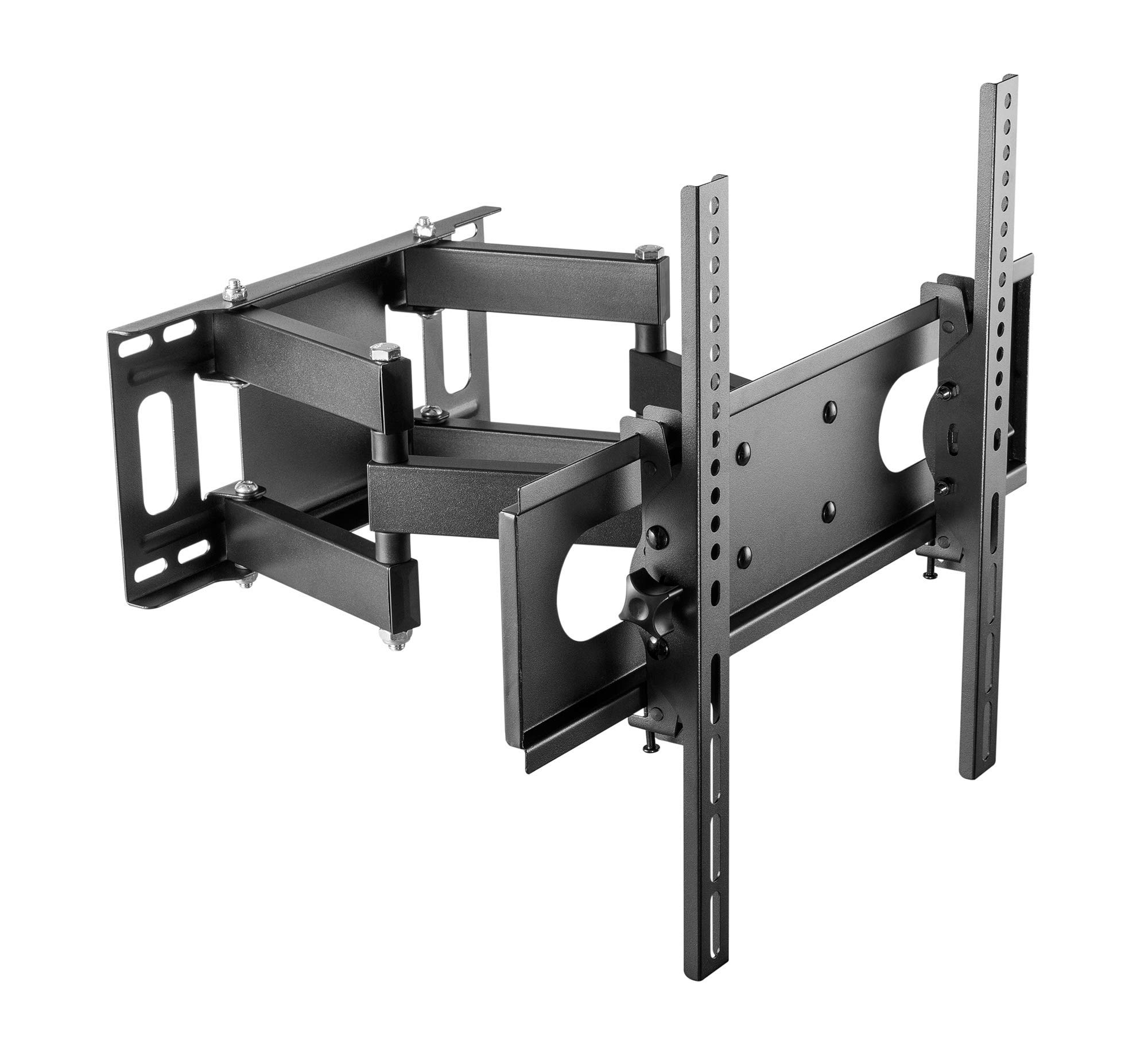
Figure 2: Cabletech UCH0198-2 wall mount in extended position.
- Bestem monteringssted: Decide on the desired height for your TV. Mark the center point on the wall.
- Locate Studs (for wood stud walls): Use a stud finder to locate the edges and center of two adjacent wood studs. The wall plate must be mounted to at least two studs for secure installation.
- Placering af vægplade: Hold the wall plate against the wall at your desired height and center. Use a level to ensure it is perfectly horizontal. Mark the drilling locations through the holes on the wall plate.
- Bor pilothuller:
- For Træknopper: Drill pilot holes using a 5.5mm drill bit to a depth of approximately 60mm.
- For Massive beton-/murstensvægge: Drill pilot holes using a 10mm drill bit to a depth of approximately 60mm. Insert the concrete anchors into the drilled holes until they are flush with the wall surface.
- Fastgør vægplade: Align the wall plate with the drilled holes. Secure it to the wall using the lag bolts and washers provided in the hardware kit. Tighten all bolts firmly, but do not overtighten.
5.4 Ophængning af tv'et
- With assistance, carefully lift the TV (with brackets attached) and hook the TV bracket arms onto the wall plate.
- Ensure the TV is securely seated on the wall plate. The safety screws or locking mechanisms on the bottom of the TV bracket arms should be engaged to prevent accidental dislodging.
- Gently test the stability of the mounted TV before releasing det fuldstændigt.
6. Betjeningsvejledning (Justeringer)
Your Cabletech UCH0198-2 mount offers various adjustments for optimal viewing.
6.1 Extending and Retracting the TV

Figure 3: Wall mount extended, showing adjustable distance from wall.
- Gently pull or push the TV to extend it away from the wall (up to 400mm) or retract it closer to the wall (minimum 78mm).
- Ensure cables are not pinched or strained during movement.
6.2 Tilting the TV
- The mount allows for a tilt range of 0° to -20° (downwards).
- Loosen the tilt adjustment knobs or bolts on the TV bracket arms.
- Juster tv'et til den ønskede hældningsvinkel.
- Retighten the knobs/bolts to secure the TV in position.
6.3 Swiveling the TV (Horizontal Adjustment)
- The articulating arm allows you to swivel the TV horizontally to achieve various viewing vinkler.
- Gently push or pull the side of the TV to rotate it left or right.
- The mount also features a small horizontal level adjustment of +3° to -3° to correct for minor leveling issues after installation. This is typically adjusted by loosening specific bolts on the TV plate, leveling, and retightening. Refer to the detailed diagrams for specific adjustment points.
6.4 Kabelstyring
- The mount includes a cable winder or clips to help organize and route cables along the articulating arm.
- Secure cables to prevent them from dangling or getting caught during TV movement. Ensure enough slack is provided for full range of motion.
7. Vedligeholdelse
- Rensning: Tør holderen af med en blød, tør klud. Brug ikke slibende rengøringsmidler eller opløsningsmidler.
- Periodiske kontroller: Kontrollér regelmæssigt alle skruer og bolte for at sikre, at de forbliver stramme og sikre. Efterspænd om nødvendigt.
- Bevægelse: If the mount's movement becomes stiff, a small amount of silicone-based lubricant can be applied to the pivot points, avoiding contact with painted surfaces.
8. Fejlfinding
| Problem | Mulig årsag | Løsning |
|---|---|---|
| TV'et er ikke i vater efter installation. | Wall plate not perfectly level, or minor adjustment needed. | Use the horizontal level adjustment feature (+3° to -3°). Loosen the specific bolts on the TV plate, adjust with a level, and retighten. |
| Mount feels loose or unstable. | Mounting bolts not fully tightened, or wall structure is inadequate. | Check and retighten all wall mounting bolts. If the wall structure is compromised, consult a professional. Ensure TV safety screws are engaged. |
| TV cannot tilt or swivel smoothly. | Adjustment bolts are too tight, or pivot points need lubrication. | Loosen tilt adjustment knobs/bolts slightly. Apply a small amount of silicone-based lubricant to pivot points if necessary. |
| Cables are getting pinched. | Insufficient slack or improper cable routing. | Reroute cables using the integrated cable management. Ensure enough slack for full range of motion. |
9. Garanti og kundesupport
This Cabletech UCH0198-2 TV Wall Mount comes with a manufacturer's warranty of 2 år fra købsdatoen.
For warranty claims, technical assistance, or if you have any questions regarding the installation or operation of your product, please contact Cabletech customer support through your retailer or the official Cabletech website. Please have your model number (UCH0198-2) and proof of purchase ready when contacting support.