
Indledning
This manual provides detailed instructions for the setup, operation, and maintenance of your Sunbuck TAV-339BT Wireless Karaoke Bluetooth Power Amplifier System. This 2-channel stereo amplifier is designed for home audio and karaoke applications, featuring Bluetooth connectivity, USB/SD card playback, FM radio, and dual microphone inputs. Please read this manual thoroughly before using the product to ensure proper operation and to prevent damage.

Figur 1: Forside view of the Sunbuck TAV-339BT amplifier. This image displays the main unit with its various controls and inputs on the front panel, including the power switch, microphone inputs, volume knobs, and digital display.
Sikkerhedsoplysninger
- Strømkilde: Tilslut amplifier only to the specified power supply (AC 110V or DC 12V 5A). Ensure the voltage matches the requirements before plugging in.
- Ventilation: Bloker ikke ventilationsåbningerne. Sørg for tilstrækkelig luftgennemstrømning omkring enheden for at forhindre overophedning.
- Vand og fugt: Udsæt ikke enheden for regn, fugt eller dryppende/sprøjtende væsker. Placer ikke genstande fyldt med væsker, såsom vaser, oven på apparatet.
- Varmekilder: Hold enheden væk fra varmekilder såsom radiatorer, varmeapparater, komfurer eller andre apparater (herunder ampløftere), der producerer varme.
- Rensning: Tag stikket ud af stikkontakten før rengøring. Brug en tør klud til rengøring.
- Service: Forsøg ikke selv at servicere dette produkt. Overlad al service til kvalificeret servicepersonale.
- Børn: Opbevar enheden og dens tilbehør utilgængeligt for børn.
Pakkens indhold
Tjek venligst pakken for følgende varer:
- 1 x Sunbuck TAV-339BT Ampforstærker (110V)
- 1 x fjernbetjening
- 1 x brugermanual
Produktegenskaber
- Compact and powerful 2-channel stereo amplifier system.
- Integrated Bluetooth for wireless audio streaming from compatible devices (smartphones, tablets, PCs).
- Supports USB flash drive and SD memory card playback.
- Indbygget FM-radiotuner.
- Dual 1/4-inch microphone input jacks for karaoke functions.
- RCA (L/R) audio input for external devices.
- Front panel controls for master volume, bass, treble, microphone volume, echo, and microphone bass/treble.
- Traditional VU meter display.
- Inkluderer en fjernbetjening for praktisk betjening.
Frontpanel overview
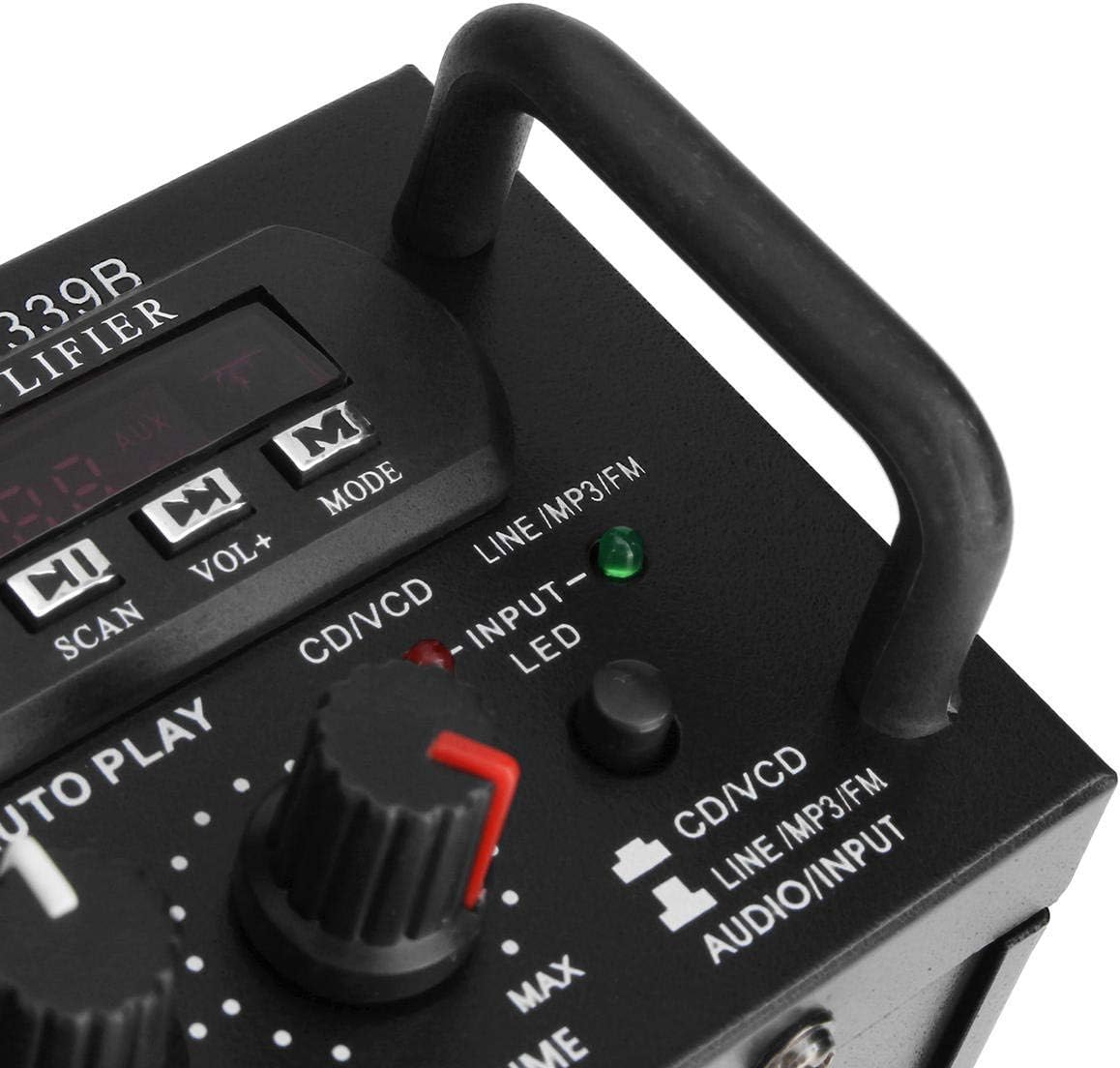
Figur 2: Detaljeret view af amplifier's front panel, highlighting the various knobs, buttons, and input ports.
- Afbryderen: Drejer amplivligere til eller fra.
- ECHO-kontrol: Justerer ekkoeffekten for mikrofoner.
- MIC1/MIC2-indgang: 6,3 mm stik til tilslutning af mikrofoner.
- M.BASS/M.TREBLE: Adjusts bass and treble for microphone input.
- Mikrofon/lydstyrke: Adjusts the volume level for microphones.
- VU-METER: Displays audio output level.
- USB/SD-kortslot: For connecting USB flash drives or SD memory cards.
- Digital skærm: Viser aktuel tilstand, spornummer eller FM-frekvens.
- Control Buttons (SCAN, VOL-, VOL+, MODE): For navigating USB/SD/FM functions.
- BAS/TREBLE: Adjusts the main audio bass and treble levels.
- BIND: Master volumenkontrol for alle lydkilder.
- INPUT-vælger: Cycles through input sources (CD/VCD, LINE, MP3/FM, Bluetooth).
- INPUT LED Indicators: Lights up to show the currently selected input source.
Bagpanel overview

Figur 3: Bagside view af amplifier, showing the various input and output terminals for connecting speakers and audio sources.
- INPUT (CD/VCD, LINE): RCA (L/R) audio input jacks for connecting external audio sources like CD/DVD players, TVs, or other line-level devices.
- HØJTTALERSYSTEM: Spring clip terminals for connecting passive speakers. Ensure correct polarity (+ to + and - to -).
- POWER DC 12V INPUT: DC power input for 12V power supply (e.g., car battery, not included).
- AC 110V 60Hz: AC power input for standard household power.
- FM-antenne: Connector for the included FM antenna.
Fjernbetjening overview
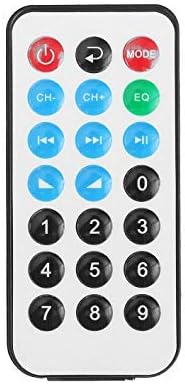
Figure 4: Layout of the remote control buttons.
Fjernbetjeningen muliggør bekvem betjening af amplifier's functions from a distance. It typically includes buttons for power, mode selection, volume adjustment, track navigation (for USB/SD), and FM radio controls.
Batteriinstallation til fjernbetjening

Figure 5: Step-by-step guide for installing the CR2025 lithium battery into the remote control.
The remote control requires a CR2025 lithium battery (3V). To install or replace the battery:
- Find batterirummet på bagsiden af fjernbetjeningen.
- Push the small tab to release the battery tray.
- Skub batteribakken ud.
- Isæt CR2025-batteriet med den positive (+) side opad.
- Skub batteribakken tilbage i fjernbetjeningen, indtil den klikker på plads.
Opsætning
1. Højttalerforbindelse
Connect your passive speakers to the "SPEAKER SYSTEM" terminals on the rear panel. Ensure that the positive (+) terminal of the amphøjttaleren tilsluttes den positive (+) terminal på højttaleren og den negative (-) terminal på amplifier connects to the negative (-) terminal of the speaker. Incorrect polarity can affect sound quality.
2. Lydindgangsforbindelse
- RCA Inputs (CD/VCD, LINE): Use RCA cables to connect external audio sources (e.g., CD player, DVD player, TV audio output) to the corresponding "INPUT" jacks on the rear panel.
- USB/SD-kort: Insert a USB flash drive or SD memory card into the respective slot on the front panel.
- Bluetooth: No physical connection is needed for Bluetooth. Refer to the "Operating Instructions" section for pairing.
3. Mikrofontilslutning
Connect up to two 1/4-inch microphones to the "MIC1" and "MIC2" input jacks on the front panel for karaoke use.
4. FM-antennetilslutning
Connect the included FM antenna to the FM antenna terminal on the rear panel for improved radio reception.
5. Strømtilslutning
Connect the power cord to the AC 110V 60Hz input on the rear panel and then plug it into a standard wall outlet. Alternatively, for DC operation, connect a 12V DC power source (not included) to the "POWER DC 12V INPUT" terminals.
Betjeningsvejledning
1. Tænd/sluk
Press the "POWER" switch on the front panel to turn the amptænd eller sluk for apparatet. Det digitale display lyser, når enheden er tændt.
2. Kildevalg
Press the "INPUT" button on the front panel or the "MODE" button on the remote control to cycle through available input sources: CD/VCD, LINE, MP3/FM, and Bluetooth. The corresponding LED indicator on the front panel will light up.
3. Bluetooth-betjening
- Select "Bluetooth" as the input source using the "INPUT" or "MODE" button. The digital display will show "BLUE" or a similar indicator.
- Enable Bluetooth on your mobile device (smartphone, tablet, PC).
- Søg efter available Bluetooth devices and select "TAV-339BT" or "Sunbuck" from the list.
- Når den er parret, kan du streame lyd trådløst fra din enhed til amplivligere.
4. USB/SD-kortafspilning
- Indsæt et USB-flashdrev eller SD-kort, der indeholder MP3-lyd files ind i den respektive plads på frontpanelet.
- Select "MP3/FM" as the input source. The ampLifier registrerer og begynder automatisk at afspille lyd files.
- Use the "SCAN", "VOL-", "VOL+" buttons on the front panel or the corresponding buttons on the remote control to navigate tracks (play/pause, next/previous).
5. Betjening af FM-radio
- Ensure the FM antenna is connected.
- Select "MP3/FM" as the input source.
- Press the "SCAN" button to automatically scan and store available FM radio stations.
- Use the "VOL-" and "VOL+" buttons (or remote control) to manually tune or select stored stations.
6. Karaoke-funktion
- Connect microphones to the "MIC1" and "MIC2" jacks.
- Adjust the "MIC/VOL" knob to control the microphone volume.
- Use the "ECHO" knob to add an echo effect to the vocals.
- Adjust "M.BASS" and "M.TREBLE" to fine-tune the microphone's tone.
7. Lydstyrke- og tonekontrol
- BIND: Use the large "VOLUME" knob on the front panel to adjust the overall output volume.
- BAS/TREBLE: Use the "BASS" and "TREBLE" knobs to adjust the low and high frequencies of the main audio output.
Opretholdelse
- Rensning: Disconnect the power before cleaning. Use a soft, dry cloth to wipe the exterior of the unit. Do not use liquid cleaners or aerosol cleaners.
- Ventilation: Ensure that the ventilation openings are clear of dust and debris to maintain proper cooling.
- Opbevaring: Hvis enheden skal opbevares i længere tid, skal den afbrydes fra strømforsyningen og opbevares et køligt og tørt sted.
Fejlfinding
| Problem | Mulig årsag | Løsning |
|---|---|---|
| Ingen strøm | Netledning ikke tilsluttet; Strømafbryder slukket; Ingen strøm fra stikkontakten. | Ensure power cord is securely connected. Turn the POWER switch on. Check the power outlet with another device. |
| Ingen lydudgang | Incorrect input source selected; Speaker wires loose or incorrectly connected; Volume too low; Mute activated (if applicable). | Select the correct input source. Check speaker connections and polarity. Increase the VOLUME. Ensure no mute function is active. |
| Bluetooth forbinder ikke | AmpFjernbetjeningen er ikke i Bluetooth-tilstand; Enheden er for langt væk; Enheden er allerede forbundet til en anden amplifier; Bluetooth on device is off. | Select Bluetooth input on the amplifier. Move device closer. Disconnect from other devices. Enable Bluetooth on your device. |
| USB/SD-kort afspiller ikke | Incorrect input source; Files not in supported format (MP3); USB/SD card corrupted or empty. | Select MP3/FM input. Ensure files are MP3 format. Try another USB/SD card. |
| Fjernbetjening virker ikke | Battery depleted or incorrectly installed; Obstruction between remote and ampFjernbetjeningssensor blokeret. | Replace battery (CR2025) and ensure correct polarity. Remove any obstructions. Ensure the remote sensor on the amplifer er klar. |
Specifikationer
| Feature | Detalje |
|---|---|
| Model | TAV-339BT |
| Nominel impedans | 4 til 8 ohm |
| RMS udgangseffekt | 200W + 200W (Recommended for speaker boxes with speakers less than 8") |
| Peak Music Power Output (P.M.P.O) | 300W + 300W (I alt 600W) |
| Strømforsyning | AC: 110V 60Hz or DC: 12V 5A |
| Kanaler | 2 kanaler |
| Lydindgang | Multi-channel signal input (RCA L/R), USB, SD, Bluetooth |
| Mikrofonindgang | Dual 1/4-inch Jack |
| Forbindelsesteknologi | Bluetooth, USB, RCA |
| Trådløs type | Bluetooth, Infrared (for remote) |
| Produktmål (L x B x H) | 25.4 x 20.32 x 7.01 cm (10 x 8 x 2.76 tommer) |
| Produktets vægt | 2.72 kg (6 lbs) |
| Kompatible enheder | Headphones, Laptops, Smartphones |
Garanti og support
For garantioplysninger eller teknisk support henvises til den dokumentation, der blev leveret ved køb, eller kontakt din forhandler. Gem din købsbevis til garantikrav.