
1. Introduktion
The CooSpo Cycling Sensor is a versatile 2-in-1 device designed to accurately track both speed and cadence for your cycling activities. Utilizing both Bluetooth and ANT+ wireless technologies, it offers broad compatibility with various cycling computers, smartphones, and fitness applications. This manual provides detailed instructions for the proper installation, operation, and maintenance of your sensor to ensure optimal performance.
2. Pakkens indhold
Kontroller venligst, at alle nedenstående varer er inkluderet i din pakke:
- CooSpo Cycling Sensor Unit
- Cadence Magnet
- Speed Magnet
- Gummi monteringspude
- Zip Ties (various sizes)
- Gummibånd
- Hex-nøgle
- Brugermanual

Figure 2.1: CooSpo Cycling Sensor package contents.
3. Opsætning og installation
3.1. Batteriinstallation
The sensor comes with a pre-installed CR2032 battery. Before first use, you must remove the insulation film to activate the battery.
- Find batterirummet på sensorenheden.
- Gently twist the battery cover counter-clockwise to open it.
- Remove the small plastic insulation film covering the battery.
- Sørg for, at CR2032-batteriet er korrekt isat med den positive (+) side opad.
- Replace the battery cover by twisting it clockwise until securely closed.

Figure 3.1: Removing the battery insulation film.
3.2. Montering af sensor
The CooSpo sensor can function as either a speed sensor or a cadence sensor. The installation method differs based on the desired function.
3.2.1. Installation af kadencesensor
To use the sensor as a cadence tracker, it should be mounted on the crank arm.
- Attach the sensor unit to the inside of your bicycle's left crank arm using the provided rubber pad and rubber bands or zip ties. Ensure it is securely fastened and does not interfere with pedaling.
- Attach the cadence magnet to the pedal spindle or the crank arm itself, ensuring it passes closely by the sensor unit with each pedal rotation. The gap between the sensor and the magnet should be approximately 3-5mm.
3.2.2. Installation af hastighedssensor
To use the sensor as a speed tracker, it should be mounted on the rear chainstay.
- Mount the sensor unit to the rear chainstay of your bicycle using the provided rubber pad and zip ties. Position it so that the sensor's detection area faces the wheel spokes.
- Attach the speed magnet to one of the wheel spokes. Adjust the magnet's position so that it passes closely by the sensor unit with each wheel rotation. The gap between the sensor and the magnet should be approximately 3-5mm.

Figure 3.2: Sensor and magnet placement for speed and cadence tracking.

Figure 3.3: Close-up of sensor with indicator lights and magnet interaction.

Figure 3.4: CooSpo Cycling Sensor and included magnets.
3.3. Vejledning til videoinstallation
For en visuel vejledning til installationsprocessen, se venligst den officielle video nedenfor:
Video 3.1: Official CooSpo installation guide for the bike cadence sensor, demonstrating unpacking, mounting on the chain stay, installing magnets, and checking clearance.
4. Betjeningsvejledning
4.1. Pairing with Cycling Computer or App
The CooSpo sensor supports both Bluetooth and ANT+ connectivity, allowing it to pair with a wide range of devices.
- Ensure the sensor is active. Spin the wheel or crank arm a few times to wake it up. The LED indicator on the sensor will flash.
- On your cycling computer or smartphone app (e.g., CooSpo Fitness, Zwift, Wahoo Fitness), navigate to the sensor pairing or device connection menu.
- Select to add a new sensor. The device should detect the CooSpo sensor via Bluetooth or ANT+.
- Confirm the pairing. Once connected, your device will display real-time speed or cadence data.
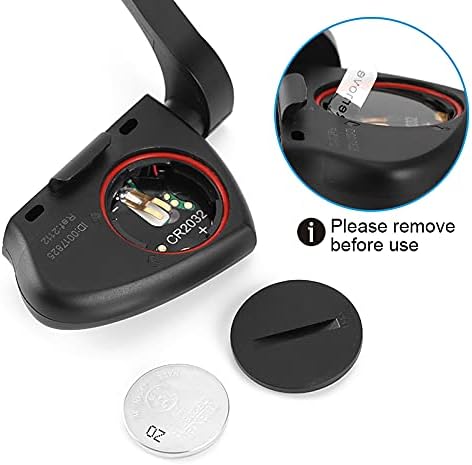
Figure 4.1: CooSpo Cycling Sensor connected to a smartphone app.

Figure 4.2: Cyclist using the CooSpo sensor with a cycling computer.
4.2. Checking Connection
After pairing, spin the wheel or crank arm to ensure data is being transmitted and displayed correctly on your connected device. The sensor's LED indicator will typically flash to confirm data transmission.
5. Vedligeholdelse
5.1. Udskiftning af batteri
The sensor uses a standard CR2032 coin cell battery. Replace the battery when the sensor's LED indicator no longer flashes or when your connected device reports low battery.
- Drej batteridækslet mod uret for at åbne.
- Fjern det gamle CR2032-batteri.
- Indsæt et nyt CR2032-batteri med den positive (+) side opad.
- Replace the battery cover by twisting it clockwise until securely closed.
5.2. Rengøring og opbevaring
To maintain the sensor's performance and longevity:
- Wipe the sensor clean with a damp cloth after use, especially if it has been exposed to dirt or sweat.
- Undgå at bruge skrappe kemikalier eller slibende rengøringsmidler.
- Opbevar sensoren på et køligt, tørt sted, når den ikke er i brug.
- Hvis du opbevarer produktet i en længere periode, bør du overveje at fjerne batteriet for at forhindre lækage.
6. Fejlfinding
If you encounter issues with your CooSpo Cycling Sensor, try the following troubleshooting steps:
- No Data or Intermittent Readings:
- Ensure the sensor's battery is not depleted and the insulation film has been removed. Replace the battery if necessary.
- Verify that the sensor and magnets are correctly aligned and the gap is within the recommended 3-5mm.
- Check that the sensor is securely mounted and not shifting during activity.
- Sørg for, at der ikke er stærke elektromagnetiske forstyrrelser i nærheden.
- Try re-pairing the sensor with your cycling computer or app.
- Sensor ikke registreret:
- Wake up the sensor by spinning the wheel or crank arm.
- Sørg for, at Bluetooth eller ANT+ er aktiveret på din modtagerenhed.
- Move the sensor closer to your receiving device during the pairing process.
- Check if the sensor is already paired with another device, which might prevent new connections.
- Incorrect Speed/Cadence Readings:
- Re-check the magnet placement and ensure it passes directly over the sensor's detection area.
- For speed, ensure your cycling computer or app has the correct wheel circumference set.
7. Specifikationer
| Feature | Specifikation |
|---|---|
| Mærke | CooSpo |
| Modelnummer | DE-SPJS-1110-2569 |
| Sensortype | Kadencesensor, Hastighedssensor |
| Forbindelsesteknologi | ANT+, Bluetooth |
| Farve | Sort |
| Emne Pakke Dimensioner | 4.9 x 4.5 x 1.9 tommer |
| Pakkevægt | 0.05 kilo |
| Batteritype | CR2032 (inkluderet) |
8. Garanti og support
CooSpo products are designed for reliability and performance. For information regarding warranty coverage, technical support, or to access additional resources, please visit the official CooSpo webwebstedet eller kontakt deres kundeservice direkte. Gem din købskvittering som købsbevis i tilfælde af garantikrav.