
Indledning
The Lenovo Legion H500 Pro 7.1 Gaming Headset is designed to provide an immersive audio experience for gaming, music, and movies. It features driverless 7.1 surround sound, a high-end retractable noise-cancelling microphone, and dedicated audio profiles. Built for durability and comfort, it includes a stainless steel headband and memory foam earcups.
Hvad er der i æsken
- Lenovo Legion H500 PRO 7.1 Gaming Headset
- Brugermanual
Opsætning
Tilslutning af headsettet
The Legion H500 PRO headset offers versatile connectivity options:
- USB 2.0-forbindelse: For driverless 7.1 surround sound and advanced audio controls, connect the headset via the included USB 2.0 advanced control box.
- 3.5 mm lydstik: For standard stereo audio, connect the headset directly using the 3.5mm audio jack.
Mikrofon opsætning
The headset features a high-end retractable noise-cancelling microphone. Extend the microphone boom from the left earcup and position it appropriately for clear communication.
Lydkontrol
The USB advanced control box provides convenient access to key audio functions:
- 7.1 Surround Sound Switch: Toggle virtual 7.1 surround sound on or off.
- Pre-set Equalizer Profiles: Select from dedicated audio profiles for optimized sound.
- Mikrofon mute: Slå mikrofonen til eller fra.
- Lydstyrkekontrol: Juster headsettets lydstyrke.

Billede: Detaljeret view of the Lenovo Legion H500 PRO headset highlighting the inline audio controls, including the 7.1 surround sound switch, equalizer profiles, mic mute, and volume control.
Betjeningsvejledning
Using 7.1 Surround Sound
When connected via USB, activate the virtual 7.1 surround sound using the switch on the advanced control box for enhanced spatial audio in games and media. This feature provides directional audio cues, improving situational awareness in gaming environments.
Selecting Audio Profiles
Utilize the pre-set equalizer profiles on the USB control box to quickly switch between optimized audio settings for different content types, such as gaming, music, or movies.
Mikrofonbrug
The noise-cancelling microphone ensures clear voice capture by reducing background noise. Use the mic mute button on the control box to quickly silence your microphone when needed.
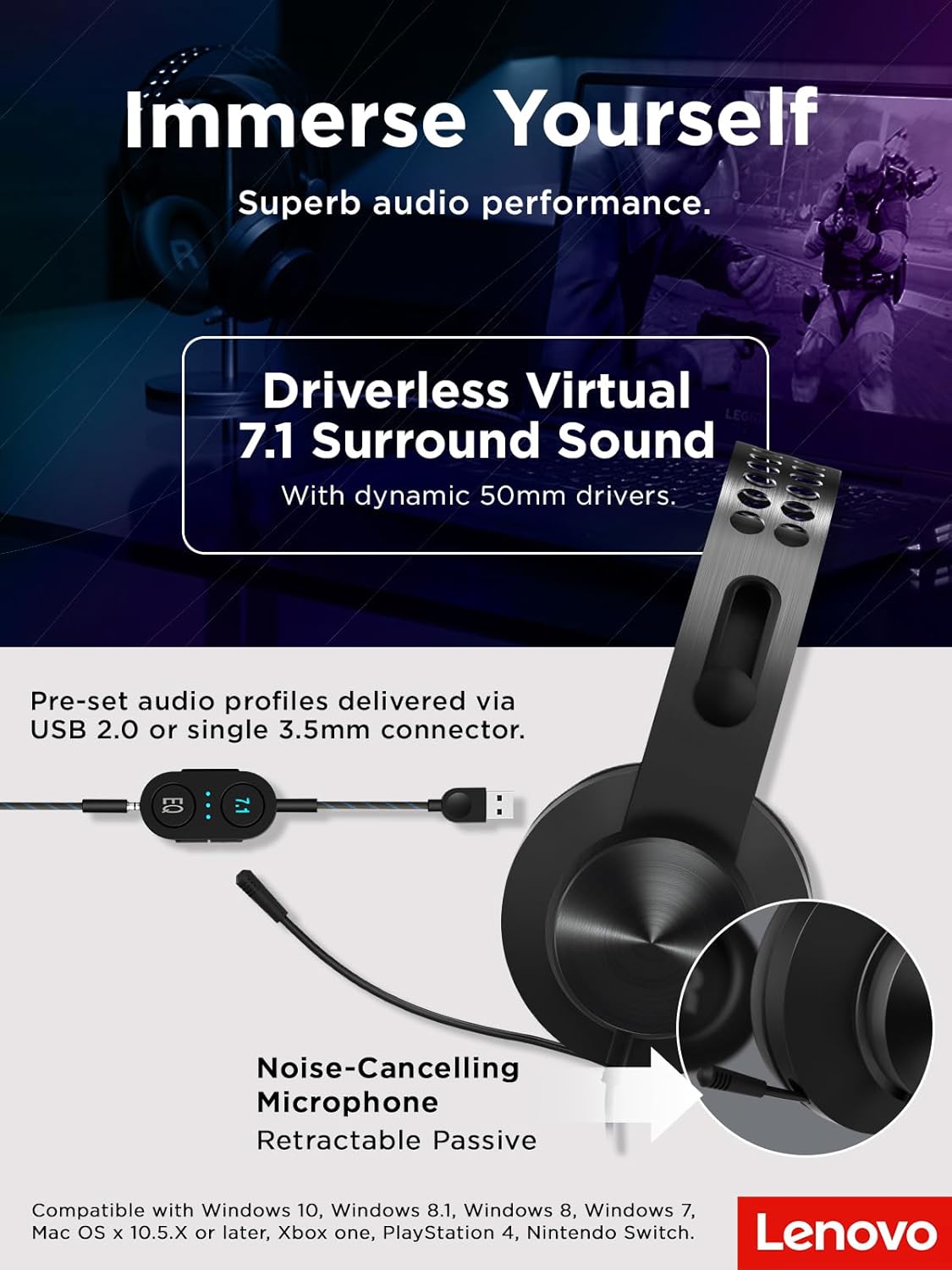
Image: The Lenovo Legion H500 PRO headset with its retractable noise-cancelling microphone extended, illustrating its use for communication.
Komfort og design
The Legion H500 PRO is engineered for extended use with maximum comfort. It features a durable single-piece stainless steel headband and soft, high-quality PU leather earcups filled with memory foam. The ergonomic design allows the earcups to rotate in every direction, ensuring a comfortable fit for various head shapes without excessive pressure, making it suitable for long gaming sessions.

Billede: Et nærbillede view of the headset's soft PU leather earcups and the lightweight suspension design of the headband, emphasizing comfort.
Kompatibilitet
The Lenovo Legion H500 PRO headset is compatible with a wide range of devices:
- Operativsystemer: Windows 10, Windows 8.1, Windows 8, Windows 7, Mac OS X 10.5.X or later
- Spillekonsoller: Xbox One, PlayStation 4, Nintendo Switch

Image: The Lenovo Legion H500 PRO headset positioned next to a gaming laptop, illustrating its compatibility with PC gaming setups.
Specifikationer
| Feature | Detalje |
|---|---|
| Transducertype | Dynamic 50mm with neodymium magnets |
| Frekvensområde (hovedtelefon) | 20Hz - 20KHz |
| Impedans | 32Ω ±15% @ 1KHz |
| Følsomhed (SPL) | 99dB /1mW @ 1KHz |
| Mikrofontype | Electret condenser microphone with noise canceller |
| Mikrofon polært mønster | Omnidirektionel |
| Mikrofon frekvensområde | 100Hz - 10KHz |
| Forbindelse | Wired via 3.5mm audio jack or USB 2.0 |
| Kabellængde | Headset to 3.5mm: 1M, USB advanced control box: 1M |
| Vægt | 12 ounces (ca. 340 g) |
| Dimensioner (ca.) | 18 cm (7.1 in) width, 20.5 cm (8.1 in) height, 9.3 cm (3.7 in) earcup height, 3.5 cm (1.4 in) earcup width |

Image: Diagram showing the approximate dimensions and weight of the Lenovo Legion H500 PRO headset.
Opretholdelse
For at sikre dit headsets lange levetid og optimale ydeevne:
- Clean earcups regularly with a soft, damp klæde. Undgå skrappe kemikalier.
- Opbevar headsettet et køligt, tørt sted væk fra direkte sollys og ekstreme temperaturer.
- Avoid pulling on the cables to prevent damage to the connectors.
Fejlfinding
Ingen lyd / Lav lydstyrke
- Ensure the volume control on the headset's inline control box is turned up.
- Check your device's audio settings to ensure the headset is selected as the output device and volume is not muted.
- If using USB, try connecting to a different USB port. If using 3.5mm, ensure the jack is fully inserted.
Mikrofon virker ikke
- Verify the microphone mute button on the inline control box is not activated.
- Check your device's sound settings to ensure the headset microphone is selected as the input device and its volume is not muted.
- Ensure the microphone boom is fully extended and positioned correctly.
Garanti og support
Dette produkt leveres med en 1 års begrænset garanti. For detailed warranty information, technical support, or service inquiries, please refer to the official Lenovo support webwebsted eller kontakt deres kundeservice.
Officiel produktvideo
Video: Officielt produkt slutview of the Lenovo Legion H500 Pro 7.1 Surround Sound Gaming Headset, demonstrating its features and design.