
1. Introduktion
Thank you for choosing the Wendry Ergonomic Vertical USB Wired Mouse. This manual provides essential information for setting up, operating, and maintaining your new mouse. Designed for left-handed users, this vertical mouse promotes a natural hand and wrist posture, aiming to reduce strain and discomfort during extended computer use. Its ergonomic design, adjustable DPI settings, and programmable buttons enhance productivity and comfort for various tasks, including office work, graphic design, and gaming.

Image 1: The Wendry Ergonomic Vertical USB Wired Mouse, showcasing its design features including a skin-friendly surface, ergonomic shape, 3 adjustable DPI settings, and dedicated forward/back keys.
2. Produktet er slutview
The Wendry Ergonomic Vertical USB Wired Mouse is engineered to provide a comfortable and efficient user experience. Key features include:
- Ergonomisk design: Vertical orientation to relieve wrist tension through comfortable thumb and pinky support, and contoured palm support.
- Left-Handed Specific: Tailored for left-handers to align with palm and wrist muscles.
- Justerbar DPI: Three levels of DPI settings (800/1200/1600) for precise cursor control.
- 6 programmerbare knapper: Customize functions for enhanced workflow.
- Web Switch Keys: Dedicated forward and back buttons for easy web sidenavigation.
- Optical Tracking Technology: Premium optical engine for quicker response, smoother tracking, and higher precision.
- Bred kompatibilitet: Supports most operating systems including Windows 2000, 7, 8, 98, Vista, ME, and OS.
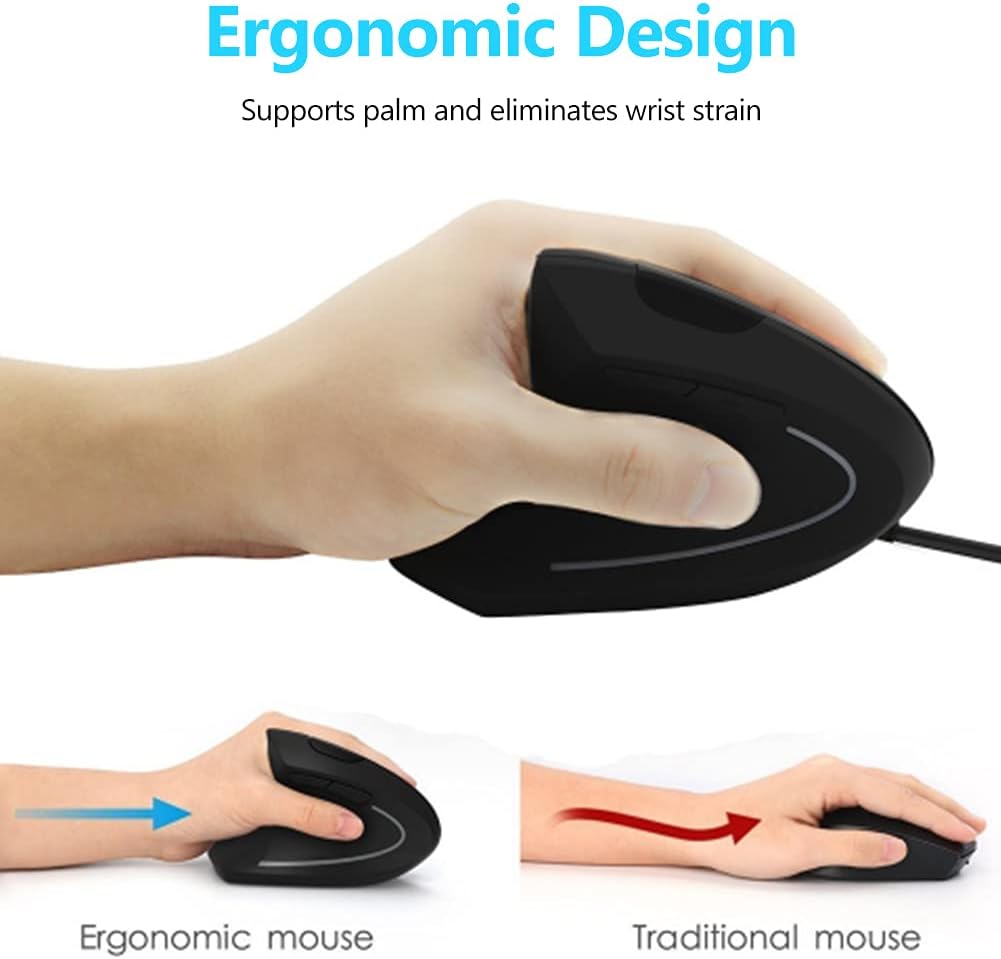
Image 2: A visual comparison demonstrating the ergonomic advantage of the vertical mouse, showing how it supports the palm and reduces wrist strain compared to a traditional horizontal mouse.
3. Opsætningsvejledning
Setting up your Wendry Ergonomic Vertical USB Wired Mouse is a simple plug-and-play process:
- Tilslut USB-kablet: Locate an available USB port on your computer (laptop, desktop, notebook, PC, etc.).
- Sæt musens USB-stik godt fast i USB-porten.
- Driver installation: The mouse is plug-and-play and typically does not require any additional driver installation. Your operating system should automatically detect and configure the device.
- Klar til brug: Når den er tilsluttet, er musen klar til brug med det samme.

Billede 3: En detaljeret view of the USB connector, which is used to connect the mouse to your computer.
4. Betjeningsvejledning
Familiarize yourself with the various buttons and functions of your vertical mouse for optimal control:
- Venstre knap: Standard venstreklikfunktion.
- Højre knap: Standard højreklikfunktion.
- Scrollhjul: Rul op eller ned gennem dokumenter og web sider. Kan også klikkes for midterklikfunktion.
- DPI knap: Located on the top of the mouse, press this button to cycle through the 3 adjustable DPI settings (800/1200/1600). This allows you to adjust cursor sensitivity to your preference.
- Frem/Tilbage-knapper: Located on the side, these buttons allow for quick navigation between web pages or folders (e.g., going back or forward in your browser history).

Image 4: An illustration detailing the location and labels of the six programmable buttons on the vertical mouse, including the DPI button, left/right click, scroll wheel, and forward/backward buttons.

Image 5: A visual guide to using the forward and back buttons, highlighting their convenience for navigating web sider og files with a single click.
Officiel produktvideo
Video 1: An official product video from Wendryer demonstrating the Ergonomic Vertical USB Wired Mouse in use, highlighting its design and functionality.
5. Vedligeholdelse
To ensure the longevity and optimal performance of your mouse, follow these simple maintenance tips:
- Rensning: Brug en blød, tør klud til at tørre musens overflade af. Ved genstridigt snavs, tør let afampRengør kluden med vand eller en mild rengøringsopløsning. Undgå skrappe kemikalier eller slibende materialer.
- Optisk sensor: Periodically check the optical sensor on the underside of the mouse for dust or debris. Use a cotton swab or compressed air to gently clean it.
- Kabelpleje: Avoid sharply bending or pulling the USB cable to prevent damage. Store the cable neatly when not in use.
6. Fejlfinding
If you encounter any issues with your mouse, refer to the following troubleshooting steps:
- Musen reagerer ikke:
- Sørg for, at USB-kablet er korrekt tilsluttet en fungerende USB-port på din computer.
- Prøv at tilslutte musen til en anden USB-port.
- Genstart din computer.
- Inaccurate or Jerky Cursor Movement:
- Rengør den optiske sensor på undersiden af musen.
- Sørg for at bruge musen på en passende overflade (f.eks. en musemåtte eller en ikke-reflekterende, ensartet overflade).
- Adjust the DPI setting using the DPI button to see if a different sensitivity improves performance.
- Knapper virker ikke:
- Sørg for, at musen er korrekt tilsluttet.
- Test musen på en anden computer for at afgøre, om problemet skyldes musen eller computerens indstillinger.
7. Specifikationer
Detailed specifications for your Wendry Ergonomic Vertical USB Wired Mouse:
| Feature | Specifikation |
|---|---|
| Produktdimensioner | 4.92 x 2.95 x 2.44 tommer |
| Varens vægt | 4.9 ounce |
| Varemodelnummer | Wendrymcb5iqnw3g |
| Forbindelsesteknologi | USB, kablet |
| Speciel funktion | Ergonomisk design |
| Bevægelsesdetekteringsteknologi | Optisk |
| Justerbare DPI-niveauer | 800/1200/1600 |
| Antal knapper | 6 |
| Farve | Sort |
| Fabrikant | Wendry |
| Første ledige dato | 28. maj 2019 |
8. Garanti og support
For any product inquiries, technical assistance, or warranty claims, please contact Wendry customer support through the retailer's platform or the official brand webwebsted. Gem venligst din købsbevis for at validere garantien.