
1. Introduktion
The Norwii N29 is a multifunctional wireless presentation remote designed to enhance your presentations. It features a bright laser pointer, long control range, and customizable buttons for seamless navigation through slides, controlling volume, and managing hyperlinks. Its plug-and-play design ensures easy setup across various operating systems and presentation software.

Image 1.1: Norwii N29 Wireless Presentation Remote
2. Pakkens indhold
Tjek venligst pakken for følgende varer:
- 1 x Norwii N29 Wireless Presenter
- 1 x USB-modtager
- 1 x brugermanual
- 1 x pose
3. Produktet er slutview
Familiarize yourself with the buttons and features of your Norwii N29 Wireless Presentation Remote:

Image 3.1: Detailed button functions of the Norwii N29 remote.
- LED-indikator: Shows connection status and low power alert.
- Tænd/sluk-knap: Located on the side to conserve battery.
- Lydstyrke op/ned: Side buttons for system volume control.
- Top Key (Square icon): Single click for Tab, Long press for Alt+Tab (switch windows). Double click to open hyperlinks.
- Page Up (Left Arrow): Single click for Page Up.
- Page Down (Right Arrow): Single click for Page Down.
- Laser Key (Yellow button): Aktiverer den røde laserpointer.
- Integrated USB Receiver: Stored securely in the tail of the presenter.

Image 3.2: The USB receiver is stored in the tail of the presenter for convenience.

Image 3.3: The bumped design on the 'Page Down' key allows for tactile navigation without looking.
4. Opsætning
The Norwii N29 is a plug-and-play device, requiring no driver installation for basic functionality.
- Indsæt batteri: Open the battery cover and insert one AAA battery (not included) into the presenter, ensuring correct polarity.
- Hent USB-modtager: Gently pull out the USB receiver from the tail of the presenter.
- Tilslut til computer: Plug the USB receiver into an available USB-A port on your computer (Laptop, Mac, Personal Computer).
- Tænd: Slide the Power On/Off switch on the side of the presenter to the 'ON' position.
- Klar til brug: Your computer should automatically detect the device. You are now ready to use the presenter.
For a visual guide on setup, please refer to the video below:
Video 4.1: Official Norwii N29 'How to Use' video, demonstrating initial setup and basic functions.
5. Betjeningsvejledning
5.1. Slide Navigation
- Tryk på Page Up (Left Arrow) key to move to the previous slide.
- Tryk på Page Down (Right Arrow) key to move to the next slide.
5.2. Laserpointer
- Tryk og hold på Yellow Laser Key to activate the red laser pointer. Release to turn off.
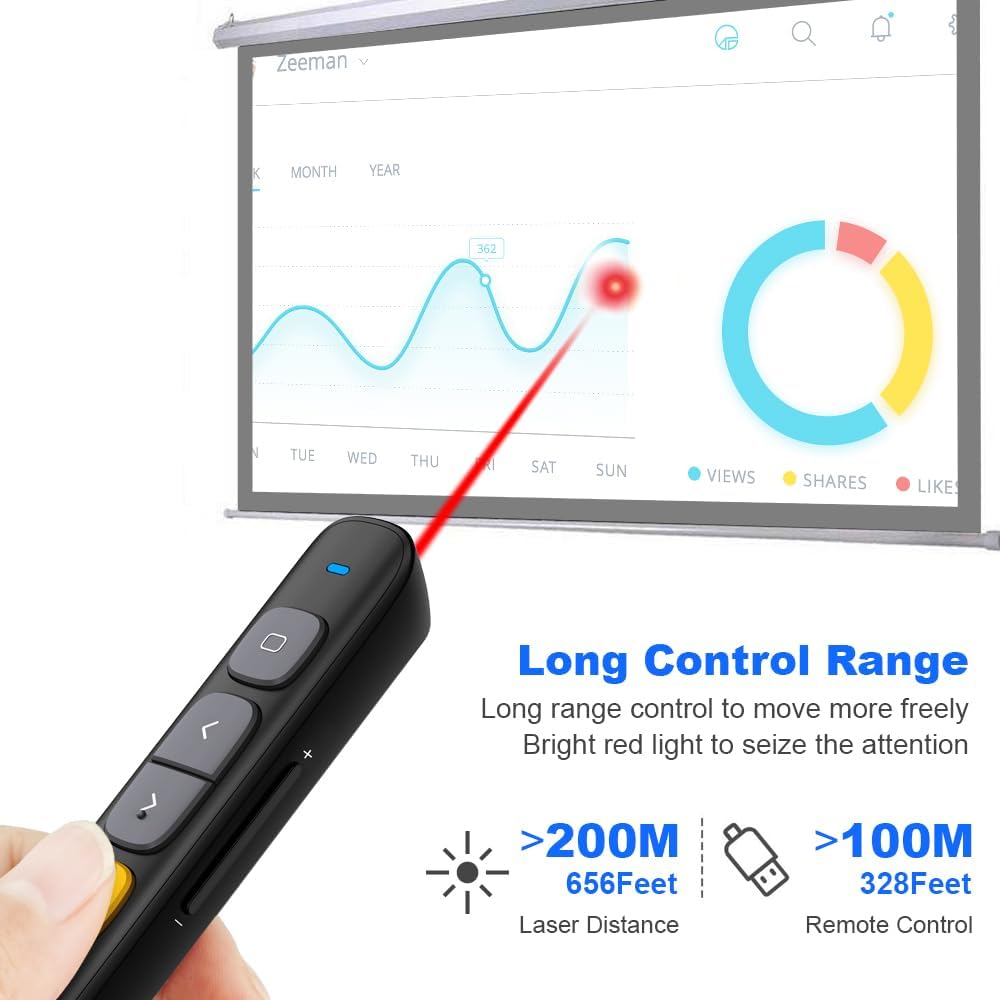
Image 5.1: The Norwii N29 offers a long control range for both the remote and the laser pointer.
5.3. Full Screen / Black Screen
- Fuld skærm: Tryk længe på Page Up (Left Arrow) key to enter full screen mode in presentation software.
- Sort skærm: Tryk længe på Page Down (Right Arrow) key to turn the screen black during a presentation. Press any page turning key to exit black screen.
5.4. Hyperlinkkontrol
- Vælg hyperlink: Enkelt klik på Top Key (Square icon) to select a hyperlink on your slide. A dashed box will appear around the selected hyperlink.
- Åbn hyperlink: Dobbeltklik på Top Key (Square icon) to open the selected hyperlink.

Image 5.2: The top key allows for selection and activation of hyperlinks within presentations.
5.5. Lydstyrkekontrol
- Tryk længe på Lydstyrke op (+) key on the side to increase system volume.
- Tryk længe på Skrue ned (-) key on the side to decrease system volume.

Image 5.3: Side buttons provide convenient control over system volume.
5.6. Switching Active Windows
- Tryk længe på Top Key (Square icon) to switch between active windows (equivalent to Alt+Tab).
6. Modes Switching
The Norwii N29 supports three different modes for its page navigation keys, allowing compatibility with various presentation software. You can switch between these modes by long pressing the '<' and '>' keys simultaneously for 1-3 seconds. The device automatically remembers the last used mode.

Image 6.1: Visual representation of the three operating modes for page navigation.
- Tilstand 1: Op/Ned-taster (Default) - Usually used in PowerPoint, Keynote.
- Tilstand 2: Venstre/højre taster - Usually used in Prezi.
- Mode 3: PgUp/PgDn Keys - Usually used in browser or photo vieweh software.
7. Knapper, der kan tilpasses
The Norwii N29 allows you to reprogram button functions using the Norwii Presenter software. This software can be downloaded from the official Norwii webwebsted.
- Download and install the Norwii Presenter software.
- Ensure the USB receiver is plugged into your computer and the presenter is turned on.
- Open the Norwii Presenter software.
- Navigate to the 'Customize' tab.
- Vælg den tast, du vil tilpasse.
- Choose the desired function from the available options for short press, long press, or double click.
- Gem dine ændringer.

Image 7.1: Screenshot of the Norwii Presenter software interface for customizing key functions.
8. Kompatibilitet
The Norwii N29 Wireless Presentation Remote offers broad compatibility with various operating systems and presentation software.
8.1. Operativsystemer
- Windows
- macOS
- Android
- Linux
8.2. Presentation Software
- PowerPoint
- Prezi
- Keynote
- Google Slides
- Propresenter
- MediaShout
- Word, Excel, ACD See, OneNote, Pages, Numbers, Photos (for PgUp/PgDn mode)

Image 8.1: The Norwii N29 is compatible with major operating systems and presentation applications.
9. Fejlfinding
If you encounter issues with your Norwii N29, please refer to the following common problems and solutions:

Image 9.1: Troubleshooting steps for common issues with the Norwii N29.
9.1. Weak Laser
- Ensure the battery has sufficient power. Replace if necessary.
- Note: Laser may appear weak on TV screens due to prohibitive regulations. For TV screens, consider Norwii N95s Pro or N97s models.
9.2. Short Control Range
- Sørg for, at batteriet har tilstrækkelig strøm.
- An obstruction between the wireless presenter and the USB receiver may shorten the control distance. Ensure a clear line of sight or reduce distance.
9.3. Laser Works, But Page Turn Does Not Respond
- Ensure that the presentation window is the currently active window on your computer.
- Long press the '<' and '>' keys for 3 seconds to switch among the 3 or 4 working modes (Up & Down, Left & Right, Scroll, PgUp & PgDn). Ensure the correct mode is selected for your software.
- For første gang på macOS skal du indstille tastaturtypen til ANSI, efter du har tilsluttet USB-modtageren til din computer.
If these steps do not resolve your issue, please contact technical support.
10. Specifikationer
| Feature | Detalje |
|---|---|
| Modelnavn | N29 |
| Forbindelsesteknologi | Radio Frequency (2.4GHz RF) |
| Kontrolområde | Op til 328 fod (100 meter) |
| Laserafstand | Op til 656 fod (200 meter) |
| Laser type | Class II, Red |
| Udgangseffekt | <1mW |
| Batteritype | 1 x AAA batteri (medfølger ikke) |
| Dimensioner | 139.2 x 19.2 x 15.4 mm |
| Varens vægt | 26.9 gram |
| Kompatible enheder | Laptop, Mac, Personal Computer |
| Særlige funktioner | Reprogrammable buttons, Hyperlink & Volume Control, Integrated USB receiver storage, Bumped design for tactile feedback |
11. Garanti og support
11.1. Garantioplysninger
The Norwii N29 Wireless Presentation Remote comes with a 1 års garanti fra købsdatoen. Denne garanti dækker fabrikationsfejl og funktionsfejl ved normal brug. Gem venligst din købsbevis til garantikrav.
11.2. Teknisk support
For technical assistance or further inquiries, please contact Norwii customer support. You can find contact information on the official Norwii webhjemmeside eller gennem din forhandler.