
Indledning
This manual provides detailed instructions for the assembly, operation, and maintenance of your TOPSKY S-205 Series Computer Desk. Designed for home office use, this desk features a 46.5-inch wide desktop, integrated storage shelves, a keyboard tray, and a monitor stand to optimize your workspace.
The TOPSKY S-205 Series Computer Desk is constructed from P2 Class Particle Board and a durable iron frame, ensuring stability and longevity. It is suitable for various tasks, including working, studying, and gaming.

Image: The TOPSKY S-205 Series Computer Desk, showcasing its compact design and integrated monitor stand and side shelves. A person is seated at the desk using a laptop.
Opsætning og montering
The TOPSKY S-205 Series Computer Desk requires self-assembly. All necessary fixings and tools are supplied with the product. It is recommended that two people assemble the desk for ease and safety.
Vigtige overvejelser ved montering:
- Trin 2 Bemærk: During assembly, do not fully tighten all screws until all steps are completed. This allows for minor adjustments and ensures proper alignment of components.
- Komponentidentifikation: Carefully identify all parts using the provided instruction manual before beginning assembly.
- Overfladebeskyttelse: Assemble the desk on a soft, clean surface to prevent scratches or damage to the components.

Image: An exploded diagram illustrating the various components and overall dimensions of the TOPSKY S-205 Series Computer Desk, providing a visual guide for assembly.
Driftsfunktioner
Desktop and Monitor Stand:
The desk features a 46.5-inch wide desktop with an integrated monitor stand. This raised platform helps elevate your monitor to an ergonomic viewing height, reducing neck and eye strain. The space beneath the monitor stand can be utilized for additional storage or to keep your desktop clear.

Billede: En detaljeret view of the 46.5-inch wide desktop and monitor stand, emphasizing the compact design suitable for small rooms or limited spaces.
Tastaturbakke:
A 23.2-inch wide slide-out keyboard tray is included, designed to accommodate full-size 108-key keyboards or 87-key keyboards with a mouse. This tray positions your input devices approximately 2.8 inches below the main desktop, promoting a more ergonomic posture to reduce fatigue during long workdays.

Image: The 23.2-inch slide-out keyboard tray, demonstrating its capacity for a keyboard and mouse, designed for ergonomic comfort.
Multi-Function Open Shelves:
The desk incorporates two multi-function open shelves on the side. These shelves are ideal for storing books, binders, paperwork, or other office essentials, keeping them within easy reach. The center shelf is removable, offering flexibility to house a CPU tower or to create additional vertical storage space.
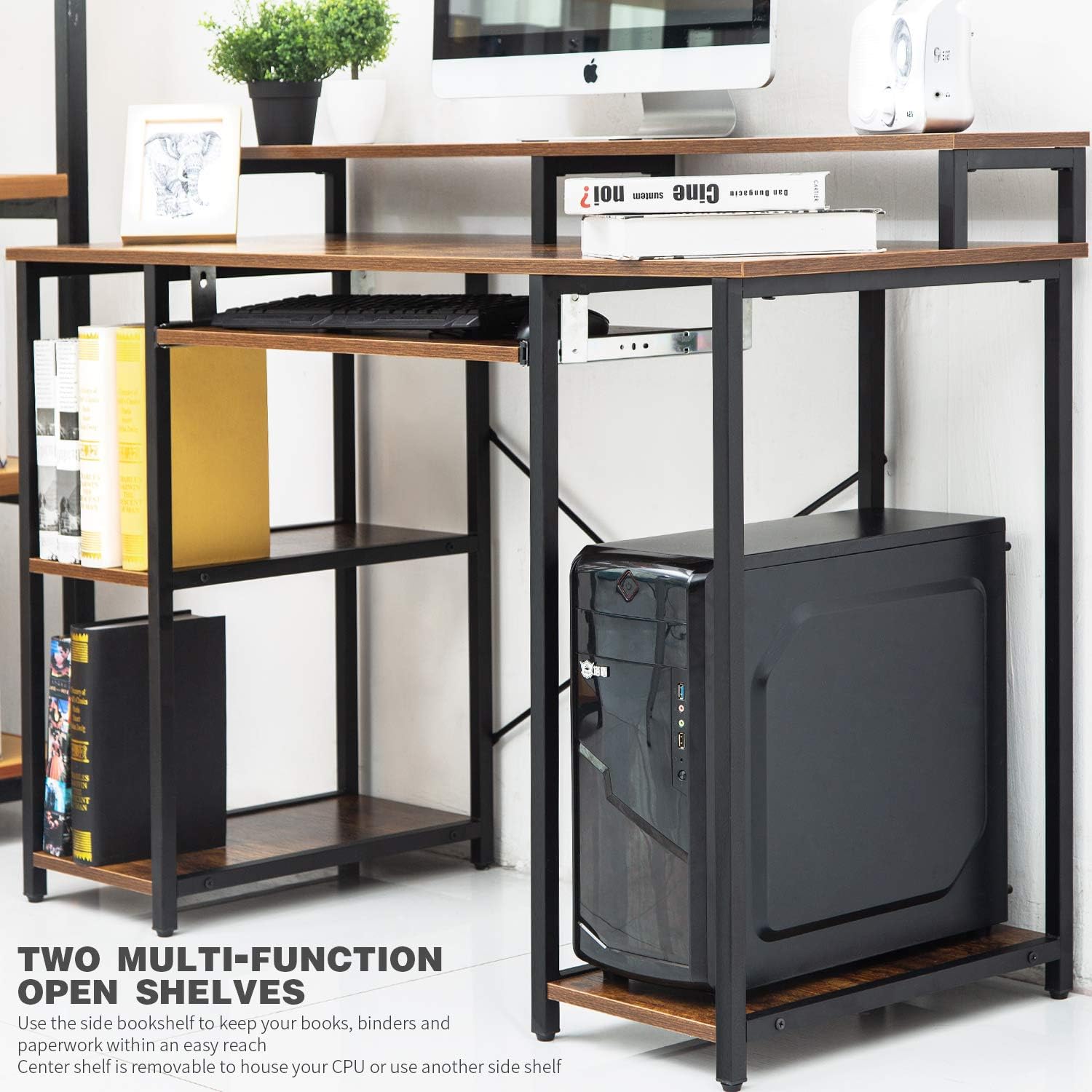
Image: The side storage shelves, illustrating their use for organizing books and accommodating a CPU, enhancing the desk's functionality.
Stabilitet:
The desk is designed with a stable cross structure, featuring a powder-coated iron frame that provides robust support and durability for years of use.

Image: A detailed shot of the desk's stable cross structure, highlighting the powder-coated iron frame for enhanced durability.
Videodemonstrationer:
Video: This video demonstrates how to maximize working space with the TOPSKY S-205 Series Desk, showcasing its features like the monitor stand and keyboard tray for an ergonomic setup.
Video: En overview of the TOPSKY Computer Desk, highlighting its shelves, keyboard tray, and monitor stand, illustrating its practical design for various uses.
Opretholdelse
To ensure the longevity and appearance of your TOPSKY Computer Desk, follow these maintenance guidelines:
- Rensning: Tør overflader af med en blød, damp klud. Undgå skrappe kemikalier eller slibende rengøringsmidler, som kan beskadige overfladen.
- Spild: Promptly clean up any spills to prevent staining or damage to the particle board.
- Varme og fugt: Avoid placing hot items directly on the desktop. Use coasters for beverages to protect against moisture rings.
- Fastgørelsesmidler: Kontrollér og spænd regelmæssigt alle skruer og fastgørelseselementer for at opretholde skrivebordets stabilitet.
- Vægt kapacitet: Do not exceed the maximum weight capacity of 200 lbs (90.7 kg) for the desktop to prevent structural damage.
Fejlfinding
If you encounter any issues with your TOPSKY Computer Desk, consider the following common solutions:
- Vaklende skrivebord: Ensure all screws and bolts are securely tightened. Check that the desk is placed on a level surface. Adjust leg levelers if present.
- Keyboard Tray Sticking: Inspect the slide rails for any obstructions or debris. Apply a silicone-based lubricant if necessary.
- Manglende dele: Hvis der manglede dele ved levering, henvises til afsnittet om garanti og support for kontaktoplysninger for at anmode om udskiftninger.
- Overfladeskader: Til mindre ridser kan der anvendes touch-up penne eller møbeltusjer, der matcher finishfarven.
Specifikationer
| Feature | Detalje |
|---|---|
| Mærke | TOPSKY |
| Modelnummer | S-205 serien |
| Produktmål (D x B x H) | 19" D x 46.5" B x 34.2" H (48 x 118 x 87 cm) |
| Desktop Height (from Floor) | 30" (76 cm) |
| Keyboard Tray Height (from Floor) | 26.3" (67 cm) |
| Keyboard Tray Dimensions (L x W) | 23.2"L x 11.8"W (59 x 30 cm) |
| Mål på monitorstativ (L x B) | 46.5"L x 7.8"W (118 x 20 cm) |
| Sidehyldemål (L x B x H) | 23 x 48 x 68.8 cm (L x B x H) |
| Produktets vægt | 44.5 lbs (20 kg) |
| Maksimal vægtkapacitet | 200 lbs (90.7 kg) |
| Materiale | P2 Class Particle Board, Iron Frame (Powder Coated) |
| Farve | Sort |
| Montering påkrævet | Yes (All tools supplied) |
Garanti og support
The TOPSKY S-205 Series Computer Desk comes with a 1 års eftersalgsservice. For any inquiries, assistance, or to report missing/damaged parts, please contact TOPSKY customer support.
Kontaktoplysninger:
Phone Call Hours: Mandag - fredag, 9:00 - 4:00 PST
E-mail support: 7 dage om ugen, 24 timer i døgnet.
Der henvises til TOPSKY Amazon Shop Page eller officiel website for specific email addresses and additional contact details.