Indledning
The TENMIYA A200 Portable Bluetooth Speaker is designed to provide high-quality audio with versatile connectivity options. Featuring Bluetooth 5.0, FM radio, TF card, USB, and AUX input, this speaker offers a comprehensive audio experience for various environments, from home to outdoor gatherings. Its compact design and remote control functionality ensure ease of use and portability.

Image: The TENMIYA A200 speaker in beech color, showcasing its front panel with a large speaker grille, digital display, control buttons, and a remote control placed in front.
Hvad er der i æsken
Kontroller venligst pakkens indhold for at sikre, at alle varer er til stede og i god stand:
- 1 x TENMIYA A200 Bluetooth Speaker
- 1 x fjernbetjening
- 1 x AUX-kabel (3.5 mm)
- 1 x USB ladekabel
- 1 x Brugermanual (dette dokument)
Opsætning
1. Opladning af højttaleren
Before first use, fully charge the speaker. Connect the provided USB charging cable to the speaker's DC 5V input port and the other end to a USB power adapter (not included) or a computer USB port. The charging indicator will show the charging status. A full charge typically takes about 3-4 hours.
2. Tænd/sluk
Locate the power switch on the side of the speaker. Slide it to the "ON" position to power on the speaker. Slide it to the "OFF" position to power off.
3. Bluetooth-forbindelse
- Power on the speaker. It will automatically enter Bluetooth pairing mode, indicated by a flashing Bluetooth icon on the digital display.
- Aktiver Bluetooth på din enhed (smartphone, tablet, bærbar computer), og søg efter tilgængelige enheder.
- Select "TENMIYA A200" from the list of devices.
- Once connected, the speaker will emit a confirmation sound, and the Bluetooth icon on the display will stop flashing.

Image: The TENMIYA A200 speaker displaying "Bluetooth 4.1" (note: product specs state 5.0, this image might be older) and a smartphone screen showing music playback, illustrating Bluetooth connectivity.
4. AUX-indgangsforbindelse
For devices without Bluetooth, use the provided 3.5mm AUX cable. Connect one end to the speaker's AUX input port and the other end to the audio output jack of your device (e.g., MP3 player, computer, TV). The speaker will automatically switch to AUX mode.
5. TF Card and USB Playback
Insert a TF (MicroSD) card or a USB flash drive containing MP3 music files into the respective slots on the side of the speaker. The speaker will automatically detect the storage device and begin playing music.
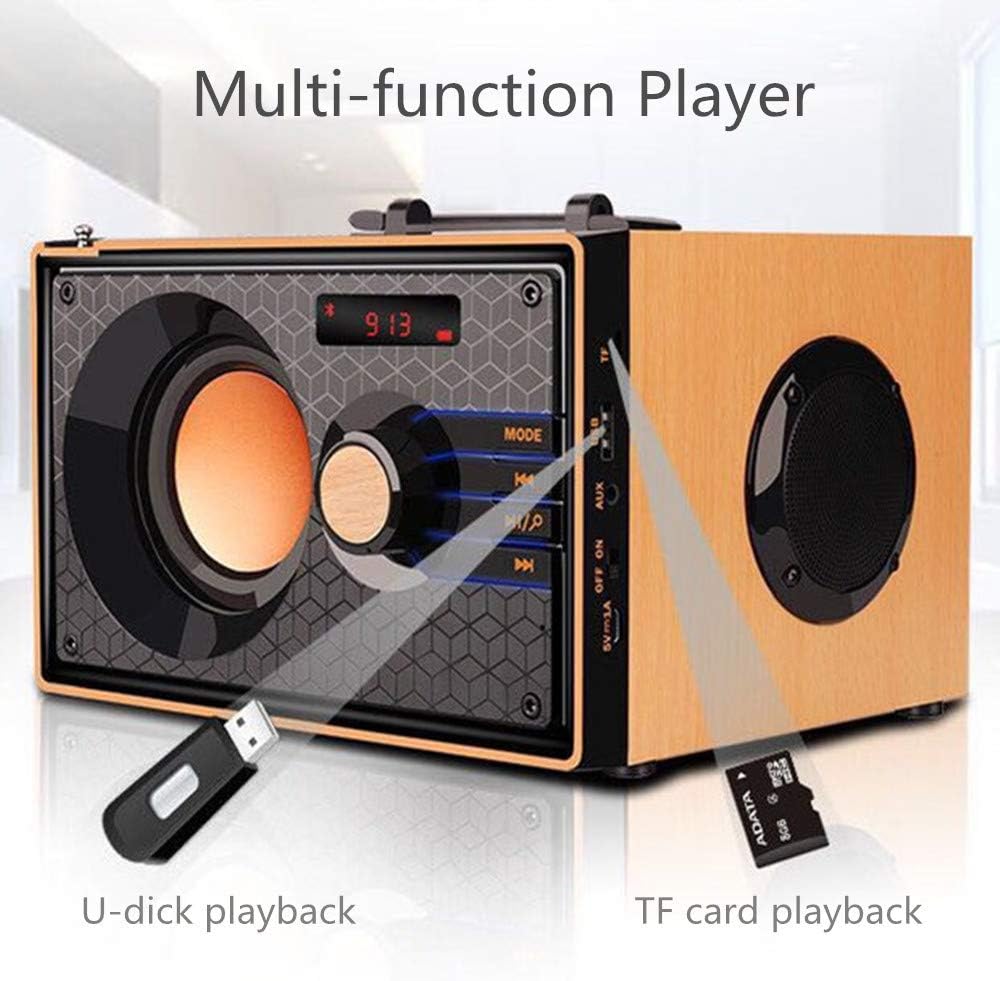
Image: A close-up of the side panel of the TENMIYA A200 speaker, highlighting the USB and TF card input slots with a USB drive and TF card inserted, demonstrating multi-function playback.
Betjeningsvejledning
1. Valg af tilstand
Tryk på MODE button on the speaker's front panel or the remote control to cycle through available modes: Bluetooth, FM Radio, AUX, TF Card, and USB.
2. Lydstyrkekontrol
Rotate the large knob on the front panel clockwise to increase volume and counter-clockwise to decrease volume. Alternatively, use the VOL+ og VOL- knapperne på fjernbetjeningen.
3. Playback Control (Bluetooth, TF Card, USB)
- Tryk på Afspil/pause knap (▶▶) to play or pause the current track.
- Tryk på Forrige spor knap (◀◀) for at gå til begyndelsen af det aktuelle nummer eller det forrige nummer.
- Tryk på Næste spor knap (▶▶) for at springe til næste spor.
4. Betjening af FM-radio
- Skift til FM-tilstand ved hjælp af MODE knap.
- To automatically scan and save available stations, press and hold the Afspil/pause button. The speaker will scan and store stations with strong signals.
- To manually tune or navigate through saved stations, use the Forrige spor og Næste spor knapper.
- Extend the telescopic antenna on the back of the speaker for improved FM reception.

Image: A man relaxing on a couch, listening to the TENMIYA A200 speaker which has its telescopic antenna extended, indicating FM radio functionality.
5. Brug af fjernbetjening
The included remote control provides convenient access to all speaker functions from a distance of up to 10 feet. Functions include power on/off, mode selection, volume control, track navigation, play/pause, and direct station input for FM radio (if supported by the remote's number pad).
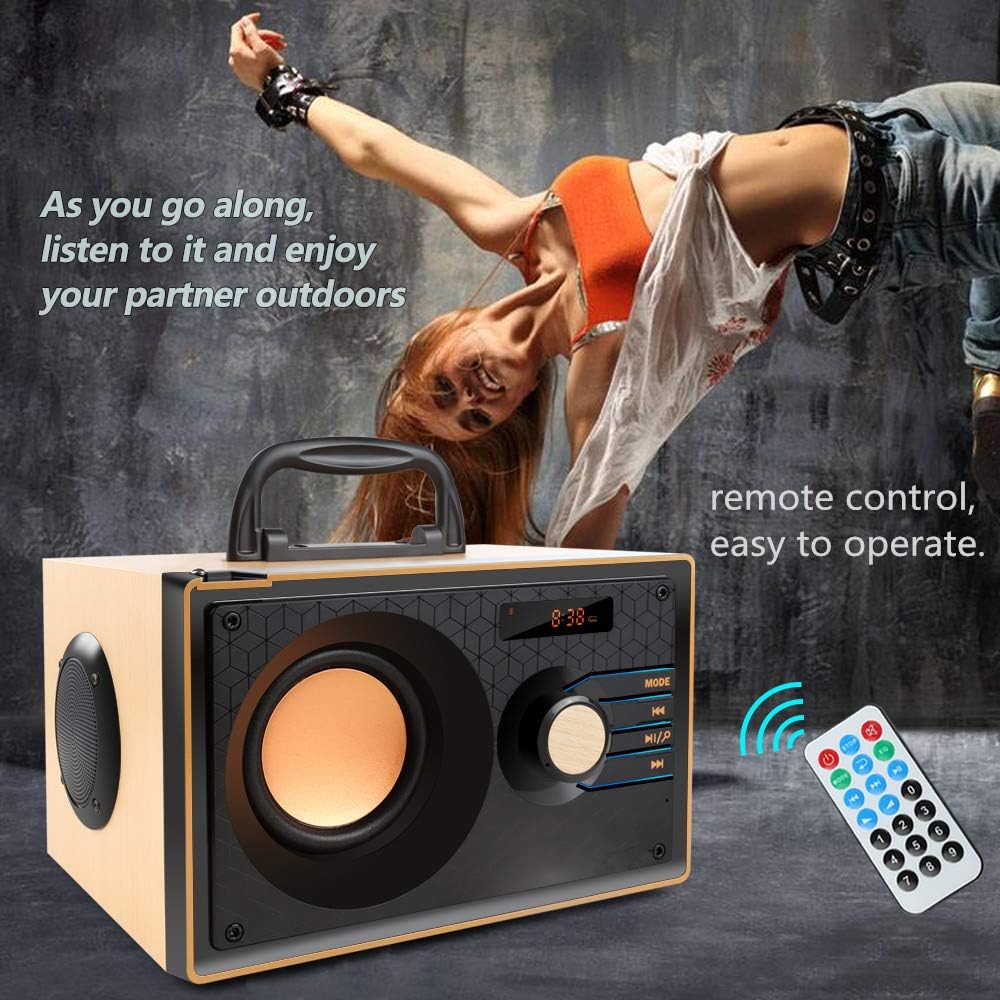
Image: The TENMIYA A200 speaker with its remote control, emphasizing the ease of operation from a distance.
Opretholdelse
- Hold højttaleren væk fra vand, fugt og direkte sollys.
- Rengør højttaleren med en blød, tør klud. Brug ikke slibende rengøringsmidler eller opløsningsmidler.
- Undgå at tabe højttaleren eller udsætte den for kraftige stød.
- Opbevar højttaleren et køligt og tørt sted, når den ikke er i brug i længere perioder.
Fejlfinding
| Problem | Mulig årsag | Løsning |
|---|---|---|
| Højttaleren tænder ikke. | Lavt batteri; Tænd/sluk-knappen er slukket. | Oplad højttaleren; Sørg for, at tænd/sluk-knappen er i "ON"-positionen. |
| Ingen lyd. | Lydstyrken er for lav; Forkert tilstand valgt; Enheden er ikke tilsluttet korrekt. | Øg lydstyrken; Tryk på MODE-knappen for at vælge den korrekte indgang; Gentilslut enheden. |
| Bluetooth-forbindelse mislykkes. | Højttaler ikke i parringstilstand; Enhedens Bluetooth er slået fra; For langt fra højttaleren. | Ensure speaker is in Bluetooth mode and flashing; Turn on device Bluetooth; Move device closer (within 10 meters/33 feet). |
| Dårlig FM-radiomodtagelse. | Antennen ikke strakt ud; Område med svagt signal. | Fully extend the telescopic antenna; Try repositioning the speaker for better signal. |
| Fjernbetjening virker ikke. | Battery depleted; Obstruction between remote and speaker; Too far from speaker. | Replace remote battery; Remove obstructions; Move closer to speaker (within 10 feet). |
Specifikationer
| Feature | Detalje |
|---|---|
| Mærke | TENMIYA |
| Model | A200 |
| Højttaler udgangseffekt | 10W (5W + 2.5W x 2) |
| Højttalerenhed | 3" + 2" x 2 |
| Frekvensrespons | 60Hz - 20KHz |
| Bluetooth version | 5.0 |
| Bluetooth rækkevidde | Op til 10 meter (33 fod) |
| Batterikapacitet | 2200mAh |
| Opladningstid | Ca. 3-4 timer |
| Spilletid | Ca. 8 timer (ved 40 % volumen) |
| Indgangseffekt | DC 5V |
| Dimensioner (L x B x H) | 7.5 x 6.1 x 4.7 tommer (190 x 155 x 120 mm) |
| Varens vægt | 2.91 pund |
| Understøttede funktioner | Bluetooth, FM Radio, TF Card, USB, AUX Input |
| Kontrolmetode | Manual buttons, Remote Control |

Image: The TENMIYA A200 speaker with its dimensions labeled (190mm length, 155mm depth, 120mm height), illustrating its compact size.
Garanti og support
The TENMIYA A200 Portable Bluetooth Speaker comes with a worry-free 12-month warranty. If you encounter any issues or have questions regarding your product, please contact our customer service team. We are committed to providing the best customer service and will respond to your inquiries within 24 hours.
For support, se venligst kontaktoplysningerne på produktemballagen eller på sælgersiden, hvor du købte varen.