
Produkt overview
The FrSky Taranis X9 Lite is a portable radio transmitter designed for drone control, combining traditional radio design with the advanced ACCESS protocol. It features a classic grip design and a program scroll button for enhanced user experience, making it suitable for both experienced pilots and beginners.
Nøglefunktioner
- ACCESS protocol compatibility (receivers must be upgraded for proper function)
- Supports ACCST D16 and ACCESS receivers
- Wired training function for skill development
- G7 Noble potentiometer gimbal for smooth and precise control
- Spectrum analyzer function for RF environment monitoring
- Haptic vibration alerts and voice speech outputs for real-time feedback
- Højhastighedsmodul digital interface
- Easily accessible battery compartment (adaptive with replaceable 18650 button top Li-ion batteries, not included)
- Operating system: ErskyTX / OpenTX
- 24 kanaler
- Internal RF module: ISRM-N
- Operation voltage rækkevidde: 6.0~8.4V
- Driftstemperatur: -20℃ ~ 60℃ (-4℉ ~ 140℉)
- Baggrundsbelyst LCD-opløsning: 128 * 64
- 60 model memories (expandable by Micro SD card)
- Smart Port, Micro SD card slot, Micro USB Port and DSC Port for connectivity
Opsætning
Installation af batteri
The FrSky X9 Lite requires 18650 button top Li-ion batteries (not included). To install, locate the battery compartment on the back of the transmitter. Open the cover and insert the batteries, ensuring correct polarity as indicated within the compartment. Close the cover securely.

Bag view of the FrSky X9 Lite, highlighting the easily accessible battery compartment for 18650 Li-ion batteries.
Tænd og grundlæggende navigation
Before powering on, ensure all switches are in their 'up' position and the throttle stick is at its lowest point. Press the power button to turn on the transmitter. Use the navigation buttons (OK, Cancel, Up, Down) located near the LCD screen to navigate through the menus. Hold the OK button for approximately 1-2 seconds to access the main settings menu.
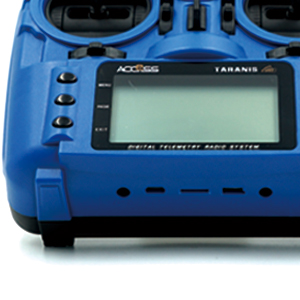
The backlit 128x64 LCD screen of the FrSky X9 Lite, along with the navigation buttons for menu access and settings adjustment.
Binding with Receiver
The X9 Lite utilizes the ACCESS protocol. For proper operation, ensure your receivers are also upgraded to the ACCESS protocol. Refer to your specific receiver's manual for detailed binding instructions. Generally, this involves placing the receiver into bind mode (often by pressing a bind button while powering on) and then initiating the binding process from the transmitter's menu. Confirm successful binding through the receiver's indicator lights.
Operation
Gimbals and Switches
The FrSky X9 Lite is equipped with G7 Noble potentiometer gimbals, providing smooth centering and precise response for accurate control of your drone. The transmitter also features several customizable switches that can be assigned to various functions (e.g., flight modes, arming/disarming) through the OpenTX/ErskyTX operating system. Consult the software manual for detailed customization options.

The FrSky Transmitter X9 Lite, showcasing its ergonomic design, gimbals, and LCD screen.
Wired Training Function
For new pilots, the wired training function allows connection to another compatible transmitter (master/slave setup). This enables an instructor to take over control or provide assistance, facilitating a safer learning experience. Connect via the DSC Port.
Telemetry and Alerts
The high-speed module digital interface supports advanced telemetry features, allowing you to receive real-time data from your drone, such as battery voltage, RSSI (Received Signal Strength Indicator), and more. Haptic vibration alerts and voice speech outputs provide customizable notifications for critical flight parameters or warnings, enhancing situational awareness.
Spektrumanalysatorfunktion
The integrated spectrum analyzer function helps identify potential radio frequency interference in your operating environment. This allows you to choose cleaner channels or adjust your setup to minimize signal degradation, ensuring a more reliable connection.
Opretholdelse
Almen pleje
- Keep the transmitter clean by wiping it with a soft, dry cloth. Avoid using harsh chemicals or solvents.
- Protect the transmitter from dust, dirt, moisture, and extreme temperatures.
- Store the transmitter in a safe place when not in use to prevent physical damage.
Batteripleje
- Always remove the 18650 Li-ion batteries if the transmitter will not be used for an extended period to prevent discharge or potential leakage.
- Use only high-quality, recommended 18650 button top Li-ion batteries.
- Charge batteries using a compatible charger and follow all safety guidelines.
Firmware opdateringer
Regularly check the official FrSky website for the latest firmware updates. Updating your transmitter's firmware can improve performance, add new features, and resolve potential issues. The X9 Lite supports wireless firmware updates via the ACCESS communication protocol, simplifying the update process.
Fejlfinding
Binding Issues
- Protokol uoverensstemmelse: Ensure both the transmitter and receiver are set to the same protocol (ACCESS or ACCST D16).
- Indbindingstilstand: Verify that the receiver is correctly placed in bind mode before initiating the binding sequence from the transmitter.
- Afstand/forhindringer: Perform binding at a close distance (e.g., 1 meter) and away from potential sources of interference or physical obstructions.
Signal Loss or Intermittent Connection
- Antenne orientering: Ensure the transmitter antenna is properly oriented and not obstructed by your body or other objects.
- Batteriniveauer: Check the battery levels of both the transmitter and the drone's receiver. Low voltage can lead to signal instability.
- Miljøforstyrrelser: Use the spectrum analyzer function to detect and avoid areas with high radio frequency interference.
Kontroller, der ikke reagerer
- Modelvalg: Confirm that the correct model profile is selected on your transmitter for the drone you are operating.
- Kalibrering: If gimbals or switches are unresponsive, recalibrate them through the transmitter's system settings.
- Fysisk skade: Inspect gimbals and switches for any visible damage or debris that might impede their movement.
Tekniske specifikationer
| Feature | Specifikation |
|---|---|
| Dimensioner | 184*170*101 mm (L*B*H) |
| Vægt | 505g (uden batteri) |
| Operativsystem | ErskyTX / OpenTX |
| Antal kanaler | 24 kanaler |
| Internt RF-modul | ISRM-N |
| Operation VoltagRækkevidde | 6.0~8.4V |
| Driftstemperatur | -20℃ ~ 60℃ (-4℉ ~ 140℉) |
| Backlit LCD Resolution | 128*64 |
| Modelminder | 60 modeller (kan udvides med Micro SD-kort) |
| Havne | Smart Port, Micro SD card slot, Micro USB Port, DSC Port |
| Kompatibilitet | ACCST D16 og ACCESS modtagere |
Garanti og support
For detailed warranty information, technical support, and service inquiries, please visit the official FrSky webwebstedet eller kontakt din autoriserede forhandler. Det anbefales at gemme dit købsbevis i tilfælde af garantikrav.