
1. Introduktion
This manual provides instructions for the proper setup, operation, and maintenance of your Ohaus CR5200 Compass Series Portable Balance. Please read this manual thoroughly before using the balance to ensure correct operation and to prevent damage.
The Ohaus CR5200 is a portable digital balance designed for accurate weighing with a capacity of 5200 grams and a readability of 1 gram. It supports multiple weighing units including grams (g), ounces (oz), pounds:ounces (lb:oz), troy ounces (ozt), and pennyweights (dwt).

Billede 1.1: Top view of the Ohaus CR5200 Compass Series Portable Balance, showing the display and control buttons.
2. Sikkerhedsoplysninger
- Operate the balance on a stable, level surface free from vibrations and drafts.
- Undgå at udsætte vægten for ekstreme temperaturer, fugtighed eller direkte sollys.
- Do not overload the balance beyond its maximum capacity of 5200 grams.
- Keep the balance clean and free from dust and debris.
- Use only the specified power source (3 AA batteries or compatible AC adapter).
3. Opsætning
3.1 Udpakning
Carefully remove the balance from its packaging. Inspect the balance for any signs of damage. Retain the packaging for future transport or storage.
3.2 Powering the Balance
The Ohaus CR5200 can be powered by three AA alkaline batteries or an external AC adapter (not included, but compatible with the side power port).
Batteri installation:
- Locate the battery compartment on the underside of the balance.
- Åbn batterirummets dæksel.
- Insert three AA alkaline batteries, ensuring correct polarity (+/-).
- Luk batterirummets dæksel forsvarligt.

Billede 3.1: Underside view of the balance with the battery compartment open, showing three AA batteries installed.
Ekstern strømtilslutning:
If using an AC adapter, connect it to the power input port located on the side of the balance. Ensure the adapter meets the specified voltage and current requirements (e.g., 12V 0.5A).

Billede 3.2: Side view of the balance, highlighting the external power input port.
3.3 Placering
Place the balance on a firm, level, and stable surface. Avoid locations near air vents, windows, or equipment that generates vibrations or electromagnetic interference.
4. Betjeningsvejledning
4.1 Tænd/sluk
- For at tænde: Tryk på [ON/OFF] button. The display will show a self-test sequence and then settle at 0.0 g.
- For at slukke: Tryk og hold nede [ON/OFF] knappen, indtil displayet slukker.
4.2 Selecting Weighing Units
The balance supports multiple weighing units: grams (g), ounces (oz), pounds:ounces (lb:oz), troy ounces (ozt), and pennyweights (dwt).
- To change the weighing unit: Press the [ENHED] button (often labeled with 'g' and an arrow). Each press cycles through the available units.
4.3 Tara funktion
The tare function allows you to zero out the weight of a container, so only the weight of the contents is measured.
- Place the empty container on the weighing pan. The display will show its weight.
- Tryk på [TARE/NUL] button (often labeled with '→0←'). The display will reset to 0.0.
- Tilsæt det materiale, der skal vejes, til beholderen. Displayet viser materialets nettovægt.
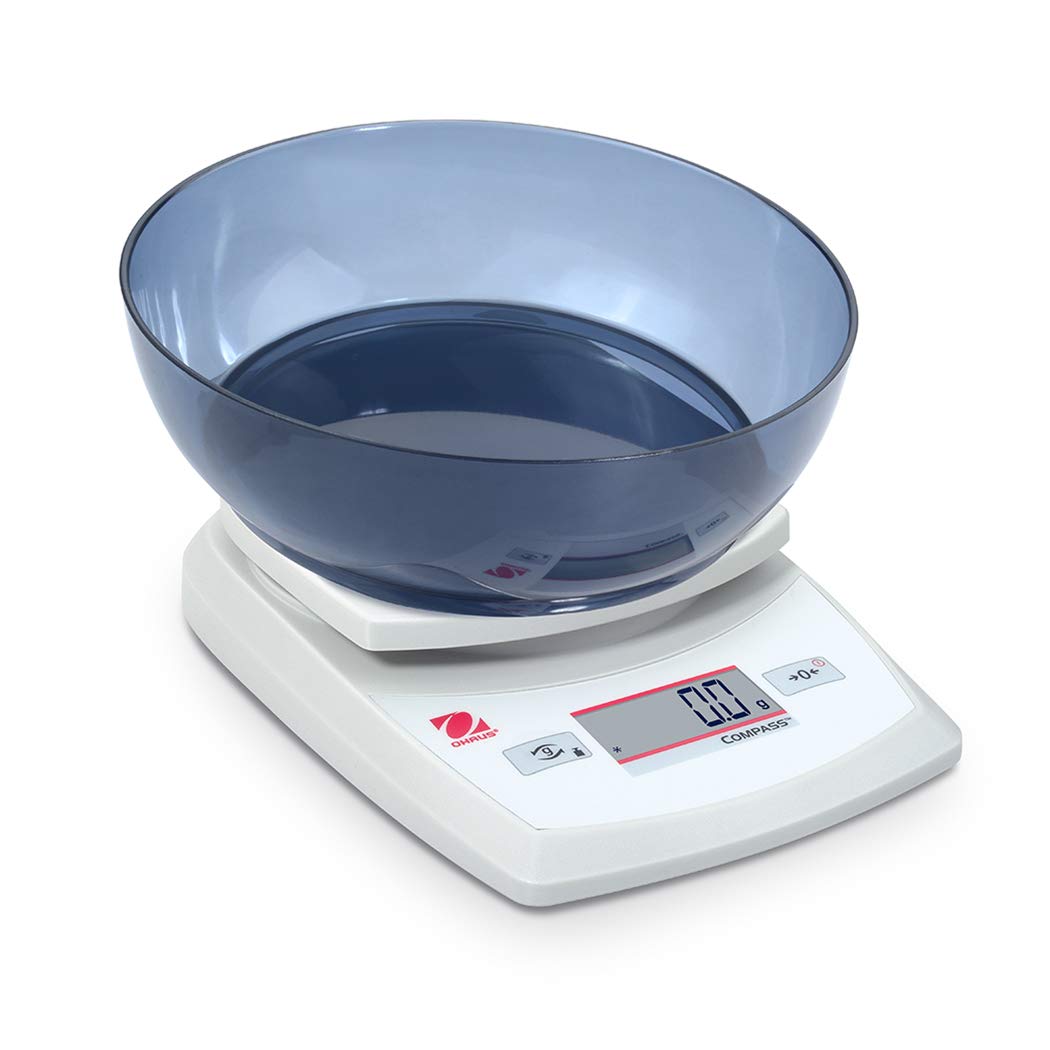
Image 4.1: The balance with an empty bowl on the weighing pan, ready for the tare function.
4.4 Grundlæggende vejning
- Ensure the balance is powered on and the display shows 0.0 in the desired weighing unit.
- Placer forsigtigt den genstand, der skal vejes, midt på vejepladen.
- Wait for the display to stabilize. The stable weight will be shown.
- Tag varen ud af panden.
4.5 Ekstern kalibrering
The Ohaus CR5200 features external calibration. This process requires a known calibration weight (not included) to ensure accuracy. Refer to the full Ohaus CR Series manual for detailed calibration procedures specific to your model.

Image 4.2: The balance with a cylindrical calibration weight placed on the weighing pan.
5. Vedligeholdelse
5.1 Rengøring
- Wipe the balance exterior with a soft, damp klæde. Brug ikke slibende rengøringsmidler eller opløsningsmidler.
- Sørg for, at der ikke kommer væske ind i vægtens hus eller display.
- Keep the weighing pan clean to ensure accurate readings.
5.2 Udskiftning af batteri
When the battery indicator appears on the display, replace the three AA alkaline batteries as described in Section 3.2.
5.3 Opbevaring
When not in use for extended periods, remove the batteries to prevent leakage. Store the balance in a dry, dust-free environment. The Ohaus CR5200 is designed for portability and can be stored in a protective case (if available).

Image 5.1: The Ohaus CR5200 balance shown alongside its protective carrying case.
6. Fejlfinding
| Problem | Mulig årsag | Løsning |
|---|---|---|
| Balancen tændes ikke. | Dead or incorrectly installed batteries; no AC power. | Replace batteries or check AC adapter connection. Ensure correct battery polarity. |
| Unøjagtige eller ustabile aflæsninger. | Unstable surface; drafts; electromagnetic interference; balance needs calibration. | Move balance to a stable, level surface. Shield from drafts. Recalibrate the balance (refer to Section 4.5). |
| Displayet viser "Err" eller fejlkoden. | Overbelastning; intern fejl. | Remove excess weight if overloaded. Power cycle the balance. If error persists, contact Ohaus support. |
| Tarafunktionen virker ikke. | Balance not stable; button not pressed correctly. | Ensure balance is stable and display is settled. Press the TARE/ZERO button firmly. |
7. Specifikationer
| Feature | Specifikation |
|---|---|
| Modelnummer | CR5200 |
| Kapacitet | 5200 g (5.2 kg) |
| Læsbarhed | 1 g |
| Vejningsenheder | g, oz, lb:oz, ozt, dwt |
| Kalibreringstype | Ekstern |
| Strømkilde | 3 AA alkaline batteries (included) or AC adapter (not included) |
| Display Type | Digital |
| Materiale | Plast |
| Produktmål (L x B x H) | 23.62 x 17.02 x 5.59 cm |
| Varens vægt | 408.23 g (ca. 14.4 ounces) |
| Særlige funktioner | Transportabel |
8. Garanti og support
For garantioplysninger, teknisk support eller serviceforespørgsler, kontakt venligst Ohaus kundeservice eller besøg den officielle Ohaus webwebstedet. Behold din købskvittering som købsbevis.