
1. Introduktion og overview
This manual provides comprehensive instructions for the setup, operation, maintenance, and troubleshooting of your SHARP 4T-C55BJ3EF2NB 55-inch 4K UHD Smart LED TV. Please read this manual thoroughly before using your television to ensure proper functionality and safety.
The SHARP 4T-C55BJ3EF2NB is a 55-inch 4K Ultra HD Smart LED TV, offering a resolution of 3840 x 2160 pixels. It features Active Motion 400, HDR10, HLG, Aquos UltraClear, and Aquos Motion technologies for smooth and clear image movements. The integrated Harman/Kardon speaker system, with 2 x 10W output, Dolby Digital, Dolby Digital Plus, DTS-HD, DTS Studio Sound, and Sound Equalizer, delivers an immersive audio experience. This TV also includes a Triple Tuner for satellite, cable, and antenna reception, along with a range of pre-installed smart applications.

Figur 1.1: Forside view of the Sharp 4T-C55BJ3EF2NB 55-inch 4K UHD Smart LED TV, displaying colorful content and smart app logos.
2. Sikkerhedsoplysninger
Følg altid grundlæggende sikkerhedsforanstaltninger, når du bruger dette fjernsyn, for at mindske risikoen for brand, elektrisk stød og personskade.
- Udsæt ikke TV'et for regn eller fugt.
- Bloker ikke ventilationsåbninger.
- Sørg for, at strømkablet ikke bliver trådt på eller klemt.
- Tag stikket ud af tv'et under tordenvejr eller når det ikke bruges i længere perioder.
- Overlad al service til kvalificeret servicepersonale.
3. Pakkens indhold
Pak forsigtigt dit fjernsyn ud, og kontroller, at alle følgende dele er inkluderet:
- 1 x SHARP 4T-C55BJ3EF2NB 55-inch 4K UHD Smart LED TV
- 1 x Remote Control (including 2 x AAA batteries)
- 1 x TV Stand with Installation Package (screws, etc.)
- 1 x Quick Start Guide
- 1 x Brugermanual (dette dokument)
4. Opsætning
4.1 Fysisk opsætning (stativ eller vægmontering)
You can either install the TV on its included stand or mount it on a wall. Ensure the TV is placed on a stable, level surface if using the stand.
Montering af stativ:
- Placer tv-skærmen med nedad på en blød, flad overflade for at forhindre skader.
- Attach the stand components to the bottom of the TV using the provided screws from the installation package.
- Sørg for, at alle skruer er forsvarligt spændt.
Vægmontering:
The TV supports VESA standard mounting 400 x 200 mm. Use a compatible wall mount bracket (not included) and follow the instructions provided with the wall mount. Ensure the wall can support the TV's weight (approximately 21.4 kg).
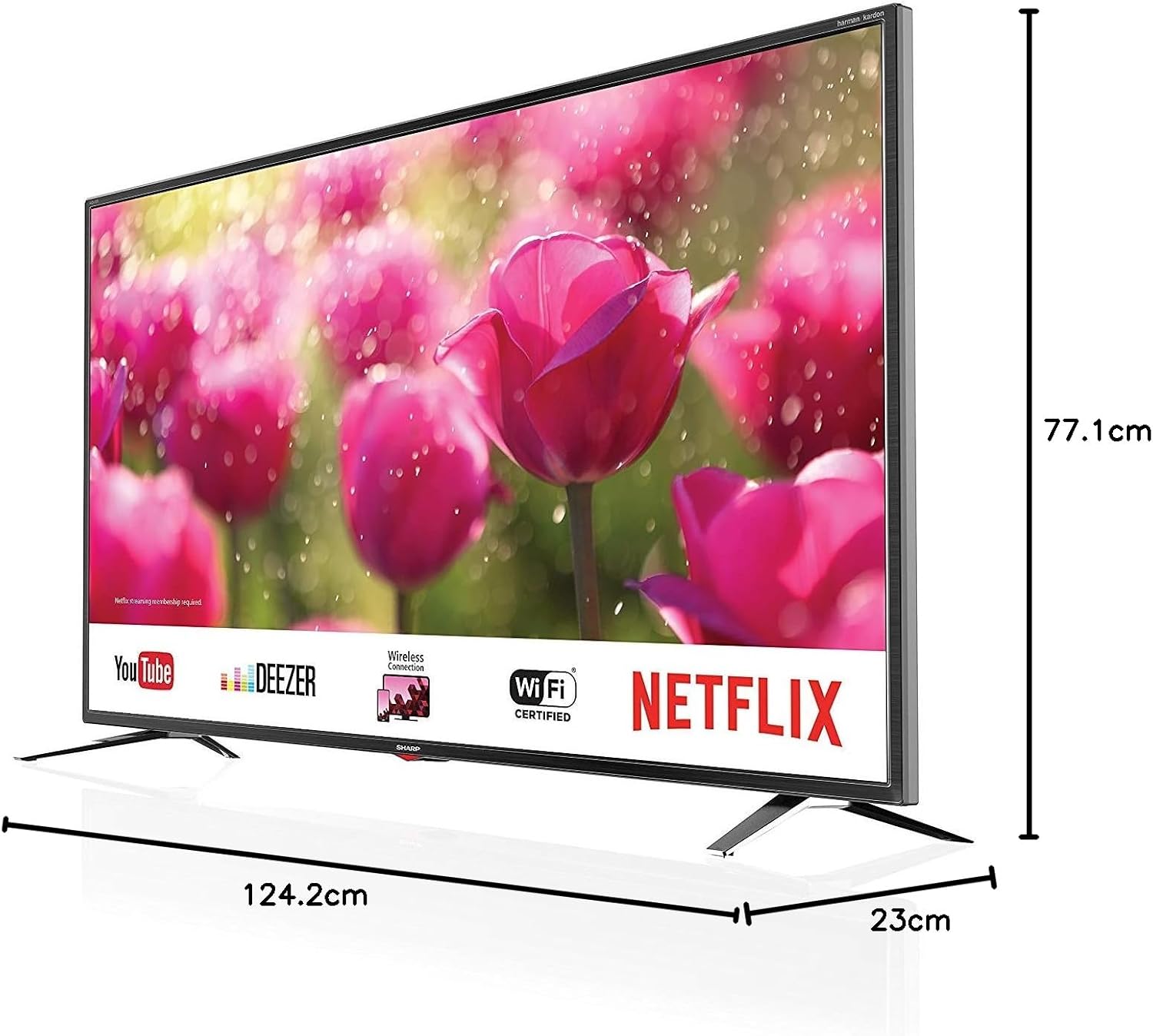
Figure 4.1: Product dimensions of the Sharp 4T-C55BJ3EF2NB 55-inch 4K UHD Smart LED TV.
4.2 Forbindelser
Tilslut dine eksterne enheder til tv'et ved hjælp af de relevante porte på bagpanelet.

Figur 4.2: Bagside view viser tilslutningsporte.
- HDMI: Tilslut op til 3 HDMI-enheder (f.eks. Blu-ray-afspiller, spillekonsol).
- USB: Connect USB storage devices for media playback (3 ports available).
- Antenne/Kabel/Satellit: Connect your antenna, cable, or satellite feed to the Triple Tuner input.
- LAN (RJ-45): Til kablet internetforbindelse.
- Digital optisk lydudgang: Til tilslutning til et eksternt lydsystem.
- Audio/Headphone (3.5 mm jack): Til hovedtelefoner eller eksterne højttalere.
- CI+ slot: Til betingede adgangsmoduler (CAM) til krypterede kanaler.
- SD-kortplads: Til afspilning af medier fra SD-kort.
4.3 Førstegangsopsætning
After connecting all necessary cables and plugging in the power cord, press the power button on the remote control or TV. The TV will guide you through the initial setup process, including language selection, network connection (Wi-Fi or LAN), channel scanning, and time zone settings.
5. Betjening
5.1 Grundlæggende betjening
- Tænd/sluk: Tryk på tænd/sluk-knappen på fjernbetjeningen.
- Lydstyrkekontrol: Brug VOL +/- knapperne.
- Kanalvalg: Use the CH +/- buttons or number buttons.
- Inputkilde: Press the SOURCE button to select between HDMI, TV (Tuner), USB, etc.
- Menu navigation: Brug piletasterne og OK-knappen til at navigere i menuerne.
5.2 Smart TV-funktioner
Your SHARP TV is equipped with smart functionalities, allowing access to various online content and applications via the Sharp Aquos Net+ App Store.
- Forudinstallerede apps: Access popular services like YouTube, Deezer, Rakuten TV, Chili, Netflix, Eurosport Player, Joyn, and Prime Video directly from the home screen.
- Web Browser: Surf på internettet direkte på dit tv.
- Wireless Connection (WLAN): Connect to your home Wi-Fi network for internet access.
5.3 Billed- og lydindstillinger
Tilpas din viewlytteoplevelsen via tv'ets indstillingsmenu.
- Billedtilstande: Select from various preset picture modes (e.g., Standard, Movie, Game) or customize brightness, contrast, color, and sharpness.
- HDR-understøttelse: The TV supports HDR10 and HLG for enhanced contrast and color with compatible content.
- Lydtilstande: Choose from preset sound modes or adjust bass, treble, and balance. The Harman/Kardon speaker system provides high-quality audio.
- Lyd-equalizer: Fine-tune audio frequencies for a personalized sound profile.
5.4 Betjening af tredobbelt tuner
The integrated Triple Tuner supports DVB-T/T2 (terrestrial), DVB-C (cable), and DVB-S/S2 (satellite) signals. After initial channel scanning, you can access digital channels directly.
- Kanalliste: View and manage your scanned channels.
- Elektronisk programguide (EPG): Få adgang til programoplysninger og tidsplaner.
6. Vedligeholdelse
6.1 Rengøring
- Skærm: Tør forsigtigt skærmen af med en blød, fnugfri klud. Brug en skærmrengøringsopløsning, der er specielt designet til tv'er, til genstridige pletter, og påfør den på kluden, ikke direkte på skærmen.
- Skab: Tør tv-kabinettet af med en blød, tør klud. Brug ikke slibende rengøringsmidler eller opløsningsmidler.
6.2 Softwareopdateringer
Periodically check for software updates to ensure optimal performance and access to the latest features. Updates can typically be performed via the TV's settings menu when connected to the internet.
7. Fejlfinding
Hvis du støder på problemer med dit tv, kan du se følgende almindelige problemer og løsninger:
| Problem | Mulig løsning |
|---|---|
| Ingen strøm | Kontroller, om netledningen er korrekt tilsluttet tv'et og stikkontakten. Prøv en anden stikkontakt. |
| Intet billede, men der er lyd | Sørg for, at den korrekte inputkilde er valgt. Kontroller kabelforbindelserne til eksterne enheder. |
| Ingen lyd, men der er billede | Kontroller lydstyrkeniveau og mute-status. Kontroller lydkabelforbindelser. Kontroller indstillingerne for tv'ets lydudgang. |
| Fjernbetjening virker ikke | Udskift batterierne. Sørg for, at der ikke er nogen forhindringer mellem fjernbetjeningen og tv'ets IR-sensor. |
| Kan ikke oprette forbindelse til Wi-Fi | Check Wi-Fi password. Restart your router. Ensure the TV is within range of the Wi-Fi signal. |
For more complex issues, consult the full user manual (if available in print) or contact Sharp customer support.
8. Specifikationer
| Feature | Beskrivelse |
|---|---|
| Modelnummer | 4T-C55BJ3EF2NB |
| Mærke | Skarp |
| Skærmstørrelse | 55 tommer (139 cm) |
| Displayteknologi | LED |
| Opløsning | 4K Ultra HD (3840 x 2160 pixels) |
| Opdateringshastighed | 60 Hz |
| HDR-understøttelse | HDR10, HLG |
| Bevægelsesteknologi | Active Motion 400, Aquos UltraClear, Aquos Motion |
| Lydsystem | Harman/Kardon, 2 x 10W (8 Ohm), Dolby Digital, Dolby Digital Plus, DTS-HD, DTS Studio Sound, Sound Equalizer |
| Tunere | Triple Tuner (DVB-T/T2/C/S/S2) with HEVC/H.265 (10-bit), MPEG4/H.264, VP9 support |
| Forbindelse | 3x HDMI 4K, 3x USB, Audio/Headphone (3.5 mm jack), Digital Optical Audio Output, LAN (RJ-45), WLAN (2.412 GHz – 2.472 GHz), 1x SD Card Slot, CI+ Slot |
| Smarte funktioner | Web Browser, Sharp Aquos Net+ App Store, Pre-installed apps (YouTube, Netflix, Deezer, Prime Video, etc.) |
| Produktmål (med stativ) | 124.2 x 77.1 x 23 cm (B x H x D) |
| Produktvægt (med stativ) | 21.4 kg |
| VESA Monteringsstandard | 400 x 200 mm |
| Fabrikant | Skarp |
| Første ledige dato | 15. januar 2020 |
9. Garanti og support
For garantioplysninger henvises til garantikortet, der følger med dit produkt, eller besøg den officielle Sharp-side. website. For technical support, troubleshooting assistance beyond this manual, or service requests, please contact Sharp customer service.
Online support: www.sharp.eu