
Nestling HK-688
Nestling HK-688 Walkie Talkies User Manual
Model: HK-688
1. Introduktion
This manual provides comprehensive instructions for the safe and effective operation of your Nestling HK-688 Walkie Talkies. These mini 2-way radios are designed for clear communication over long distances, making them ideal for children's outdoor adventures, camping, hiking, and general play.
The Nestling HK-688 Walkie Talkies feature 22 UHF channels, a generous range, and user-friendly controls. Please read this manual thoroughly before using the device to ensure proper functionality and to maximize your experience.

Image: Three Nestling HK-688 walkie talkies in camo blue, camo pink, and camo green, displayed with their product packaging.
2. Produktet er slutview
2.1 Pakkens indhold
Standardpakken indeholder følgende varer:
- 3x Nestling HK-688 Camo Kids Walkie Talkies (Camo Blue, Camo Pink, Camo Green)
- 1x Brugermanual (dette dokument)
- Bemærk: AAA-batterier er ikke inkluderet og skal købes separat.
2.2 Nøglefunktioner
- 22 FRS/GMRS-kanaler: Giver flere kommunikationsmuligheder.
- Lang distance: Up to 3km (1.9 miles) in typical conditions, and up to 5km (3.1 miles) in open fields.
- Klar lydkvalitet: Ensures effective communication.
- LCD baggrundsbelyst skærm: For let viewing of channel, battery status, and other indicators.
- Built-in Mini LED Torch: Useful for low-light conditions.
- Automatisk kanalscanning: Finder hurtigt aktive kanaler.
- Automatic Squelch: Reducerer baggrundsstøj for klarere modtagelse.
- CTCSS 99 Sub-codes: Enhances privacy by filtering unwanted signals.
- Ring alarm: Giver dig besked om indgående opkald.
- Kanallås: Prevents accidental channel changes.
- PTT/VOX Function: Push-to-Talk for manual transmission or Voice Operated Exchange for hands-free communication.
- Batterisparefunktion: Forlænger batteriets levetid.
- Alarmer med lav effekt: Indicates when batteries are running low.
- Justerbar lydstyrke: Control the listening level.
- Let og bærbar: Designed for easy carrying with a built-in belt clip.
- Drop Resistant Design: Forbedret holdbarhed til aktiv brug.

Image: Visual representation of the walkie talkie's dimensions and key features like drop resistance, low battery alert, flashlight, and communication range.

Image: Features of the walkie talkie, including 22 channels with privacy codes, extended range, noise reduction, drop resistance, and a built-in flashlight.
2.3 Enhedskomponenter

Image: Detailed diagram illustrating the various parts of the walkie talkie, including buttons, display, and audio components.
- Antenne: Til at sende og modtage signaler.
- Lamp (Lommelygte): Indbygget LED-lys.
- Mikrofon: For at tale ind i enheden.
- PTT-knap (Push-to-Talk): Tryk og hold nede for at sende din stemme.
- LCD-skærm: Shows channel, battery level, and other indicators.
- Call Lock Button: Locks the current channel.
- Skærmknap: Allows listening to weak signals on the current channel.
- Lamp Scan knap: Activates the flashlight and initiates channel scan.
- Ned-knap: Navigerer i menuer eller reducerer værdier.
- Tænd/sluk-/menuknap: Tænder/slukker enheden og åbner menuen.
- Højttaler: For listening to incoming transmissions.
3. Opsætning
3.1 Batteriinstallation
Each Nestling HK-688 Walkie Talkie requires 4x AAA batteries (not included).
- Release the Belt Clip: Press the lock on the top of the belt clip and lift the clip up to detach it from the radio.
- Åbent batterirum: Locate the battery cover on the back of the walkie talkie. Gently push down on the tab and slide the cover off.
- Indsæt batterier: Insert 4x AAA batteries into the compartment, ensuring correct polarity (+/-) as indicated inside the compartment.
- Luk batterirummet: Replace the battery cover and slide it until it clicks securely into place. Reattach the belt clip if desired.
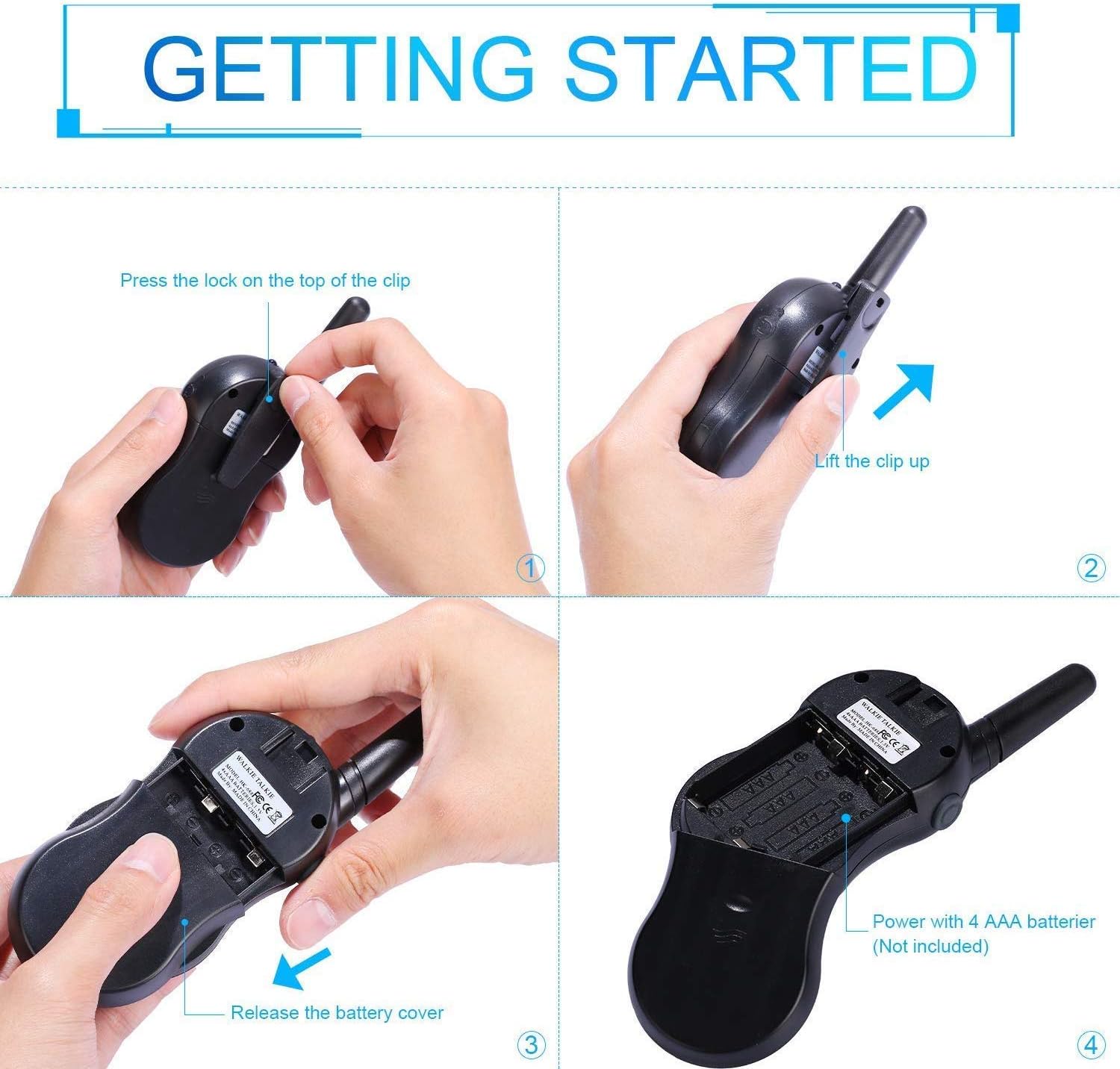
Image: Step-by-step instructions for opening the battery compartment and inserting AAA batteries into the walkie talkie.

Image: An open battery compartment of the walkie talkie, ready for battery insertion.
3.2 Tænd/sluk
To turn the walkie talkie on or off, press and hold the Strøm/menu button until the LCD screen illuminates or turns off.
4. Betjeningsvejledning
4.1 Grundlæggende kommunikation (Push-to-Talk)
- Vælg en kanal: Ensure all walkie talkies you wish to communicate with are set to the same channel and sub-code. Use the Up og Ned knapper for at skifte kanal.
- Send: Tryk og hold på PTT button (located on the side of the radio). Speak clearly into the microphone, holding the radio approximately 2-3 inches from your mouth.
- Modtage: Slip PTT button to listen for incoming transmissions.
Tip: For optimal range and clarity, avoid obstructions like buildings, dense foliage, or large metal objects. Adverse weather conditions can also affect range.
4.2 Channel Selection and Sub-codes (CTCSS/DCS)
Your walkie talkie supports 22 FRS/GMRS channels and 99 CTCSS/DCS sub-codes. Sub-codes help filter out unwanted conversations on the same channel, enhancing privacy.
- Tryk på Menu Tryk én gang på knappen for at gå ind i kanalvalgstilstanden. Kanalnummeret blinker.
- Brug Up or Ned knapperne til at vælge den ønskede kanal (1-22).
- Tryk på Menu button again to enter sub-code selection mode. The sub-code number will flash.
- Brug Up or Ned buttons to select your desired sub-code (0-99). Setting to 0 disables the sub-code.
- Tryk på PTT button or wait a few seconds for the setting to be saved and exit the menu.
4.3 VOX-funktion (stemmestyret central)
The VOX function allows for hands-free communication. When activated, the radio will automatically transmit when it detects your voice.
- Tryk på Menu button multiple times until the VOX icon (VOX) appears on the LCD and flashes.
- Brug Up or Ned buttons to select the VOX sensitivity level (e.g., 1-3, with 1 being most sensitive). Select "OFF" to disable VOX.
- Tryk på PTT button or wait a few seconds to save the setting and exit.
4.4 Betjening af lommelygte
To turn the built-in LED flashlight on or off, briefly press the Lamp button (often combined with the Scan button).
4.5 Call Alert Tone
To send a call alert tone to other radios on the same channel, briefly press the Ring button (often represented by a musical note icon).
4.6 Kanallås
To prevent accidental channel changes, you can lock the current channel.
- Tryk og hold på Call Lock button (often represented by a key icon) until a key icon appears on the LCD.
- For at låse op skal du trykke på og holde nede Call Lock knappen igen, indtil nøgleikonet forsvinder.

Billede: Eksamples of suitable scenarios for using the walkie talkies, such as outdoor play, family activities, and leisure.

Image: Illustrations of walkie talkies being used for communication in both play and household settings.
5. Vedligeholdelse
5.1 Pleje af batterier
- Brug altid friske AAA-batterier af høj kvalitet.
- Remove batteries from the walkie talkie if it will not be used for an extended period to prevent leakage and damage.
- Bortskaf brugte batterier ansvarligt i henhold til lokale regler.
5.2 Rengøring og opbevaring
- Clean the walkie talkie with a soft, damp klæde. Brug ikke skrappe kemikalier eller slibende rengøringsmidler.
- Do not immerse the walkie talkie in water, as it is not water-resistant.
- Opbevar walkie-talkien et køligt, tørt sted væk fra direkte sollys og ekstreme temperaturer.
6. Fejlfinding
| Problem | Mulig årsag | Løsning |
|---|---|---|
| Ingen strøm | Batterierne er døde eller forkert installeret. | Udskift batterierne med nye, og sørg for korrekt polaritet. |
| Kan ikke sende eller modtage | Not on the same channel/sub-code; out of range; PTT button not pressed/released. | Ensure all radios are on the same channel and sub-code. Move closer to the other radio. Press and hold PTT to transmit, release to receive. |
| Dårlig lydkvalitet / Statisk | Out of range; obstructions; low battery; squelch setting. | Move closer. Avoid obstructions. Replace batteries. Check squelch settings. |
| Kanalskift ved et uheld | Channel lock is not activated. | Activate the channel lock function. |
| VOX virker ikke | VOX sensitivity too low or VOX is off. | Adjust VOX sensitivity to a higher level or ensure VOX is enabled. |
7. Specifikationer
| Feature | Detalje |
|---|---|
| Mærke | Indlejret |
| Model | HK-688 |
| Frekvensområde | 400-470 MHz |
| Kanaler | 22 FRS/GMRS-kanaler |
| Underkoder | CTCSS 99 |
| Transmissionseffekt | <=0.5W |
| Modulationstype | FM-F3E |
| Rækkevidde | Up to 3km (1.9 miles) typical, MAX 5km (3.1 miles) in open field |
| squelch | Automatisk squelch |
| Display Type | LCD baggrundsbelyst |
| Høretelefonstik | 2.5mm / 0.1inch |
| Strømforsyning | 4x AAA batteries per radio (Not Included) |
| Product Dimensions (H x L x D) | 14 cm x 5.5 cm x 3.5 cm (5.5 x 2.2 x 1.4 tommer) |
| Pakkevægt | 370 g |
| Farve | Camo Blue, Camo Pink, Camo Green |
| Vandmodstandsniveau | Ikke vandafvisende |
8. Garanti og support
Nestling HK-688 Walkie Talkies come with a 12 måneders garanti fra købsdatoen.
For any support inquiries, troubleshooting assistance beyond this manual, or warranty claims, please refer to the contact information provided on the product packaging or the retailer's webwebstedet hvor produktet blev købt.
Ask a question about this manual
Ask about setup, troubleshooting, compatibility, parts, safety, or missing instructions. Manuals+ will review the question and use this page’s manual context to help answer it.