
Awei A780BL
Awei A780BL Bluetooth 5.0 Over-Ear Headphones User Manual
Model: A780BL | Mærke: Awei
Indledning
This manual provides comprehensive instructions for the Awei A780BL Bluetooth 5.0 Over-Ear Headphones. Please read this manual carefully before using the product to ensure proper operation and to maximize your listening experience. These headphones offer high-quality audio, a built-in microphone, and a comfortable over-ear design, suitable for various uses including gaming, music, and calls.
Pakkens indhold
Sørg for at alle varer er til stede i pakken:
- 1 x Awei A780BL Bluetooth Headset
- 1 x USB ladekabel
- 1 x Brugermanual (dette dokument)

Image: The Awei A780BL headphones shown alongside their retail packaging, highlighting the included components.
Produkt overview

Billede: Forside view of the Awei A780BL Over-Ear Headphones in black, showcasinderes design.
The Awei A780BL headphones are designed for comfort and superior sound quality. They feature a foldable design for portability and intuitive controls for ease of use.
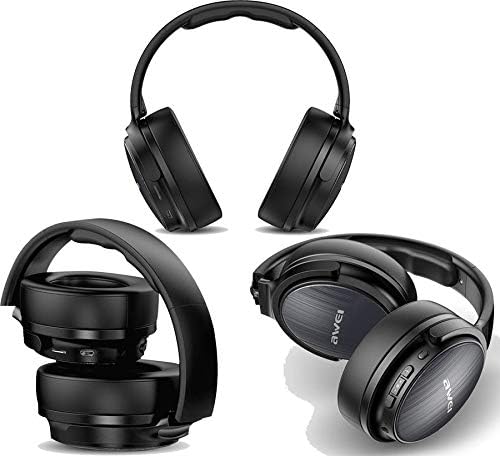
Billede: Flere views of the Awei A780BL headphones, demonstrating their foldable earcups and compact storage capability.
Nøglefunktioner:
- Bluetooth V5.0 for stabil og effektiv trådløs forbindelse.
- Dynamic 40mm drivers for powerful and clear audio.
- Built-in microphone for hands-free calls and gaming communication.
- IPX5 water and sweat resistance, suitable for sports and outdoor activities.
- Supports both wireless (Bluetooth) and wired (3.5mm AUX) connectivity.
- Long battery life: Up to 15 hours of music/talk time.
- Komfortabelt over-ear design med bløde ørekopper.

Image: A graphic highlighting the "All-Around Stereo Sound" feature of the Awei A780BL headphones, noting the 40mm driver, 32 Ohm impedance, and 122dB sensitivity.
Opsætning
Opladning af hovedtelefoner:
- Find USB-opladeporten på hovedtelefonerne.
- Connect one end of the provided USB charging cable to the headphone's charging port.
- Tilslut den anden ende af USB-kablet til en kompatibel USB-strømkilde (f.eks. en computers USB-port eller en USB-vægadapter).
- The indicator light will illuminate during charging and turn off or change color once fully charged.
- En fuld opladning tager cirka 2 timer.
Tænd/sluk:
- For at tænde: Press and hold the Power button (usually the Multi-function button) for a few seconds until the indicator light flashes and you hear a power-on prompt.
- For at slukke: Press and hold the Power button for a few seconds until the indicator light turns off and you hear a power-off prompt.
Betjeningsvejledning
Bluetooth-parring:
- Sørg for, at hovedtelefonerne er fuldt opladede og slukkede.
- Tryk på tænd/sluk-knappen og hold den nede i cirka 5-7 sekunder, indtil indikatorlampen blinker skiftevis rødt og blåt, hvilket angiver parringstilstand.
- Aktiver Bluetooth på din enhed (smartphone, tablet, computer) og søg efter tilgængelige enheder.
- Vælg "AWEI A780BL" fra listen over fundne enheder.
- Once paired, the indicator light will typically turn solid blue or flash slowly, and you will hear a connection confirmation.
- Hvis du bliver bedt om en adgangskode, skal du indtaste "0000".
Wired Connection (AUX Mode):
The headphones can also be used with a 3.5mm audio cable (not included) when the battery is low or for devices without Bluetooth.
- Connect one end of a 3.5mm audio cable to the AUX port on the headphones.
- Tilslut den anden ende til 3.5 mm lydstikket på din enhed.
- In wired mode, the headphone's battery is not consumed, and the power button is not required for operation.
Grundlæggende kontroller:
| Fungere | Handling |
|---|---|
| Afspil/pause musik | Tryk én gang på multifunktionsknappen. |
| Næste spor | Tryk længe på knappen Lydstyrke op (+). |
| Forrige spor | Tryk længe på lydstyrke ned-knappen (-). |
| Lydstyrke op | Tryk kort på knappen Lydstyrke op (+). |
| Lydstyrke ned | Tryk kort på lydstyrke ned-knappen (-). |
| Besvar/afslut opkald | Tryk én gang på multifunktionsknappen under et indgående opkald. |
| Afvis opkald | Tryk længe på multifunktionsknappen under et indgående opkald. |
| Genopkald sidste nummer | Tryk to gange på multifunktionsknappen. |
| Aktiver Voice Assistant | Triple-press the Multi-function button (if supported by your device). |
Opretholdelse
- Rensning: Brug en blød, tør klud til at rengøre hovedtelefonerne. Brug ikke slibende rengøringsmidler eller opløsningsmidler.
- Opbevaring: Når hovedtelefonerne ikke er i brug, skal de opbevares køligt og tørt, væk fra direkte sollys og ekstreme temperaturer. Det foldbare design muliggør kompakt opbevaring.
- Batteripleje: For at forlænge batterilevetiden bør du undgå at aflade hovedtelefonerne helt ofte. Oplad dem regelmæssigt, selvom de ikke er i konstant brug.
- Vandtæthed: The headphones are IPX5 water resistant, meaning they can withstand splashes and sweat. Do not submerge them in water or expose them to heavy rain.
Fejlfinding
| Problem | Mulig løsning |
|---|---|
| Hovedtelefonerne tændes ikke. | Ensure the headphones are fully charged. Press and hold the Power button for a longer duration. |
| Kan ikke parres med enheden. |
|
| Ingen lyd eller lav lydstyrke. |
|
| Mikrofon virker ikke. |
|
| Kort batterilevetid. |
|
Specifikationer
| Feature | Detalje |
|---|---|
| Modelnavn | A780BL |
| Mærke | Awei |
| Forbindelsesteknologi | Wireless (Bluetooth V5.0), Wired (3.5mm AUX) |
| Bluetooth-protokol | HSP/A2DP/HFP/AVRCP |
| Driftsafstand | Up to 10 meters (barrier-free space) |
| Hovedtelefonens formfaktor | Over-Ear |
| Driver størrelse | 40 mm |
| Impedans | 32 Ohm |
| Følsomhed | 122 dB |
| Frekvensområde | 2.402 GHz - 2.480 GHz |
| Mikrofon | Ja |
| Støjkontrol | None (No Active Noise Cancellation) |
| Vandmodstandsvurdering | IPX5 (vand- og svedafvisende) |
| Batteritype | Lithium polymer |
| Batterikapacitet | 250 mAh |
| Opladningstid | Cirka 2 timer |
| Musik afspilningstid | Op til 15 timer |
| Taletid | Op til 12 timer |
| Standby tid | Op til 300 timer |
| Nettovægt | 270 gram |
| Farve | Sort |
| Produktdimensioner | 4 x 10 x 16.5 cm |
Garanti og support
Specific warranty information for the Awei A780BL headphones is not provided in this manual. Please refer to the product packaging or the retailer's webwebstedet for detaljer om garantidækning og supportmuligheder.
For technical assistance or customer service, please contact the vendor or manufacturer directly through their official channels.