
Walfront MS5908A
Walfront MS5908A Circuit Analyzer
Brugermanual
1. Introduktion
The Walfront MS5908A Circuit Analyzer is a professional-grade instrument designed for comprehensive electrical circuit testing. It provides accurate measurements for various electrical parameters, ensuring safety and efficiency in electrical installations and troubleshooting. This manual provides detailed instructions for the proper use, maintenance, and care of your MS5908A Circuit Analyzer.

Figure 1.1: The Walfront MS5908A Circuit Analyzer and its detachable power cable.
2. Sikkerhedsoplysninger
Always adhere to the following safety precautions to prevent personal injury or damage to the instrument:
- Læs og forstå alle instruktioner, før du bruger enheden.
- Do not use the analyzer if it appears damaged or is operating abnormally.
- Sørg for, at strømkilden matcher den angivne lydstyrketage-område (AC100-240V).
- Always disconnect the device from the power source before cleaning or servicing.
- Undgå at bruge enheden i vådt eller damp forhold.
- Forsøg ikke at åbne eller ændre enheden. Overlad al service til kvalificeret personale.
- Wear appropriate personal protective equipment (PPE) when working with electrical circuits.
3. Produktkomponenter og deroverview
Familiarize yourself with the various parts of the MS5908A Circuit Analyzer:
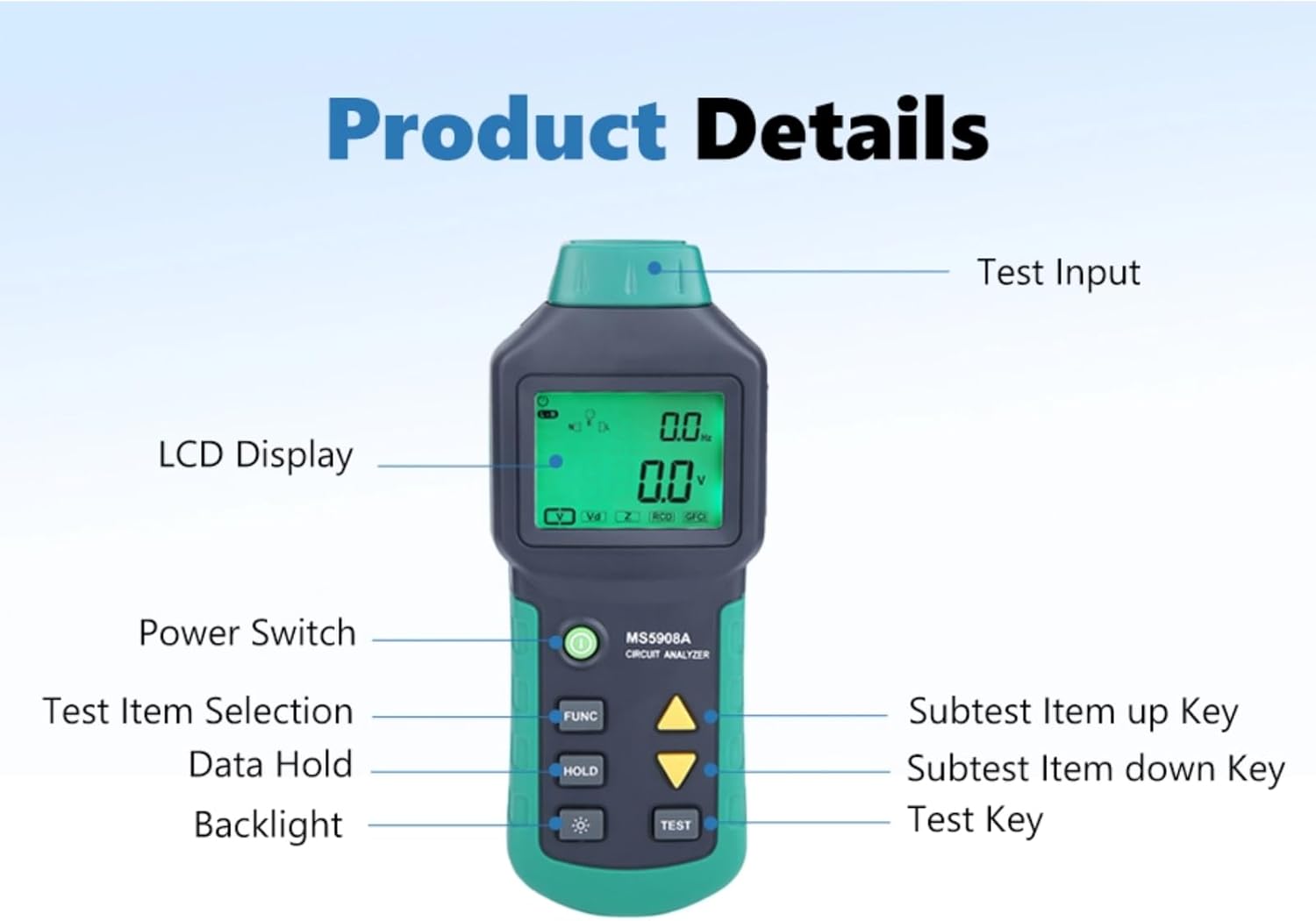
Figure 3.1: Key components of the MS5908A Circuit Analyzer.
- Test Input: The port where the power cable is connected to the circuit under test.
- LCD-skærm: Shows measurement readings, indicators, and menu options.
- Afbryderen: Tænder eller slukker for enheden.
- FUNC-knap: Selects different test items or functions.
- HOLD knap: Fryser den aktuelle aflæsning på displayet.
- Baggrundslys knap: Aktiverer eller deaktiverer displayets baggrundsbelysning.
- Op/ned piletaster: Navigate through subtest items or adjust settings.
- TEST knap: Initiates a test or confirms a selection.
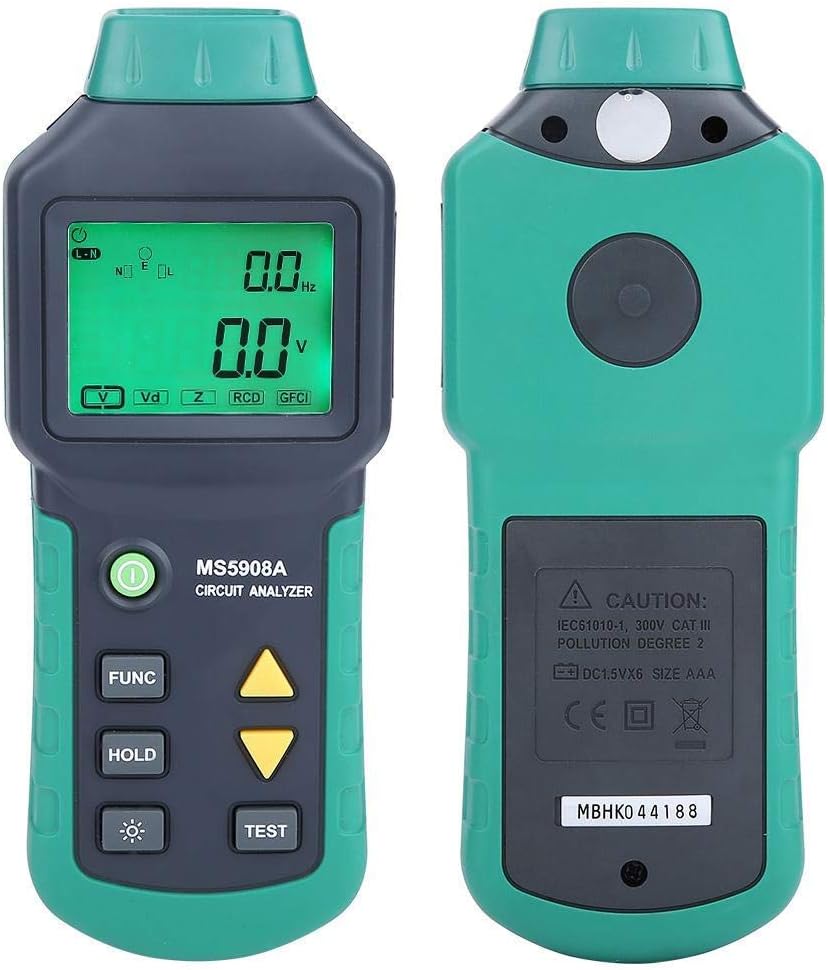
Figur 3.2: Foran og bagpå views of the MS5908A Circuit Analyzer.
4. Opsætning
Before using the MS5908A, ensure it is properly prepared:
4.1. Batteriinstallation
The MS5908A requires six (6) AA batteries for operation. Batteries are not included with the device.
- Find batterirummet på bagsiden af enheden.
- Using a screwdriver, carefully remove the screw securing the battery cover.
- Fjern batteridækslet.
- Insert six AA batteries, observing the correct polarity (+/-) as indicated inside the compartment.
- Sæt batteridækslet på igen og fastgør det med skruen.

Figure 4.1: Battery compartment for six AA batteries.
4.2. Tilslutning af strømkablet
Connect the provided power cable to the test input port at the bottom of the analyzer and then to the electrical outlet you wish to test.

Figure 4.2: Power input port on the MS5908A.

Figure 4.3: US standard three-prong plug.
5. Betjeningsvejledning
The MS5908A offers various measurement functions. Follow these steps for accurate readings:
5.1. Powering On and Basic Voltage Måling
- Ensure batteries are installed and the power cable is connected to the analyzer.
- Plug the analyzer's power cable into the electrical outlet to be tested.
- Tryk på Strømafbryder to turn on the device. The LCD display will illuminate.
- The device will automatically display the TRMS AC Voltage og frekvens.
5.2. Identifying 3-Wire Socket Connection Mode
This function helps verify correct wiring of a 3-wire socket (neutral for left, live for right, and presence of earth wire).
- With the device powered on and connected to the socket, press the FUNK button repeatedly until the "Socket Connection Mode" indicator appears on the display.
- The display will show the detected wiring configuration. Refer to the device's on-screen indicators for interpretation (e.g., correct wiring, open ground, open neutral, hot/neutral reverse).
5.3. Measuring Wire Drop (Artificial Load Test)
This test measures voltage drop under a simulated load, indicating the health of the wiring. For MS5908A, available loads are 12A, 15A, and 20A.
- Connect the analyzer to the circuit.
- Tryk på FUNK button until the "Wire Drop" or "Load Test" mode is selected.
- Brug Op/Ned piletaster to select the desired artificial load (12A, 15A, or 20A).
- Tryk på PRØVE button to initiate the load test. The display will show the voltage drop.
- Forsigtighed: Do not run the load test for extended periods to prevent overheating or circuit overload.
5.4. Measuring Phase Voltage, Neutral Wire, Voltage to Earth, Peak Voltage, og Frekvens
These measurements provide detailed insights into the quality of the power supply.
- With the device connected and powered on, press the FUNK button to cycle through the available measurement modes.
- The display will show readings for:
- Phase Voltage (Live to Neutral)
- Neutral Wire Voltage (Neutral to Earth)
- Voltage to Earth (Live to Earth)
- Peak Voltage
- Frekvens (Hz)
- Brug HOLDE button to freeze any reading for closer inspection. Press HOLDE igen for at frigive.
5.5. Measuring Conductor Impedance (Live, Neutral, Earth)
This function measures the impedance of the live (phase), neutral, and earth wires, which is crucial for assessing circuit integrity and fault current paths.
- Connect the analyzer to the live circuit.
- Tryk på FUNK button until the "Impedance" or "Z" mode is selected.
- The display will show the impedance values for the live, neutral, and earth conductors.
5.6. GFCI/RCD Fault Testing
The MS5908A can test Ground Fault Circuit Interrupters (GFCIs) and Residual Current Devices (RCDs) to ensure they trip correctly, providing critical safety verification.
- Connect the analyzer to the GFCI/RCD protected outlet.
- Tryk på FUNK button until the "GFCI" or "RCD" test mode is selected.
- Tryk på PRØVE button. The device will simulate a fault condition.
- Observe if the GFCI/RCD trips. A successful trip indicates proper functioning.
- If the GFCI/RCD does not trip, it indicates a fault or malfunction, and the circuit should be inspected by a qualified electrician.
- Reset the GFCI/RCD after the test.
6. Vedligeholdelse
Proper maintenance ensures the longevity and accuracy of your MS5908A Circuit Analyzer:
- Rensning: Wipe the device with a soft, dry cloth. Do not use abrasive cleaners or solvents. Ensure the device is disconnected from any power source before cleaning.
- Opbevaring: Store the analyzer in a cool, dry place away from direct sunlight and extreme temperatures. If storing for an extended period, remove the batteries to prevent leakage.
- Udskiftning af batteri: Replace batteries when the low battery indicator appears on the display. Always replace all six batteries simultaneously with new ones of the same type.
- Kalibrering: For professional use, periodic calibration by a certified laboratory is recommended to maintain measurement accuracy.
7. Fejlfinding
If you encounter issues with your MS5908A Circuit Analyzer, refer to the following common problems and solutions:
| Problem | Mulig årsag | Løsning |
|---|---|---|
| Enheden tænder ikke. | Døde eller forkert installerede batterier. | Kontroller batteripolariteten; udskift alle batterier. |
| Upræcise aflæsninger. | Poor connection; device malfunction; environmental factors. | Ensure secure connection; re-test; if problem persists, contact support. |
| GFCI/RCD test does not trip. | Faulty GFCI/RCD; incorrect test procedure. | Ensure correct test mode; if GFCI/RCD still doesn't trip, it may be faulty and requires professional inspection. |
| Skærmen er svag eller flimrer. | Lav batteristrøm. | Udskift batterierne. |
If the problem persists after attempting these solutions, please contact Walfront customer support.
8. Specifikationer
Technical specifications for the Walfront MS5908A Circuit Analyzer:
| Parameter | Værdi |
|---|---|
| Model | MS5908A |
| Mærke | Walfront |
| Strømkilde | Corded Electric (for testing), 6x AA Batteries (for device operation) |
| Operation VoltagRækkevidde | AC100-240V (Min. Operating Voltage: 85V AC) |
| Artificial Load (MS5908A) | 12A, 15A, 20A |
| Dimensioner (L x B x H) | 7.68 x 3.15 x 1.38 tommer (19.5 x 8 x 3.5 cm) |
| Varens vægt | 1.3 pund (ca. 0.59 kg) |
| Farve | Grøn |
| Oprindelsesland | Kina |
| UPC | 749249628865 |
| Internt modelnummer | Wal fronti6sp8erauz-01 |

Figure 8.1: Dimensions of the MS5908A Circuit Analyzer.
9. Garanti og support
Walfront products are manufactured to high-quality standards. For information regarding warranty coverage, technical support, or service, please refer to the contact information provided with your purchase or visit the official Walfront webwebsted. Gem venligst din købsbevis til garantikrav.
For further assistance, you may contact Walfront customer service through their official channels. When contacting support, please have your product model (MS5908A) and purchase details ready.