
Produkt overview
The Ergotron LX Dual Monitor Arm is a VESA desk mount designed to enhance your workstation's flexibility and ergonomics. This arm supports two monitors, allowing for independent positioning and adjustment to optimize your viewing experience and reclaim valuable desk space.
Nøglefunktioner omfatter:
- Bred kompatibilitet: Fits two screens up to 27 inches diagonal and 7 to 20 pounds each. Compatible with VESA patterns 75x75mm and 100x100mm.
- Workstation Flexibility: Includes two arms, two extensions, a pole, T-bracket, and options for desk clamp eller tyllemontering.
- Large Range of Motion: Offers 13 inches of lift, 360 degrees of rotation, and 75 degrees of tilt for customized viewing.
- Strømlinet design: Arms fold out of the way to maximize desk space and feature cable management for a clean workspace.
- Holdbar konstruktion: Built to last with extensive quality testing.

Image: The Ergotron LX Dual Monitor Arm in Matte Black, supporting two monitors side-by-side on a desk.
Opsætning og installation
The LX Dual Monitor Arm offers two primary mounting options: a two-piece desk clamp or a grommet mount. Ensure your desk surface meets the specified thickness requirements for your chosen method.
Udpakning og komponentkontrol
Before beginning installation, carefully unpack all components and verify that all parts are present according to the packing list. Refer to the image below for a visual guide to the included parts.

Image: All components of the Ergotron LX Dual Monitor Arm laid out for inspection.
Monteringsmuligheder
Choose between the desk clamp or grommet mount based on your desk type and preference.
- Skrivebord Clamp: Suitable for surface edges 0.63 to 2.6 inches (1.5 to 6.6 cm) thick.
- Grommet-beslag: Attaches through a desk surface hole up to 2 inches (5.1 cm) wide and 3 inches (7.6 cm) deep.
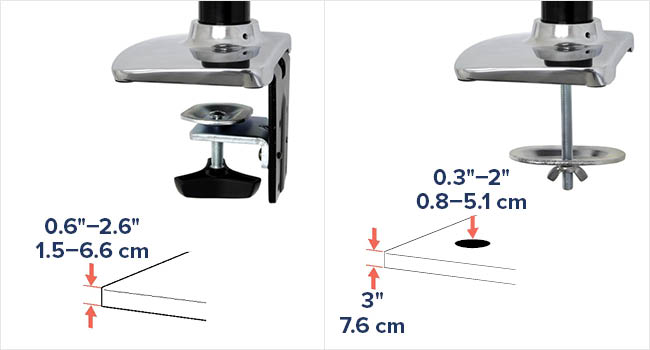
Image: Diagram showing desk clamp and grommet mount installation methods and their respective desk compatibility.
Attaching Monitors
Once the arm is securely mounted to your desk, attach your VESA-compatible monitors to the mounting plates. Ensure all screws are tightened appropriately to secure the monitors.
Video: This video demonstrates the key features and benefits of the LX Side-by-Side Dual Monitor Arm, including its installation process and various adjustment capabilities. It highlights how the arm can be easily moved and positioned, freeing up desk space and maintaining organized cables.
Betjeningsvejledning
The Ergotron LX Dual Monitor Arm provides fluid and dynamic adjustments to position your monitors precisely where you need them.
Højdejustering
The arm offers 13 inches (33 cm) of vertical lift, allowing you to raise or lower your monitors to an ergonomic viewing height. Gently push or pull the monitor to the desired height. The arm's constant force technology will hold it in place.
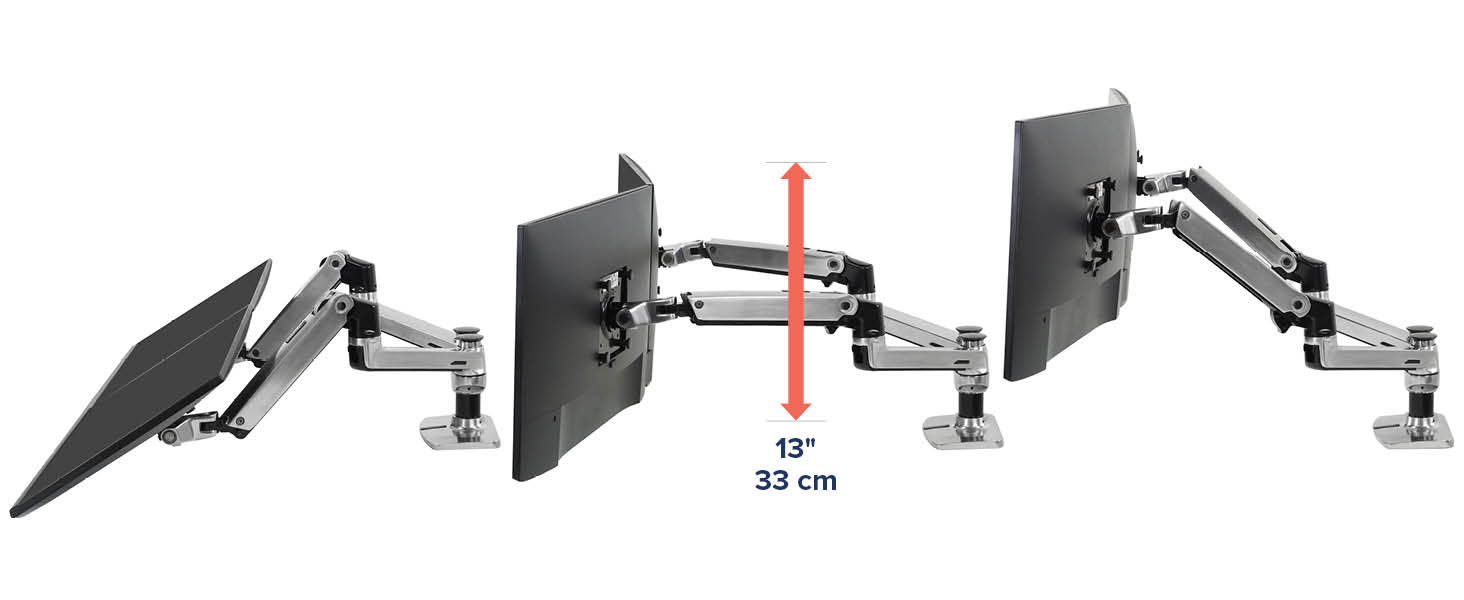
Image: Illustration of the monitor arm's vertical adjustment range, showing 13 inches (33 cm) of lift.
Extension and Retraction
Extend or retract the arms to bring your monitors closer or push them further away, creating optimal viewing distance and freeing up desk space when not in use. The arm provides a total extension of 25 inches (63.5 cm).
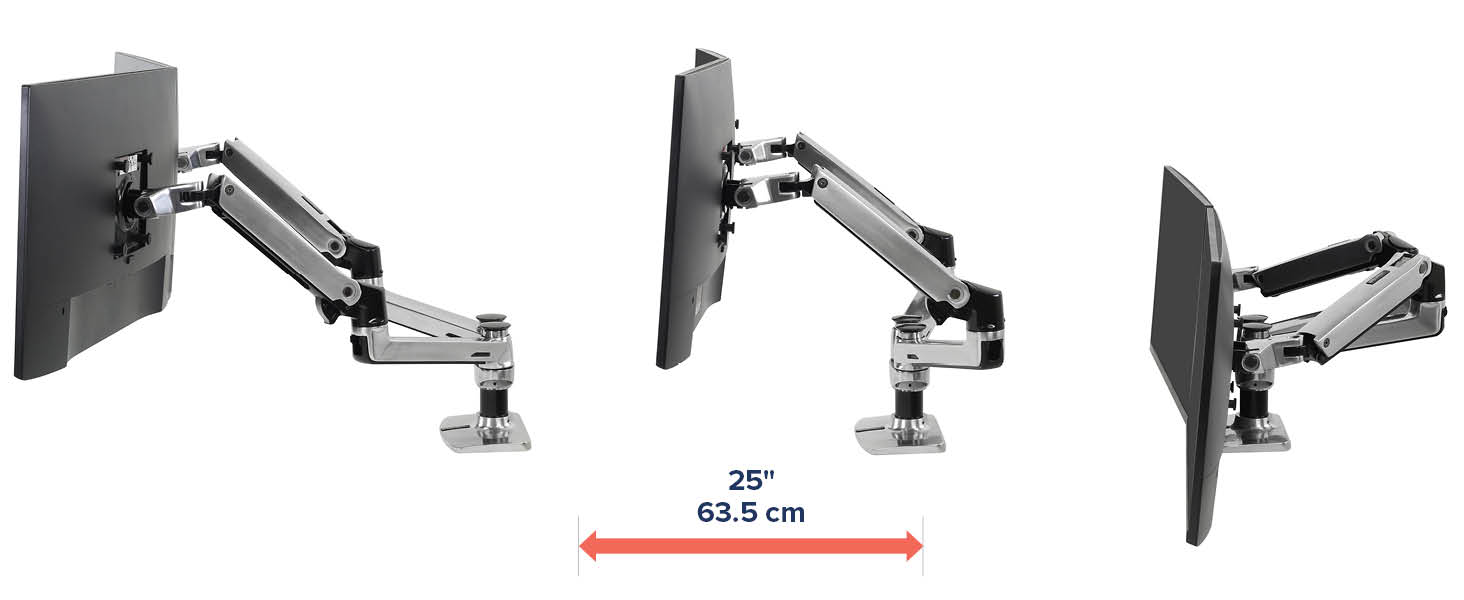
Image: Illustration of the monitor arm's horizontal extension and retraction capabilities.
Hældning og rotation
Each monitor can be tilted up to 75 degrees and rotated 360 degrees, allowing for portrait or landscape viewing and easy screen sharing.
Kabelstyring
Route your monitor cables through the integrated cable management channels along the arms and pole to maintain a tidy and organized workspace.

Image: A diagram illustrating the proper routing of cables through the monitor arm's integrated cable management system.
Opretholdelse
To ensure the longevity and optimal performance of your Ergotron LX Dual Monitor Arm, follow these maintenance guidelines:
- Rensning: Wipe down the arm surfaces with a soft, damp klud. Undgå slibende rengøringsmidler eller opløsningsmidler, der kan beskadige overfladen.
- Periodisk eftersyn: Regularly check all mounting points and adjustment mechanisms to ensure they are secure and functioning correctly. Tighten any loose fasteners as needed.
- Kabelstyring: Periodically inspect cables routed through the arm to ensure they are not pinched or stressed, which could lead to damage.
Fejlfinding
If you encounter issues with your monitor arm, consider the following common troubleshooting steps:
- Skærm der hænger ned eller ikke holder positionen: The tension in the arm may need adjustment. Refer to the installation guide for instructions on adjusting the arm's tension to match your monitor's weight.
- Vanskeligheder med at bevæge armen: If the arm is too stiff, the tension may be too high. Adjust the tension as described above. Ensure no cables are obstructing movement.
- Unstable Mount: Bekræft at skrivebordet eramp or grommet mount is securely fastened to the desk. Check for any wobbling at the base.
- Skærme er ikke i vater: Use the fine-tuning adjustments on the VESA mounting plates to level your monitors.
For further assistance, please contact Ergotron customer support.
Specifikationer
| Feature | Detalje |
|---|---|
| Produktdimensioner | 19.4 x 18.1 x 7 tommer |
| Varens vægt | 13.86 pund |
| Varemodelnummer | 45-245-224 |
| Monteringstype | Bordmontering (Clamp eller Grommet) |
| Bevægelsestype | Artikulerende |
| Mærke | Ergotron |
| Materiale | Metal |
| Farve | Mat sort |
| Kompatible enheder | Monitors up to 27 inches, 7 to 20 lbs each |
| Maksimal hældningsvinkel | 75 grader |
| VESA-kompatibilitet | 75x75mm, 100x100mm |
| Skrivebord Clamp Tykkelse | 0.63 til 2.6 tommer (1.5 til 6.6 cm) |
| Grommet Mount Hole Size | Up to 2 inches (5.1 cm) wide, 3 inches (7.6 cm) deep |
| Fabrikant | Ergotron |
| Dato først tilgængelig | 19. marts 2019 |
Garanti og support
Ergotron products are known for their quality and durability. The LX Dual Monitor Arm comes with a 10 års garanti, ensuring your investment is protected. For technical support, warranty claims, or any product-related inquiries, please visit the official Ergotron webwebsted eller kontakt deres kundeserviceafdeling.
Du kan finde flere oplysninger og supportressourcer på Ergotron Store on Amazon.


