1. Introduktion
Thank you for choosing the Hoco E30 Wireless Earphone. This manual provides essential information for setting up, operating, and maintaining your earphone. Please read it carefully before use to ensure optimal performance and longevity of your device.
2. Sikkerhedsoplysninger
To prevent damage to your device or injury to yourself and others, please observe the following safety precautions:
- Undgå langvarig eksponering for høje lydstyrker for at forhindre høreskader.
- Do not use the earphone while driving or in situations where you need to be aware of your surroundings.
- Hold enheden væk fra vand, fugt og ekstreme temperaturer.
- Do not attempt to disassemble, repair, or modify the earphone. This will void the warranty.
- Brug kun de medfølgende eller certificerede opladningskabler og adaptere.
- Opbevares utilgængeligt for børn og kæledyr.
3. Pakkens indhold
Markér venligst feltet for følgende elementer:
- Hoco E30 Wireless Earphone
- USB opladningskabel
- Brugermanual
4. Produktet er slutview
Familiarize yourself with the components of your Hoco E30 Wireless Earphone:

Figur 4.1: Side view of the Hoco E30 Wireless Earphone, highlighting its sleek design and ear hook.

Figur 4.2: The Hoco E30 Wireless Earphone positioned next to a smartphone, illustrating its compact size and wireless connectivity.
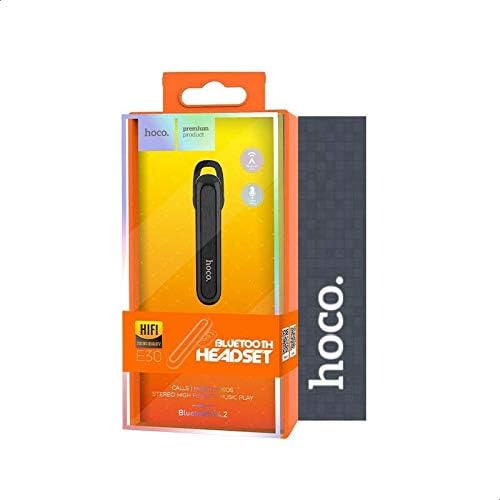
Figur 4.3: The retail packaging for the Hoco E30 Wireless Earphone, displaying branding and key features.
5. Opsætning
5.1 Opladning af øretelefonerne
Before first use, fully charge your Hoco E30 earphone.
- Connect the provided USB charging cable to the charging port on the earphone.
- Tilslut den anden ende af USB-kablet til en DC 5V strømkilde (f.eks. en USB-vægadapter eller en computers USB-port).
- Opladningsindikatorlampen lyser.
- Charging typically takes approximately 2 hours. The indicator light will change or turn off once charging is complete.
5.2 Parring med en enhed
To connect your Hoco E30 earphone to your smartphone or other Bluetooth-enabled device:
- Ensure the earphone is fully charged and turned off.
- Tryk og hold multifunktionsknappen på øretelefonen nede, indtil indikatorlampen blinker skiftevis rødt og blåt, hvilket angiver, at den er i parringstilstand.
- Aktiver Bluetooth på din enhed, og søg efter tilgængelige enheder.
- Vælg "Hoco E30" fra listen over fundne enheder.
- Once paired, the indicator light on the earphone will flash blue slowly, and you will hear a confirmation tone.
- The earphone has a transmission range of up to 10 meters (33 feet).
6. Betjeningsvejledning
6.1 Tænd/sluk
- Tænd: Press and hold the multi-function button for approximately 3 seconds until the blue indicator light flashes and you hear a power-on tone.
- Sluk: Press and hold the multi-function button for approximately 5 seconds until the red indicator light flashes and you hear a power-off tone.
6.2 Opkaldshåndtering
- Besvar opkald: Briefly press the multi-function button when an incoming call rings.
- Afslut opkald: Tryk kort på multifunktionsknappen under et opkald.
- Afvis opkald: Tryk på multifunktionsknappen og hold den nede i 2 sekunder, når et indgående opkald ringer.
- Genopkald sidste nummer: Dobbelttryk på multifunktionsknappen, når du ikke er i gang med et opkald.
6.3 Musikafspilning
- Afspil/pause: Briefly press the multi-function button to play or pause music.
- Næste nummer: Press and hold the multi-function button for 2 seconds to skip to the next track.
- Forrige nummer: Press and hold the multi-function button for 2 seconds (during playback) to go to the previous track.
Note: The Hoco E30 supports A2DP and AVRCP protocols for high-quality audio streaming and remote control. Volume control is typically managed via the connected device.
6.4 Batteristatusvisning
The Hoco E30 earphone supports battery level display on compatible Apple iOS devices and some Android smartphones. Check your device's notification bar or Bluetooth settings for this feature.
7. Vedligeholdelse
- Rensning: Brug en blød, tør klud til at rengøre øretelefonerne. Brug ikke skrappe kemikalier eller slibende materialer.
- Opbevaring: Opbevar øretelefonerne et køligt, tørt sted væk fra direkte sollys og ekstreme temperaturer.
- Batteripleje: For at forlænge batteriets levetid bør du undgå at aflade øretelefonerne helt ofte. Oplad dem regelmæssigt, selvom de ikke er i brug i længere perioder.
8. Fejlfinding
If you encounter issues with your Hoco E30 earphone, try the following solutions:
| Problem | Løsning |
|---|---|
| Høretelefonerne tændes ikke. | Ensure the earphone is fully charged. Connect it to a power source and try again. |
| Kan ikke parres med enheden. |
|
| Ingen lyd eller dårlig lydkvalitet. |
|
| Opladning virker ikke. |
|
9. Specifikationer
| Feature | Detalje |
|---|---|
| Model | E30 |
| Bluetooth version | V4.2 WT |
| Understøttede protokoller | Headset, håndfri, A2DP, AVRCP |
| Transmission Range | 10 meter (33 fod) |
| Transmissionsfrekvens | 2.4 GHz |
| Opladning Voltage | DC 5V |
| Opladningstid | Ca. 2 timer |
| Batterikapacitet | 60 mAh |
| Taletid | Ca. 3.5 timer |
| Musik afspilningstid | Ca. 3.5 timer |
| Standby tid | Ca. 110 timer |
| Netto produktvægt | 6 gram |
| Dimensioner (L x B x H) | 58 mm x 14 mm x 25 mm |
| Materiale | Plast |
| Kontrolmetode | Røre |
| Farve | Sort og sølv |
10. Garanti og support
Hoco products are designed and manufactured to the highest quality standards. This product is covered by a limited warranty from the date of purchase. Please refer to the warranty card included in your package for specific terms and conditions.
For technical support or warranty claims, please contact your local Hoco distributor or visit the official Hoco webside for mere information.