
1. Introduktion
This manual provides detailed instructions for the installation, operation, and maintenance of your EMANER Model 7042-WH Dual-Head LED Security Light. Please read this manual thoroughly before installation and retain it for future reference.

Front view of the EMANER Dual-Head LED Security Light, highlighting its two rotatable light heads and motion sensor. A 120V warning label is visible.
2. Sikkerhedsoplysninger
ADVARSEL: Risk of electric shock. Disconnect power at the fuse or circuit breaker before installation or servicing. All wiring connections must be in accordance with local and national electrical codes.
- Ensure the power supply is 120V AC.
- Installer ikke i nærheden af brændbare materialer.
- This product is designed for outdoor use and is IP65 waterproof rated.
- Kontakt en kvalificeret elektriker, hvis du er usikker på installationsprocessen.
- Se ikke direkte ind i LED-lyskilden, når den er tændt.
3. Produktet er slutview og komponenter
The EMANER Model 7042-WH is a dual-head LED security light featuring a rotatable design and multiple intelligent control modes. Key components include:
- Drejelige lyshoveder: Two adjustable LED light panels.
- PIR Motion Sensor: Passiv infrarød sensor til bevægelsesdetektion.
- Kontrolknapper: For adjusting time delay and sensitivity.
- Monteringshardware: Includes mounting strap, screws, and wire nuts.

A diagram providing precise measurements of the security light's length, width, height, and the dimensions of the rotatable light heads and PIR motion sensor.
4. Specifikationer
| Feature | Specifikation |
|---|---|
| Mærke | EMANER |
| Modelnummer | 7042-WH |
| Farve | White Fixture |
| Materiale | ABS Plastic + Aluminum internal |
| Lyskildetype | LED |
| Wattage | 28 watt |
| Lysstyrke | 2800 lumen |
| Farvetemperatur | 5000K dagslys hvid |
| Voltage | 120 volt |
| Vandmodstandsniveau | IP65 vandtæt |
| Følende vinkel | 180 grader |
| Detektionsafstand | 20-70 feet (adjustable) |
| Monteringstype | Wall mount, Eave/Soffit mount |
| Produktdimensioner | 9 cm L x 7.4 cm B x 6.4 cm H |
| Varens vægt | 1.74 pund |
5. Opsætning og installation
This LED security light is designed for easy installation. Follow these steps carefully:
5.1 Forinstallation
- Sluk for strømmen: Disconnect power at the circuit breaker or fuse box before beginning installation.
- Select mounting location: Choose a wall or eave/soffit location that provides the desired coverage and is within reach of existing wiring. Recommended mounting height is 6.5-12 feet.
- Udpak indholdet: Ensure all components are present: light fixture, mounting strap, screws, and wire nuts.
5.2 Ledningsføring og montering
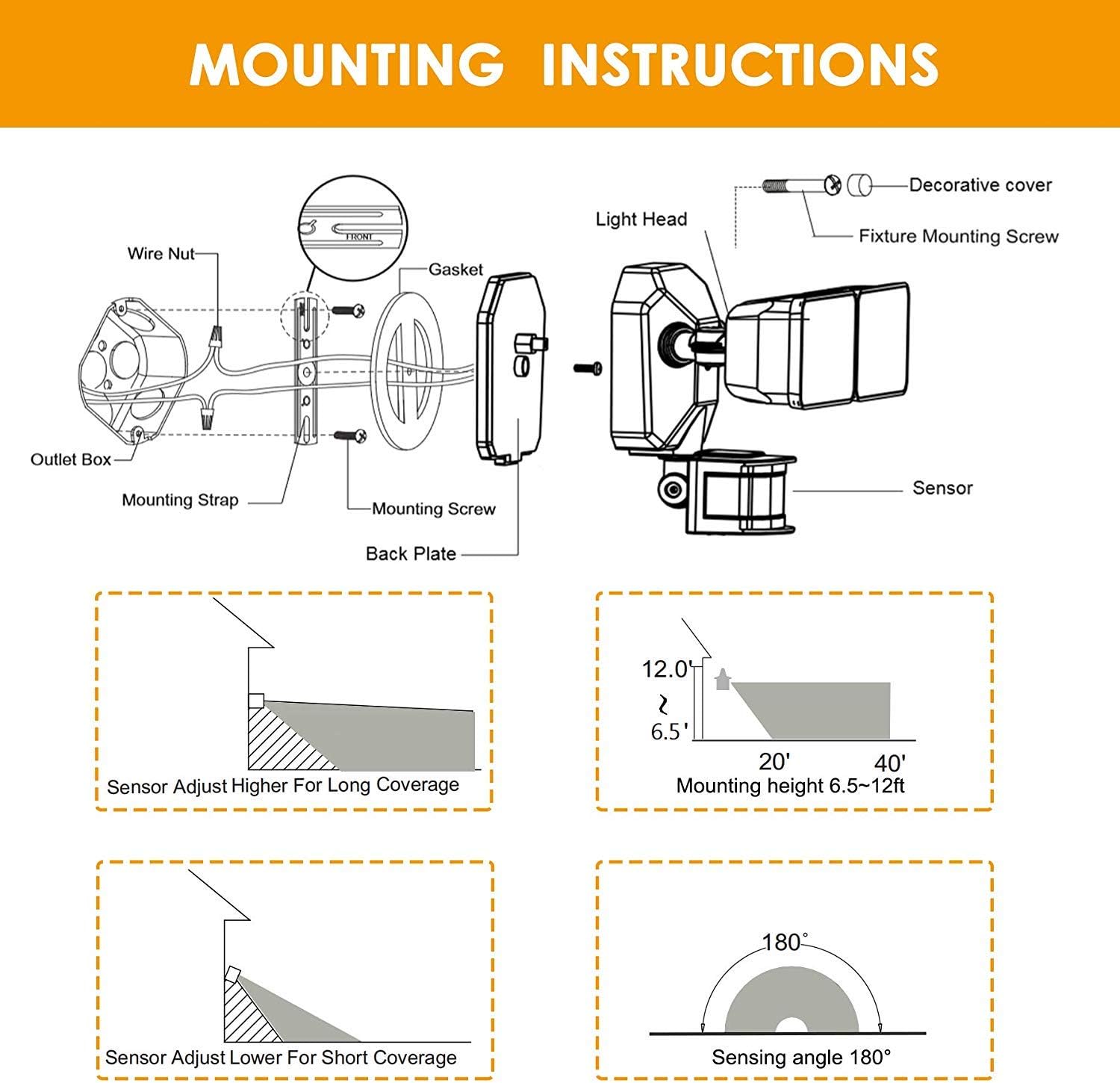
- Attach the mounting strap to your existing electrical outlet box using the provided screws.
- Tilslut de elektriske ledninger:
- Tilslut sort (Spændende) ledning fra armaturet til sort (Følgende) ledning fra stikkontaktdåsen.
- Tilslut hvid (Neutral) ledning fra armaturet til hvid (Neutral) ledning fra stikkontakten.
- Tilslut grøn/bart kobber (Jord)ledning fra armaturet til grøn/bart kobber (Jord)ledning fra stikkontakten.
- Carefully tuck the wires into the outlet box.
- Align the light fixture with the mounting strap and secure it with the decorative cover and fixture mounting screw.
- Adjust the light heads and motion sensor to your desired angles.
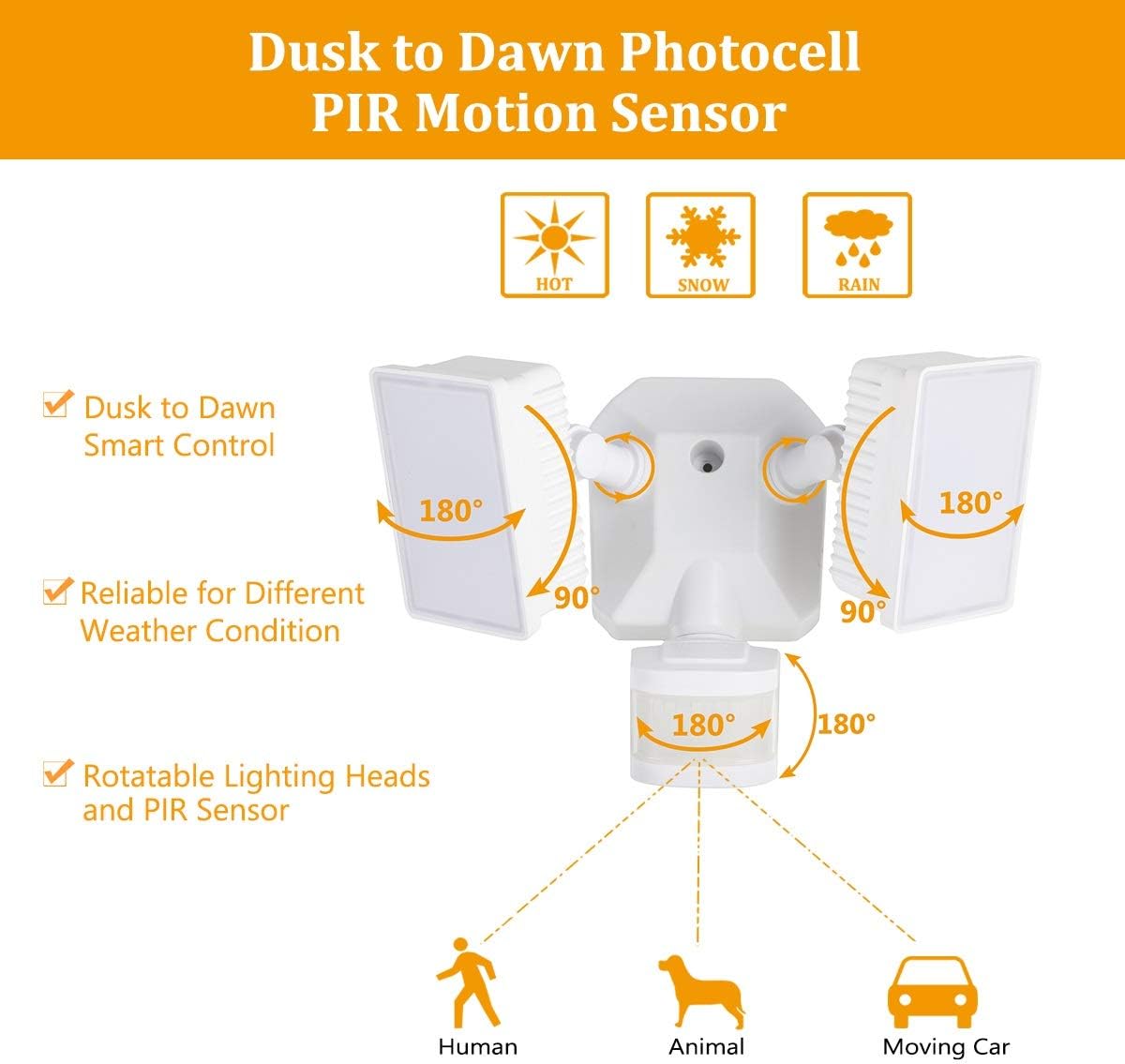
Diagram for installing the security light, detailing wire connections, mounting strap, back plate, and attaching the light head and sensor.
Illustrations showing two common installation methods: mounting the light under an eave or soffit, and mounting it directly onto a wall.
6. Driftstilstande og indstillinger
The security light features a control panel with dials for TIME and SENSITIVITY, and a slide switch for selecting operating modes. All modes operate only at night or in dark environments, automatically turning off at dawn.

An infographic explaining the various operating modes: TEST, AUTO, Motion Sensor, 6 Hours, and Dusk to Dawn (PC) modes, along with their respective time delay and sensitivity settings.
6.1 Kontrolpanel overview

Detaljeret view of the control panel, showing the 'TIME' dial (5S, 3MIN, TEST) and 'SENSITIVITY' dial (+/-) for adjusting light duration and motion detection range.
- TIME Dial: Adjusts how long the light stays on after motion is detected (5 seconds to 3 minutes). The 'TEST' setting is for initial setup.
- SENSITIVITY Dial: Adjusts the motion sensor's detection range (Low to High sensitivity, 20-70 feet).
- Tilstandsskydeknap: Selects between AUTO, OFF (Motion Sensor), 6H (6 Hours), and PC (Dusk to Dawn Stay On) modes.
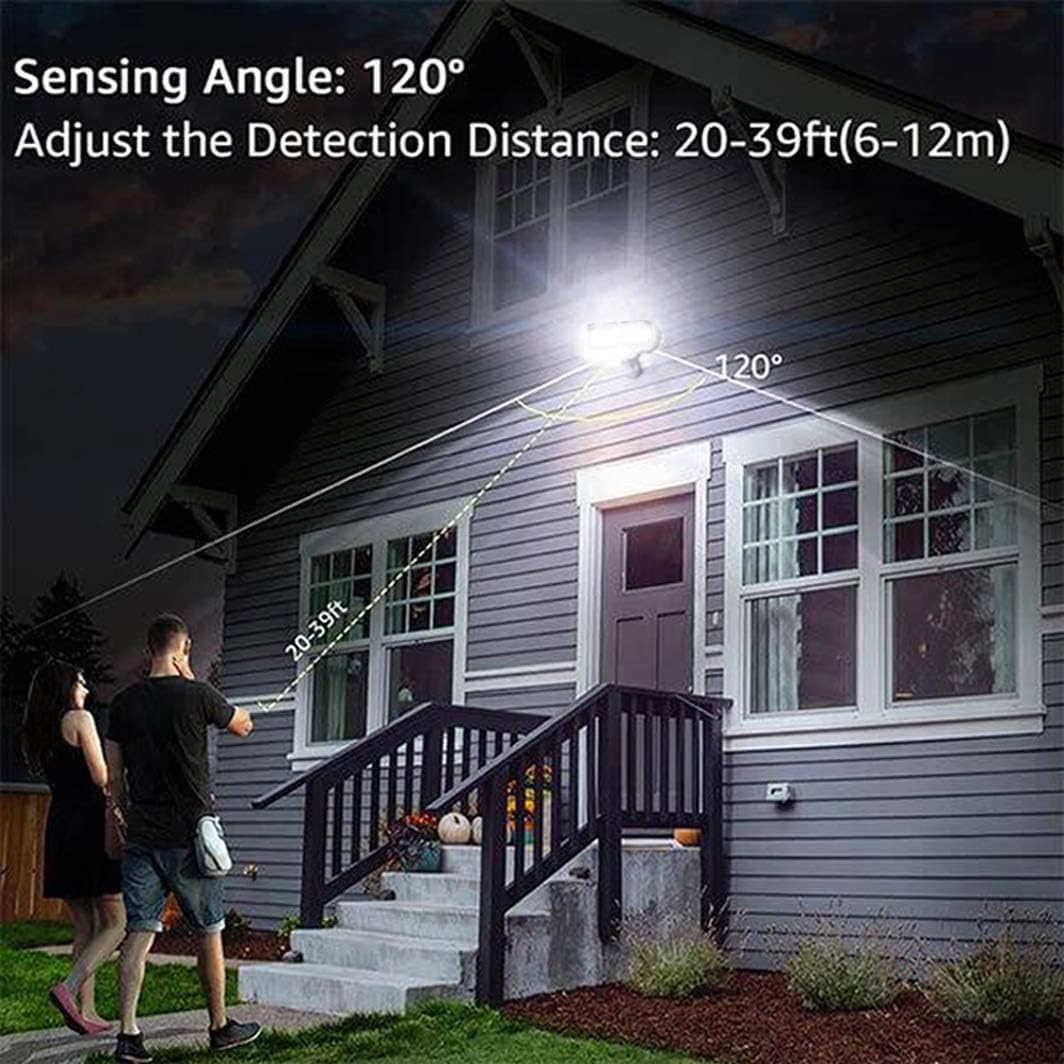
An illustration demonstrating the motion sensor's 120-degree sensing angle and adjustable detection distance of 20-39 feet (6-12 meters) from a mounting height of 6.5-12 feet.
6.2 driftstilstande
- TEST-tilstand: (Slide switch to 'TEST' on TIME dial) This mode is for testing after installation. When connected to AC power, the light will turn on for 5 seconds based on the time delay setting.
- AUTO Dim Light Mode: (Slide switch to 'AUTO') The security light turns on with dim light at dusk. When motion is detected, it switches to 100% brightness. After no motion is detected for the set time delay (5 seconds to 3 minutes), it returns to dim light. Automatically turns off at dawn.
- Motion On/Off Mode: (Slide switch to 'OFF') The security flood light only turns on at 100% brightness when motion is activated. It automatically turns off when no motion is detected for the set time delay. Automatically turns off at dawn.
- 6 Hours Mode: (Slide switch to '6H') The flood light turns on at 100% brightness and stays on for 6 hours. After 6 hours, it automatically switches to 'AUTO Dim Light Mode'. Automatically turns off at dawn.
- Dusk to Dawn Stay On Mode (PC Mode): (Slide switch to 'PC') The motion security light turns on with bright light (100% brightness) and stays on all night. It automatically turns off in the daytime.
7. Vedligeholdelse
Regular maintenance ensures optimal performance and longevity of your EMANER LED Security Light.
- Rensning: Rengør lampehovederne og bevægelsessensorlinsen med jævne mellemrum med en blød klud.amp klæde. Brug ikke slibende rengøringsmidler eller opløsningsmidler.
- Inspektion: Annually inspect the wiring and mounting for any signs of wear, damage, or loose connections.
- Ingen dele, der kan serviceres af brugeren: The LED light source is non-removable and not user-serviceable. Do not attempt to open the light heads.
8. Fejlfinding
Hvis du støder på problemer med din sikkerhedslampe, kan du se følgende almindelige problemer og løsninger:
| Problem | Mulig årsag | Løsning |
|---|---|---|
| Lyset tænder ikke om natten. | 1. Strømmen er slukket. 2. Photocell sensor is detecting ambient light. 3. Ledningsproblem. | 1. Kontroller afbryderen/sikringen. 2. Ensure the sensor is not obstructed or exposed to other light sources. 3. Verify all wiring connections are secure. |
| Lyset forbliver tændt konstant. | 1. Mode set to 'PC' (Dusk to Dawn Stay On). 2. Constant motion detected. 3. Wiring error. | 1. Change mode to 'AUTO' or 'OFF'. 2. Adjust sensor sensitivity or angle to avoid constant triggers. 3. Kontroller ledningerne igen. |
| Light flashes or cycles on/off rapidly. | 1. Intermittent power supply. 2. Sensor interference. 3. Faulty unit. | 1. Kontroller strømtilslutningerne. 2. Ensure no objects are moving within the sensor's range. 3. Kontakt kundesupport, hvis problemerne fortsætter. |
| Bevægelsessensor registrerer ikke. | 1. Følsomhed indstillet for lavt. 2. Sensor obstructed or misaligned. 3. Temperature too high (reduces PIR effectiveness). | 1. Increase SENSITIVITY setting. 2. Clear obstructions and adjust sensor angle. 3. This is normal behavior in very hot weather. |
9. Garantioplysninger
The EMANER Model 7042-WH LED Security Light comes with a 2 års producentgarantiDenne garanti dækker materiale- og fabrikationsfejl ved normal brug. Gem venligst din købsbevis i tilfælde af garantikrav.
10. Kundesupport
For technical assistance, warranty claims, or any questions regarding your EMANER product, please contact EMANER customer service. You can typically find contact information on the product packaging or through the retailer where the product was purchased.
Alternatively, you may visit the official EMANER brand store online or use the 'Ask a question' feature on the product's retail page.