
1. Vigtige sikkerhedsoplysninger
Please read all safety instructions carefully before using your monitor. Keep this manual for future reference.
- Anbring ikke skærmen på en ustabil vogn, stativ, stativ, beslag eller bord.
- Sørg for tilstrækkelig ventilation omkring skærmen. Bloker ikke ventilationsåbningerne.
- Brug kun den netledning og adapter, der følger med skærmen.
- Avoid exposing the monitor to rain or moisture to prevent fire or electric shock.
- Åbn ikke skærmen casing. Overlad al service til kvalificeret servicepersonale.
- Unplug the monitor from the wall outlet during lightning storms or when unused for long periods.
2. Pakkens indhold
Bekræft, at alle varer er til stede i din produktpakke:
- Samsung LC27F396FHNXZA 27-Inch Curved Monitor
- Stativbase
- Stå hals
- Power Adapter and Power Cable (1.5 m)
- HDMI kabel
- Hurtig installationsvejledning
- Garantikort
3. Opsætning
3.1 Samling af stativet
- Placer forsigtigt skærmen med forsiden nedad på en blød, ren klud for at undgå ridser.
- Fastgør stativets hals på bagsiden af skærmen, indtil den klikker på plads.
- Connect the stand base to the stand neck by aligning the tabs and tightening the screw at the bottom of the base.

3.2 Tilslutningskabler
Ensure the monitor and your computer are powered off before connecting any cables.
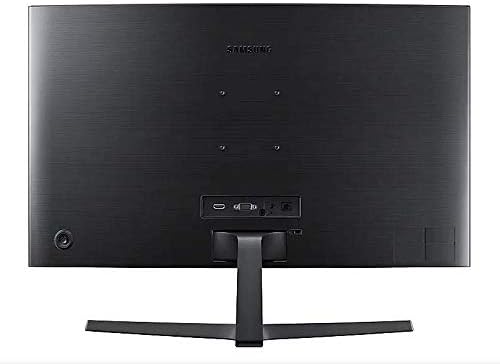
- Strømkabel: Connect the power adapter to the monitor's power input, then plug the power cable into the adapter and a wall outlet.
- Video Cable (HDMI or VGA): Connect one end of the HDMI or VGA cable to the corresponding port on your computer's graphics card and the other end to the HDMI or VGA input on the monitor. Ensure cables are tightened securely.
- Lydkabel (valgfrit): If you wish to use external speakers or headphones, connect a 3.5mm audio cable from your computer's audio output to the monitor's 3.5mm audio input.
3.3 Tænd
Når du har tilsluttet alle nødvendige kabler, skal du tænde computeren og derefter trykke på tænd/sluk-knappen på skærmen. Skærmen burde automatisk registrere indgangssignalet.
4. Betjening af monitoren
4.1 Basic Functions and OSD Menu
The monitor features a single joystick button located on the back for navigating the On-Screen Display (OSD) menu. Press the joystick to open the OSD menu, then move it up/down/left/right to select and adjust settings.
4.2 Billedindstillinger
Adjust picture quality settings via the OSD menu:
- Lysstyrke/kontrast: Adjust these to your preferred viewniveauer.
- Opløsning: The optimal resolution for this monitor is 1920 x 1080 (FHD 1080p).
- Aspektforhold: Set to 16:9 for widescreen content.
- MagicBright: Select from various preset modes (e.g., Standard, Cinema, Dynamic Contrast) for optimized viewing miljøer.
- Aktiv krystalfarve: Enhances color reproduction for a more vibrant display.

4.3 AMD FreeSync and Game Mode
This monitor supports AMD FreeSync technology, which synchronizes the screen refresh rate with your graphics card's frame rate to reduce input latency and minimize image tearing and stutter during gaming. Enable FreeSync through the OSD menu for a smoother gaming experience.

4.4 Curved Display Benefits
The 1800R curvature of this monitor is designed to match the natural curve of the human eye, providing a more immersive viewing experience. This curvature helps to reduce peripheral distractions and enhances depth perception, drawing you deeper into your content.

5. Vedligeholdelse
5.1 Rengøring af monitoren
- Tag altid stikket ud af skærmen før rengøring.
- Brug let en blød, fnugfri klud damprengøres med vand eller en specialiseret skærmrenser.
- Sprøjt ikke rengøringsmiddel direkte på skærmen.
- Undgå at bruge slibende rengøringsmidler, voks eller opløsningsmidler.
5.2 Opbevaring
When storing the monitor for an extended period, ensure it is kept in a cool, dry place, preferably in its original packaging to protect it from dust and physical damage.
6. Fejlfinding
Hvis du støder på problemer med din skærm, kan du se følgende almindelige fejlfindingstrin:
| Problem | Mulig løsning |
|---|---|
| Ingen strøm | Ensure the power cable is securely connected to the monitor, power adapter, and wall outlet. Check if the wall outlet is functioning. |
| Intet signal / Blank skærm | Verify that the video cable (HDMI/VGA) is firmly connected to both the monitor and the computer. Try a different video input source on the monitor if available. Ensure the computer is powered on and not in sleep mode. |
| Distorted Image / Incorrect Resolution | Adjust the display resolution on your computer to 1920 x 1080. Check the video cable for damage. |
| Screen Tearing / Stuttering (during gaming) | Ensure AMD FreeSync is enabled in the monitor's OSD menu and your graphics card settings. |
| Monitor does not wake up from sleep | Try unplugging and replugging the monitor's power cable. Check your computer's power management settings. |
7. Specifikationer
| Feature | Detalje |
|---|---|
| Modelnummer | LC27F396FHNXZA |
| Skærmstørrelse | 27 tommer |
| Opløsning | 1920 x 1080 (FHD 1080p) |
| Aspektforhold | 16:9 |
| Skærmkurvatur | 1800R |
| Paneltype | VA |
| Svartid | 4 millisekunder |
| Opdateringshastighed | 60 Hz |
| Forbindelse | 1x HDMI, 1x VGA, 1x 3.5mm Audio Out |
| Adaptiv synkroniseringsteknologi | AMD FreeSync |
| Strømforbrug | 25 Watts (Typical) |
| Dimensioner (med stativ) | 62.28 x 24.26 x 46.61 cm (24.5" x 9.6" x 18.4") |
| Vægt (med stativ) | 4.1 kg (9.04 pund) |
| Monteringstype | Vægmonterbar |
8. Garanti og support
8.1 Producentens garanti
This Samsung monitor is covered by a 1 års producentgaranti fra købsdatoen. Gem venligst din købsbevis i forbindelse med garantikrav. Garantien dækker materiale- og fabrikationsfejl ved normal brug.
8.2 Kundesupport
For technical assistance, troubleshooting, or warranty service, please contact Samsung Customer Support. You can find contact information on the official Samsung webwebsted for din region.
Fabrikantens kontaktoplysninger: Mississauga, ON L5M 9Z9, CA
For mere information, besøg den officielle Samsung Canada Support webwebsted.


