
SINGTRONIC 2500W Complete Karaoke System
Singtronic 2500W Complete Karaoke System Instruction Manual
Brand: SINGTRONIC | Model: 2500W Complete Karaoke System
Indledning
This manual provides comprehensive instructions for the setup, operation, and maintenance of your Singtronic 2500W Complete Karaoke System. Designed for optimal audio performance, this system offers a rich karaoke experience with extensive song libraries and versatile connectivity options.
Hvad er der i æsken
- Singtronic KSP-1500ProB Digital 2500W Amplivligere
- 2 x Singtronic Anti-Feedback Wireless Microphones
- Singtronic KS-550Pro Vocalist 2000W Speakers (Pair)
- Singtronic KTV-15.6UHD Touch Screen 5TB Smart 4K with 50,000 Preloaded Songs
- Singtronic Heavy Duty Tripod Speaker Stands (Pair)
- All necessary cables and accessories

Image: All components of the Singtronic 2500W Complete Karaoke System, including amplifier, speakers, microphones, touch screen, and stands.
Opsætningsinstruktioner
- Udpak komponenter: Fjern forsigtigt alle varer fra emballagen.
Image: The complete karaoke system with all its components ready for setup.
- Assemble Speaker Stands: Extend the tripod legs of the speaker stands and secure them. Adjust the height as desired.

Billede: Detaljeret view of the speaker stands, showing adjustable height and stable tripod base.
- Monter højttalere: Place each Singtronic KS-550Pro speaker onto the assembled tripod stands. Ensure they are stable.

Image: A pair of Singtronic KS-550Pro speakers, designed for clear vocal and music output.
- Forbinde Amplivligere: Place the Singtronic KSP-1500ProB Digital 2500W Amplifier in a central location. Connect the speakers to the amplifier using the provided banana plug speaker connectors.

Image: Front panel of the Singtronic amplifier, showing controls and microphone inputs.
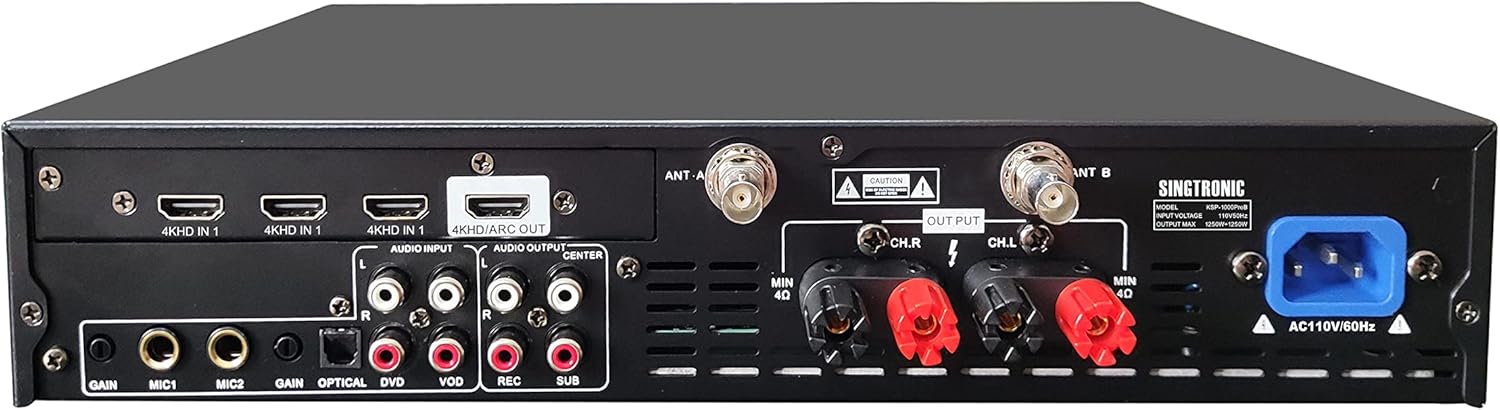
Image: Rear panel of the Singtronic amplifier, highlighting various audio input/output ports including HDMI, Optical, RCA, and speaker connections.
- Connect Touch Screen: Connect the KTV-15.6UHD Touch Screen to the amplifier using the appropriate cables (e.g., HDMI for video, RCA for audio if needed).
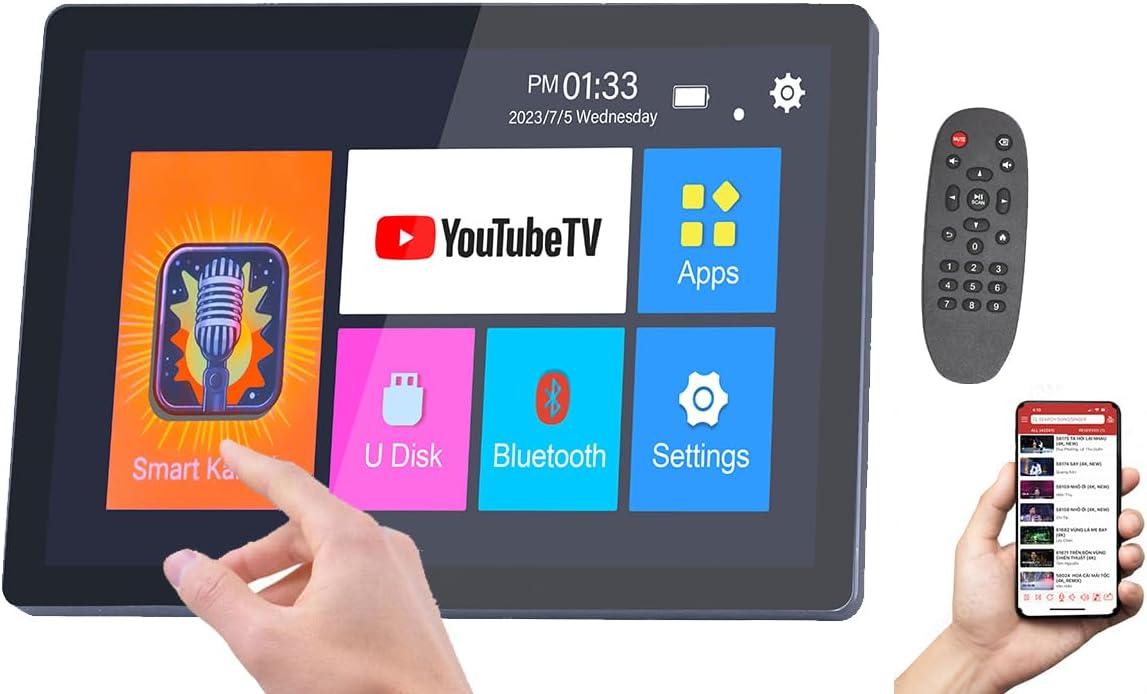
Image: The touch screen interface of the karaoke system, displaying app icons like YouTube TV, Smart Karaoke, and Settings.
- Tænd: Tilslut amplifier and touch screen to a power source and turn them on.
- Mikrofonopsætning: Ensure the wireless microphones are charged and powered on. They should automatically pair with the amplivligere.
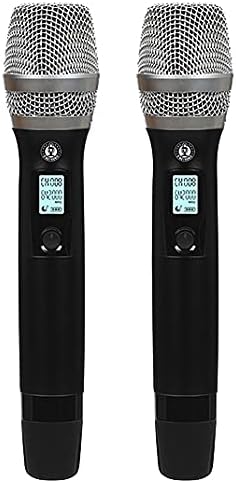
Image: A pair of Singtronic Anti-Feedback Wireless Microphones, featuring digital displays.
- Videovejledning: For a visual guide on setting up your karaoke system, please refer to the official setup video below.
Video: Official Singtronic setup guide for the 2500W Digital Karaoke System. This video demonstrates the step-by-step process of connecting all components for initial use.
Betjeningsvejledning
Navigation på berøringsskærm
The KTV-15.6UHD Touch Screen operates on an Android-based interface. Navigate through apps like "Smart Karaoke" for preloaded songs, "YouTube TV" for unlimited online content, or "Bluetooth" to connect your smartphone or tablet.
Mikrofonbrug
- Power on each wireless microphone using its dedicated button.
- Adjust microphone volume, treble, echo, and delay using the dedicated controls on the amplifiers toppanel.
- The built-in Anti-Feedback technology helps prevent unwanted audio feedback.
Lydjustering
De amplifier features a Built-in Digital Equalizer with individual controls for Music, Microphone, and Effect. Use these knobs to fine-tune your audio output. The Built-in BBE Sonic Maximizer enhances both vocal and music clarity.
Medieafspilning
- Preloaded Songs: Access 50,000 preloaded songs via the "Smart Karaoke" app on the touch screen.
- YouTube: Connect to Wi-Fi and use the "YouTube TV" app for an extensive library of karaoke content.
- Eksterne enheder: Use Digital Optical / Coax Audio Input to connect directly from any Smart TV. HDMI, RCA, and Bluetooth connectivity are also available for other devices like smartphones or tablets.
Opretholdelse
- Keep the system clean by wiping surfaces with a soft, dry cloth.
- Avoid exposing the system to excessive moisture or extreme temperatures.
- Store microphones in a dry place when not in use.
- Sørg for ordentlig ventilation til ampfor at forhindre overophedning.
Fejlfinding
- Ingen lydoutput:
- Check all cable connections (power, speakers, audio inputs).
- Sørg for amplifier and speakers are powered on and volume levels are adequate.
- Verify the correct input source is selected on the amplifier/touch screen.
- Microphone Feedback/Howling:
- Skru ned for mikrofonens lydstyrke.
- Juster mikrofonens diskant-, ekko- og forsinkelsesindstillinger på kontrolpanelet.
- Avoid pointing microphones directly at speakers.
- Karaoke Function Not Working:
- Ensure the touch screen is properly connected and the karaoke app is running.
- Check internet connection for YouTube-based karaoke.
Specifikationer
| Feature | Detalje |
|---|---|
| Max effekt | 2500W (1250W + 1250W) |
| Produktdimensioner | 12 x 12 x 22.4 tommer |
| Farve | Sort |
| Kompatible enheder | Amplifier, Smartphone, Tablet |
| Connector Type | HDMI, Optical, RCA, Bluetooth |
| Talertal | 2 (Par) |
| Medieformat | Digital lyd |
| Strømkilde | AC, elektrisk ledning |
| Særlige funktioner | Touch Screen, Built-in Microphone, Digital Key Pitch Control, Anti-Feedback, BBE Sonic Maximizer |
Garanti & Support
For warranty information or technical support, please refer to the documentation included with your product or contact Singtronic customer service directly. Contact details can typically be found on the manufacturer's webwebstedet eller i produktets hurtigstartvejledning.
Ask a question about this manual
Ask about setup, troubleshooting, compatibility, parts, safety, or missing instructions. Manuals+ will review the question and use this page’s manual context to help answer it.