
Indledning
Welcome to the Ipega PG-9033 Bluetooth Gamepad user manual. This guide provides detailed instructions for setting up, operating, maintaining, and troubleshooting your new wireless controller. Please read this manual carefully before use to ensure optimal performance and longevity of your device.
Produkt overview
The Ipega PG-9033 is a versatile Bluetooth gamepad designed for an enhanced gaming experience across multiple platforms, including Android, iOS, and PC. It features an adjustable phone holder, dual analog sticks, a D-pad, and action buttons.

Figure 1: The Ipega PG-9033 Bluetooth Gamepad with a smartphone securely mounted in its adjustable holder, actively displaying a racing game. This illustrates the controller's primary use for mobile gaming.
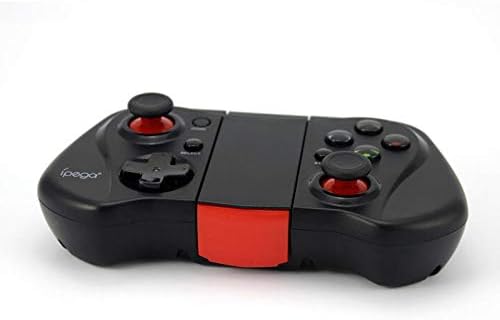
Figur 2: En side view of the Ipega PG-9033 Bluetooth Gamepad, showcasing its ergonomic design and compact form factor when not in use. The red accent on the central hinge is visible.
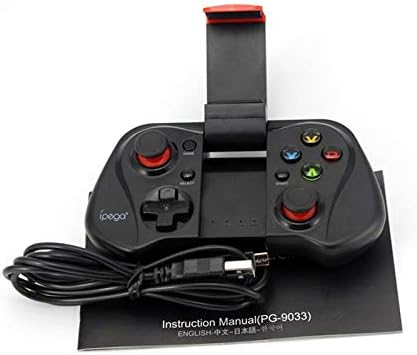
Figure 3: The Ipega PG-9033 Bluetooth Gamepad displayed alongside its USB charging cable and the included instruction manual, which clearly indicates the model number PG-9033.

Figur 4: Bagsiden view of the Ipega PG-9033 Bluetooth Gamepad, featuring a label with technical details such as "BLUETOOTH CONTROLLER," working voltage, working current, and input specifications.
Opsætning
Opladning af gamepad
Before first use, fully charge the gamepad using the provided USB cable.
- Connect the micro-USB end of the charging cable to the gamepad's charging port.
- Connect the USB-A end to a USB power source (e.g., computer, USB wall adapter).
- Opladningsindikatorlampen lyser. Den slukker typisk eller skifter farve, når den er fuldt opladet.
Parring med en enhed
The PG-9033 supports different pairing modes for various operating systems.
Android-parring
- Ensure the gamepad is off.
- Tryk og hold på HJEM knappen og X button simultaneously until the indicator light flashes rapidly. This puts the gamepad into Android pairing mode.
- Gå til Bluetooth-indstillingerne på din Android-enhed, og søg efter tilgængelige enheder.
- Select "PG-9033" from the list to pair. The indicator light will become solid when connected.
iOS Pairing (iCade Mode)
- Ensure the gamepad is off.
- Tryk og hold på HJEM knappen og B button simultaneously until the indicator light flashes rapidly. This puts the gamepad into iOS iCade pairing mode.
- Gå til Bluetooth-indstillinger på din iOS-enhed, og søg efter tilgængelige enheder.
- Select "PG-9033" from the list to pair. The indicator light will become solid when connected.
Note: iCade mode has limited game compatibility. For broader iOS compatibility, check specific game requirements.
PC-parring
- Ensure the gamepad is off.
- Tryk og hold på HJEM knappen og A button simultaneously until the indicator light flashes rapidly. This puts the gamepad into PC pairing mode.
- On your PC, go to Bluetooth settings and search for available devices.
- Select "PG-9033" from the list to pair. The indicator light will become solid when connected.
Note: A Bluetooth adapter may be required for PCs without built-in Bluetooth.
Betjeningsvejledning
Attaching Your Smartphone
- Gently extend the adjustable phone holder located on the top of the gamepad.
- Carefully place your smartphone into the holder, ensuring it is securely gripped and centered.
- Juster vinklen for optimal viewing.
Game Mode Selection
The gamepad automatically enters the last used mode upon reconnection. To switch modes, disconnect the gamepad and re-pair using the desired mode's button combination (HOME + X for Android, HOME + B for iOS, HOME + A for PC).
Tænd/sluk
For at tænde skal du trykke på HJEM knap. For at slukke skal du trykke på og holde nede HJEM button for approximately 5 seconds until the indicator light turns off. The gamepad will automatically power off after a period of inactivity.
Opretholdelse
To ensure the longevity and proper functioning of your Ipega PG-9033 gamepad, follow these maintenance guidelines:
- Hold enheden tør. Undgå udsættelse for fugt eller væsker.
- Clean the gamepad with a soft, dry cloth. Do not use harsh chemicals or abrasive cleaners.
- Opbevar gamepad'en et køligt, tørt sted væk fra direkte sollys og ekstreme temperaturer.
- Undgå at tabe gamepad'en eller udsætte den for kraftige stød.
- Oplad batteriet regelmæssigt, selvom det ikke er i brug, for at opretholde batteriets tilstand.
Do not attempt to disassemble the gamepad. This will void the warranty and may cause damage.
Fejlfinding
Gamepad not connecting or pairing:
- Sørg for, at gamepad'en er fuldt opladet.
- Bekræft, at Bluetooth er aktiveret på din enhed.
- Make sure the gamepad is in the correct pairing mode for your device (Android, iOS, or PC).
- Prøv at glemme enheden i dine Bluetooth-indstillinger og parre den igen.
- Genstart både gamepad'en og din enhed.
Knapper eller joysticks reagerer ikke:
- Kontroller, om gamepad'en er korrekt tilsluttet.
- Sørg for, at det spil, du spiller, understøtter eksterne controllere.
- Some games may require specific controller mapping or settings adjustments within the game.
- If the issue persists, try resetting the gamepad (if a reset button is available, typically a small pinhole).
Lag eller inputforsinkelse:
- Ensure your device is not too far from the gamepad. Maintain a clear line of sight.
- Reducer interferens fra andre trådløse enheder.
- Luk unødvendige baggrundsapplikationer på din enhed.
Telefonen passer ikke i holderen:
- The holder is designed for most smartphones. Ensure your phone's dimensions are within the supported range.
- Fjern alle store telefoncovers, der kan forhindre en sikker pasform.
Specifikationer
| Feature | Detalje |
|---|---|
| Model | PG-9033 |
| Mærke | Ipega |
| Forbindelse | Bluetooth |
| Kompatibilitet | Android, iOS (iCade), PC |
| Working Voltage | DC 3.7V |
| Arbejdsstrøm | 30mA |
| Input bindtage | DC 5V 500mA |
| ASIN | B07P52YH7M |
Garanti og support
For warranty information and technical support, please refer to the official Ipega webwebstedet eller kontakt din forhandler. Gem din købskvittering som købsbevis.
Denne manual er kun til orientering. Specifikationerne kan ændres uden varsel.