
1. Introduktion
The Bewinner Tiger 911 is a wired telephone voice auto-dialer designed to enhance the security of your home or office. This system integrates with existing alarm hosts or independent sensors to automatically dial pre-programmed telephone numbers when an alarm is triggered, providing immediate notification. Its microcomputer design ensures reliable operation and intelligent judgment for various security needs.

Image 1.1: The Bewinner Tiger 911 Telephone Voice Dialer, a compact device for automated alarm calls.
2. Produktet er slutview og funktioner
The Tiger 911 voice dialer is engineered with advanced features to provide robust security notifications.
- Microcomputer Design: Features a microcomputer for automatic dial-up assistance. It supports N.C. (Normally Closed), N.O. (Normally Open), or voltage input triggers, adaptable to various alarm systems.
- Mulighed for fjernbetjening: Can be integrated with anti-theft hosts or independent sensors. Allows for remote control via telephone for convenient and efficient management.
- Opbevaring af oplysninger: Capable of storing up to 4 groups of telephone or mobile phone numbers, each with a maximum of 16 digits. Includes two levels of password protection. Stored numbers and voice recordings are retained even after power loss.
- Intelligent Judgment: Incorporates an all-round boot and self-detection function to prevent failures. Features an automatic voice recording IC for direct recording or playback via microphone and speaker.
- Adgangskodesikkerhed: Equipped with a password feature, allowing users to stop an accidental or triggered dialing alarm directly through the panel keys.

Image 2.1: The voice dialer shown alongside a smartphone, illustrating its function to store and dial up to 4 groups of telephone numbers.
3. Opsætning
Proper setup is crucial for the effective operation of your Bewinner Tiger 911 voice dialer.
3.1 Komponenter overview
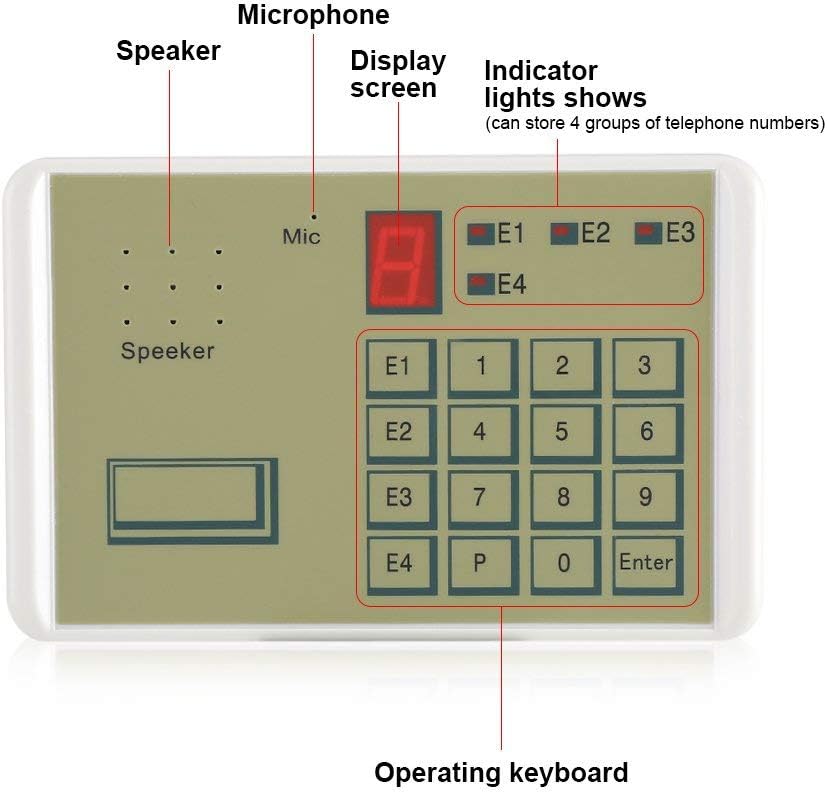
Image 3.1: A detailed diagram highlighting the key components of the voice dialer: Speaker, Microphone, Display Screen, Indicator Lights (E1-E4), and Operating Keyboard.
3.2 Connecting to an Alarm Host
The voice dialer acts as an intermediary between your alarm host and your phone.
- Connect Alarm Host: Connect the alarm host's output to the designated input terminals on the voice dialer. The dialer supports N.C. (Normally Closed), N.O. (Normally Open), or voltage input triggers. Refer to your alarm host's manual for its output type.
- Tilslut telefonlinje: Plug a standard telephone line into the dialer's telephone line crystal jack.
- Strømtilslutning: Connect the 12V power adapter to the dialer and a power outlet.

Image 3.2: Connection diagram illustrating how the voice dialer integrates with an alarm host and a telephone line to notify the user's mobile phone.

Image 3.3: Close-up of the wiring connections for the voice dialer, including the telephone line connector and bare wires for alarm input.
4. Betjeningsvejledning
Follow these steps to configure and operate your voice dialer.
4.1 Recording Voice Alarm
The dialer can store a 20-second voice message that will play when an alarm is triggered.
- Tryk på Optage button (if available, or follow specific manual instructions for recording mode).
- Speak clearly into the built-in microphone (Mic) for up to 20 seconds.
- Tryk på Stop button (or equivalent) to end recording.
- The recorded message will play automatically when the dialer activates.

Image 4.1: The microphone area of the dialer, indicating its voice recording alarm capability for a 20-second message.
4.2 Storing Telephone Numbers
You can program up to 4 telephone numbers for the dialer to call during an alarm event. Each number can be up to 16 digits long.
- Enter programming mode (refer to the specific manual for key sequence, typically involving a password).
- Select one of the four groups (E1, E2, E3, E4) using the corresponding button on the operating keyboard.
- Input the desired telephone number using the numeric keypad.
- Trykke Indtast to save the number for that group.
- Repeat for other groups as needed.

Image 4.2: The operating keyboard highlighting the E1-E4 buttons used for storing and accessing the four groups of alarm telephone numbers.
4.3 Stopping an SOS Dial
If the dialer is accidentally triggered or you wish to stop an ongoing alarm call, you can do so using the password.
- Enter your private password directly using the numeric keypad.
- Trykke Indtast. The dialing sequence will cease.

Image 4.3: The numeric keypad, indicating its use for entering a password to stop an accidental or triggered SOS dial.
5. Vedligeholdelse
To ensure the longevity and optimal performance of your Bewinner Tiger 911 voice dialer, follow these maintenance guidelines:
- Rensning: Use a soft, dry cloth to clean the exterior of the device. Avoid using abrasive cleaners or solvents, which can damage the surface.
- Miljø: Opbevar enheden et tørt sted, væk fra direkte sollys, ekstreme temperaturer og høj luftfugtighed.
- Strømforsyning: Ensure the device is connected to a stable 12V power supply. Unplug the device during electrical storms or when not in use for extended periods.
- Kabelintegritet: Regularly inspect all connected cables (telephone line, alarm input, power) for any signs of wear or damage. Replace damaged cables immediately.
6. Fejlfinding
If you encounter issues with your voice dialer, refer to the following common troubleshooting steps:
| Problem | Mulig årsag | Løsning |
|---|---|---|
| Enheden tænder ikke. | No power, faulty adapter, or loose connection. | Check power adapter connection and wall outlet. Ensure the adapter is functioning correctly. |
| Dialer does not make calls when triggered. | Incorrect alarm input wiring, no phone numbers stored, or telephone line issue. | Verify alarm input wiring (N.C./N.O./voltage). Ensure phone numbers are correctly programmed. Check telephone line connection and functionality. |
| Recorded voice message is unclear or not playing. | Recording error or microphone issue. | Re-record the voice message, speaking clearly and at an appropriate volume. Ensure the microphone is not obstructed. |
| Cannot stop dialing with password. | Forkert adgangskode indtastet. | Ensure the correct password is being entered. If forgotten, refer to the full manual for password reset procedures (if available). |
For more complex issues, please consult the full product manual or contact customer support.
7. Specifikationer
Detailed technical specifications for the Bewinner Tiger 911 Wired Telephone Voice Dialer.
| Feature | Detalje |
|---|---|
| Mærke | Bewinner |
| Modelnummer | Tiger 911 |
| Strømkilde | Elektrisk med ledning |
| Voltage | 12 volt |
| Forbindelsesteknologi | Kablet |
| Kompatible enheder | Smartphone (for receiving calls) |
| Alert Type | Indgang |
| Kontrolmetode | Remote (via phone call) |
| Inkluderede komponenter | Remote Control (functionality, not a physical remote) |
| Varens vægt | 0.09 kilogram (ca. 3.17 ounces) |
| Sensor Technology | Motion Sensor (compatible with, not built-in) |
| Stemmeoptagelsens længde | 20 sekunder |
| Phone Number Storage | 4 groups, up to 16 digits each |
| Produktdimensioner | Ca. 14 cm x 9 cm x 3 cm (5.51 tommer x 3.54 tommer x 1.18 tommer) |

Image 7.1: A visual representation of the product specifications, including operating voltage, alarm receiving mode, voice recording length, and dimensions.
8. Produktvideo
Se denne korte video for en hurtig gennemgangview of the Bewinner Tiger 911 Voice Alarm Dialer.
Video 8.1: An 8-second overview of the Bewinner Tiger 911 Voice Alarm Dialer, demonstrating its physical appearance and basic components.
9. Garanti og support
Bewinner is committed to providing quality products and a pleasant shopping experience.
- Produktkvalitet: Each product undergoes careful inspection from production to delivery to ensure quality.
- Kundesupport: For any questions, technical assistance, or support needs, please refer to the contact information provided with your purchase or visit the official Bewinner store page.