
1. Introduktion
This manual provides essential information for the safe and efficient operation of the Walfront AT3-1500X Variable Frequency Drive (VFD). The AT3-1500X is a high-performance 3-phase adjustable speed controller designed for motor speed control applications, offering a wide speed regulating range and robust performance. Please read this manual thoroughly before installation, operation, or maintenance.
2. Sikkerhedsforanstaltninger
Failure to follow these safety instructions may result in death, severe injury, or property damage.
- Sørg altid for, at strømforsyningen er afbrudt, før du udfører ledningsføring eller vedligeholdelse.
- Do not connect the U/V/W output terminals directly to the AC power supply. This will cause internal damage to the inverter.
- The inverter must not be installed on flammable surfaces or near flammable materials to prevent fire hazards.
- Ensure the ground terminal of the inverter is properly and securely grounded.
- Avoid installation in environments containing explosive gases to eliminate explosion risks.
- Only qualified professionals should perform wiring and internal inspections. The converter contains high voltage components; do not open the shell casually.

Billede: Forside view of the VFD showing the safety precautions label.
3. Produktet er slutview
The Walfront AT3-1500X VFD utilizes a unique control method to achieve high performance and a wide speed regulating range. It features excellent anti-trip capabilities and resilience against power fluctuations, temperature, humidity, and dust interference, enhancing overall stability. Optimized PWM control technology and electromagnetic compatibility ensure low noise and minimal electromagnetic interference.

Billede: Forside view of the Walfront AT3-1500X VFD, showing the display and control panel.
3.1 Nøglefunktioner
- Omfattende beskyttelse: Inkluderer overstrøm, overvolumentage, over-heat, overload, under-voltage, and intelligent power module protection.
- Holdbar konstruktion: Made from heat and flame-retardant shell material for extended lifespan.
- Effektiv køling: Equipped with a high-efficiency fan for optimal heat dissipation, prolonging service life.
- Interferensmodstand: Designed to resist interference from rough power, temperature, humidity, and dust, ensuring high reliability and stability.
- Responsiv drift: Fast start and stop response with high torque at low speeds.

Billede: Side view of the VFD, highlighting the heat sink fins for effective cooling.

Billede: Bagside view of the VFD, showing the cooling fans and product label with model information.
4. Specifikationer
| Parameter | Værdi |
|---|---|
| Model | AT3-1500X |
| Anvendelsesområde | Universel |
| Strømforsyningsfase | Tre fase |
| Nominel strøm | 4A |
| Nominel voltage | AC380V (Three Phase) |
| Suitable Motor Power | 1.5 kW |
| Filter | Indbygget filter |
| DC strømforsyning | Voltage Type |
| Kontrolmetode | V/F Closed Loop |
| Udgang Voltage Adjustable Method | PWM-kontrol |
| Dimensioner (L x B x H) | Ca. 18 x 12.5 x 12.5 cm (7 x 4.9 x 4.9 tommer) |
| Vægt | Ca. 1431 g (3.15 pund) |
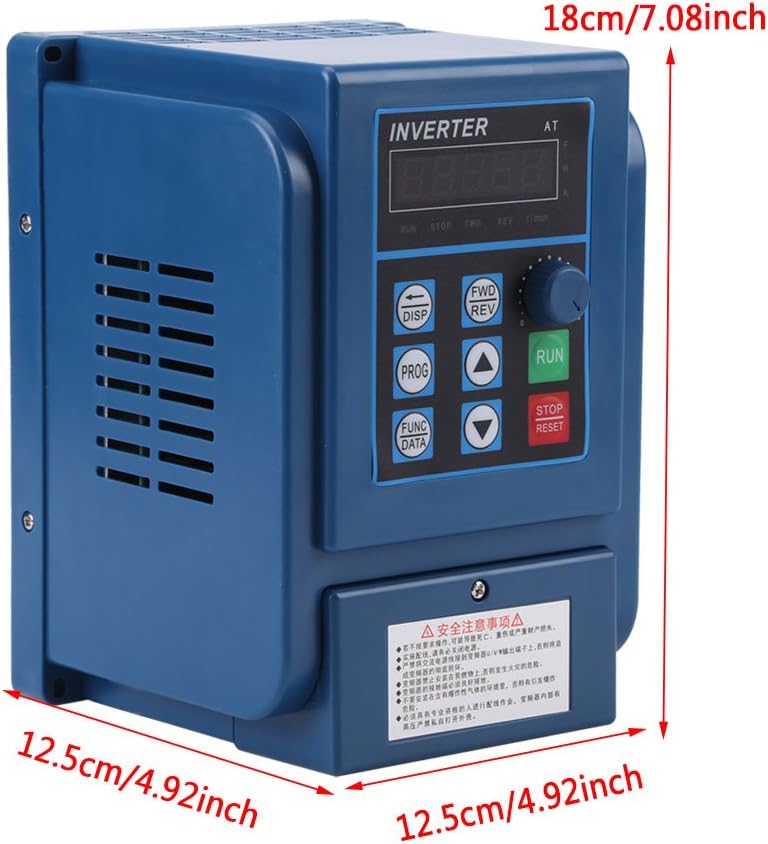
Billede: Forside view of the VFD with key dimensions indicated.
5. Opsætning og installation
5.1 Miljøhensyn
- Install the VFD in a clean, dry, and well-ventilated area.
- Avoid direct sunlight, excessive dust, corrosive gases, and flammable materials.
- Sørg for, at omgivelsestemperaturen er inden for det angivne driftsområde.
5.2 Ledningsinstruktioner
Proper wiring is crucial for safe and correct operation. Refer to the wiring diagram below and ensure all connections are secure and correctly terminated. Always disconnect power before wiring.

Billede: Nærbillede view of the VFD's input and output wiring terminals.

Billede: Detaljeret view of the VFD's wiring terminals, showing input (380V) and three-phase motor connections (R, S, T, W, V, U).
- Strømtilførsel (R, S, T): Connect the three-phase 380V AC power supply to these terminals.
- Motoreffekt (U, V, W): Connect the three-phase motor to these terminals.
- Jording: Ensure the ground terminal is connected to a reliable earth ground.
- Kontrolterminaler: Refer to the detailed wiring diagram in the full product manual for specific control signal connections (if applicable).
6. Betjeningsvejledning
The VFD features a user-friendly control panel for easy operation and parameter adjustment.
6.1 Kontrolpanelknapper

Image: Diagram illustrating the functions of each button on the VFD control panel.
- 5 Digits LED Display: Shows operational parameters and settings.
- DISP (Movement Key): Switches monitoring parameters in monitoring state; moves data frame to edit bit in the second-level menu.
- PROG (Programme Key): Exits the current state, switches to another state, mainly used to switch to the monitoring state.
- FUNC/DATA (Function/Save Key): Enters the menu step by step, saves the set parameters.
- ▼ (Minus Key): Short/Long press decreases data and function code.
- ▲ (Plus Key): Short/Long press increases data and function code.
- FWD/REV (CW/CCW Key): Press to run (CW operation), release to stop. For CCW operation, refer to advanced settings.
- STOP/RESET-knap: Stops the operation of the VFD; recovers from previous wrong interface.
- RUN (Operation Key): Starter driften.
6.2 Function Indicators

Image: Diagram explaining the various function indicators on the VFD display.
- FWD: Indicates the VFD is operating in the Clockwise (CW) direction.
- REV: Indicates the VFD is operating in the Counter-Clockwise (CCW) direction.
- r/min: Indicates that the motor's Revolutions Per Minute (RPM) is displayed.
- A: Indicates that the current (Amperes) is displayed.
7. Vedligeholdelse
Regelmæssig vedligeholdelse sikrer din VFD's levetid og optimale ydeevne.
- Rensning: Periodically clean the VFD's exterior and cooling fins to prevent dust accumulation, which can hinder heat dissipation. Use a soft, dry cloth.
- Ventilator inspektion: Kontroller, at køleblæseren fungerer korrekt, og sørg for, at den ikke er blokeret. Udskift den, hvis den støjer eller ikke fungerer korrekt.
- Terminaltjek: Regularly inspect wiring terminals for tightness and signs of corrosion. Loose connections can cause overheating and malfunction.
- Miljøtjek: Sørg for, at driftsmiljøet holder sig inden for de angivne temperatur- og fugtighedsgrænser.
- Professionel inspektion: For internal components, professional inspection is recommended at regular intervals.
8. Fejlfinding
This section provides solutions for common issues. For complex problems, contact technical support.
| Problem | Mulig årsag | Løsning |
|---|---|---|
| VFD'en tænder ikke | Ingen indgangsstrøm; Sprunget sikring; Forkert ledningsføring | Kontroller strømforsyningen; Udskift sikringen; Verificer ledningsforbindelserne. |
| Motoren kører ikke | Incorrect motor wiring; Parameter settings incorrect; Overload condition | Check motor connections (U, V, W); Verify VFD parameters; Reduce motor load. |
| Overstrømsfejl | Motor overload; Short circuit in motor or wiring; Rapid acceleration/deceleration | Check motor load; Inspect motor and wiring; Adjust acceleration/deceleration times. |
| Over-voltage fejl | Høj input voltage; Rapid deceleration of high inertia load | Kontroller input voltage; Increase deceleration time; Consider braking resistor if necessary. |
| Over-heat fault | Insufficient cooling; Blocked fan; High ambient temperature | Clean VFD and fan; Ensure proper ventilation; Reduce ambient temperature. |
9. Garanti og support
Walfront products are designed for reliability and performance. For warranty information, please refer to the purchase documentation or contact your retailer. For technical assistance or support, please reach out to Walfront customer service through the official channels provided at the time of purchase.