
Vocal-Star VS-T200
Vocal-Star VS-T200 Bærbar PA Fest Bluetooth Højttaler Brugsanvisning
Model: VS-T200
1. Introduktion
This instruction manual provides comprehensive guidance for the safe and effective use of your Vocal-Star VS-T200 Portable PA Party Bluetooth Speaker. Please read this manual thoroughly before operating the device and retain it for future reference. The VS-T200 is a versatile audio system designed for various entertainment purposes, offering powerful sound, dynamic light effects, and karaoke capabilities.
2. Sikkerhedsoplysninger
- Udsæt ikke højttaleren for vand eller overdreven fugt.
- Undgå at placere højttaleren i nærheden af varmekilder eller i direkte sollys.
- Brug kun den medfølgende strømadapter til opladning.
- Forsøg ikke selv at skille enheden ad eller reparere den. Overlad al service til kvalificeret personale.
- Opbevares utilgængeligt for børn.
- Sørg for ordentlig ventilation omkring højttaleren under drift.
- Bortskaf batterier ansvarligt i henhold til lokale regler.
3. Pakkens indhold
Tjek venligst pakken for følgende varer:
- 1 x Vocal-Star VS-T200 Portable PA Speaker
- 2 x trådløse mikrofoner
- 1 x strømadapter (AC/DC)
- 1 x Brugermanual (dette dokument)
4. Produktet er slutview
The Vocal-Star VS-T200 is a powerful 200W portable speaker system featuring dual woofers, integrated LED light effects, and a top-mounted disco ball. It supports multiple audio inputs including Bluetooth, AUX, and USB, and comes with two wireless microphones for karaoke. Its built-in battery and carry handle ensure maximum portability.

Figure 4.1: Vocal-Star VS-T200 Portable PA Speaker with included wireless microphones. The image shows the main speaker unit, two wireless microphones, and a display screen illustrating karaoke functionality.
4.1. Hovedtræk
- 200W Peak Power Output with powerful bass and clear treble.
- Integrated LED light effects on front woofers and a top disco ball.
- Multiple connectivity options: Bluetooth, AUX, USB.
- Two wireless microphones included for karaoke.
- Indbygget genopladeligt batteri til bærbar brug.
- True Wireless Stereo (TWS) function for connecting two VS-T200 units.
- Integrated carry handle for easy transport.
4.2. Komponenter og kontroller
Familiarize yourself with the various parts and controls of your VS-T200 speaker.

Figur 4.2: Forside view of the VS-T200 speaker with its LED lights active, showcasing the two illuminated woofers and the top disco ball light projection.

Figur 4.3: Detaljeret view of the light effects, including the patterns projected by the disco ball and the vibrant colors from the LED woofers.
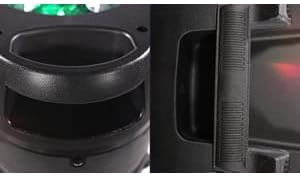
Figure 4.4: Close-up of the robust integrated carry handle, designed for easy and secure transportation of the speaker.
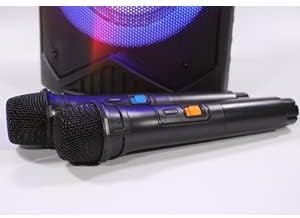
Figure 4.5: The two wireless microphones provided with the VS-T200 speaker, essential for karaoke functionality.
(Note: Specific control panel layout and button functions are typically detailed in a diagram in a physical manual. For this digital format, general functions are described.)
- Master volumen knap: Justerer det samlede lydniveau.
- Mikrofonlydstyrkeknap: Controls the volume of the connected microphones.
- Echo Control Knob: Justerer ekkoeffekten for mikrofonerne.
- Mode knap: Switches between Bluetooth, AUX, and USB input modes.
- Afspil/pause knap: Styrer medieafspilning.
- Knapper til forrige/næste spor: Navigerer gennem spor.
- Lystilstandsknap: Cycles through different LED light patterns or turns them off.
- USB-port: Til afspilning af lyd fra USB-flashdrev.
- AUX-indgang: 3.5 mm jackstik til tilslutning af eksterne lydenheder.
- Strømindgang: For connecting the AC/DC power adapter.
5. Opsætning
5.1. Opladning af højttaleren
- Connect the provided power adapter to the speaker's power input port.
- Sæt adapteren i en passende stikkontakt.
- The charging indicator light (if present) will illuminate. Allow the speaker to charge fully before first use (typically 4-6 hours).
- Once fully charged, disconnect the power adapter. The speaker can be used while charging.
5.2. Installation af mikrofonbatterier
Each wireless microphone requires 2 x AA batteries (included). Ensure correct polarity when inserting.
- Skru den nederste hætte af hver trådløs mikrofon.
- Insert 2 AA batteries into each microphone, observing the correct positive (+) and negative (-) terminals.
- Replace the bottom cap securely.
6. Betjeningsvejledning
6.1. Tænd/sluk
Locate the power switch on the speaker's control panel. Flip the switch to the "ON" position to power on the speaker. Flip it to "OFF" to power off.
6.2. Bluetooth-forbindelse
- Power on the VS-T200 speaker. It will automatically enter Bluetooth pairing mode, indicated by a flashing Bluetooth indicator or voice prompt.
- Aktiver Bluetooth på din Bluetooth-aktiverede enhed (smartphone, tablet, bærbar computer), og søg efter tilgængelige enheder.
- Select "VS-T200" from the list of devices.
- Once connected, the speaker will confirm with an audible prompt, and the Bluetooth indicator will become solid.
- You can now play audio from your device through the VS-T200 speaker.
6.3. AUX -indgang
- Connect one end of a 3.5mm audio cable (not included) to the AUX input port on the VS-T200 speaker.
- Connect the other end of the cable to the audio output jack of your external device (e.g., MP3 player, TV).
- Press the "Mode" button on the speaker until "AUX" mode is selected.
- Afspil lyd fra din eksterne enhed.
6.4. USB-afspilning
- Indsæt et USB-flashdrev med MP3-lyd files i USB-porten på højttaleren.
- Højttaleren skifter automatisk til USB-tilstand og begynder at afspille den første kompatible lydfil. file. If not, press the "Mode" button to select USB.
- Brug knapperne Afspil/Pause og Forrige/Næste spor til at styre afspilningen.
6.5. Karaoke-funktion
- Ensure the wireless microphones have batteries installed and are powered on.
- Play your desired karaoke track via Bluetooth, AUX, or USB.
- Adjust the "Microphone Volume" knob on the speaker's control panel to your desired vocal level.
- Use the "Echo Control" knob to add echo effects to your voice.
6.6. TWS-funktion (ægte trådløs stereo)
The TWS function allows you to connect two VS-T200 speakers wirelessly for a stereo sound experience.
- Ensure both VS-T200 speakers are powered on and are NOT connected to any Bluetooth device.
- On one of the speakers (this will be the primary speaker), press and hold the TWS button (or a designated pairing button, refer to speaker's physical controls if available).
- The primary speaker will search for the secondary speaker. Once connected, both speakers will confirm with an audible prompt.
- Now, connect your Bluetooth device to the primary VS-T200 speaker as described in section 6.2.
- Lyden afspilles nu i stereo gennem begge højttalere.
6.7. Lyseffektstyring
The VS-T200 features dynamic LED light effects and a disco ball. Use the "Light Mode" button on the control panel to cycle through different light patterns or to turn the lights off.
7. Vedligeholdelse
- Rensning: Brug en blød, tør klud til at rengøre højttalerens yderside. Brug ikke slibende rengøringsmidler eller opløsningsmidler.
- Opbevaring: Når højttaleren ikke er i brug i længere perioder, skal den opbevares køligt og tørt, væk fra direkte sollys og ekstreme temperaturer.
- Batteripleje: To prolong battery life, fully charge the speaker before storing it for long periods. Recharge the battery at least once every 3 months if not in regular use.
8. Fejlfinding
| Problem | Mulig årsag | Løsning |
|---|---|---|
| Højttaleren tænder ikke. | Batteriet er fladt; Strømadapteren er ikke tilsluttet eller defekt. | Charge the speaker's battery; Ensure power adapter is securely connected and working. |
| Ingen lyd fra højttaleren. | Lydstyrken er for lav; Forkert inputtilstand; Enheden er ikke tilsluttet korrekt. | Increase master volume; Press "Mode" button to select correct input (Bluetooth, AUX, USB); Reconnect Bluetooth device or AUX cable. |
| Bluetooth-forbindelse mislykkes. | Højttaler ikke i parringstilstand; Enhed for langt væk; Interferens. | Ensure speaker is in pairing mode; Move device closer to speaker; Turn off other Bluetooth devices. |
| Mikrofonerne virker ikke. | Microphone batteries depleted or incorrectly inserted; Microphone volume too low. | Replace microphone batteries, ensuring correct polarity; Increase microphone volume on speaker. |
| Lyseffekterne virker ikke. | Lyset er slukket; Fejlfunktion. | Press the "Light Mode" button to activate lights; If issue persists, contact customer support. |
9. Specifikationer
| Feature | Detalje |
|---|---|
| Modelnummer | VS-T200 |
| Mærke | Vocal-Star |
| Strømudgang | 200W |
| Forbindelse | Bluetooth, USB, AUX |
| Mikrofoner | 2 x Wireless Microphones (requires 2x AA batteries each) |
| Højttaler batteri | Built-in Lithium-ion (rechargeable) |
| Lyseffekter | LED Woofer Lights, Top Disco Ball |
| Farve | Sort |
| Bærbarhed | Integreret bærehåndtag |
| Særlige funktioner | TWS (True Wireless Stereo) -funktion |
10. Garanti og support
Vocal-Star products are designed for reliability and performance. While specific warranty details are not provided in this manual, Vocal-Star offers dedicated UK customer service to assist with any queries or issues you may encounter.
For support, please refer to the contact information provided on the product packaging or the official Vocal-Star website. When contacting support, please have your product model number (VS-T200) and purchase details ready.