
1. Vigtige sikkerhedsoplysninger
Læs venligst alle sikkerhedsinstruktioner omhyggeligt inden montering og brug. Manglende overholdelse af disse instruktioner kan medføre personskade eller beskadigelse af produktet.
- Opmærksomhed: Assemble and use the product following the provided instructions.
- Do not exceed the maximum allowed weight of 70 kg (154 lbs).
- Do not use the product if it is damaged or unstable.
- Avoid using the product for prolonged periods in a fixed position to prevent back problems.
2. Pakkens indhold
Before beginning assembly, ensure all components are present and undamaged. Refer to the packing list for a complete overview dele.

Billede: Overview of the electric height adjustable desk frame components, including legs, crossbar, motor, and control panel.
The package includes the electric desk frame, control panel, power adapter, and all necessary assembly tools.
3. Opsætning og montering
Assembly is required for this product. For optimal safety and ease, it is recommended that 2 personer udføre samlingen.
3.1 Nødvendigt værktøj
- Screwdriver (recommended)
- Alle nødvendige monteringsværktøjer er inkluderet i pakken.
3.2 Monteringstrin
- Udpak komponenter: Tag forsigtigt alle dele ud af emballagen, og læg dem på en ren, plan overflade.
- Fastgør fødder til ben: Secure the base feet to the bottom of each leg using the provided screws.
- Tilslut tværstang: Attach the adjustable crossbar between the two legs. Ensure the motor and control panel cables are routed correctly.
- Installer kontrolpanel: Mount the control panel to the desired location on the desk frame, typically on the front edge of the desktop (desktop not included).
- Tilslut strøm: Connect the power adapter to the desk frame's motor unit and then to a power outlet.
- Vedhæft skrivebord: Secure your chosen desktop to the frame using appropriate screws (desktop not included).
- Nivellering: Adjust the leveling feet at the bottom of the desk legs to ensure stability on uneven surfaces.

Image: The desk frame assembled with the control panel and power cables visible, illustrating the electrical connections.
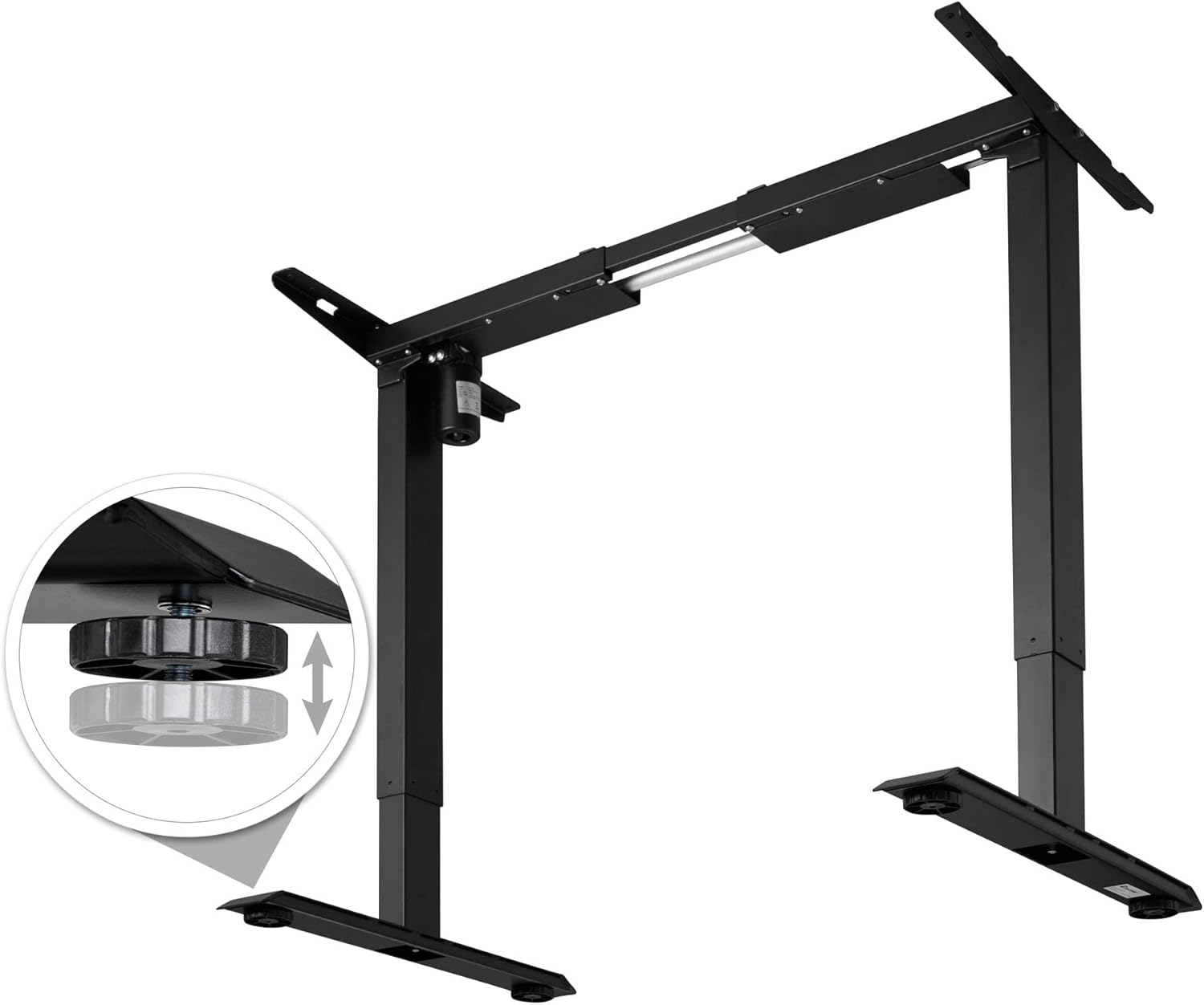
Image: The desk frame showing the power adapter and control panel connected, ready for operation.

Billede: Et nærbillede view of the adjustable leveling feet, demonstrating how to stabilize the desk on uneven floors.
4. Betjeningsvejledning
The TecTake 800665 desk frame features electric height adjustment, memory functions, and an alarm to promote ergonomic working habits.
4.1 Kontrolpanel overview

Billede: Detaljeret view of the control panel, showing the digital height display, up/down arrows, and memory preset buttons (1, 2, 3, M, A).
- Op/ned-pile (▲ / ▼): Tryk og hold nede for at justere skrivebordets højde manuelt.
- Digital skærm: Shows the current height of the desk in centimeters.
- Hukommelsesknapper (1, 2, 3): Store and recall preferred height settings.
- "M"-knap: Used to save a height setting to a memory button.
- "A" Button (Alarm): Activates or deactivates the sit/stand reminder alarm.
4.2 Justering af højde
Press and hold the up (▲) or down (▼) arrow button to move the desk to your desired height. Release the button to stop movement.
The desk can be adjusted between a minimum height of 71 cm and a maximum height of 121 cm.
4.3 Indstilling af hukommelsesforudindstillinger
- Juster skrivebordet til den ønskede højde ved hjælp af pilene op/ned.
- Tryk på knappen "M". Displayet viser "S-".
- Within 3 seconds, press one of the memory buttons (1, 2, or 3). The display will show "S-1", "S-2", or "S-3" to confirm the setting is saved.
4.4 Brug af hukommelsesforudindstillinger
Simply press the desired memory button (1, 2, or 3) to automatically move the desk to the saved height.
4.5 Indstilling af alarmen
The alarm function reminds you to change your working position. Consult the full manual for detailed alarm setting instructions, as specific steps are not provided here.
5. Vedligeholdelse
Proper maintenance ensures the longevity and optimal performance of your desk frame.
- Rensning: Clean the desk frame with a damp klud. Undgå slibende rengøringsmidler eller opløsningsmidler.
- Inspektion: Kontrollér regelmæssigt alle skruer og forbindelser for at sikre, at de er fastspændte. Efterspænd om nødvendigt.
- Vægtgrænse: Do not exceed the maximum recommended weight of 70 kg (154 lbs) to prevent damage to the motor and frame.
6. Fejlfinding
If you encounter any issues with your TecTake 800665 desk frame, refer to the following common troubleshooting steps:
- Skrivebordet bevæger sig ikke:
- Check if the power cable is securely plugged into both the desk frame and the wall outlet.
- Ensure the control panel cable is properly connected to the motor unit.
- If the desk has been used continuously for an extended period, the motor might have overheated. Allow it to cool down for 18 minutes (as indicated on some motor units) before attempting to operate it again.
- Ujævn bevægelse:
- Check that the desk is not overloaded beyond its 70 kg weight capacity.
- Verify that all assembly screws are tightened evenly.
- Ensure the floor surface is level, or adjust the leveling feet accordingly.
- Fejlkoder på displayet:
- If an error code appears, try unplugging the desk from the power outlet for 10-15 seconds, then plug it back in. This can often reset the system.
- Kontakt kundesupport, hvis problemet fortsætter.
7. Specifikationer
| Feature | Detalje |
|---|---|
| Mærke | tectake |
| Modelnummer | 402999 |
| Skrivebordsdesign | Stående skrivebordsramme |
| Farve | Sort |
| Grundmateriale | Legeret stål |
| Top materialetype | Alloy Steel (for frame, desktop not included) |
| Speciel funktion | Height Adjustable, Memory Function, Alarm |
| Minimum højde | 71 centimeter |
| Maksimal højde | 121 centimeter |
| Varedimensioner (L x B x H) | 129 x 65 x 121 Centimeters (Max. H) |
| Varens vægt | 21 kilo |
| Recommended Maximum Weight Capacity | 70 kilo |
| Løftemekanisme | Elektrisk |
| Montering påkrævet | Ja |
| Recommended Persons for Assembly | 2 |
| Inkluderet monteringsværktøj | Ja |
| Plejevejledning | Rengør med annonceamp klæde. |

Image: Technical drawing illustrating the dimensions of the desk frame, including width (85-129 cm), depth (65 cm), and height (71-121 cm).
8. Garanti og support
For warranty information or technical support, please contact TecTake customer service. Keep your purchase receipt and model number (402999) handy for faster service.
Du kan typisk finde kontaktoplysninger på producentens officielle webwebstedet eller gennem dit købssted.