
1. Introduktion
This manual provides instructions for the installation, operation, and maintenance of the Cisco CP-68KEM-3PCC Expansion Module. This module is designed to enhance the functionality of your Cisco IP Phone 6851 by providing additional programmable keys.
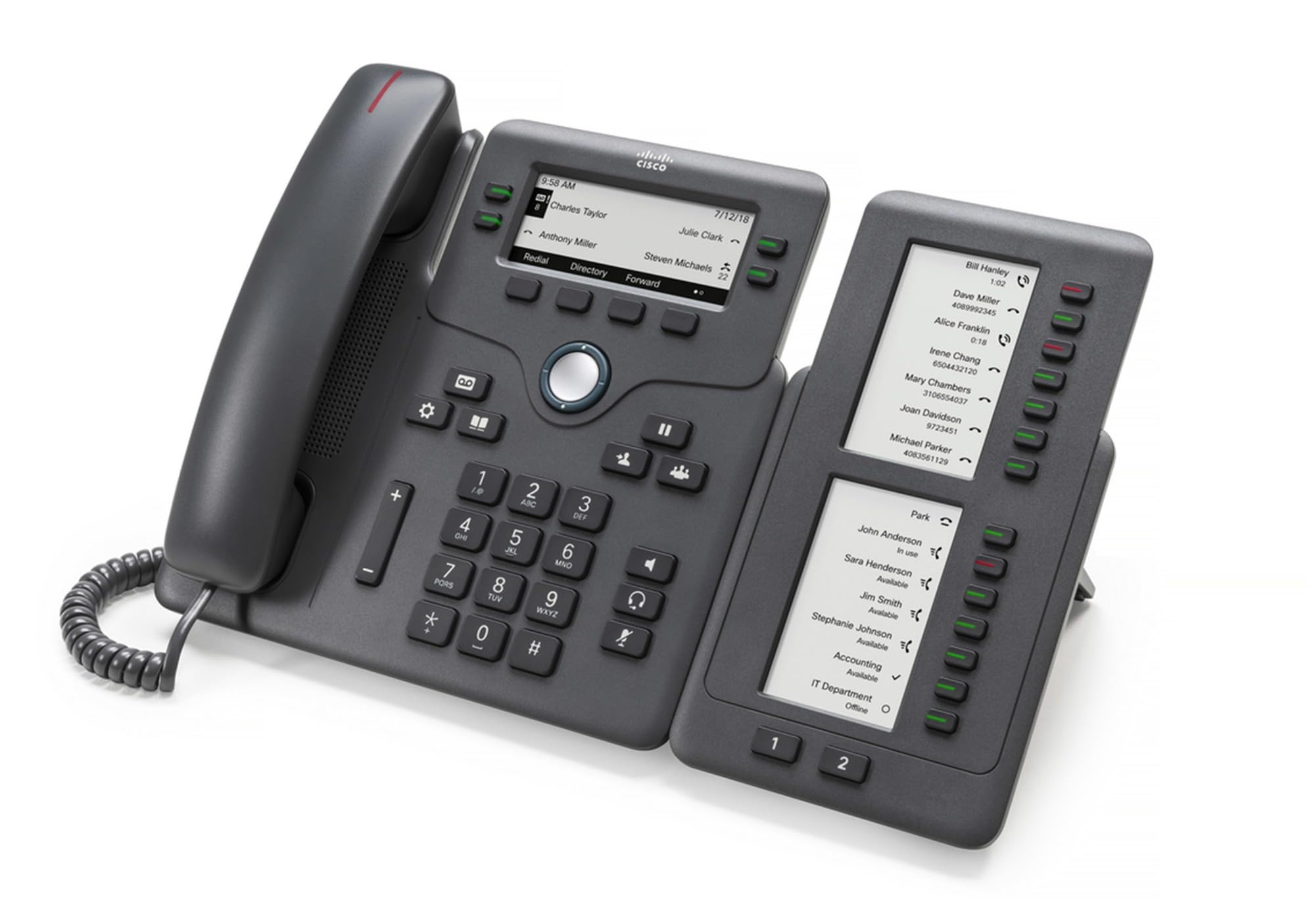
Figure 1: Cisco CP-68KEM-3PCC Expansion Module. This image shows the front view of the expansion module with its grayscale LCD screen and programmable keys.
The Cisco CP-68KEM-3PCC Expansion Module adds 14-line keys and 2-page keys, totaling 28 additional keys, with an easy-to-read grayscale LCD screen. It is ideal for monitoring and managing call status, directory numbers, and speed dial functions.
2. Hvad er der i æsken
Pak forsigtigt kassen ud, og sørg for, at alle dele er til stede:
- Cisco CP-68KEM-3PCC Phone Expansion Module
- Connecting Cable (typically included for linking to the phone)
- Documentation (this user manual, safety information)
Hvis der mangler eller er beskadigede dele, bedes du straks kontakte din leverandør eller Cisco-support.
3. Opsætningsvejledning
Follow these steps to connect your Cisco CP-68KEM-3PCC Expansion Module to your Cisco IP Phone 6851.
- Prepare the IP Phone: Ensure your Cisco IP Phone 6851 is powered off and disconnected from the network.
- Connect the Expansion Module: Locate the expansion port on the back or side of your Cisco IP Phone 6851. Connect the provided connecting cable from the expansion module to this port.
- Sikre forbindelsen: Ensure the cable is securely fastened to prevent accidental disconnection.
- Tænd: Reconnect your Cisco IP Phone 6851 to the network and power it on. The expansion module should be detected automatically.
- Bekræft funktionalitet: Once the phone has booted, check the expansion module's display and keys to ensure they are responsive.
For detailed visual instructions, refer to the official Cisco documentation or support webwebsted.
4. Operating the Expansion Module
The expansion module provides additional keys for various functions, enhancing your call management capabilities.
4.1 Programmerbare taster
The 28 programmable keys (14 keys across 2 pages) can be configured for:
- Directory Numbers (DNs): Assign specific phone lines or extensions.
- Hurtigopkald: Programmér ofte opkaldte numre for hurtig adgang.
- Funktionstaster: Assign functions like call transfer, conference, or call park.
- Call Status Monitoring: Monitor the status of other lines (e.g., busy, ringing).
4.2 Page Navigation
Use the dedicated page keys (usually located near the display) to switch between the two pages of programmable keys. The grayscale LCD screen will update to show the labels for the currently active page.
4.3 Konfiguration
Configuration of the programmable keys is typically managed through your organization's phone system administrator or via the web interface of the Cisco IP Phone 6851. Consult your IT department for specific configuration instructions.
5. Vedligeholdelse
To ensure the longevity and optimal performance of your Cisco CP-68KEM-3PCC Expansion Module, follow these maintenance guidelines:
- Rensning: Use a soft, dry, lint-free cloth to clean the exterior surfaces. For stubborn marks, slightly dampRengør kluden med vand. Undgå at bruge skrappe kemikalier, slibende rengøringsmidler eller opløsningsmidler, da disse kan beskadige overfladen og de elektroniske komponenter.
- Miljø: Keep the module in a clean, dry environment, away from direct sunlight, excessive heat, and moisture.
- Håndtering: Håndter modulet forsigtigt. Undgå at tabe det eller udsætte det for hårde stød.
- Kabelstyring: Ensure connecting cables are not kinked, pinched, or under strain.
There are no user-serviceable parts inside the expansion module. Do not attempt to open or repair the device yourself.
6. Fejlfinding
If you encounter issues with your expansion module, try the following troubleshooting steps:
| Problem | Mulig årsag | Løsning |
|---|---|---|
| Module not recognized by phone | Loose cable connection, phone not restarted, incompatible phone model. |
|
| Tasterne reagerer ikke | Software glitch, configuration issue. |
|
| Skærmen er tom eller flimrer | Strømproblem, intern fejl. |
|
If these steps do not resolve the issue, please contact Cisco technical support or your authorized reseller.
7. Specifikationer
| Feature | Detalje |
|---|---|
| Modelnummer | CP-68KEM-3PCC |
| Mærke | Cisco |
| Kompatible enheder | Cisco IP-telefon 6851 |
| Farve | Sort |
| Materiale | Metal |
| Emnedimensioner (LxBxH) | 5.1 x 10.2 x 20.3 cm |
| Strømkilde | Corded (powered via host IP Phone) |
| Antal nøgler | 28 (14 keys across 2 pages) |
| Vise | Grayscale LCD |
| GTIN/UPC | 889728068383 |
8. Garantioplysninger
The Cisco CP-68KEM-3PCC Expansion Module comes with a 2 års produktgaranti fra købsdatoen. Denne garanti dækker defekter i materialer og udførelse ved normal brug. Den dækker ikke skader forårsaget af misbrug, ulykker, uautoriserede ændringer eller eksterne årsager.
For warranty claims or detailed terms and conditions, please refer to the official Cisco warranty policy available on their webwebstedet eller kontakt dit købssted.
9. Support
For technical assistance, product information, or to report issues, please contact Cisco support:
- Cisco Support Webwebsted: Besøg embedsmanden Cisco Support webwebsted for documentation, downloads, and contact options.
- Authorized Reseller: Contact the reseller from whom you purchased the product.
When contacting support, please have your product model (CP-68KEM-3PCC) and serial number ready.