
Indledning
This manual provides instructions for the operation and maintenance of your Senville Remote Control, model AR2015-IR. This remote is designed for use with Senville AURA Series and LETO Series mini split air conditioning systems. Please read this manual thoroughly before using the remote control to ensure proper function and longevity.
Produkt overview
The Senville AR2015-IR remote control allows you to manage various functions of your compatible Senville mini split system, including temperature settings, operating modes, fan speed, and special features.
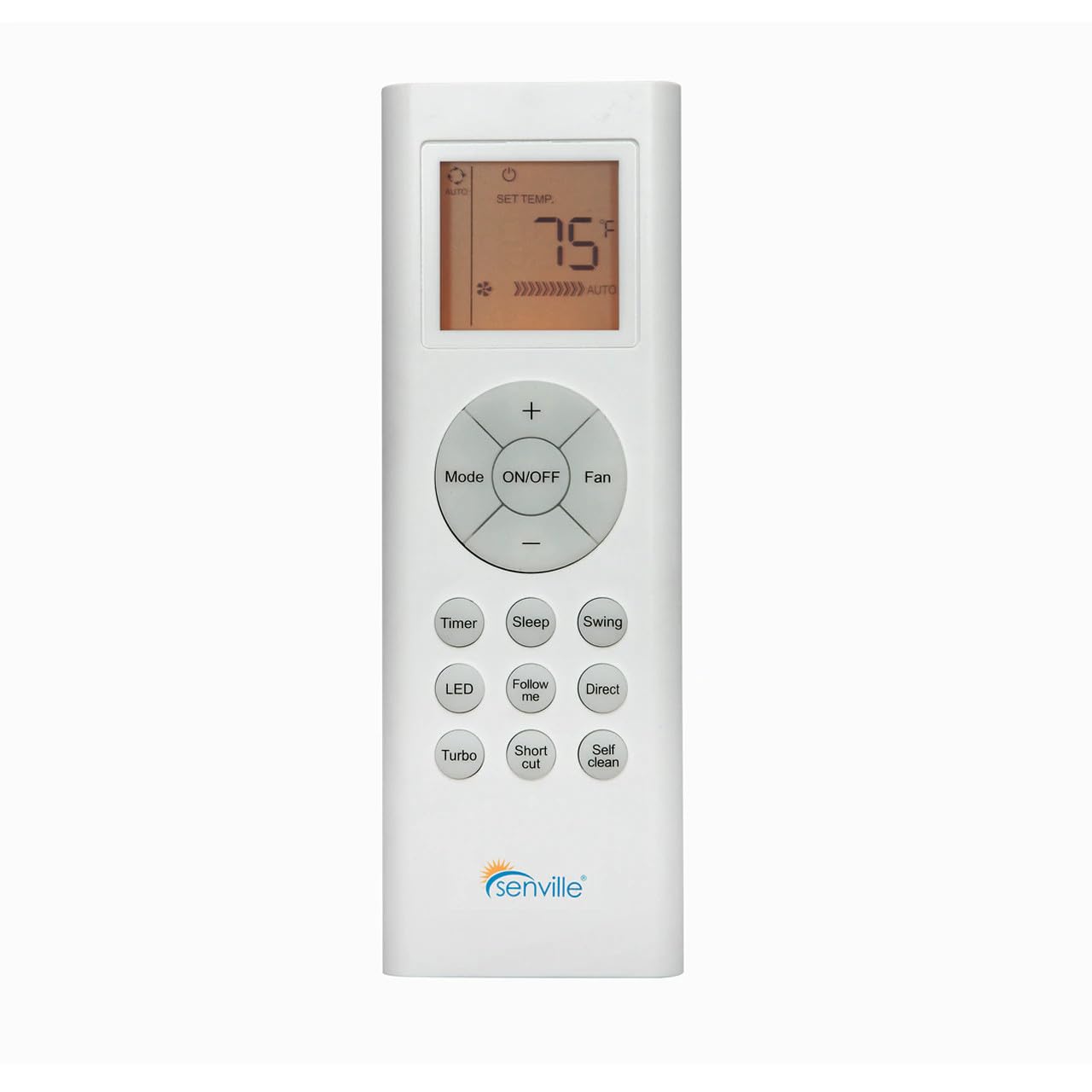
Figur 1: Front view of the Senville AR2015-IR Remote Control. It features an LCD screen at the top, a central circular button cluster for power, mode, fan, and temperature adjustment, and additional function buttons below.
Opsætning
1. Batteriinstallation
- Find batterirummets dæksel på bagsiden af fjernbetjeningen.
- Skub dækslet nedad, eller tryk på låsen for at åbne det.
- Isæt to AAA-batterier (medfølger ikke), og sørg for at polerne (+ og -) vender korrekt som angivet i batterirummet.
- Sæt batterirummets dæksel på igen.
Note: The remote control does not require programming and should function immediately upon battery installation with compatible Senville AURA and LETO series units.
Betjeningsvejledning
Knap funktioner
- TIL/FRA: Press to turn the air conditioning unit on or off.
- Mode: Skifter mellem driftstilstande: Auto, Køling, Tørring, Varme, Ventilator.
- Ventilator: Justerer ventilatorhastigheden: Auto, Lav, Mellem, Høj.
- Temperature (+/-): Increases or decreases the set temperature. The display shows the set temperature in Fahrenheit or Celsius.
- Timer: Indstiller timeren for automatisk tænding eller automatisk slukning.
- Sove: Activates or deactivates the Sleep mode for energy-efficient operation during sleep.
- Svinge: Styrer den vertikale lamelsvingningfunktion.
- LED: Turns the indoor unit's display LED light on or off.
- Følg mig: Activates the Follow Me function, which senses the temperature at the remote's location.
- Direkte: Justerer den vandrette lamelretning.
- Turbo: Aktiverer hurtig afkøling eller opvarmning i en kort periode.
- Genvej: Genkalder dine foretrukne indstillinger.
- Selvrensende: Initiates the self-cleaning function of the indoor unit.
Valg af temperaturenhed
To switch between Fahrenheit (°F) and Celsius (°C), ensure the unit is off. Press and hold the Temperature (+) and Temperature (-) buttons simultaneously for approximately 3 seconds. The display will change to the alternate unit.
Opretholdelse
Udskiftning af batteri
Replace batteries when the display becomes dim or the remote's range decreases. Always replace both batteries at the same time with new AAA batteries. Dispose of used batteries according to local regulations.
Rengøring af fjernbetjeningen
Tør fjernbetjeningen af med en blød, tør klud. Brug ikke flydende rengøringsmidler eller slibende materialer, da disse kan beskadige fjernbetjeningens overflade eller interne komponenter.
Fejlfinding
- Fjernbetjeningen svarer ikke:
- Kontroller, om batterierne er korrekt installeret og ikke er opbrugte. Udskift dem om nødvendigt.
- Ensure there are no obstructions between the remote control and the indoor unit's receiver.
- Confirm the remote is pointed directly at the indoor unit.
- Skærmen er svag eller tom:
- Udskift batterierne.
- Unit not responding to specific functions:
- Verify that your specific Senville unit model supports the function you are trying to use. Refer to your air conditioner's manual for compatibility.
Specifikationer
| Modelnummer | AR2015-IR |
| Kompatible enheder | Senville AURA Series, Senville LETO Series mini split air conditioners (HF, HF/Z, CD/X Models) |
| Forbindelsesteknologi | Infrarød |
| Strømkilde | 2 x AAA batterier (medfølger ikke) |
| Dimensioner (L x B x H) | 6.89 x 2.68 x 0.83 tommer |
| Vægt | 2.89 ounce (uden batterier) |
Garanti og support
For warranty information or technical support regarding your Senville Remote Control or compatible air conditioning unit, please refer to the documentation provided with your main Senville product or visit the official Senville website. Contacting Senville customer service directly is recommended for specific inquiries.
Du kan finde flere oplysninger og supportressourcer på Senville Store on Amazon.