
Sonew Sonewtvy42gamns
Sonew 125Khz RFID Access Card User Manual
Model: Sonewtvy42gamns
1. Introduktion
This manual provides essential information for the proper use and maintenance of your Sonew 125Khz RFID Access Cards. These cards are designed for reliable and efficient access control in various environments.

Figure 1.1: Sonew 125Khz RFID Access Cards (Pack of 10)
2. Produktet er slutview
The Sonew 125Khz RFID Access Cards are passive RFID tags primarily used for proximity door control and entry access systems. Each package contains 10 readable and erasable cards, suitable for integration with most standard 125KHz card readers.
Nøglefunktioner:
- Mængde: Includes 10 individual RFID access cards.
- Frekvens: Operates at 125 KHz, compatible with standard 125KHz card readers.
- Læseafstand: Effective reading range of 5-10 cm (2-4 inches).
- Høj følsomhed: Designed for reliable and quick recognition by compatible readers.
- Holdbarhed: Features an erasable life of over 100,000 times, indicating re-programmability.
- Alsidig anvendelse: Suitable for use in various environments including homes, schools, offices, and commercial buildings.
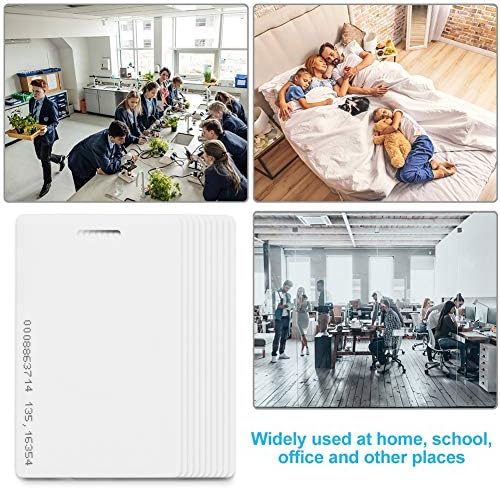
Figure 2.1: Diverse applications of the RFID Access Cards.
3. Opsætning og programmering
These RFID cards are designed to be integrated with existing 125KHz access control systems. The setup process primarily involves programming the cards with your specific access control reader/writer.
Programmeringsinstruktioner:
- Acquire a Compatible Reader/Writer: Ensure you have a 125KHz RFID card reader/writer device. This device is necessary to read the unique ID of the cards and, if supported by your system, to write specific data to them.
- Refer to Your System's Manual: The exact programming steps will depend on your specific access control system or RFID reader/writer. Consult the instruction manual provided with your access control system for detailed programming procedures.
- Enroll Cards: Typically, you will place an RFID card on the reader/writer, and the device will either read its unique identifier or allow you to write new data to it. Follow your system's prompts to enroll each card into your access control database.
- Test funktionalitet: After programming, test each card with your access control system to ensure it grants access as intended.
Note: While these cards are described as "readable" and having an "erasable life," their specific writability features depend on the capabilities of your 125KHz RFID reader/writer and access control system. Some systems may only utilize the pre-programmed unique ID of the card.
4. Operating the Access Cards
Once programmed, using the Sonew 125Khz RFID Access Cards is straightforward. They operate on proximity technology, requiring no physical contact with the reader.
Brugstrin:
- Henvend dig til læseren: Hold the RFID access card within the reading range (typically 5-10 cm) of the compatible 125KHz access control reader.
- Vent på bekræftelse: The reader will typically provide an audible beep or a visual indicator (e.g., an LED light changing color) to confirm that the card has been successfully read and access has been granted or denied.
- Enter/Exit: If access is granted, proceed through the controlled entry point.

Figure 4.1: Illustrative diagram of card usage with a reader.

Figure 4.2: RFID card interacting with a door access control system.
5. Vedligeholdelse og pleje
To ensure the longevity and reliable performance of your RFID access cards, follow these simple maintenance guidelines:
- Hold rent: Wipe the cards periodically with a soft, dry cloth to remove dust and grime. Avoid abrasive cleaners.
- Undgå ekstreme forhold: Do not expose the cards to extreme temperatures (outside -20°C to 55°C), direct sunlight for prolonged periods, or high humidity.
- Forebyg fysisk skade: Avoid bending, scratching, or puncturing the cards, as this can damage the internal antenna or chip.
- Opbevar korrekt: When not in use, store cards in a clean, dry place, away from strong magnetic fields or other RFID devices that could interfere with them.
6. Fejlfinding
If you encounter issues with your Sonew 125Khz RFID Access Cards, consider the following troubleshooting steps:
- Kort læser ikke:
- Ensure the card is within the reader's specified reading distance (5-10 cm).
- Verify that the reader is powered on and functioning correctly.
- Confirm the card has been properly programmed and enrolled in your access control system.
- Check for any physical damage to the card.
- Adgang nægtet:
- Confirm the card is correctly programmed for the specific access point.
- Check the access control system's logs for reasons for denial (e.g., invalid card, expired access).
- Ensure the card is presented correctly to the reader.
- Inkonsekvent læsning:
- Avoid holding multiple RFID cards together when presenting to a reader, as this can cause interference.
- Ensure there are no strong electromagnetic fields near the reader or card during use.
If problems persist, consult the manual for your specific access control system or contact the system administrator/installer.
7. Specifikationer
| Feature | Specifikation |
|---|---|
| Arbejdsfrekvens | 125 KHz |
| Læseafstand | 5 - 10 cm (2 - 4 tommer) |
| Læsetid | 64 ms |
| Arbejdstemperatur | -20°C til 55°C (-4°F til 131°F) |
| Erasable Life | > 100,000 gange |
| Dimension | Standard thick card |
| Emballage materialer | PVC, PET, ABS, 0.13 mm copper wire |
| Encapsulation Process | PVC lamineret |
| Weight (per 10 cards) | Ca. 90 g (3.17 oz) |
| Fabrikant | Sonew |
| Modelnummer | Sonewtvy42gamns |
| Oprindelsesland | Kina |
8. Garanti og support
Specific warranty details for the Sonew 125Khz RFID Access Cards are not provided in the product information. For any product-related inquiries, technical support, or warranty claims, please refer to the seller or the platform where the product was purchased.
Du kan også besøge Sonew Store on Amazon for additional information or contact options.
Ask a question about this manual
Ask about setup, troubleshooting, compatibility, parts, safety, or missing instructions. Manuals+ will review the question and use this page’s manual context to help answer it.