
1. Introduktion
The Dremel 8220 12V Max Cordless Rotary Tool is designed to provide high performance and versatility for a wide range of projects. This tool is compatible with all current Dremel rotary tool accessories, offering flexibility for various applications such as cutting, grinding, sanding, cleaning, and polishing. Its ergonomic design ensures comfort and control during use.
This manual provides essential information for the safe and effective operation, maintenance, and troubleshooting of your Dremel 8220 rotary tool.

Figure 1: Dremel 8220-1/28 Cordless Rotary Tool kit, including the tool, carrying case, charger, and various accessories.
2. Sikkerhedsoplysninger
Always observe basic safety precautions to reduce the risk of fire, electric shock, and personal injury when using power tools. Read and understand all instructions before operating the tool.
Generelle sikkerhedsregler:
- Sikkerhed på arbejdsområdet: Hold dit arbejdsområde rent og godt oplyst. Rodede eller mørke områder indbyder til ulykker. Brug ikke elværktøj i eksplosive atmosfærer, f.eks. i nærheden af brandfarlige væsker, gasser eller støv.
- Elektrisk sikkerhed: Undgå kropskontakt med jordforbundne overflader. Udsæt ikke elværktøj for regn eller våde forhold.
- Personlig sikkerhed: Always wear eye protection. Use safety glasses, goggles, or a face shield. Wear hearing protection when operating for extended periods. Dress properly; avoid loose clothing or jewelry. Keep hair, clothing, and gloves away from moving parts.
- Brug og pleje af værktøj: Tving ikke værktøjet. Brug det korrekte værktøj til din anvendelse. Frakobl batteripakken fra værktøjet, før du foretager justeringer, skifter tilbehør eller opbevarer elværktøj. Opbevar inaktivt værktøj utilgængeligt for børn.
- Brug og vedligeholdelse af batteriværktøj: Genoplad kun med den oplader, der er angivet af producenten. Brug kun elværktøj med specifikt beregnede batteripakker.
3. Kom godt i gang (opsætning)
3.1 Udpakning
Carefully remove all contents from the packaging. Verify that all items listed in the 'Kit Contents' section are present and undamaged. Retain packaging materials for future storage or transport.
3.2 Opladning af batteriet
The Dremel 8220 is powered by a 12V Max Lithium-Ion battery. Before first use, fully charge the battery.
- Tilslut opladeren til en almindelig stikkontakt.
- Insert the battery pack into the charger. The charging indicator light will illuminate.
- Allow approximately one hour for a full charge. The indicator light will change or turn off when charging is complete.
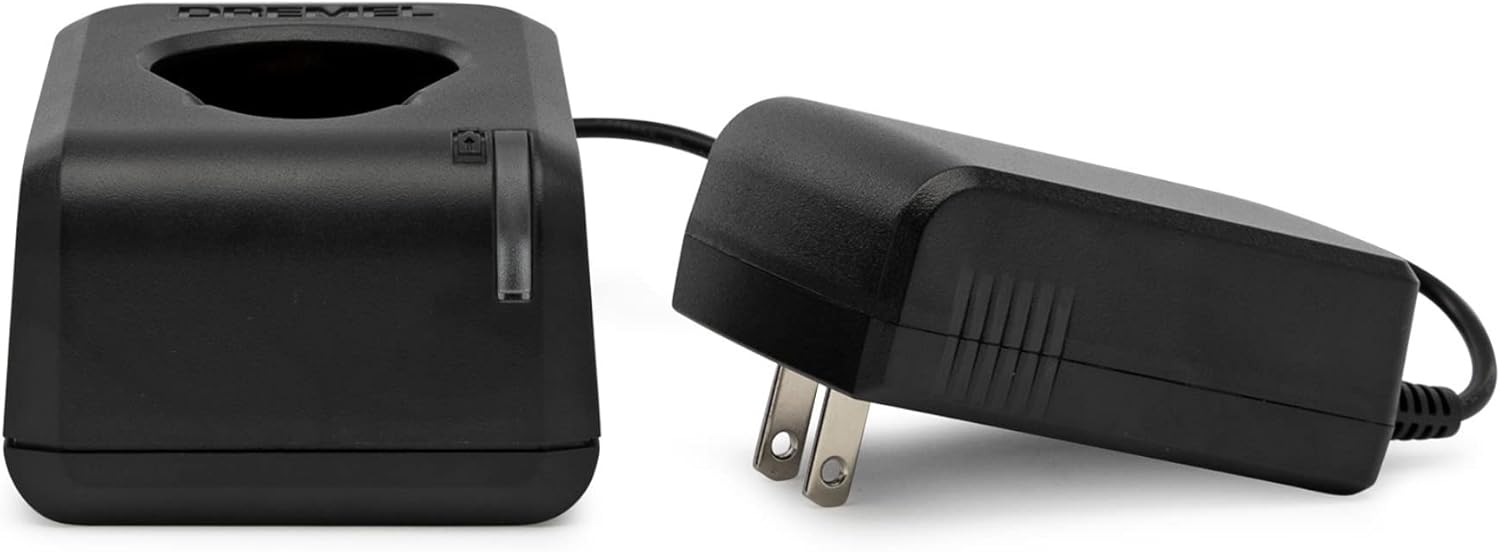
Figure 2: The Dremel 12V Max battery charger and power adapter. Ensure the battery is properly seated for charging.
3.3 Montering og udskiftning af tilbehør
The Dremel 8220 features an EZ Twist nose cap for quick accessory changes without a separate wrench.
- Ensure the tool is turned OFF and the battery is removed before changing accessories.
- Tryk og hold aksellåseknappen nede.
- Unscrew the EZ Twist nose cap counter-clockwise to loosen the collet nut.
- Insert the desired accessory shank fully into the collet.
- Tighten the EZ Twist nose cap clockwise until the accessory is securely held. Do not overtighten.

Figure 3: The Dremel EZ Twist nose cap, which integrates a wrench for easy accessory changes.

Figure 4: The Dremel 710-08 multi-purpose rotary accessory kit, containing 160 pieces for various applications.
4. Betjeningsvejledning
4.1 Tænd/sluk
To turn the tool ON, slide the separate ON/OFF switch to the 'ON' position. To turn the tool OFF, slide the switch to the 'OFF' position.
4.2 Variabel hastighedskontrol
The Dremel 8220 features variable speed control, allowing adjustment from 5,000 to 35,000 RPM for optimal precision across different materials and tasks. The speed setting is retained even after turning the tool off and on again.

Figur 5: Nærbillede view of the Dremel 8220 tool, highlighting the variable speed dial and ergonomic grip.
- Rotate the speed dial to increase or decrease the rotational speed.
- Start with a lower speed for delicate tasks or softer materials and gradually increase as needed.
- Higher speeds are generally suitable for harder materials and more aggressive material removal.
4.3 Generelle brugstips
- Lad værktøjet nå fuld hastighed, før det berører emnet.
- Apply light pressure. Let the tool and accessory do the work. Excessive pressure can cause the tool to bog down, overheat, or damage the workpiece.
- Keep the tool moving to prevent gouging or burning the material.
5. Vedligeholdelse
5.1 Rengøring af værktøjet
Regularly clean the ventilation openings of the tool to prevent dust and debris buildup, which can affect performance and motor life. Use a soft brush or compressed air.
5.2 Pleje af batterier
- Opbevar batteriet på et køligt, tørt sted væk fra direkte sollys og ekstreme temperaturer.
- Opbevar ikke batteriet i afladet tilstand i længere perioder. Genoplad det med jævne mellemrum, hvis det ikke er i brug.
- Avoid dropping or subjecting the battery to heavy impacts.
5.3 Opbevaring af tilbehør
Store accessories in their designated case (e.g., Dremel 710-08 kit case) to keep them organized and protected from damage.
6. Fejlfinding
| Problem | Mulig årsag | Løsning |
|---|---|---|
| Værktøjet tænder ikke. | Batteriet er afladet. | Genoplad batteriet helt. |
| Værktøjet tænder ikke. | ON/OFF switch is in the 'OFF' position. | Skub kontakten til 'ON'-positionen. |
| Opladeren virker ikke. | Charger or power adapter is faulty. | Check the power outlet. If the issue persists, contact Dremel customer support for a replacement charger. |
| Værktøjet mister kraft eller bliver langsommere under brug. | Battery is low or accessory is binding. | Recharge the battery. Reduce pressure on the tool or ensure the accessory is not jammed. |
| Tilbehøret er løst eller vakler. | Spændetangsmøtrikken er ikke spændt tilstrækkeligt, eller spændetangsstørrelsen er forkert. | Ensure the EZ Twist nose cap is tightened securely. Verify the accessory shank matches the collet size. |
7. Specifikationer
| Feature | Specifikation |
|---|---|
| Modelnummer | 8220-1/28 |
| Voltage | 12 volt (maks.) |
| Strømkilde | Cordless Electric (Lithium-Ion Battery) |
| Hastighedsområde | 5,000 - 35,000 omdr./min. (variabel hastighed) |
| Varens vægt | 1 Pound (approx. 453.59 grams) |
| Produktmål (L x B x H) | 39.1 x 29.2 x 11.9 cm |
| Særlige funktioner | Rechargeable, Cordless, Variable Speed, EZ Twist Nose Cap |
| Inkluderet tilbehør | 28 accessories/1 attachment, Dremel 710-08 Multi-Purpose Rotary Accessory Kit (160 pieces) |
8. Garanti og support
8.1 Begrænset garanti
The Dremel 8220-1/28 Cordless Rotary Tool comes with a 2 års begrænset garantiSe venligst garantikortet, der er inkluderet i produktemballagen, for at få de fulde vilkår og betingelser.
8.2 Kundesupport
For technical assistance, service, or warranty claims, please contact Dremel Experts:
- Telefon: 1-800-437-3635 (USA)
- Webwebsted: www.dremel.com
You can also scan the QR code on the product packaging or visit http://m.dremel.com/10079 for product registration, additional manuals, and more information.