
Sharp LC-40LE185M
Sharp 40-inch LED TV (Model LC-40LE185M) User Manual
Model: LC-40LE185M
1. Introduktion
This manual provides essential information for the safe and efficient use of your Sharp 40-inch LED TV, model LC-40LE185M. Please read these instructions thoroughly before operating the television and retain them for future reference. This television is designed to provide a high-quality viewing experience with its 1366 x 768 resolution display and various connectivity options.
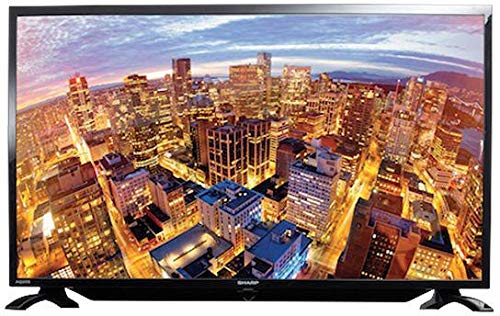
Figur 1.1: Forside view of the Sharp 40-inch LED TV.
2. Sikkerhedsoplysninger
Overhold altid følgende sikkerhedsforanstaltninger for at forhindre elektrisk stød, brand eller personskade:
- Udsæt ikke TV'et for regn eller fugt.
- Åbn ikke tv'etasing. Overlad al service til kvalificeret personale.
- Sørg for tilstrækkelig ventilation; bloker ikke ventilationsåbningerne.
- Placer tv'et på en stabil, plan overflade for at forhindre det i at falde ned.
- Tag stikket ud af tv'et under tordenvejr eller når det ikke bruges i længere perioder.
- Hold tv'et væk fra direkte sollys, varmekilder og stærke magnetfelter.
3. Pakkens indhold
Bekræft at alle varer er til stede i pakken:
- Sharp 40-inch LED TV (Model LC-40LE185M)
- Fjernbetjening
- Strømledning
- Table-top Stand (including screws)
- Brugervejledning (dette dokument)
4. Opsætning
4.1 Udpakning
Tag forsigtigt tv'et og alt tilbehør ud af emballagen. Gem emballagematerialerne til senere transport eller opbevaring.
4.2 Montering af stativet
Hvis du bruger bordstativet:
- Placer tv'et med forsiden nedad på en blød, ren overflade for at forhindre, at skærmen beskadiges.
- Juster stativet med monteringshullerne i bunden af tv'et.
- Fastgør stativet med de medfølgende skruer. Sørg for, at stativet er ordentligt fastgjort.
If wall-mounting, consult a professional installer. Note: Some users have reported that the lower screw bracket hole for wall mounting may not be firmly attached, and the frame can be flimsy/wobbly. Exercise caution and ensure secure installation if wall mounting.

Figure 4.1: Illustration of the TV with its table-top stand.
4.3 Tilslutning af strøm
Tilslut netledningen til tv'ets strømindgang og derefter til en stikkontakt.
4.4 Tilslutning af eksterne enheder
Your TV supports various connections:
- HDMI: Connect Blu-ray players, gaming consoles, or set-top boxes using HDMI cables. The TV has HDMI ports for compatible devices.
- USB: Tilslut USB-lagerenheder til view photos or other media. The TV has a USB port for compatible devices.
- MHL: Use MHL connectivity to connect your smartphone to the TV.
5. Betjeningsvejledning
5.1 Tænd/sluk
Press the Power button on the remote control or on the TV to turn the TV on or off. The TV automatically switches to standby mode when there is no signal, saving power consumption.
5.2 Grundlæggende kontroller
Use the remote control to navigate menus, adjust volume, and change channels. Refer to the remote control diagram (not included in this manual) for specific button functions.
5.3 Indgangsvalg
Press the 'Input' or 'Source' button on your remote to select the desired input source (e.g., HDMI 1, USB, TV).
5.4 Billed- og lydindstillinger
Access the TV's menu to adjust picture settings (brightness, contrast, color, sharpness) and sound settings (bass, treble, balance, sound mode). The Easy Colour Adjustment feature allows you to achieve ideal color tones.
5.5 Særlige funktioner
- Ørn View Teknologi: Enhances your visual experience with improved display quality.
- AquoMotion Lite Technology: Reduces motion blur and distortions, improving transitions during fast-paced movements.
- Photo Frame Mode: Relive your special memories by displaying vibrant photos on the screen.
- USB-afspilning: Enjoy content stored on compatible USB devices directly on the TV screen.
- HDMI tilslutning: Connect various compatible devices for an immersive vieweller spiloplevelse.
6. Specifikationer
| Feature | Specifikation |
|---|---|
| Mærke | Skarp |
| Modelnummer | LC-40LE185M |
| Skærmstørrelse | 40 tommer |
| Displayteknologi | LED |
| Opløsning | 1366 x 768 pixels |
| Opdateringshastighed | 60 Hz |
| Produktdimensioner | 40.8 x 29 x 2.8 cm |
| Vægt | 5.8 kg |
| Forbindelsesteknologi | HDMI, USB |
| Aspektforhold | 1.77:1 |
| Understøttede internettjenester | YouTube |
| Speciel funktion | Bred skærm |
7. Fejlfinding
Hvis du støder på problemer med dit tv, kan du se følgende almindelige problemer og løsninger:
- Ingen strøm: Sørg for, at netledningen er korrekt tilsluttet til både tv'et og stikkontakten. Kontroller, om stikkontakten fungerer.
- Intet billede/lyd: Bekræft, at den korrekte inputkilde er valgt. Kontroller alle kabelforbindelser (HDMI, antenne).
- Dårlig billedkvalitet: Juster billedindstillingerne (lysstyrke, kontrast, skarphed). Sørg for, at inputkilden leverer et signal af høj kvalitet.
- Fjernbetjeningen virker ikke: Kontroller batterierne, og sørg for, at der ikke er nogen forhindringer mellem fjernbetjeningen og tv'ets IR-sensor.
- TV Automatically Switches to Standby: This is a power-saving feature that activates when no signal is detected. Ensure your input source is active.
Ved vedvarende problemer, kontakt kundesupport.
8. Vedligeholdelse
- Rengøring af skærmen: Gently wipe the screen with a soft, lint-free cloth. For stubborn marks, use a screen cleaner specifically designed for LED TVs. Do not spray cleaner directly onto the screen.
- Rengøring af kabinettet: Brug en blød, tør klud til at tørre tv-kabinettet af. Brug ikke slibende rengøringsmidler eller opløsningsmidler.
- Ventilation: Sørg for, at ventilationsåbningerne på bagsiden af tv'et ikke er blokerede for at forhindre overophedning.
9. Garanti og support
Your Sharp TV comes with a standard manufacturer's warranty. Please refer to the warranty card included in your product packaging for details regarding coverage, terms, and conditions. For technical support, service, or warranty claims, please contact Sharp customer service through their official webwebstedet eller de kontaktoplysninger, der følger med din købsdokumentation.
Ask a question about this manual
Ask about setup, troubleshooting, compatibility, parts, safety, or missing instructions. Manuals+ will review the question and use this page’s manual context to help answer it.