
1. Introduktion
Thank you for choosing the AWEI A950BL ANC Noise Reduction Headset. This manual provides detailed instructions on how to set up, operate, and maintain your new headphones. Please read this manual thoroughly before use to ensure optimal performance and longevity of your device.

Billede: Forside view of the AWEI A950BL ANC Noise Reduction Headset.
2. Produktfunktioner
- Aktiv støjreduktion (ANC): Reducerer omgivende støj for en fordybende lydoplevelse.
- Trådløs og kablet forbindelse: Bluetooth V4.1 for wireless freedom and a 3.5mm jack for wired connection.
- Integreret mikrofon: Til håndfri opkald og stemmekommandoer.
- Lang batterilevetid: Up to 10 hours of talk or music time on a single charge.
- Sammenfoldeligt design: For nem opbevaring og bærbarhed.

Image: The AWEI A950BL headset featuring a convenient folding design for portability.
3. Pakkens indhold
- AWEI A950BL ANC Noise Reduction Headset
- USB opladningskabel
- 3.5 mm lydkabel
- Brugermanual
4. Kontroller og komponenter
Familiarize yourself with the various buttons and ports on your AWEI A950BL headset:
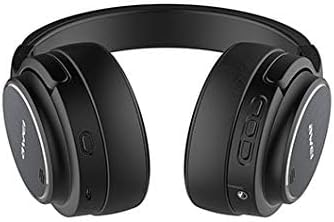
Billede: Side view of the headset highlighting the control panel.
- Tænd / sluk-knap: Located on the right earcup. Press and hold to power on or off.
- Knap til lydstyrke op / forrige sang: Short press for Volume+, Long press for Previous song.
- Knap til lydstyrke ned / Næste sang: Short press for Volume-, Long press for Next song.
- Multifunktionsknap (MFB): Used for Play/Pause, Answer/End calls, and Reject calls.
- ANC knap: Aktiverer eller deaktiverer aktiv støjreduktion.
- Mikrofon: Integreret til stemmeinput.
- AUX Jack (3.5mm): Til kablet lydforbindelse.
- USB opladningsport: Til opladning af headsettet.
- LED-indikatorlys: Viser status for strøm, parring og opladning.
5. Opsætning
5.1 Opladning af headsettet
- Connect the USB charging cable to the headset's USB charging port.
- Tilslut den anden ende af kablet til en USB-strømkilde (f.eks. en computers USB-port eller en vægadapter).
- LED-indikatoren viser opladningsstatus (f.eks. rød under opladning, slukket eller blå når den er fuldt opladet).
- En fuld opladning tager cirka 2-3 timer.
5.2 Bluetooth -parring
- Sørg for, at headsettet er slukket.
- Tryk på tænd/sluk-knappen, og hold den nede, indtil LED-indikatoren blinker skiftevis blåt og rødt, hvilket angiver parringstilstand.
- Aktiver Bluetooth på din enhed (smartphone, tablet, computer) og søg efter tilgængelige enheder.
- Vælg "AWEI A950BL" fra listen over fundne enheder.
- Når der er oprettet forbindelse, blinker LED-indikatoren langsomt blåt eller lyser konstant blåt.
5.3 Kabelforbindelse
Sådan bruger du headsettet i kablet tilstand:
- Connect one end of the 3.5mm audio cable to the AUX jack on the headset.
- Tilslut den anden ende til lydudgangsstikket på din enhed.
- The headset can be used in wired mode even if the battery is depleted.
6. Betjeningsvejledning
6.1 Tænd/sluk
- Tænd: Tryk og hold tænd/sluk-knappen nede i cirka 3 sekunder, indtil LED-indikatoren lyser.
- Sluk: Tryk og hold tænd/sluk-knappen nede i cirka 3 sekunder, indtil LED-indikatoren slukker.
6.2 Musikafspilning
- Afspil/pause: Tryk kort på multifunktionsknappen (MFB).
- Lydstyrke op: Tryk kort på lydstyrke op-knappen.
- Skrue ned for lyden: Tryk kort på lydstyrke ned-knappen.
- Næste sang: Tryk længe på lydstyrke ned-knappen.
- Forrige sang: Tryk længe på lydstyrke op-knappen.
6.3 Opkaldshåndtering
- Besvar opkald: Short press the Multi-function Button (MFB) when a call comes in.
- Afslut opkald: Short press the Multi-function Button (MFB) during a call.
- Afvis opkald: Long press the Multi-function Button (MFB) when a call comes in.
6.4 Aktiv støjreduktion (ANC)
The ANC feature reduces ambient noise, providing a clearer audio experience.

Image: Diagram illustrating the concept of Active Noise Cancellation.
- Aktiver ANC: Press the ANC button. The LED indicator for ANC will light up (usually green).
- Deaktiver ANC: Press the ANC button again. The ANC LED indicator will turn off.
7. Vedligeholdelse
- Rengør headsettet regelmæssigt med en blød, tør klud.
- Undgå at bruge skrappe kemikalier eller slibende materialer.
- Opbevar headsettet et køligt, tørt sted væk fra direkte sollys og ekstreme temperaturer.
- Udsæt ikke headsettet for vand eller overdreven fugt.
- Undgå at tabe headsettet eller udsætte det for kraftige stød.
8. Fejlfinding
| Problem | Mulig årsag | Løsning |
|---|---|---|
| Headsettet tænder ikke | Lavt batteri | Oplad headsettet helt. |
| Kan ikke parres med enheden | Headset not in pairing mode / Device Bluetooth off | Sørg for, at headsettet er i parringstilstand (blinker rødt/blåt). Slå Bluetooth til på din enhed. Flyt headsettet tættere på enheden. |
| Ingen lyd | Lydstyrken er for lav / Ikke tilsluttet / Forkert lydkilde | Increase volume on headset and device. Reconnect Bluetooth or check 3.5mm cable. Ensure correct audio output is selected on your device. |
| ANC fungerer ikke effektivt | ANC not activated / Environmental noise too high | Tryk på ANC-knappen for at aktivere. ANC er mest effektivt mod lavfrekvent, konstant støj. |
9. Specifikationer
| Modelnavn | A950BL |
| Forbindelsesteknologi | Wireless (Bluetooth V4.1), Wired (3.5 mm Jack) |
| Hovedtelefoner Form Factor | Over Ear |
| Støjkontrol | Aktiv støjreduktion |
| Batterikapacitet | 1050mAh (lithium-ion) |
| Taletid | Op til 10 timer |
| Musik Tid | Op til 10 timer |
| Produktdimensioner | 22 x 6 x 23 cm |
| Varens vægt | 165 g |
| Farve | Sort |
10. Garanti og support
AWEI products are manufactured to the highest quality standards. For warranty information or technical support, please refer to the warranty card included with your purchase or contact your local retailer or AWEI customer service. Keep your proof of purchase for warranty claims.