
Tera D5100
Tera D5100 trådløs 1D 2D QR-stregkodescanner brugermanual
Model: D5100
Indledning
Tera D5100 stregkodescanneren er en alsidig og robust enhed designet til effektiv stregkodescanning. Den understøtter både 1D- og 2D-koder (QR) og tilbyder fleksible tilslutningsmuligheder, herunder trådløs 2.4 GHz og USB-kablede forbindelser. Med en patenteret batteriniveauindikator og et ergonomisk design er denne scanner bygget til længerevarende brug og holdbarhed i forskellige miljøer.

Figur 1: Tera D5100 stregkodescanner med medfølgende tilbehør.
Nøglefunktioner
- Batteriniveauindikator og 2200mAh kapacitet: Giver længere kontinuerlig brug og forlænget standbytid. Unikke indikatorlamper viser det resterende batteriniveau.
- Ergonomisk design: Har et buet og forlænget håndtag, der er specielt skræddersyet til et behageligt greb under langvarig brug.
- Stødsikker silikone (IP54): Udstyret med et orange stødsikkert silikonebeskyttelsescover, der forhindrer ridser og friktion fra fald op til 6.56 meter. IP54-teknologi tilbyder støvbeskyttelse.
- 2.4 GHz trådløs plus USB 2.0 kablet forbindelse: Tilbyder plug-and-play-funktionalitet med enten en USB-modtager til trådløs drift (rækkevidde op til 328 meter i handicapvenlige miljøer) eller en direkte USB-kabelforbindelse. Ingen driverinstallation er nødvendig.
- Digitale og trykte 1D 2D QR-stregkodesymbologier: Understøtter en bred vifte af stregkodetyper, herunder 1D (Codabar, Code 11, Code93, MSI, Code 128, UCC/EAN-128, Code 39, EAN-8, EAN-13, UPC-A, ISBN, Industrial 25, Interleaved 25, Standard25, Matrix) og 2D (QR, DataMatrix, PDF417, Aztec, Hanxin, Micro PDF417).

Figur 2: Det ergonomiske håndtag giver et behageligt og sikkert greb.
Opsætning
Tera D5100 stregkodescanneren tilbyder to primære tilslutningsmetoder til problemfri integration med dit system.
2.4 GHz trådløs forbindelse
- Find den trådløse USB-dongle. Den opbevares typisk i bunden af scanneren for nemheds skyld.
- Sæt den trådløse USB-dongle i en ledig USB-port på din computer (pc, bærbar computer osv.).
- Scanneren er plug-and-play og burde automatisk oprette forbindelse til donglen. Batteriindikatorlamperne på scanneren lyser, hvilket indikerer, at den er klar til brug.
USB kablet forbindelse
- Tilslut den ene ende af det medfølgende USB-kabel til opladnings-/dataporten i bunden af scanneren.
- Tilslut den anden ende af USB-kablet til en ledig USB-port på din computer.
- Scanneren tændes og fungerer som en kabelforbundet enhed. Der kræves typisk ingen yderligere drivere.

Figur 3: Scanneren understøtter både USB-kablede og 2.4G trådløse forbindelser.
Betjeningsvejledning
Scanningstilstande
D5100-scanneren tilbyder tre forskellige scanningstilstande, der passer til forskellige driftsbehov:
- Manuel udløsertilstand: Tryk på udløserknappen for at aktivere scanningsstrålen og aflæse en stregkode.
- Kontinuerlig scanningstilstand: Scanningsstrålen forbliver kontinuerligt aktiv, hvilket muliggør hurtig scanning uden at skulle trykke på aftrækkeren gentagne gange.
- Auto-Sensor scanningstilstand: Scanneren registrerer automatisk en stregkode inden for sit felt view og aktiverer scanningsstrålen til at læse den.

Figur 4: Vælg mellem Manuel, Kontinuerlig eller Auto-Sense scanningstilstande.
Batteriniveauindikator
Scanneren har en patenteret batteriniveauindikator på oversiden. Denne indikator bruger en række blå lys til at vise den resterende batteriopladning:
- Fire lys: 100% opladning
- Tre lys: 75% opladning
- To lys: 50% opladning
- Én lampe: 25% opladning

Figur 5: Batteriindikatoren viser opladningsstatus i realtid.
Upload tilstande
Scanneren understøtter to dataoverførselstilstande:
- Øjeblikkelig upload-tilstand: Scannede data overføres øjeblikkeligt til din tilsluttede enhed.
- Opbevaringstilstand: Scannede data gemmes internt i scannerens hukommelse og kan senere uploades som en batch. Dette er nyttigt til lageropgaver, hvor der ikke altid er realtidsforbindelse tilgængelig.
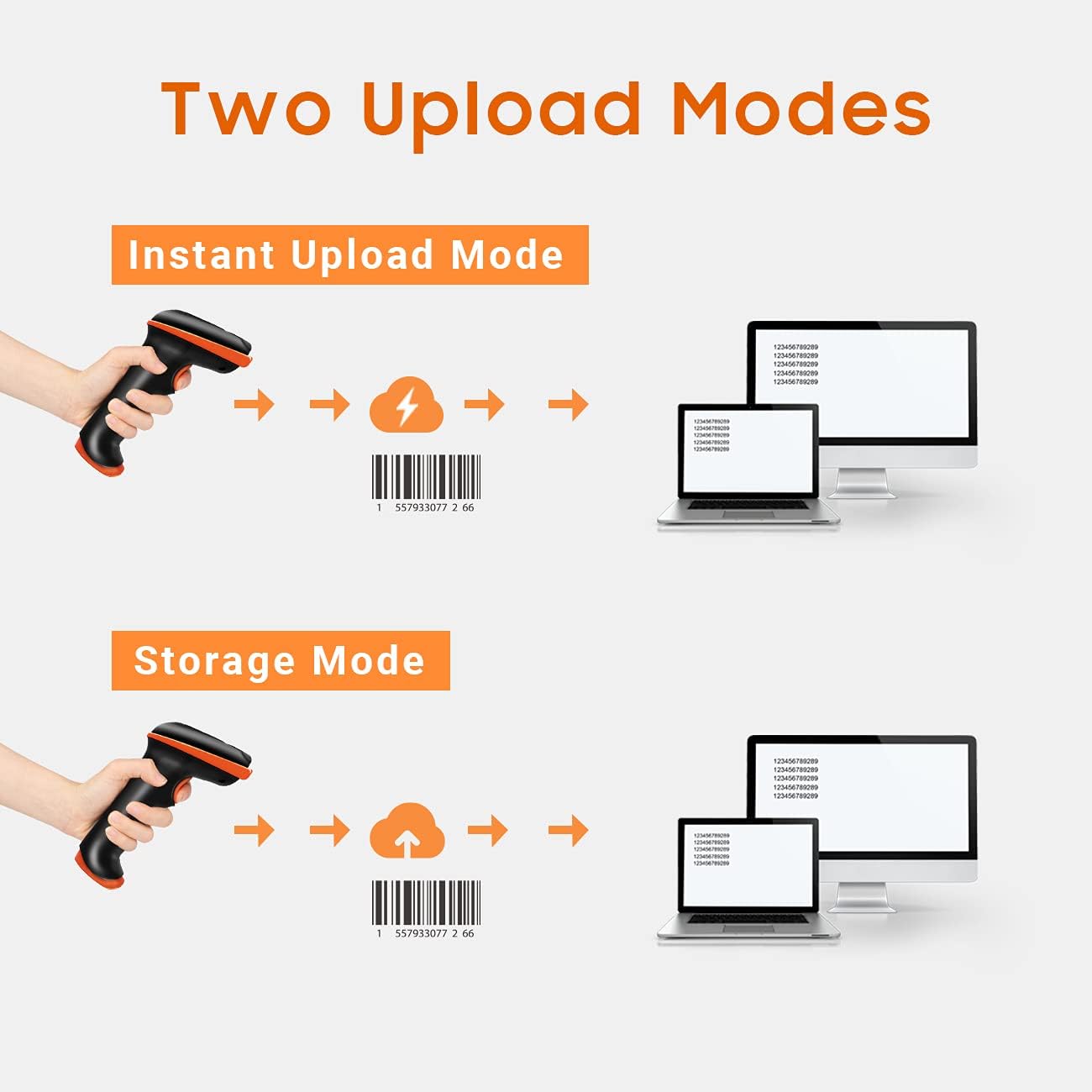
Figur 6: Vælg mellem øjeblikkelig dataoverførsel eller lagring af data til senere upload.
Scanning fra digitale skærme
D5100 kan scanne både trykte 1D/2D-koder og koder, der vises på digitale skærme (f.eks. smartphones, tablets, skærme).

Figur 7: Scanneren kan læse stregkoder fra både papir- og digitale skærme.
Tilføjelse af præfikser og suffikser
Scanneren kan konfigureres til at tilføje brugerdefinerede præfikser eller suffikser til scannede data. Denne funktion er nyttig til dataorganisering og integration med forskellige softwaresystemer.

Figur 8: Tilpas scannet output ved at tilføje præfikser eller suffikser.
Lydstyrkejustering
Scannerens biplydstyrke kan justeres, så den passer til dine omgivelser, med muligheder for lav, medium, høj eller fra.

Figur 9: Juster scannerens feedbacklydstyrke efter behov.
Opretholdelse
For at sikre din Tera D5100 stregkodescanners lange levetid og optimale ydeevne, skal du følge disse vedligeholdelsesretningslinjer:
- Rensning: Brug en blød, tør klud til at rengøre scannerens yderside. Ved genstridigt snavs kan du bruge en let tør klud.amp En klud kan bruges, men sørg for, at der ikke trænger fugt ind i enheden.
- Beskyttelse: Scanneren har et stødsikkert silikonebeskyttelsesdæksel og en IP54-klassificering, der giver modstand mod støv og mindre stænk. Selvom den er holdbar, bør den undgå at nedsænke den i vand eller udsætte den for for meget støv.
- Opbevaring: Opbevar scanneren et køligt, tørt sted væk fra direkte sollys og ekstreme temperaturer, når den ikke er i brug.
- Batteripleje: For optimal batterilevetid bør du undgå at aflade batteriet helt ofte. Oplad scanneren regelmæssigt, især hvis den skal opbevares i længere tid.

Figur 10: Den stødsikre silikone og IP54-klassificeringen forbedrer holdbarheden.
Fejlfinding
Her er løsninger på almindelige problemer, du kan støde på med din Tera D5100 stregkodescanner:
- Scanneren svarer ikke / i dvaletilstand: Hvis scanneren ikke har været brugt i et stykke tid, kan den gå i dvaletilstand for at spare på batteriet. Tryk på udløserknappen en eller to gange for at vække den. Batteriindikatorlamperne bør lyse, når den er aktiv.
- Scanner tilføjer ekstra tegn til scannede data: Dette problem indikerer typisk en uoverensstemmelse i konfigurationen, f.eks. en forkert indstilling af tastaturlayout. Se brugermanualen (inkluderet i pakken) for specifikke programmeringsstregkoder til at nulstille scanneren til standardindstillingerne eller konfigurere det korrekte tastaturlayout til din region (f.eks. amerikansk tastatur). Hvis problemet fortsætter, skal du kontakte kundesupport.
- Scanning unøjagtig eller langsom: Sørg for, at stregkoden er ren og ikke beskadiget. Hold scanneren i en passende afstand og vinkel i forhold til stregkoden. Kontroller, at der er tilstrækkelig belysning. Hvis du scanner fra en skærm, skal du sørge for, at skærmens lysstyrke er tilstrækkelig.
- Problemer med trådløs forbindelse: Sørg for, at den trådløse USB-dongle er korrekt tilsluttet din computer. Bekræft, at scanneren er inden for den effektive trådløse rækkevidde (op til 328 meter i barrierefrie miljøer). Undgå stærk elektromagnetisk interferens.
Specifikationer
| Attribut | Detalje |
|---|---|
| Modelnummer | D5100 |
| Produktdimensioner | 2.5 x 3.9 x 6.6 tommer |
| Varens vægt | 12.3 ounce |
| Strømkilde | Batteridrevet |
| Batteritype | 1 Lithium Ion batteri påkrævet |
| Forbindelsesteknologi | 2.4G trådløs, USB-kabel |
| Kompatible enheder | Bærbar computer, skrivebord |
| Fabrikant | Tera |
| Oprindelsesland | Kina |
Garanti og support
Tera-produkter er designet, udviklet og supporteret i USA. Selvom specifikke garantiperioder kan variere, er Tera forpligtet til at levere pålidelige produkter og kundeservice. For teknisk assistance, fejlfinding eller forespørgsler vedrørende din Tera D5100-stregkodescanner, henvises til kontaktoplysningerne på produktemballagen eller besøg den officielle Tera-side. webwebsted for supportressourcer.
Ask a question about this manual
Ask about setup, troubleshooting, compatibility, parts, safety, or missing instructions. Manuals+ will review the question and use this page’s manual context to help answer it.