
TENVIS T3875D
TENVIS T3875D WiFi IP Camera User Manual
Model: T3875D
1. Introduktion
This manual provides detailed instructions for the installation, operation, maintenance, and troubleshooting of your TENVIS T3875D WiFi IP Camera. Please read this manual thoroughly before using the product to ensure proper setup and optimal performance. Keep this manual for future reference.
The TENVIS T3875D is a Full HD 1080P outdoor motorized IP camera featuring 5X optical zoom, speaker, microphone, and MicroSD card support, compatible with ONVIF protocols.
2. Produktet er slutview
2.1 Pakkens indhold
- TENVIS T3875D WiFi IP Camera
- Power Adapter (AC 220V with Italian socket, output DC 12V 1A)
- Monteringsskruer og -dybler
- Ethernet-kabel (til første opsætning eller kabelforbindelse)
- Brugervejledning (dette dokument)
2.2 Kamerakomponenter
Familiarize yourself with the main components of your TENVIS T3875D camera:

Shows the camera lens, infrared LEDs, and light sensor. The camera is mounted on a wall bracket with an antenna visible at the top.

Another perspective of the front, highlighting the dome shape and the array of infrared lights around the central lens.

Displays the back of the camera, revealing the speaker grille and the covered MicroSD card slot at the bottom.

Shows the camera from a side angle, emphasizing the wall mount arm and the antenna connection point.
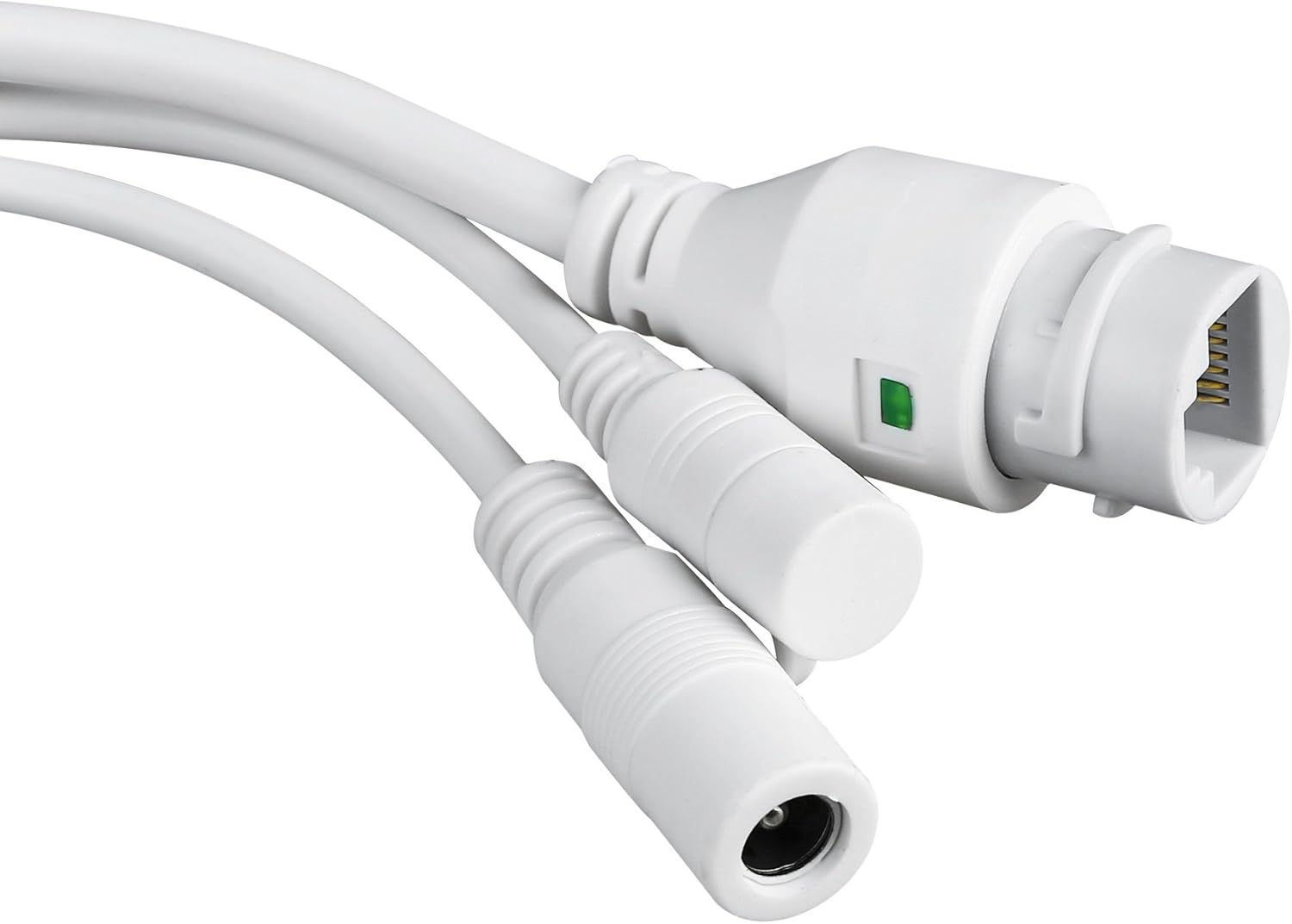
Close-up of the camera's power input and Ethernet port, essential for connectivity.
3. Opsætning og installation
3.1 Montering af kameraet
The TENVIS T3875D is designed for outdoor use and is IP66 weatherproof. Choose a suitable location for mounting, ensuring a clear field of view og adgang til en strømkilde.
- Marker borepunkterne på væggen ved hjælp af monteringsbeslaget som skabelon.
- Bor huller og isæt de medfølgende vægdyvler.
- Fastgør monteringsbeslaget til væggen med skruerne.
- Fastgør kameraet til monteringsbeslaget.
- Adjust the camera's angle as needed after initial setup.
3.2 Tænd
Connect the provided power adapter to the camera's power input and then plug it into a suitable electrical outlet. The camera will initiate its self-test sequence.
3.3 Netværksforbindelse
The camera supports both Wi-Fi (802.11n, WPA, WPA2) and Ethernet (10/100M) connections.
3.3.1 Wired Connection (Recommended for initial setup)
- Tilslut den ene ende af et Ethernet-kabel til kameraets Ethernet-port.
- Tilslut den anden ende af Ethernet-kablet til din router eller netværksswitch.
- Ensure your router has DHCP enabled for automatic IP address assignment.
3.3.2 Trådløs forbindelse
Wireless setup is typically done via the mobile application after the camera is initially connected to the network (either wired or via P2P QR code setup).
- P2P (Plug & Play) Setup: Download the "TENVISTY" app (available for Android and iOS). Scan the QR code on the product to quickly connect the camera to your smartphone/tablet. This method simplifies network configuration.
- Manual Wi-Fi Configuration: Hvis du bruger web interface or a different app, you may need to manually select your Wi-Fi network (SSID) and enter the password.
3.4 Installation af microSD-kort
The camera supports MicroSD cards up to 128GB for local storage of recordings.
- Locate the MicroSD card slot on the camera (refer to Figure 2.2.3). It is usually protected by a cover.
- Åbn forsigtigt dækslet.
- Insert the MicroSD card into the slot with the contacts facing down until it clicks into place.
- Close the cover securely to maintain the camera's weather resistance.
- Format the MicroSD card via the camera's settings in the app or web interface for optimal ydeevne.
4. Betjening af kameraet
4.1 Adgang til kameraet
You can access and control your camera using the official TENVISTY app or a web browser.
4.1.1 Using the TENVISTY App
- Download "TENVISTY" from the App Store (iOS) or Google Play Store (Android).
- Opret en konto eller log ind.
- Add your camera by scanning the QR code or manually entering its ID.
- Når du har tilføjet det, kan du view live feed, control pan/tilt/zoom, access recordings, and configure settings.
4.1.2 Brug af en Web Browser
The camera supports Internet Explorer 11. Other browsers may have limited functionality.
- Sørg for, at din computer er på samme netværk som kameraet.
- Find the camera's IP address (can be found via your router's connected devices list or a network scanner tool).
- Open Internet Explorer 11 and enter the camera's IP address in the address bar.
- Enter the default username and password (refer to the camera's label or initial setup guide for defaults).
4.2 Panorering, vipning og zoom (PTZ)-kontrol
The T3875D features motorized pan (355° horizontal), tilt (90° vertical), and 5x optical autofocus zoom.
- In the TENVISTY app or web interface, use the directional controls to move the camera's view.
- Use the zoom controls to optically zoom in or out. The camera will automatically focus.
4.3 Bevægelsesdetektion og alarmer
Configure motion detection settings to receive alerts and record events.
- Navigate to "Alarm Settings" or "Motion Detection" in the app/web interface.
- Enable motion detection.
- Adjust sensitivity levels and define detection regions to minimize false alarms.
- Configure alarm actions:
- Push-meddelelser: Receive real-time alerts on your smartphone/tablet via the TENVISTY app.
- Email Alert: Send emails with attached captured images to specified recipients.
- Videooptagelse: Automatically record video to the MicroSD card, NVR, or FTP server upon motion detection.
4.4 Optagelse og afspilning
The camera supports continuous, scheduled, or alarm-triggered recording.
- Lokal optagelse: Recordings are saved to the installed MicroSD card (up to 128GB).
- NVR/FTP Recording: Compatible with ONVIF 2.1 NVRs or FTP servers (NAS, hard drive connected to router).
- Afspilning: Få adgang til optaget footage through the TENVISTY app or web interface. Select the date and time to review begivenheder.
5. Vedligeholdelse
5.1 Rengøring af kameraet
Rengør kameralinsen og -huset regelmæssigt for at sikre en klar billedkvalitet og korrekt funktion.
- Brug en blød, damp klud til at tørre kamerahuset af.
- For the lens, use a lens cleaning cloth and solution designed for optical surfaces. Avoid abrasive materials.
- Brug ikke stærke rengøringsmidler eller opløsningsmidler.
5.2 firmwareopdateringer
Periodically check for firmware updates to improve camera performance, add new features, and enhance security. Firmware updates are typically available through the TENVISTY app or the manufacturer's webwebsted.
- Følg vejledningen, der følger med firmwareopdateringen, nøje.
- Ensure the camera remains powered during the entire update process to prevent damage.
5.3 Administration af microSD-kort
To maintain recording efficiency, it is recommended to format the MicroSD card periodically (e.g., every few months) through the camera's settings. Back up any important footage før formatering.
6. Fejlfinding
| Problem | Mulig årsag | Løsning |
|---|---|---|
| Kameraet tænder ikke. | Ingen strøm, defekt adapter, løs forbindelse. | Check power outlet, ensure adapter is securely connected to camera and power source. Try a different outlet. |
| Kan ikke oprette forbindelse til Wi-Fi. | Incorrect Wi-Fi password, camera too far from router, Wi-Fi interference. | Double-check Wi-Fi password. Move camera closer to router or use a Wi-Fi extender. Reduce interference from other devices. Try wired connection for initial setup. |
| Dårlig billedkvalitet. | Dirty lens, low network bandwidth, incorrect resolution settings. | Clean the camera lens. Ensure stable internet connection. Adjust video resolution settings in the app/web interface. |
| Bevægelsesdetektering virker ikke. | Motion detection disabled, sensitivity too low, incorrect detection area. | Enable motion detection in settings. Increase sensitivity. Adjust detection regions. |
| MicroSD-kort optager ikke. | Card not inserted correctly, card full, card not formatted, faulty card. | Reinsert card. Check storage space. Format the card via camera settings. Try a different MicroSD card. |
| Camera offline frequently. | Unstable Wi-Fi signal, power interruptions, network issues. | Improve Wi-Fi signal strength. Ensure stable power supply. Check router and internet connection. |
If the problem persists, please contact TENVIS customer support.
7. Specifikationer
| Feature | Detalje |
|---|---|
| Modelnummer | T3875D |
| Sensor | CMOS with IR Cut Filter |
| Linse | f:2.7-13.5 mm F:2.0 |
| Viewi vinkel | 25° til 96° |
| Opløsning | Up to 1920 x 1080p (2.0 megapixels) |
| Video kodning | H.264 |
| Billedhastighed | Op til 25 fps |
| WDR teknologi | Ja |
| Vejrbestandighed | IP66 standard |
| Pan & Tilt | Vandret 355°, Lodret 90° |
| Zoom | 5x optical Auto Focus |
| Infrarøde lysdioder | 6 powerful IR LED flashlights |
| Night Vision Range | Op til 60 meter |
| IR-skåret filter | Ja |
| Micro SD-slot | Op til 128 GB |
| Wi-Fi | 802.11n (WPA, WPA2) |
| LAN | Ethernet 10/100M |
| P2P | Yes (QR code setup) |
| Video stream | Two streams (main for local, sub for remote) |
| Bevægelsesdetektion | Customizable sensitivity and ranges |
| Alarmmeddelelse | TENVISTY app (push), Email with attachments |
| Indspilning | On alarms, continuous, programmable (MicroSD, NVR, FTP) |
| Understøttede browsere | Internet Explorer 11 |
| App | TENVISTY (Android, iOS), TinyCam Monitor (Android), LiveCams (iOS) |
| Understøttede protokoller | ONVIF 2.1, RTSP, RTMP |
| Driftstemperatur | -10 ℃ ~ 50 ℃ |
| Fugtighed | 10 % ~ 80 % (uden kondensering) |
| Dimensioner (L x B x H) | 18 x 17 x 10 cm |
| Vægt | 1.28 kg |
| Strømforsyning | AC 220V input, DC 12V 1A output |
| Strømforbrug | 5W (day), 12W (night) |
8. Garanti og support
8.1 Garantioplysninger
Specific warranty details may vary by region and retailer. Please refer to your purchase documentation or the TENVIS official website for the most accurate and up-to-date warranty policy.
8.2 Kundesupport
For technical assistance, troubleshooting beyond this manual, or warranty inquiries, please contact TENVIS customer support:
- E-mail: support@tenvis.com
- Webwebsted: www.tenvis.com
- For support in Italy, you may also contact DM Soluzioni ICT s.r.l. at info@dm-ict.it eller besøg www.dm-ict.it.
When contacting support, please have your product model (T3875D) and purchase information ready.
Ask a question about this manual
Ask about setup, troubleshooting, compatibility, parts, safety, or missing instructions. Manuals+ will review the question and use this page’s manual context to help answer it.