
Indledning
This manual provides comprehensive instructions for the use and maintenance of your Zerone Replacement Remote Control. Designed as a direct replacement, this remote offers seamless compatibility with various Samsung LCD, LED, and HD TV models, including BN59-00857A, BN59-00865A, and BN59-00942A, without requiring any programming or setup.
Produkt overview
The Zerone Replacement Remote Control is engineered for ease of use and reliable performance. Its ergonomic design ensures a comfortable grip, and its responsive buttons provide precise control over your television.
Nøglefunktioner:
- Kompatibilitet: Works seamlessly with LCD, LED, and HD TVs including models BN59-00857A, BN59-00865A, and BN59-00942A. Eliminates the need for programming or setup.
- Ergonomic & User-Friendly: Compact 19.1cm design fits comfortably in hand with anti-slip texture. Features an operation indicator light for intuitive nighttime use.
- Responsiv ydeevne: Strong signal emission ensures reliable command transmission up to 10 meters. Stable performance for daily home entertainment or presentations.
- Energieffektivt design: Requires 2 AAA batteries (not included) for extended use. Auto-sleep mode conserves power during idle periods.
- Direct OEM Replacement: Restores full functionality to suitable smart TVs without pairing delays. Ideal for broken or misplaced original remotes.
Fjernbetjeningslayout:

Figur 1: Forside view of the Zerone Replacement Remote Control. This image displays the full layout of the remote, including the power button, number pad, volume and channel controls, menu, source, and navigation buttons.

Figur 2: Detaljeret view of the remote control's buttons and the infrared (IR) emitter. This image highlights the tactile buttons and the IR window at the top, which transmits signals to the TV.
Opsætning
The Zerone Replacement Remote Control is designed for immediate use without complex setup procedures. Simply install the batteries, and it is ready to operate your compatible Samsung TV.
Batteri installation:
- Find batterirummet på bagsiden af fjernbetjeningen.
- Skub batteridækslet nedad, eller tryk på låsen for at åbne det.
- Insert two (2) AAA batteries (not included) into the compartment, ensuring the positive (+) and negative (-) terminals align correctly with the indicators inside.
- Luk batteridækslet ved at skubbe det tilbage på plads, indtil det klikker sikkert.

Figur 3: Bagside view of the remote control, highlighting the battery compartment. This image shows the location where the battery cover can be removed to insert the AAA batteries.
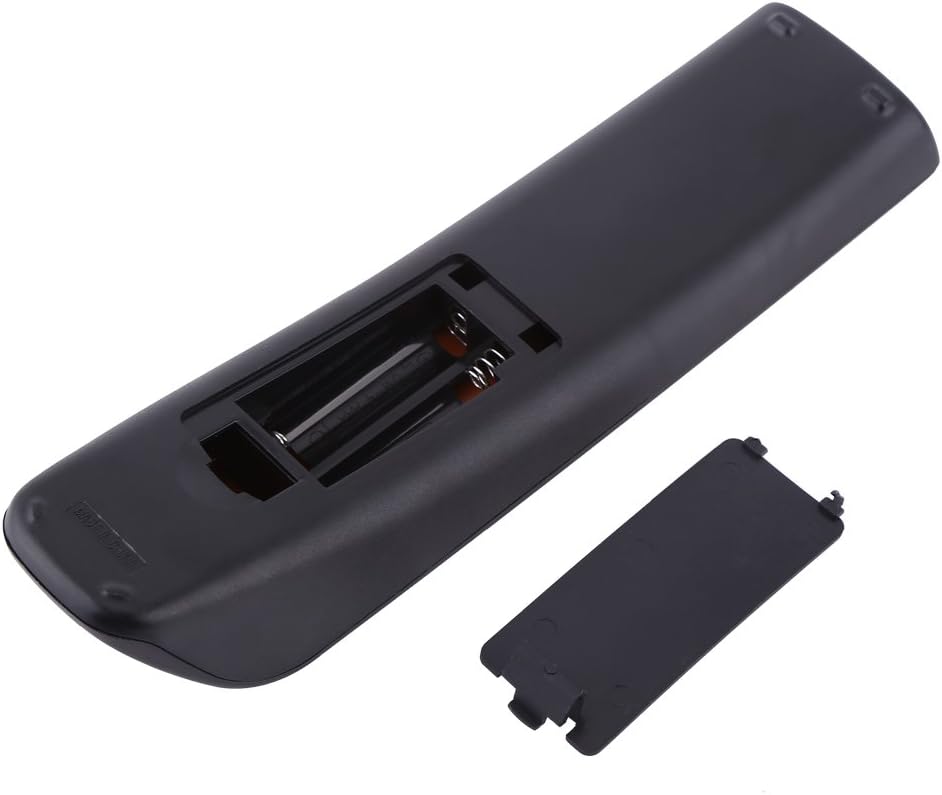
Figure 4: The remote control with its battery compartment open, revealing the slots for two AAA batteries. This view assists in correctly inserting the batteries.
Note: This remote control does not require any programming or pairing. Once batteries are installed, it is ready to control your compatible Samsung TV.
Betjeningsvejledning
To operate your TV using the Zerone Replacement Remote Control, point the remote directly at the TV's infrared receiver. Ensure there are no obstructions between the remote and the TV.
Grundlæggende funktioner:
- Strøm (MAGT): Tænder eller slukker for tv'et.
- TV: Switches the TV to TV mode.
- Nummerknapper (0-9): Vælg kanaler direkte.
- Volumen (VOL +/-): Justerer lydstyrken.
- Channel (CH +/-): Skifter kanaler op eller ned.
- Slå lyden fra (STUM): Slår lyden fra eller til på tv'et.
- Kilde (KILDE): Selects input sources (HDMI, AV, Component, etc.).
- Menu (MENU): Giver adgang til tv'ets hovedmenu.
- Navigationsknapper (op, ned, venstre, højre, enter): Bruges til at navigere i menuer og bekræfte valg.
- Afslut (EXIT): Forlader den aktuelle menu eller funktion.
- Vend tilbage (TILBAGE): Vender tilbage til den forrige skærm eller kanal.
- CH LISTE: Viser kanallisten.
- VÆRKTØJ: Åbner hurtigindstillinger eller værktøjsmenuen.
- INFO: Viser oplysninger om det aktuelle program eller input.
- P. STØRRELSE: Justerer billedstørrelse/-formatforhold.
- MTS: Multi-track sound selection.
- CC: Aktiverer eller deaktiverer undertekster.
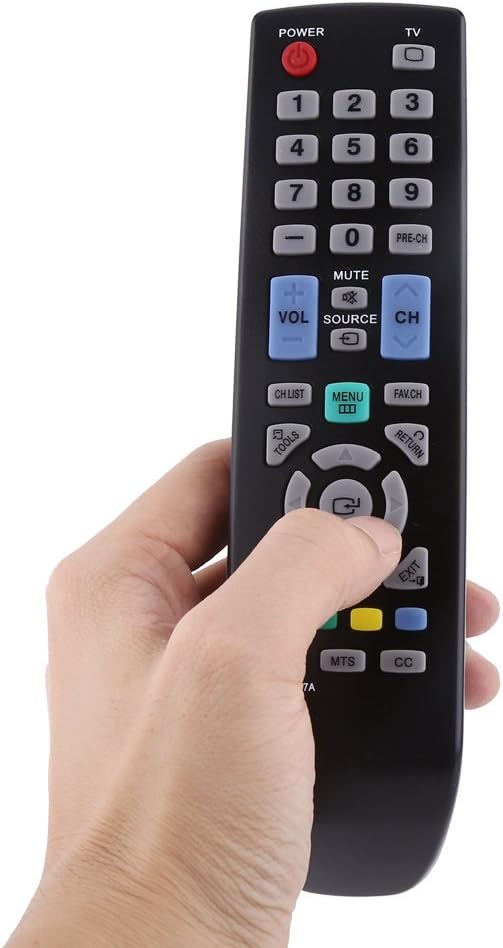
Figure 5: A hand demonstrating the natural grip and button accessibility of the remote control during use.
Opretholdelse
Korrekt pleje og vedligeholdelse vil forlænge levetiden på din fjernbetjening.
Rensning:
- Tør fjernbetjeningen af med en blød, tør klud.
- Til genstridigt snavs, let dampen the cloth with water or a mild, non-abrasive cleaner. Do not use harsh chemicals or abrasive cleaning agents.
- Undgå at få fugt ind i batterirummet eller andre åbninger.
Udskiftning af batteri:
- Udskift batterierne, når fjernbetjeningen reagerer langsomt eller holder op med at virke.
- Udskift altid begge AAA-batterier på samme tid.
- Bland ikke gamle og nye batterier eller forskellige typer batterier.
- Fjern batterierne, hvis fjernbetjeningen ikke skal bruges i længere tid, for at forhindre lækage.
Opbevaring:
- Opbevar fjernbetjeningen på et køligt, tørt sted væk fra direkte sollys og ekstreme temperaturer.
- Undgå at tabe fjernbetjeningen eller udsætte den for hårde stød.
Fejlfinding
Hvis du oplever problemer med din fjernbetjening, kan du se følgende almindelige problemer og løsninger:
| Problem | Mulig årsag | Løsning |
|---|---|---|
| Fjernbetjeningen virker ikke. | Batterierne er døde eller isat forkert. | Udskift batterierne med nye AAA-batterier, og sørg for at polariteten (+/-) vender korrekt. |
| Remote is unresponsive or has a short range. | Weak batteries; Obstruction between remote and TV; Remote is too far from TV. | Replace batteries. Remove any objects blocking the line of sight. Move closer to the TV (within 10 meters). |
| Specifikke knapper virker ikke. | Dirt or debris under the button; Internal malfunction. | Clean the remote surface. If the issue persists, the remote may require replacement. |
| TV does not respond to remote commands. | TV is off or unplugged; TV's IR receiver is blocked or faulty; Remote is not compatible with the specific TV model. | Ensure TV is powered on. Check for obstructions on the TV's IR receiver. Verify your TV model is listed as compatible (BN59-00857A, BN59-00865A, BN59-00942A). |
Specifikationer
Detailed specifications for the Zerone Replacement Remote Control:
| Attribut | Detalje |
|---|---|
| Mærke | Nul |
| Modelnummer | Zeronemz476r5kfu |
| Kompatible modeller | BN59-00857A, BN59-00865A, BN59-00942A |
| Strømkilde | 2 x AAA-batterier (medfølger ikke) |
| Kompatibilitet | LCD, LED, HD TVs |
| Farve | Sort |
| Vægt | 66 g (2.46 ounce) |
| Dimensioner (L x B x H) | 19.1 x 5 x 3.5 cm (7.5 x 2 x 1.4 tommer) |
| Type | Fjernbetjening |
| Fungere | TV fjernbetjening |
| Maks. antal understøttede enheder | 1 |
| Speciel funktion | Ergonomisk |

Figure 6: The remote control with its dimensions (length, width, and height) clearly marked in centimeters. This provides a visual reference for the physical size of the device.
Vigtige bemærkninger
- Monitors are not calibrated the same; item color displayed in photos may be showing slightly different from the real object. Please take the real one as standard.
- Please allow 1-3cm error due to manual measurement.