
TecTake 800664
TecTake Electric Height-Adjustable Sit-Stand Desk User Manual
Model: 800664 | Brand: TecTake
1. Introduktion
Thank you for choosing the TecTake Electric Height-Adjustable Sit-Stand Desk. This ergonomic desk is designed to optimize your workspace, allowing you to seamlessly switch between sitting and standing positions. Its robust construction and intelligent features provide comfort, stability, and versatility for various uses, including office work, gaming, and telecommuting. This manual provides essential information for the safe and efficient assembly, operation, and maintenance of your new desk.
2. Sikkerhedsoplysninger
Læs venligst alle sikkerhedsinstruktioner omhyggeligt inden montering og brug. Manglende overholdelse af disse instruktioner kan medføre personskade eller beskadigelse af produktet.
- This electric sit-stand desk is designed for safe and efficient use. It features an adjustable anti-collision system and a stable structure, even when fully extended.
- The maximum supported weight is 125 kg (275 lbs)Overskrid ikke denne vægtgrænse.
- It is recommended to follow the provided assembly instructions precisely to ensure proper stability, especially when the desk is used in a high position.
- Hold hænder og genstande væk fra bevægelige dele under højdejustering.
- Ensure the power cable is not pinched or damaged.
- Lad ikke børn betjene skrivebordet uden opsyn af voksne.
- Afbryd strømmen før rengøring eller udførelse af vedligeholdelse.
3. Produktet er slutview
The TecTake Electric Height-Adjustable Sit-Stand Desk frame is engineered for durability and ease of use. It features a robust steel construction, powerful motors, and an intuitive control panel.

Figur 3.1: Hovedkomponenter. This image displays the complete desk frame, including the two lifting columns, the crossbar, the control panel, and the power supply unit. It illustrates the adjustable width and height capabilities.

Figure 3.2: Control Panel and Cable Management. En detaljeret view of the intuitive control panel with its digital display, up/down arrows, memory presets (1, 2, 3), and alarm function (A). The image also highlights the spacious cable pass-through for organized wiring.
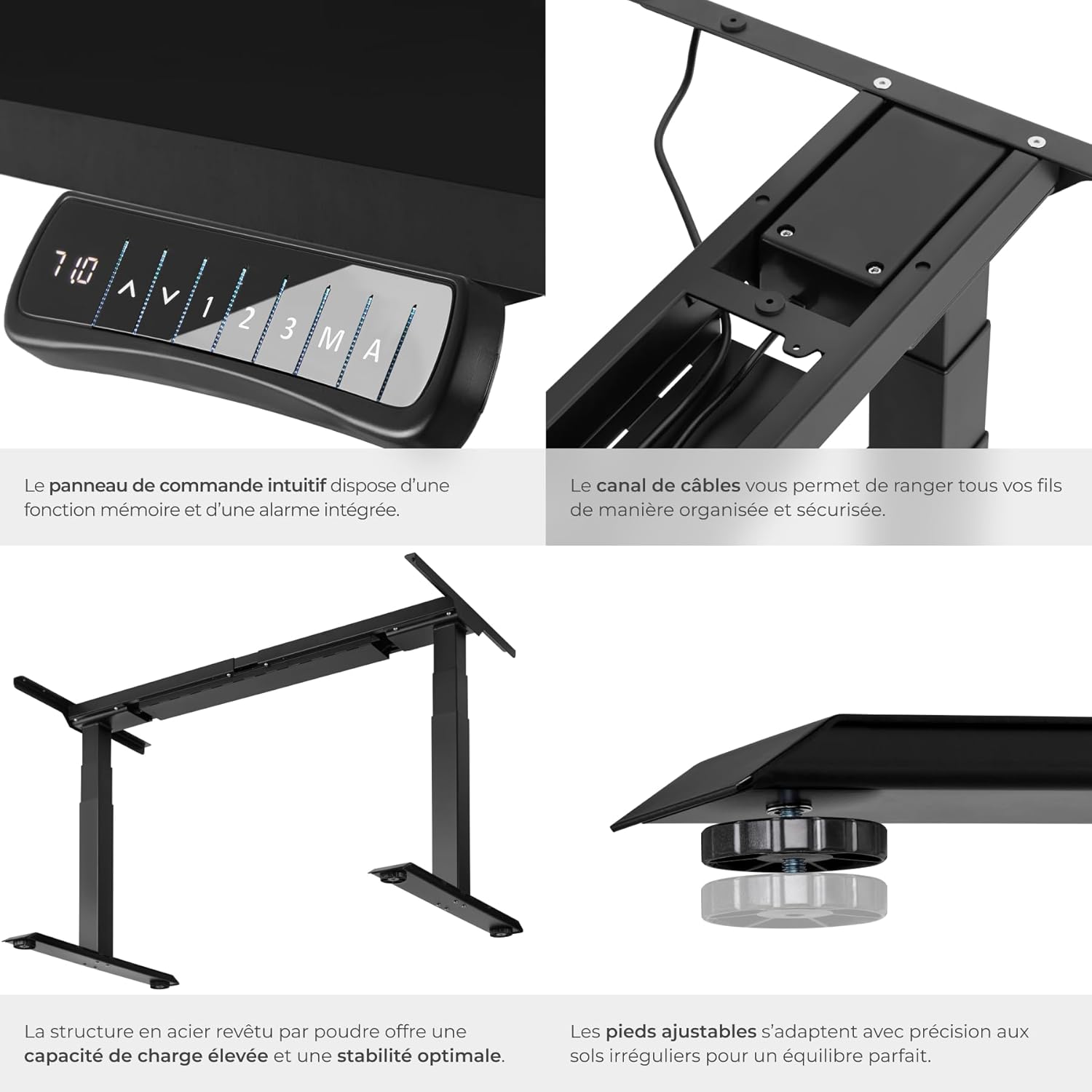
Figur 3.3: Nøglefunktioner. Close-up shots demonstrating the intuitive control panel, the integrated cable channel for tidy wiring, the robust powder-coated steel structure for high load capacity and stability, and the adjustable feet for precise leveling on uneven floors.

Figure 3.4: Functional Highlights. This image visually explains the desk's key functionalities: continuously adjustable height, variable width to fit different tabletops, a load capacity of up to 125 kg, silent motors for discreet operation, an anti-collision system that stops movement upon obstruction, and 100% stability thanks to solid T-shaped feet.
4. Opsætningsvejledning
Assembly of the TecTake desk frame is straightforward. Please ensure you have all components and tools as indicated in the packaging. A tabletop is not included and must be purchased separately.
4.1 Udpakning og komponentkontrol
- Pak forsigtigt alle komponenter ud, og læg dem på en ren, blød overflade for at undgå ridser.
- Verify that all parts listed in the packing list are present. Refer to Figure 3.1 for a visual guide of the main components.
- Ensure the mounting material (screws, tools) is included as shown in the product information (refer to image 71GtxctSrjL._AC_SL1500_.jpg for reference).
4.2 Rammesamling
- Attach the lifting columns to the crossbar according to the instructions provided in the separate assembly manual (not included in this digital manual, but typically provided with the product).
- Secure the feet to the bottom of the lifting columns.
- Install the control panel in the designated slot on the frame.
- Connect all necessary cables (power, motor cables) to the control box and ensure they are properly routed through the cable management channels.
4.3 Montering af bordpladen
- Place your chosen tabletop upside down on a soft, protected surface.
- Carefully position the assembled desk frame onto the tabletop, ensuring it is centered and aligned as desired.
- Mark the screw holes for attaching the tabletop to the frame.
- Pre-drill pilot holes if necessary (check tabletop material and thickness).
- Fastgør bordpladen til rammen med de medfølgende skruer.
- Carefully flip the desk upright and place it in its desired location.
5. Betjeningsvejledning
Your TecTake Electric Sit-Stand Desk is equipped with an intuitive control panel for easy height adjustment and memory functions.
5.1 Grundlæggende højdejustering
- Tilslut strømkablet til en passende stikkontakt.
- Brug Op (▲) og Ned (▼) arrow buttons on the control panel to adjust the desk height. The digital display will show the current height.
- Slip knappen, når den ønskede højde er nået.
5.2 Hukommelsesfunktioner
The desk allows you to save up to three preferred height positions for quick recall.
- Juster skrivebordet til den ønskede højde ved hjælp af Op/Ned-knapperne.
- Tryk på M knappen. Displayet vil vise 'S-'.
- Within 3 seconds, press one of the memory preset buttons ('1', '2', eller '3'). The display will show 'S-1', 'S-2', or 'S-3' to confirm the position has been saved.
- To recall a saved position, simply press the corresponding memory button ('1', '2', eller '3'Skrivebordet flytter sig automatisk til den gemte højde.
5.3 Alarmfunktion
The alarm function (button 'A') can be used to remind you to change your position after a set period, promoting healthier work habits. Consult your product's specific manual for detailed instructions on setting and activating the alarm, as functionality may vary.
5.4 Antikollisionssystem
The desk is equipped with an adjustable anti-collision system. If the desk encounters an obstacle during movement (up or down), it will automatically stop and reverse slightly to prevent damage. The sensitivity of this system may be adjustable; refer to your specific product manual for details on how to modify this setting if needed.
6. Vedligeholdelse
Regular maintenance will help prolong the life of your TecTake desk.
- Rensning: Wipe the desk frame and tabletop with a soft, damp klud. Undgå slibende rengøringsmidler eller opløsningsmidler, der kan beskadige overfladen.
- Kabelstyring: Periodically check that all cables are securely connected and not pinched or frayed. Re-route cables if necessary to prevent damage.
- Stabilitetstjek: Ensure all screws and bolts remain tight. If the desk feels wobbly, check and tighten all connections.
- Motorpleje: The motors are designed for maintenance-free operation. Avoid overloading the desk beyond its specified weight capacity.
7. Fejlfinding
If you encounter issues with your desk, try the following solutions before contacting support.
| Problem | Mulig årsag | Løsning |
|---|---|---|
| Skrivebordet bevæger sig ikke. | Power cable disconnected; Overload; Motor overheating. | Check power connection. Reduce weight on desk. Allow motors to cool down for 20 minutes. |
| Skrivebordet bevæger sig ujævnt eller laver usædvanlige lyde. | Løse forbindelser; Blokering; Ujævn vægtfordeling. | Check and tighten all assembly screws. Remove any obstructions. Redistribute weight evenly on the tabletop. |
| Anti-collision system triggers too easily. | Følsomhedsindstillingen er for høj. | Refer to your specific product manual for instructions on adjusting anti-collision sensitivity. |
| Hukommelsesfunktionen virker ikke. | Forkert lagringsprocedure. | Ensure you press 'M' then the preset number within 3 seconds. |
8. Specifikationer
Key technical specifications for the TecTake Electric Height-Adjustable Sit-Stand Desk (Model 800664):
| Feature | Specifikation |
|---|---|
| Mærke | TecTake |
| Modelnummer | 800664 |
| Farve | Sort |
| Produktmål (L x B x H) | 68 x 190 x 123 cm (ca. 26.8 x 74.8 x 48.4 tommer) |
| Vægt | 31 kilogram (ca. 68.3 lbs) |
| Materiale | Pulverlakeret stål |
| Belastningskapacitet | 125 kg (ca. 275 lbs) |
| Løftehastighed | 38 mm/s |
| Voltage | 100 - 240 V |
| Motorkraft | 40 W |
| Justerbart højdeområde | 58 - 123 cm (ca. 22.8 - 48.4 tommer) |
| Justerbart breddeområde | 110 - 190 cm (ca. 43.3 - 74.8 tommer) |
| Recommended Tabletop Dimensions | 120 x 60 cm to 200 x 80 cm |
| Særlige funktioner | Adjustable, Memory Function (3 positions), Alarm Function, Anti-collision System, Silent Motors |
9. Garanti og support
For warranty information, please refer to the documentation provided with your purchase or contact your retailer. TecTake products typically come with a manufacturer's warranty covering defects in materials and workmanship.
If you require further assistance, have questions about assembly, operation, or troubleshooting that are not covered in this manual, please contact TecTake customer support or your point of purchase. Keep your purchase receipt and model number handy for faster service.
For more information, you may visit the official TecTake store on Amazon: TecTake Amazon Store
Ask a question about this manual
Ask about setup, troubleshooting, compatibility, parts, safety, or missing instructions. Manuals+ will review the question and use this page’s manual context to help answer it.