
Indledning
This manual provides comprehensive instructions for the Walfront ESP-WROOM-32 Test Burn Board. This device is a small batch burn fixture designed for efficient testing and programming of ESP-WROOM-32 minimum system development modules. Please read this manual thoroughly before use to ensure proper operation and longevity of the product.
Produkt overview
The Walfront ESP-WROOM-32 Test Burn Board is engineered for reliability and ease of use in development and production environments. It features a robust design and clear pinout for various ESP-WROOM-32 modules.
Nøglefunktioner:
- Anvendelse: Suitable for burning test boards of ESP-WROOM-32 modules.
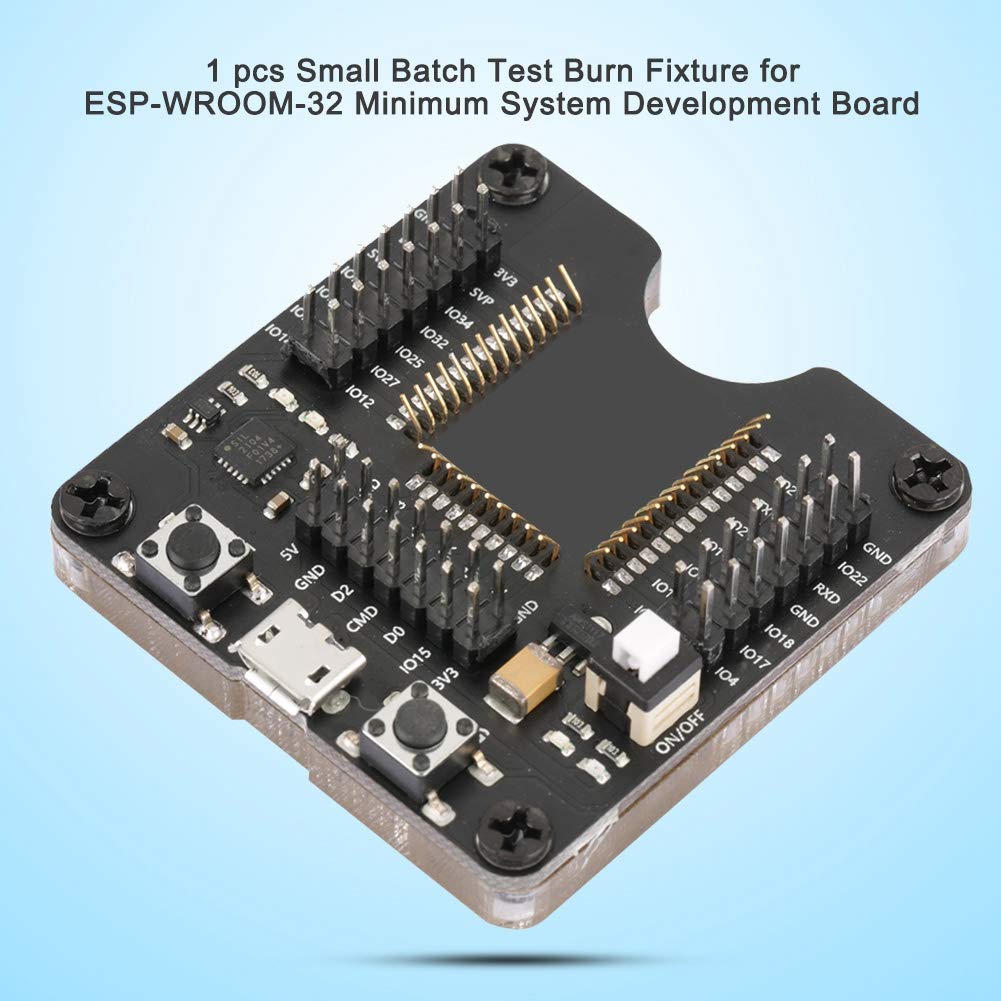
- IO Port Visibility: All IO ports are equipped with LEDs, allowing the board to function as a minimum system board or for small batch burning with the fixture.
- Høj kvalitetskonstruktion: Manufactured with precision electronic components to ensure durability and stable performance.
- Pålidelig kontakt: Designed for good contact performance, ensuring stable operation during testing and programming.
Pakkeindhold:
- 1 x Walfront ESP-WROOM-32 Test Burn Board

Figur 1: Top-down view of the Walfront ESP-WROOM-32 Test Burn Board, highlighting its pin headers and control buttons.
Figur 2: Vinklet view of the burn board, illustrating the clear acrylic base and the central slot for the ESP-WROOM-32 module.
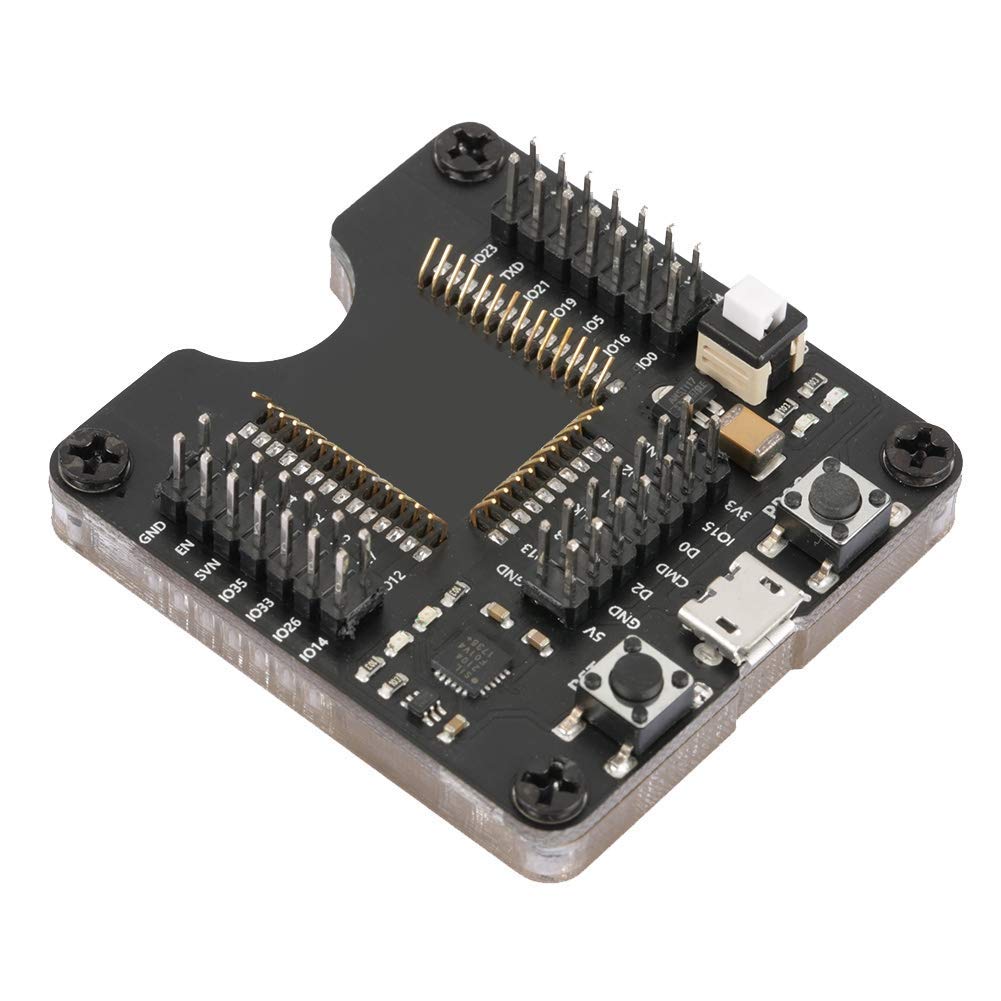
Figure 3: Dimensions of the Walfront ESP-WROOM-32 Test Burn Board, measuring 4.5 cm by 5 cm.
Opsætningsinstruktioner
- Unpack the Burn Fixture: Carefully remove the Walfront ESP-WROOM-32 Test Burn Board from its packaging. Inspect for any visible damage.
- Identify Module Slot: Locate the central slot on the burn board designed for the ESP-WROOM-32 module. Note the surrounding pin headers and their labels (e.g., GND, 3V3, IO pins).
- Insert ESP-WROOM-32 Module: Gently align your ESP-WROOM-32 module with the pin headers in the central slot. Ensure all pins are correctly seated into the spring-loaded contacts. Apply even pressure to avoid bending pins.
- Tilslut til computer: Connect the burn fixture to your computer using a standard Micro USB cable. The board will draw power from the USB connection.
- Installer drivere: If your operating system does not automatically recognize the device, you may need to install specific USB-to-serial drivers (e.g., Silicon Labs CP210x drivers) for proper communication. Refer to your computer's device manager to confirm driver installation.

Figure 4: The burn board connected via Micro USB, ready for module insertion and programming.
Betjeningsvejledning
Once the burn fixture is set up and connected, you can proceed with programming your ESP-WROOM-32 module.
- Verify Module Seating: Double-check that the ESP-WROOM-32 module is securely and correctly seated in the burn fixture's slot. Good contact is essential for stable operation.
- Start programmeringssoftware: Open your preferred Integrated Development Environment (IDE) or flashing tool (e.g., Arduino IDE, ESP-IDF, esptool.py).
- Vælg seriel port: In your software, select the serial (COM) port corresponding to the connected burn fixture. This port should appear after successful driver installation.
- Prepare for Flashing:
- Tryk og hold på PROG button (Program button).
- Mens du holder PROG, tryk kortvarigt på og slip RST button (Reset button).
- Slip PROG button. The module is now in programming mode.
- Initiate Flashing: Start the flashing or burning process from your software. The IO port LEDs on the burn board may indicate data transmission activity.
- Færdiggørelse: Once the flashing process is complete, disconnect the burn fixture from your computer. The ESP-WROOM-32 module can then be carefully removed.

Figure 5: Detail of the RST (Reset) and PROG (Program) buttons, and the Micro USB port for connection.

Figure 6: The spring-loaded pins ensure good contact with the ESP-WROOM-32 module for stable operation.
Opretholdelse
To ensure the longevity and optimal performance of your Walfront ESP-WROOM-32 Test Burn Board, follow these maintenance guidelines:
- Rensning: Keep the board clean and free from dust and debris. Use a soft, dry cloth or a brush to gently clean the surface. Avoid using liquids or abrasive cleaners.
- Opbevaring: Store the burn fixture in a dry, cool environment, away from direct sunlight and extreme temperatures.
- Håndtering: Handle the board with care. Avoid dropping it or subjecting it to excessive force, which could damage the delicate electronic components or the spring-loaded pins.
- Pin Inspection: Periodically inspect the spring-loaded pins for any signs of bending or damage. Bent pins can lead to poor contact and unreliable operation.
Fejlfinding
If you encounter issues while using the Walfront ESP-WROOM-32 Test Burn Board, refer to the following common problems and solutions:
| Problem | Mulig årsag | Løsning |
|---|---|---|
| Module not recognized by computer/software. | Missing or incorrect USB-to-serial drivers. Loose USB connection. Module not properly seated. | Install the correct drivers (e.g., Silicon Labs CP210x). Ensure the Micro USB cable is securely connected. Re-seat the ESP-WROOM-32 module, checking pin alignment. |
| Flashing process fails or encounters errors. | Module not in programming mode. Poor contact with module pins. Incorrect software settings (e.g., wrong COM port, baud rate). | Ensure the module is put into programming mode (PROG then RST). Verify the module is firmly seated. Check software settings for correct serial port and parameters. |
| IO port LEDs do not light up or behave unexpectedly. | Module not powered or not communicating. Faulty module. | Confirm the burn board is powered via USB. Ensure the ESP-WROOM-32 module is functional. |
| Physical damage to pins or components. | Improper handling or insertion of modules. | Handle with care. If pins are bent, gently attempt to straighten them with fine-tipped tweezers. If damage is severe, replacement may be necessary. |
Specifikationer
| Attribut | Værdi |
|---|---|
| Type | Burn Fixture |
| Produktdimensioner | 3.15 x 2.76 x 2.36 inches (approx. 5 x 4.5 cm) |
| Varens vægt | 0.704 ounce (ca. 27 gram) |
| Fabrikant | Walfront |
| Modelnummer | Walfront6fiapg28nw |
| ASIN | B07KPHF8XM |
| Dato først tilgængelig | 19. november 2018 |
Garanti og support
For detailed warranty information, technical assistance, or customer support regarding your Walfront ESP-WROOM-32 Test Burn Board, please refer to the product packaging or contact Walfront customer service directly. Keep your purchase receipt for warranty claims.