
1. Introduktion
The Zerone Sport Action DV Camera is a compact and portable device designed for capturing high-definition video during various outdoor activities. Featuring 1080P and 720P recording options, a 120-degree wide-angle lens, and an IPX-4 waterproof aluminum alloy shell, this camera is built for durability and ease of use. It includes a built-in microphone for audio recording and provides vibration feedback for operational status.
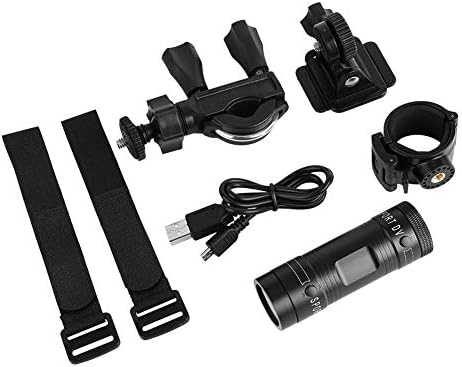
Image 1.1: The Zerone Sport Action DV Camera unit.
2. Sikkerhedsoplysninger
- Udsæt ikke kameraet for ekstreme temperaturer eller direkte sollys i længere perioder.
- While the camera features an IPX-4 waterproof rating, it is designed to withstand splashes and light rain. Do not submerge or soak the camera in water.
- Hold enheden væk fra stærke magnetiske felter.
- Brug kun det specificerede opladningskabel og strømadapter for at undgå skader.
- Forsøg ikke at skille kameraet ad eller ændre det, da dette vil ugyldiggøre garantien og kan forårsage skade.
- Store the camera in a dry, cool place when not in use.
3. Pakkens indhold
Kontroller venligst pakken for at sikre, at alle varer er til stede:
- Zerone Sport Action DV Camera Unit
- USB opladningskabel
- Mounting Accessories (e.g., bike mount, helmet mount, strap mounts)
- Rechargeable Battery (may be pre-installed)
- Brugervejledning (dette dokument)
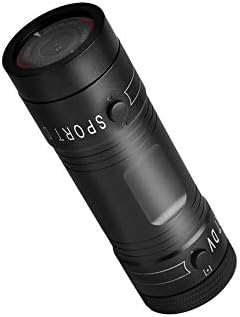
Image 3.1: Contents of the Zerone Sport Action DV Camera package, showing the camera, USB cable, and various mounting options.
4. Kamera overview
Gør dig bekendt med kameraets komponenter og betjeningselementer.
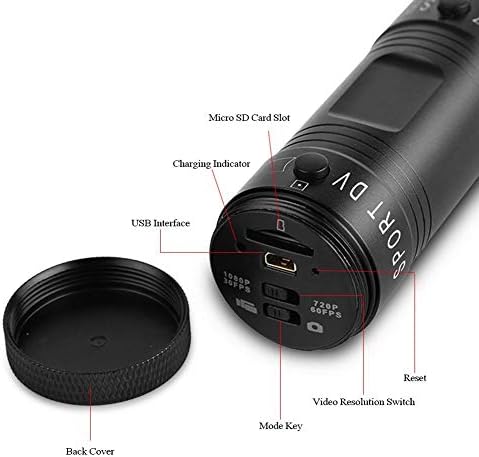
Billede 4.1: Detaljeret view of the camera's rear end, highlighting the Micro SD card slot, USB interface, charging indicator, mode key, video resolution switch (1080P 30fps / 720P 60fps), and reset button.
- Micro SD -kortplads: Insert your Micro SD card here. A card is required for operation.
- Opladningsindikator: Displays charging status. A red light indicates charging; it turns off when fully charged.
- USB-grænseflade: Til opladning og tilslutning til en computer.
- Tilstandstast: Used to switch between recording modes (e.g., video, photo).
- Video Resolution Switch: Selects between 1080P 30fps and 720P 60fps recording resolutions.
- Nulstil knap: Bruges til at nulstille enheden, hvis den ikke reagerer.
- Tænd/sluk-knap (foran): Located on the front side of the camera.
- Record/Stop Button (Back): Located on the back side of the camera.
5. Opsætning
5.1 Opladning af batteriet
- Tilslut kameraet til en USB-strømkilde (f.eks. computer, vægadapter) ved hjælp af det medfølgende USB-kabel.
- De rødt lys on the back of the camera will illuminate, indicating that it is charging.
- Når den er fuldt opladet, slukkes det røde lys.
- Note: If the camera blinks red and blue when plugged in, it indicates that an SD card is not inserted. This is not a charging indicator.
5.2 Indsættelse af et Micro SD-kort
A Micro SD card (not included) is required for recording video and photos. The camera supports Micro SD cards up to a certain capacity (check product packaging for maximum supported size, typically 32GB or 64GB for similar devices).
- Skru kameraets bagside af.
- Locate the Micro SD card slot (refer to Image 4.1).
- Sæt forsigtigt Micro SD-kortet i stikket, indtil det klikker på plads. Sørg for, at kortet vender korrekt.
- Replace the back cover, ensuring it is securely tightened to maintain water resistance.
5.3 Montering af kameraet
The camera comes with various mounting accessories for different applications.
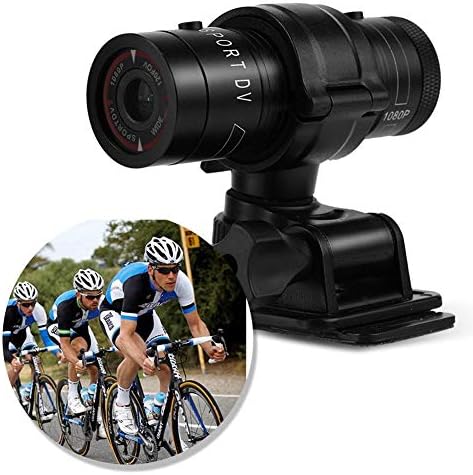
Image 5.1: The camera attached to a bicycle handlebar, demonstrating one of its mounting options.
- Cykelholder: Brug clamp mount to attach the camera securely to bicycle handlebars or other tubular structures.
- Hjelmbeslag: Utilize the adhesive or strap mounts to fix the camera to a helmet.
- Strap Mounts: For attaching to various gear or body parts.
Ensure all mounts are securely fastened before engaging in activities to prevent the camera from falling.
6. Betjening af kameraet
6.1 Tænd/sluk
- For at tænde skal du trykke på og holde nede Power knap (front switch) until the camera vibrates.
- For at slukke, skal du trykke på og holde nede Power knap again until the camera vibrates once.
6.2 Selecting Video Resolution
Before recording, select your desired video resolution using the switch on the back of the camera (refer to Image 4.1).
- Skub kontakten til "1080P 30fps" for Full HD video at 30 frames per second.
- Skub kontakten til "720P 60fps" for HD video at 60 frames per second.
6.3 Optagelse af video
- Sørg for, at kameraet er tændt.
- Tryk på Optag/Stop knap (back switch) to start recording. The camera will vibrate three times to indicate recording has started.
- Tryk på for at stoppe optagelsen Optag/Stop knap again. The camera will vibrate once to indicate recording has stopped.
6.4 Tilslutning til en computer
At overføre files or access recorded content:
- Sørg for, at kameraet er slukket.
- Tilslut kameraet til din computer ved hjælp af det medfølgende USB-kabel.
- The camera will be recognized as a removable storage device.
- You can then access and transfer your video files.
7. Vedligeholdelse
- Rensning: Brug en blød, tør klud til at rengøre kamerahuset. Brug en specialklud og -opløsning til objektivet. Undgå slibende materialer.
- Opbevaring: When not in use for extended periods, store the camera in a cool, dry place. Ensure the battery is partially charged (around 50%) to prolong its lifespan.
- Vandtæthed: Regularly check that the back cover is securely tightened to maintain the IPX-4 water resistance. Avoid exposing the USB port or SD card slot to moisture when the cover is open.
- Batteripleje: Avoid fully discharging the battery frequently. Recharge it when the low battery indicator appears.
8. Fejlfinding
| Problem | Mulig årsag | Løsning |
|---|---|---|
| Kameraet tænder ikke. | Batteriet er afladet. | Oplad kameraet helt. |
| Camera blinks red and blue, then turns off. | No Micro SD card inserted or card is faulty. | Insert a functional Micro SD card. Ensure it is properly seated. |
| Kan ikke optage video. | Intet Micro SD-kort, kort fuldt eller kortfejl. | Insert a Micro SD card, delete old files, eller formater kortet (dette vil slette alle data). |
| Dårlig videokvalitet. | Lens is dirty; low light conditions; incorrect resolution setting. | Clean the lens. Ensure adequate lighting. Select 1080P resolution for higher detail. |
| Kameraet reagerer ikke. | Softwarefejl. | Use a thin object (like a paperclip) to press the Nulstil knap (se billede 4.1). |
9. Specifikationer
| Feature | Detalje |
|---|---|
| Mærke | Nul |
| Modelnummer | Zeronefg3h149y2s |
| Videooptagelsesopløsning | 1080p (30fps), 720p (60fps) |
| Linsevinkel | 120-degree A+ grade wide-angle |
| Vandtæt vurdering | IPX-4 (splash-proof) |
| Skal materiale | Aluminiumslegering |
| Fotosensorteknologi | CMOS |
| Maksimal blænde | 1.8 millimeter |
| Flash-hukommelsestype | Micro SD (kort medfølger ikke) |
| Videooptagelsesformat | AVI |
| Understøttet lydformat | AAC, MP3, PCM, FLAC, or Dolby Digital/AC-3 |
| Forbindelsesteknologi | USB |
| Varens vægt | 10.8 ounce (ca. 306 gram) |
| Produktdimensioner | 11.81 x 6.3 x 5.91 tommer (ca. 30 x 16 x 15 cm) |
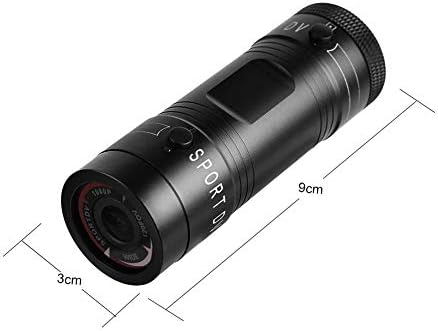
Image 9.1: Physical dimensions of the camera, showing a length of 9cm and a diameter of 3cm.
10. Garanti og support
For garantioplysninger og teknisk support henvises til den dokumentation, der fulgte med dit køb, eller kontakt forhandleren/producenten direkte. Gem din købsbevis til garantikrav.
Manufacturer: Zerone
For further assistance, you may visit the Zerone Store on Amazon: Zerone Store