
Jabra Evolve 20
Jabra Evolve 20 MS Stereo Headset Instruction Manual
Model: Evolve 20 (GSA4999-823-109)
1. Introduktion
The Jabra Evolve 20 MS Stereo Headset is a professional wired headset designed for clear communication and music listening. It features a noise-canceling microphone to reduce background distractions and an intuitive control unit for easy call management. This manual provides essential information for setting up, operating, and maintaining your headset.
2. Pakkens indhold
Tjek venligst pakken for følgende varer:
- Jabra Evolve 20 MS Stereo Headset with integrated control unit
3. Produktet er slutview
3.1 Headsetkomponenter
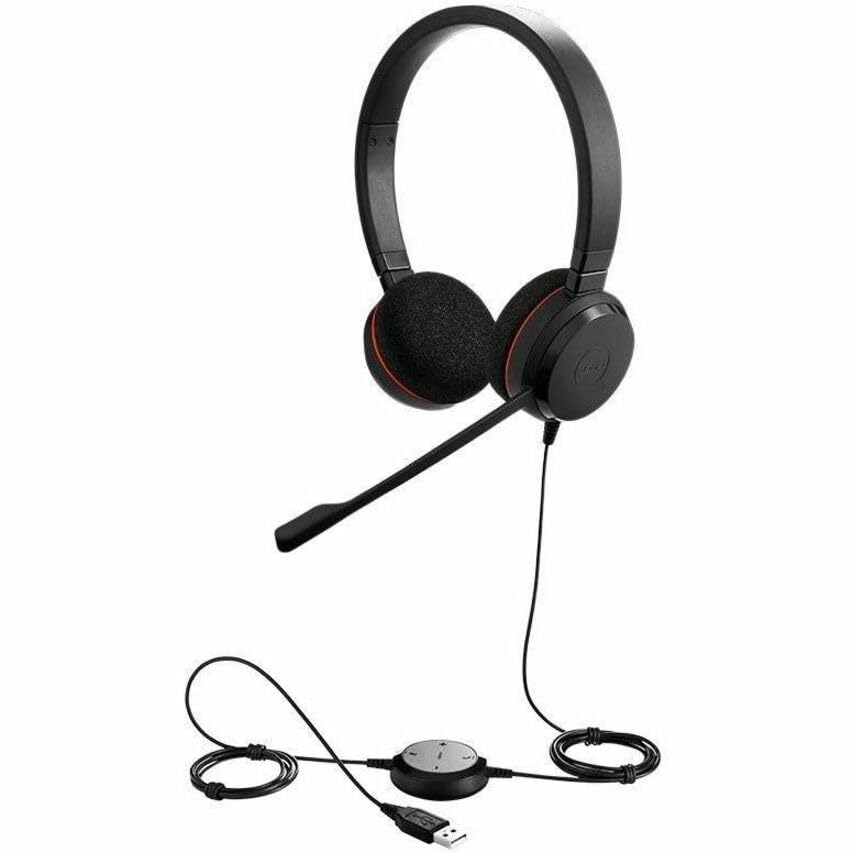
The Jabra Evolve 20 MS Stereo Headset features an adjustable headband, foam ear cushions for comfort, and a flexible microphone boom arm that can be positioned for optimal voice pickup.
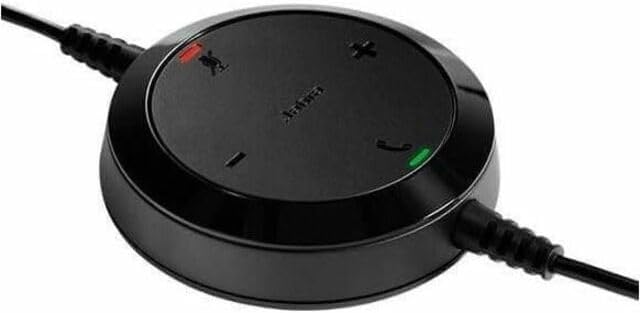
The inline control unit provides easy access to essential call management functions, including volume adjustment, microphone mute, and answer/end call buttons.
4. Opsætning
4.1 Tilslutning til din computer
- Find en ledig USB-port på din computer (stationær eller bærbar).
- Plug the USB connector of the Jabra Evolve 20 headset into the USB port.
- Din computer burde automatisk registrere og installere de nødvendige drivere. Dette kan tage et par øjeblikke.
- Once installed, the headset will be ready for use. You may need to select the Jabra Evolve 20 as your default audio device (microphone and speaker) in your operating system's sound settings or your communication software (e.g., Microsoft Teams, Skype for Business).
5. Betjeningsvejledning
5.1 Sådan bærer du headsettet
- Juster pandebåndet for at sikre en behagelig og sikker pasform på dit hoved.
- Position the microphone boom arm so that the microphone is approximately 2-3 cm (1 inch) from your mouth.
5.2 Using the Control Unit
- Lydstyrke op (+): Tryk på for at øge lydstyrken.
- Skrue ned for lyden (-): Tryk på for at mindske lydstyrken.
- Slå mikrofon fra: Press the microphone icon button to mute or unmute your microphone during a call. An indicator light on the control unit may show the mute status.
- Besvar/afslut opkald: Press the phone icon button to answer an incoming call or end an active call.
6. Vedligeholdelse
Korrekt vedligeholdelse sikrer dit headsets levetid og ydeevne.
- Rensning: Gently wipe the headset and control unit with a soft, dry cloth. For ear cushions, use a slightly damp cloth if necessary, but avoid excessive moisture. Do not use harsh chemicals or abrasive cleaners.
- Opbevaring: Når headsettet ikke er i brug, skal det opbevares et rent og tørt sted, væk fra ekstreme temperaturer og direkte sollys. Undgå at kablet filtres sammen.
- Kabelpleje: Træk ikke i kablet for at frakoble headsettet. Tag altid fat i USB-stikket.
7. Fejlfinding
If you encounter issues with your Jabra Evolve 20 headset, refer to the table below for common problems and solutions.
| Problem | Løsning |
|---|---|
| Ingen lyd fra headsettet |
|
| Mikrofon virker ikke |
|
| Knapperne til opkaldsstyring reagerer ikke |
|
8. Specifikationer
Key technical specifications for the Jabra Evolve 20 MS Stereo Headset:
| Feature | Beskrivelse |
|---|---|
| Modelnavn | Udvikle 20 |
| Forbindelsesteknologi | Kablet (USB) |
| Støjkontrol | Aktiv støjreduktion, passiv støjreduktion |
| Mikrofon | Støjdæmpende |
| Øreplacering | Over Ear |
| Formfaktor | On Ear |
| Material (Ear Cushions) | Skum |
| Varens vægt | 4.6 ounces (0.29 pund) |
| Produktdimensioner | 8 x 7 x 1.5 tommer |
| Kompatible enheder | Desktops, Laptops, Softphones, Web Clients, Desk Phones |
| Controller type | Answer/End, Mute, Volume |
9. Garanti og support
For detailed warranty information, please refer to the warranty card included with your product or visit the official Jabra webGarantibetingelserne kan variere afhængigt af region og forhandler.
For technical support, product registration, or to access additional resources, please visit the official Jabra support webwebstedet eller kontakt deres kundeservice direkte. Gem din købsbevis til garantikrav.