
1. Introduktion
About the Deco M4 System
The TP-Link Deco M4 is a Whole Home Mesh Wi-Fi System designed to provide seamless wireless coverage throughout your home. It eliminates Wi-Fi dead zones by using multiple units that work together to form a unified network. This system ensures a stable and fast internet connection for all your devices.
Key features of the Deco M4 system include:
- Wi-Fi Dead-zone Killer: Units work together to provide comprehensive Wi-Fi coverage.
- Problemfri roaming: Devices automatically connect to the fastest Deco unit as you move, maintaining an uninterrupted connection.
- High-Speed AC1200: Provides fast and stable connections up to 1167 Mbps.
- Forbinder op til 100 enheder: Capable of handling traffic from numerous devices without lag.
- Nem opsætning: Guided setup process via the Deco app.
- Forældrekontrol: Manage online time and block inappropriate webwebsteder.
- Multifunktionel: Can operate as a router, access point, or range extender.
- Alexa-kompatibel: Control your Deco M4 with voice commands.

Image: Two TP-Link Deco M4 mesh Wi-Fi units, illustrating the product design and available ports.
2. Opsætningsvejledning
Hvad er der i æsken
The TP-Link Deco M4 (2-pack) package typically includes the following items:
- 2 Deco M4 Units
- 2 strømadaptere
- 1 RJ45 Ethernet-kabel

Image: The retail packaging for the TP-Link Deco M4 system, indicating a 2-pack.
Installationstrin
Setting up your Deco M4 system is primarily done through the Deco mobile application. Follow these general steps:
- Download Deco-appen: Søg efter 'TP-Link Deco' in your device's app store (iOS or Android) and install it.
- Tilmeld dig eller log ind: Open the Deco app and either create a new TP-Link ID or log in with an existing one.
- Tilslut hoveddekoen: Power off your modem. Connect one Deco unit to your modem using the provided Ethernet cable. Power on your modem, then power on the Deco unit.
- Følg instruktionerne i appen: The Deco app will guide you through configuring the main Deco unit, including setting up your Wi-Fi network name and password.
- Tilføj yderligere deco-enheder: Once the main Deco is set up, the app will prompt you to add other Deco units. Place them in desired locations within your home and power them on. The app will automatically detect and integrate them into your mesh network.
- Optimal placering: For best coverage, place Deco units strategically to cover your entire home, avoiding obstructions and sources of interference.
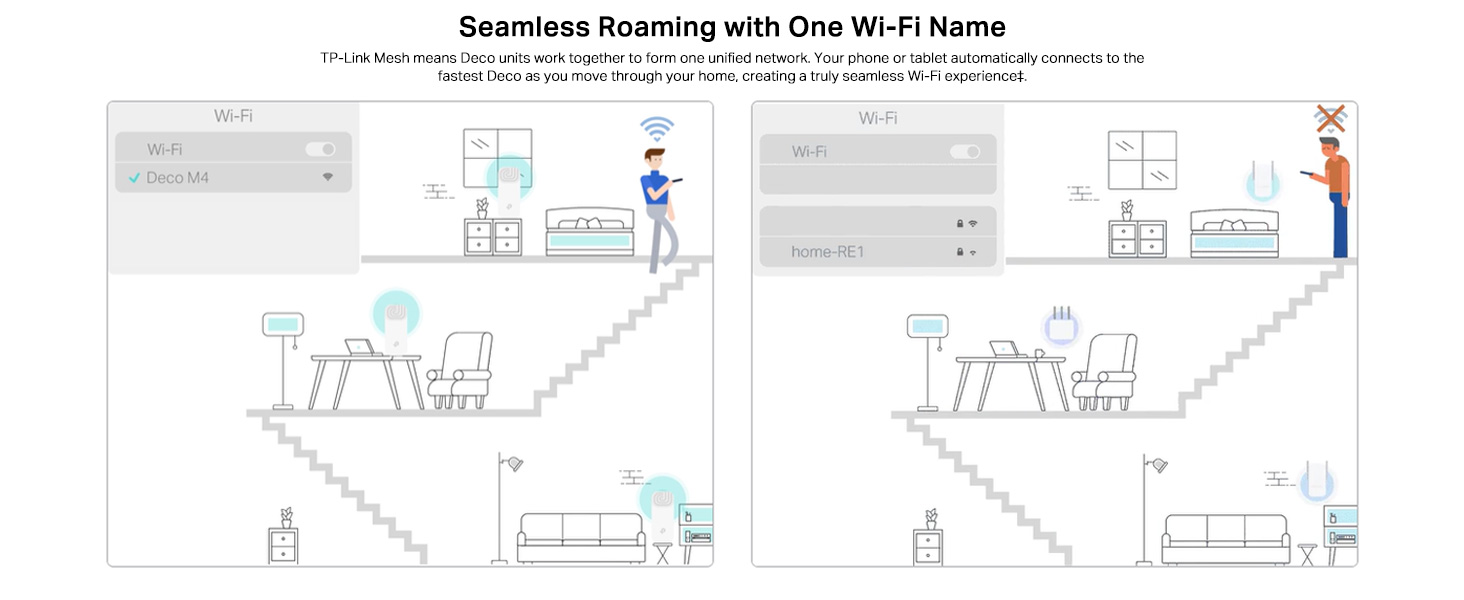
Image: A visual representation of the app-based setup process, management features, and voice control compatibility.
3. Betjening af dit Deco M4-system
Problemfri roaming
The Deco M4 system creates a single, unified Wi-Fi network with one network name (SSID). As you move through your home, your devices (phones, laptops, tablets) will automatically switch to the Deco unit with the strongest signal, ensuring a continuous and stable connection without manual intervention.
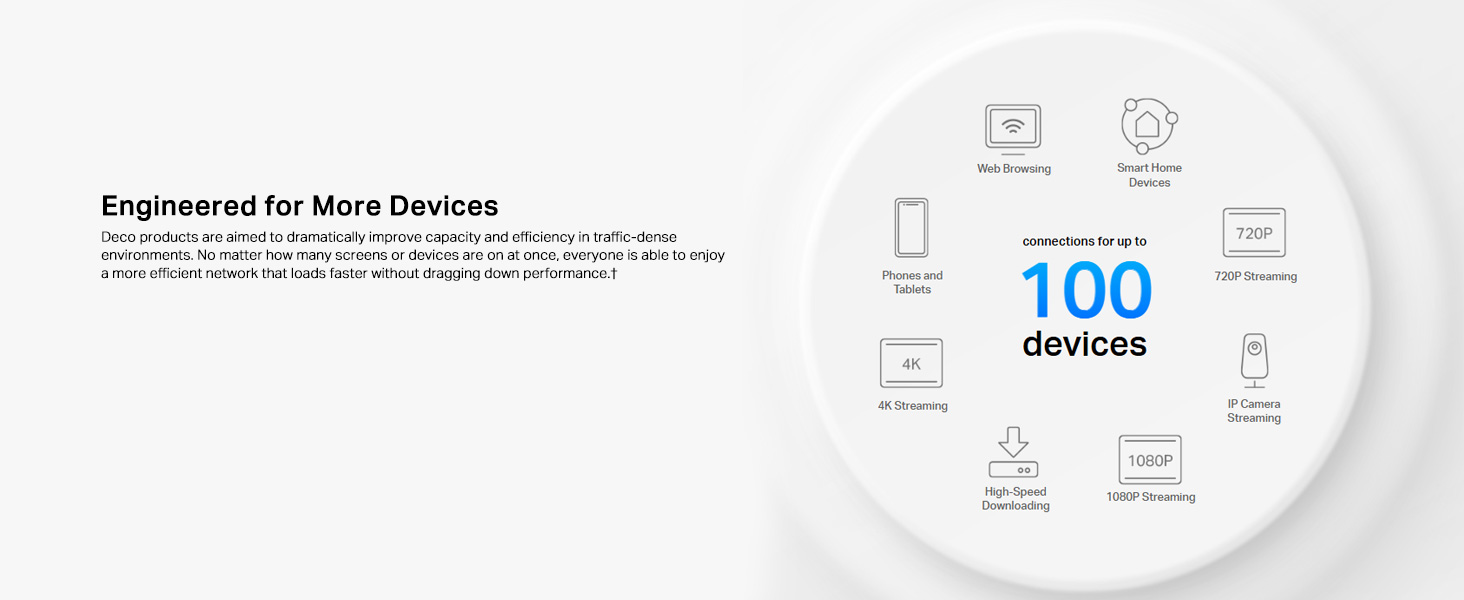
Image: Illustration of seamless roaming, where a device maintains connection by automatically switching between Deco units.
Forældrekontrol
The Deco app provides robust parental control features to manage internet access for family members. You can create individual profiles, set time limits for internet usage, filter website content, and pause internet access for specific devices or profiles.
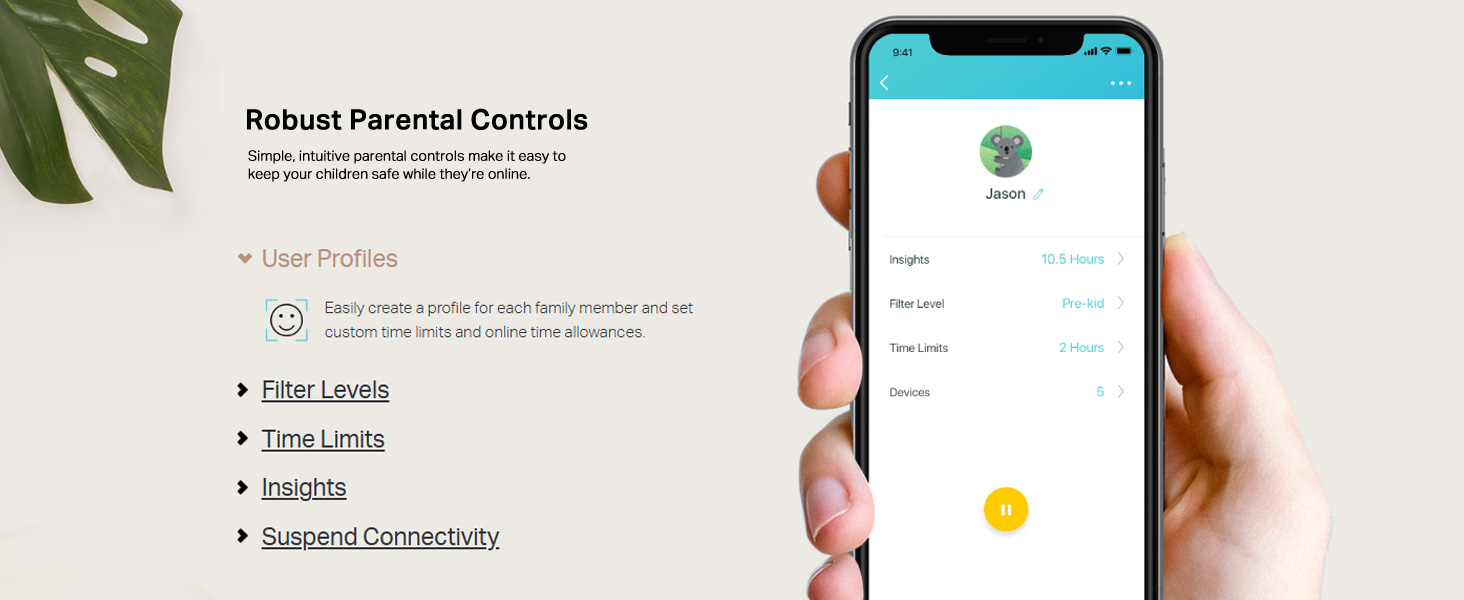
Image: A mobile phone screen displaying the parental control interface within the Deco app, showing user profiles og indstillinger.
App Control and Voice Control
Manage your Deco M4 system conveniently through the Deco app. This includes viewing connected devices, prioritizing bandwidth for certain devices, setting up a guest network, and monitoring network status. The Deco M4 is also compatible with Amazon Alexa, allowing you to control certain functions using simple voice commands.

Image: A Deco M4 unit discreetly placed on a table, demonstrating its compact design in a home environment.
Router and Access Point Modes
The Deco M4 offers flexible operating modes to suit your network needs:
- Routertilstand (standard): In this mode, the Deco system acts as your primary router, creating a new private wireless network and managing all connected devices.
- Adgangspunkttilstand: If you already have a router, you can set the Deco M4 to Access Point mode. It will extend your existing wired network's Wi-Fi coverage without creating a separate network.

Image: A diagram illustrating the two operational modes: Router mode (creating a new network) and Access Point mode (extending an existing network).
4. Vedligeholdelse
To ensure optimal performance and longevity of your TP-Link Deco M4 system, consider the following maintenance practices:
- Firmwareopdateringer: Tjek regelmæssigt efter og installer firmwareopdateringer via Deco-appen. Opdateringer inkluderer ofte forbedringer af ydeevnen, sikkerhedsrettelser og nye funktioner.
- Fysisk rengøring: Keep the Deco units clean and free from dust. Use a soft, dry cloth to wipe the exterior. Ensure ventilation holes are not obstructed to prevent overheating.
- Optimal placering: Periodisk vedrview the placement of your Deco units. Ensure they are in open areas, away from large metal objects, thick walls, and other electronic devices that could cause interference.
- Genstarter: If you experience minor network issues, a simple reboot of your Deco units (and modem) can often resolve them. Unplug the power, wait 10 seconds, then plug them back in.
5. Fejlfinding
Hvis du støder på problemer med dit Deco M4-system, skal du se følgende almindelige fejlfindingstrin:
- Ingen internetforbindelse:
- Kontroller, om dit modem fungerer korrekt.
- Sørg for, at Ethernet-kablet, der forbinder Deco-hovedenheden til modemmet, er korrekt tilsluttet.
- Reboot your modem and all Deco units.
- Bekræft din internetudbyders (ISP) forbindelsesstatus.
- Svagt Wi-Fi-signal eller døde zoner:
- Reposition Deco units closer to each other or to areas with weak signals.
- Ensure Deco units are not placed near large metal objects, concrete walls, or appliances like microwaves and cordless phones that can cause interference.
- Check the Deco app for signal strength indicators between units.
- Device Cannot Connect to Wi-Fi:
- Bekræft, at du indtaster den korrekte Wi-Fi-adgangskode.
- Genstart enheden, mens du forsøger at oprette forbindelse.
- Check parental control settings in the Deco app to ensure the device is not blocked or paused.
- Ensure the device's Wi-Fi adapter is enabled and functioning.
- Deco App Not Working:
- Ensure your smartphone has an active internet connection (either via mobile data or another Wi-Fi network).
- Update the Deco app to the latest version.
- Genstart din smartphone.
6. Tekniske specifikationer
| Feature | Specifikation |
|---|---|
| Mærke | TP-Link |
| Modelnavn | Deco M4 |
| Dataoverførselshastighed | 1200 megabit pr. sekund (Mbps) |
| Frekvensbåndsklasse | Dual-Band (2.4 GHz og 5 GHz) |
| Standard for trådløs kommunikation | 802.11ac, 802.11g, 802.11n |
| Wi-Fi generation | Wi-Fi 5 |
| Antal havne | 4 (2 per Deco unit) |
| Dækning | Up to 3,800 square feet (for 2-pack) |
| Sikkerhedsprotokol | WPA-PSK/WPA2-PSK |
| Kompatible enheder | Alexa, Amazon Echo |
| Antenne type | Indre |
| Kontrolmetode | Stemme, app |
| Varens vægt | 699 gram |
| Varedimensioner (L x B x H) | 10L x 9.1W x 10H Centimeter |
| Farve | Hvid |
7. Garantioplysninger
The TP-Link Deco M4 Whole Home Mesh Wi-Fi System comes with a 3 års garanti from the date of purchase. Please retain your proof of purchase for warranty claims. For detailed terms and conditions, refer to the official TP-Link webwebsted eller kontakt kundesupport.
8. Kundesupport
For teknisk assistance, produktforespørgsler eller garantisupport, kontakt venligst TP-Links kundeservice:
- Gratis nummer: 1800-209-4168
- E-mail support: support.in@tp-link.com
- Producentens adresse: TP-Link Systems Inc. 10 Mauchly, Irvine, CA 92618, USA or TP-Link India Private Limited Office No.1, Tower 2, Level 2, Raiaskaran Tech Park, Andheri Kurla Road, M.V Road, Andheri East-400072
Additional resources and FAQs can be found on the official TP-Link webwebsted.